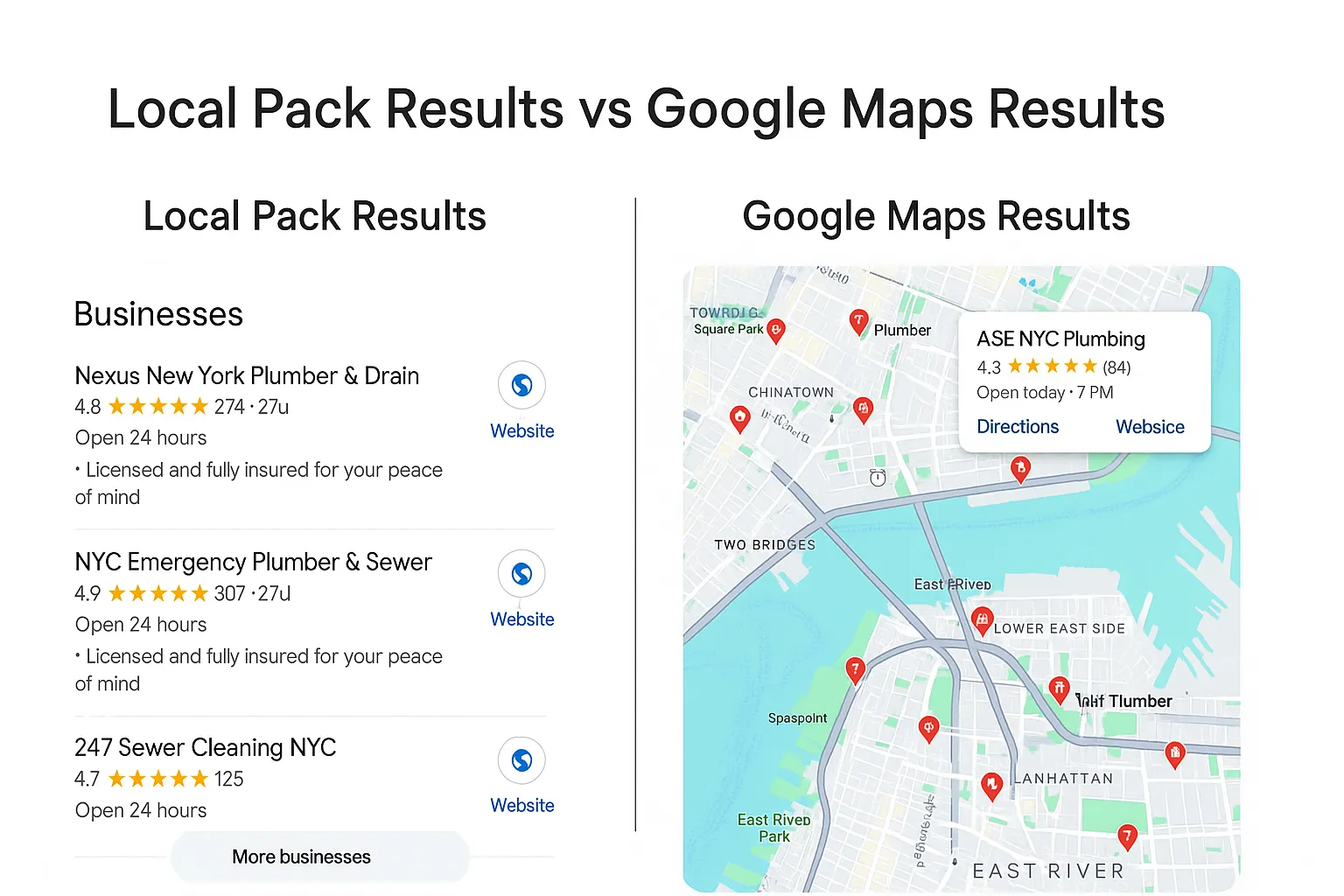
The Google local pack is the block with a small map and three business listings that Google shows in its regular search results when a search has local intent, such as "plumber near me" or "dentist in Leeds". SEOs also call it the local 3-pack, the map pack or the snack pack. Google fills it from Google Business Profiles and ranks the listings by relevance, distance and prominence. Google Maps reads the same profiles but shows a longer list tied to the part of the map on screen, so your position in Maps and in the pack can differ for the same keyword.
Updated October 2026: sponsored listings inside the pack, the end of Business Profile Q&A, and rank data from 286 profiles we audited.
Local Pack vs Google Maps at a Glance
- Where it shows: the local pack sits inside Google Search results. Google Maps is the app, maps.google.com and the Maps tab in Search.
- How many results: the pack shows three businesses, sometimes with a sponsored listing on top. Maps shows a scrollable list for the area on screen.
- Same data: both read your Google Business Profile, your reviews and what Google knows about your business from the web.
- Same factors: Google names relevance, distance and prominence for both. Your positions still differ, because Maps also uses the map view and filters.
- Harder to win: three slots make the pack the tougher target. A business at #4 gets no pack visibility at all.
- Track both: a local pack rank tracker runs the same search from many points around you, because one search from your desk shows only one of many results.
What You'll Learn
What Is the Google Local Pack?
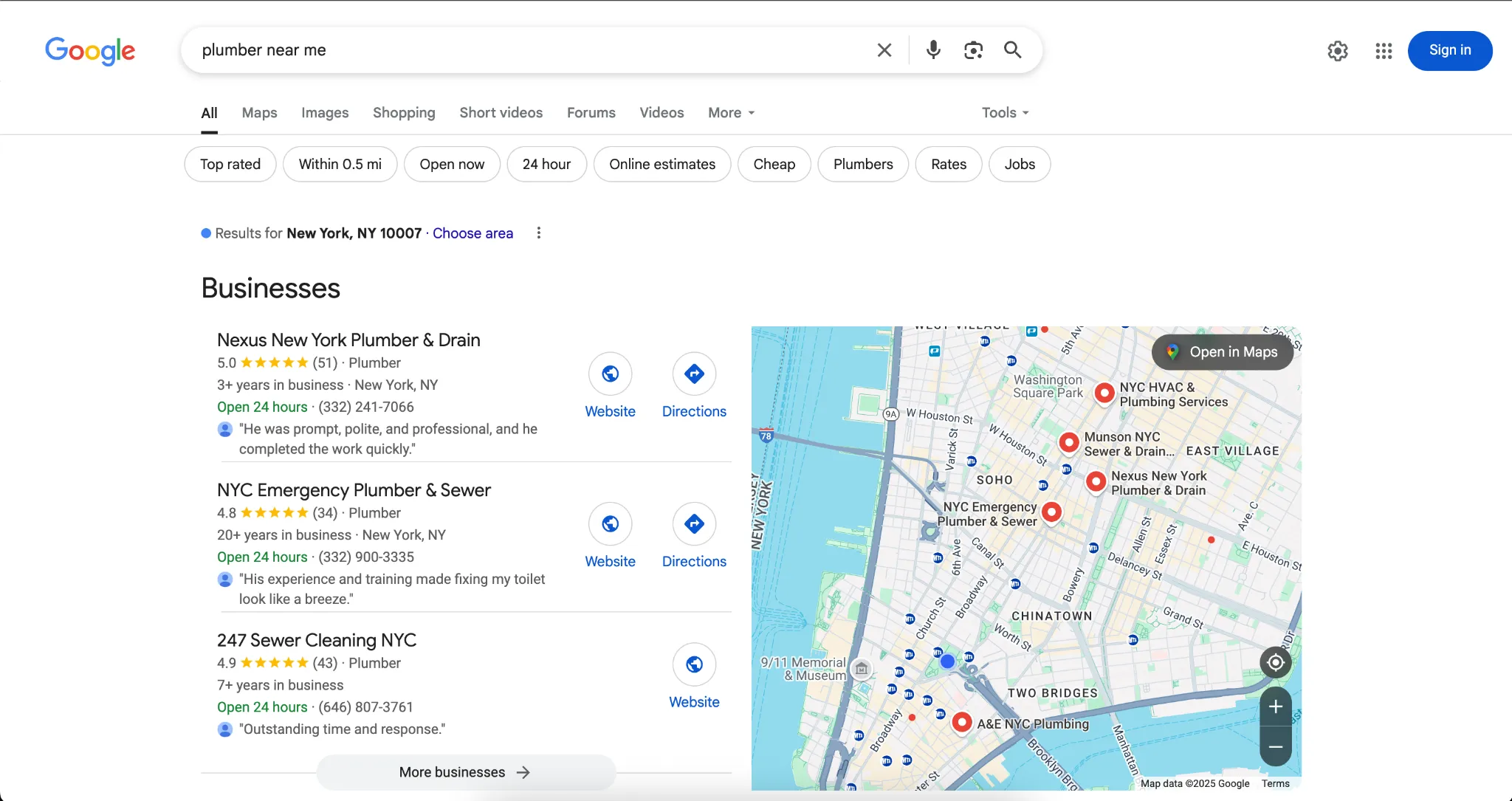
Google adds the local pack to a results page when it decides the searcher wants a place nearby. Some searches say so outright ("near me", a city or a neighbourhood). Others imply it: "emergency plumber", "coffee" or "car wash" return a pack because Google assumes you want one close to you.
The listings come from Google Business Profiles. So the profile is what you optimise for the pack; your website supports it.
What each local pack listing shows
The fields change by category and device, but a typical listing carries:
- Business name
- Star rating and review count
- Primary category, sometimes with a short description or price level
- Address or distance, and hours ("Open", "Closes soon", "Open 24 hours")
- Buttons for Website and Directions, plus Call on mobile
- For some categories, a review snippet, a service attribute such as "Online appointments" or a booking link
Clicking a listing opens its Business Profile. Clicking "More places" (on some searches "More businesses") opens the Local Finder, covered below.
Local 3-pack, map pack, snack pack: one feature, several names
Google never gave the feature an official name, so you will see several:
- Local pack or Google local pack: the most common term.
- Local 3-pack or 3-pack: from the number of listings. Until August 2015 Google often showed seven, the "7-pack", and then cut it to three.
- Map pack, local map pack or Google Maps pack: because of the map above the listings. It is still part of Google Search, not Google Maps.
- Snack pack: a nickname for the smaller 3-listing layout.
Where the local pack appears on the SERP
The pack has no fixed slot. For most "near me" and "service + city" searches it sits near the top, under any ads and AI Overview. For searches with weaker local intent, Google may place it below a few organic results, or leave it out.
The pack and the organic results are two separate rankings. Your website ranks in the blue links on page signals and links; your Business Profile ranks in the pack. One business can hold a pack slot and an organic position on the same page, and many local businesses rank in one and not the other.
Sponsored listings inside the local pack
Google Ads advertisers with a linked Business Profile can appear in the pack as a listing labelled "Sponsored". These ads grew fast over the winter of 2025-26: in Places Scout's data from 1,200 mobile ranking reports, local pack ads showed on under 3% of tracked keywords in early November 2025 and on 21.99% by January 2026 (PPC Land, February 2026).
Ads do not change the unpaid positions in the pack. Google states that "there's no way to request or pay for a better local ranking on Google" (local ranking help page). Local Services Ads, the "Google Guaranteed" or "Google Screened" units, are a different paid product that sits above the pack; our Local Services Ads guide covers them.
The Local Finder
The Local Finder is the expanded list Google opens after "More places". On desktop it shows a longer list beside a larger map, with filters such as rating and hours for many categories. It usually starts with the same businesses as the pack, so positions 4 to 20 in the Local Finder are the businesses closest to breaking into the pack.
Google Maps vs the Local Pack: What Changes
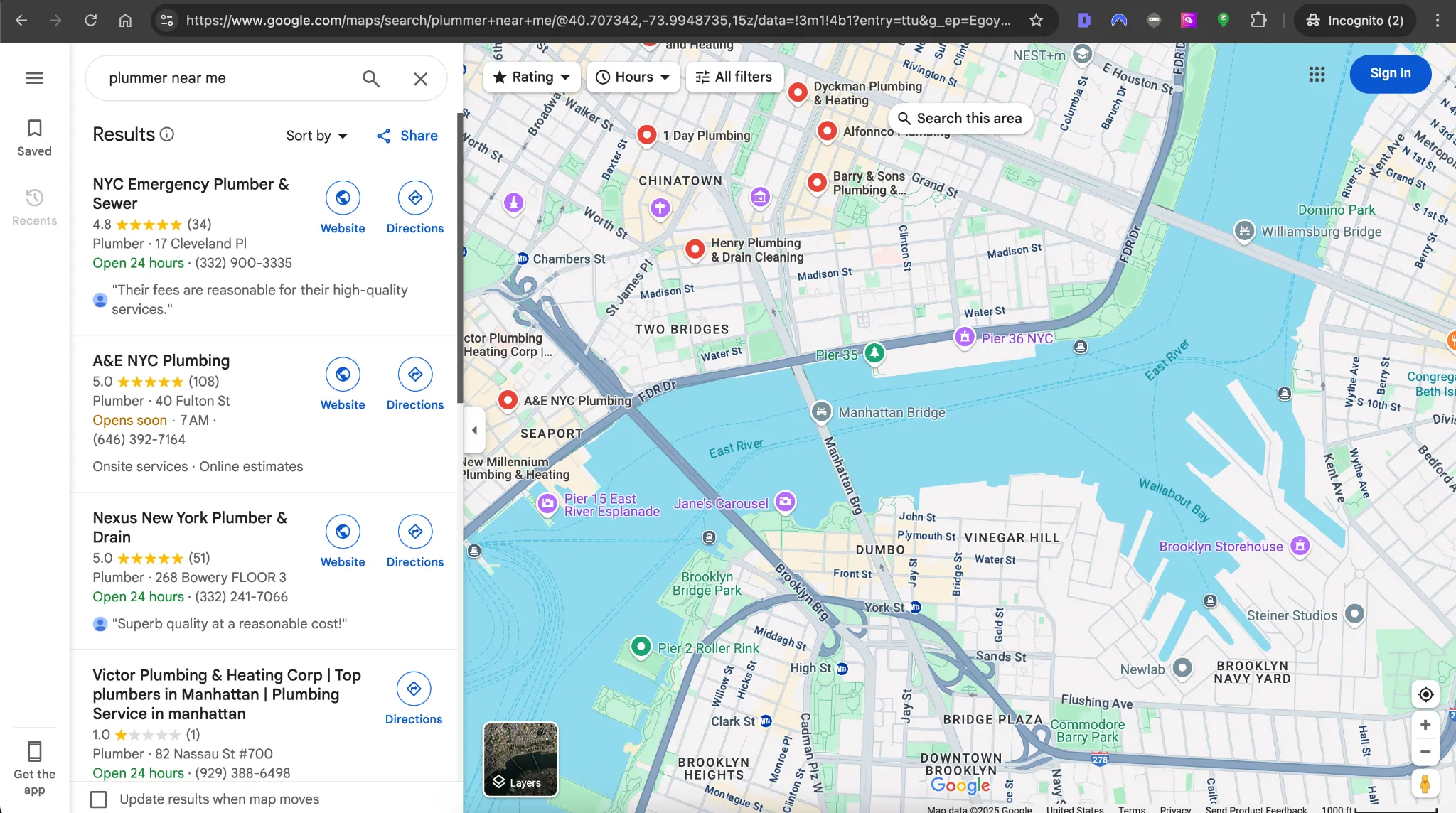
Google Maps is the app and website people use to find places and get directions. A search there returns pins on the map and a list you can scroll. People reach it from the Maps app on their phone, from maps.google.com, from the Maps tab in Search, or by tapping a pack listing on mobile.
| Local pack | Google Maps | |
|---|---|---|
| Where it appears | Inside Google Search results (web and app) | Maps app, maps.google.com, Maps tab in Search |
| Results shown | Three, plus a possible sponsored listing | A scrollable list with a pin for each result |
| Location used | The searcher's location, or the place named in the search | The same, plus the map area on screen; moving the map and tapping "Search this area" reruns the search |
| Filters | Few or none in the pack; more in the Local Finder | Rating, open now, price and category-specific filters |
| Typical next step | Website visit, call, directions, or a comparison in the Local Finder | Directions and navigation, call, save, browsing photos and reviews |
| Ranking factors Google names | Relevance, distance, prominence | Relevance, distance, prominence |
Why you can rank in Maps but not in the local pack
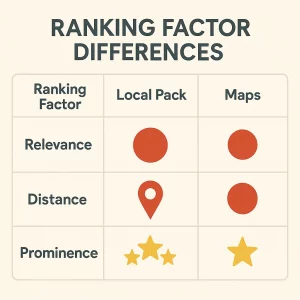
Owners often see their business at #2 in the Maps app and nowhere in the pack for the same keyword. Four things explain most of these gaps:
- Three slots. A #4 in Maps is invisible in the pack. Small gaps in reviews or relevance decide who gets the last slot.
- The map view. Someone who has zoomed Maps into your neighbourhood sees a list for that area. The pack works from the searcher's location only.
- Filters. "Open now" or a rating filter in Maps removes competitors that would beat you in the pack.
- Where you searched from. Two checks made a few streets apart compare two different searches. Our guide to why Google Maps rankings change by location shows how far a few hundred metres moves a result.
Google has not published separate weightings for the pack and Maps. Treat claims like "Maps favours proximity, the pack favours reviews" as field observations, and check your own results in both.
Local Pack Ranking Factors
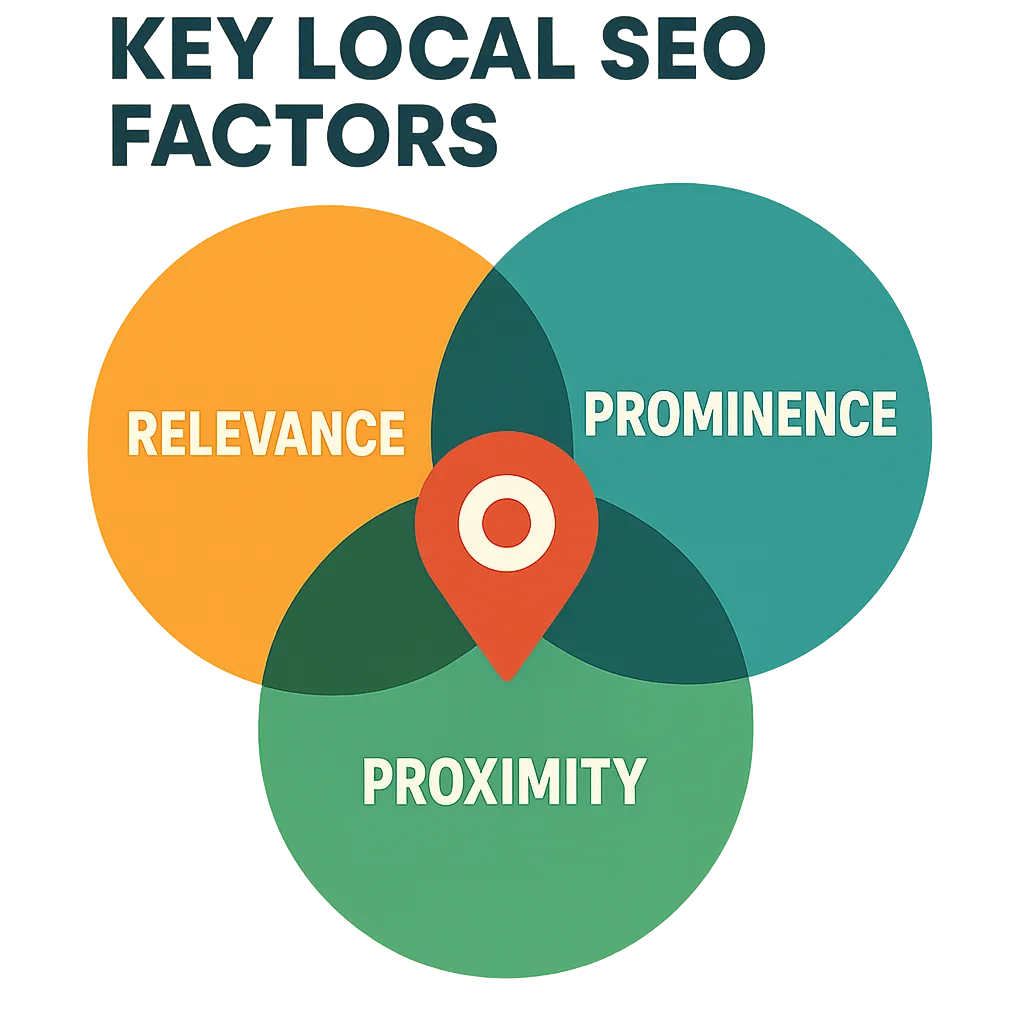
Google's local ranking help page names three factors for local results, in the pack and in Maps alike.
1. Relevance
Google defines it as "how well a Business Profile matches what someone is searching for." You control most of it:
- Primary and secondary categories
- Services and products, each with a short description
- Attributes such as "Wheelchair accessible entrance" or "Online estimates"
- The business description (750 characters) and the content of your website
- The words customers use in their reviews
2. Distance
"Distance refers to how far each business is from the customer who's searching." When the search names a place ("dentist in Boston"), Google measures from that place instead. You cannot move your business, but you can make sure the map pin sits on your real entrance and that a service-area business lists the areas it serves.
3. Prominence
"Prominence means how well-known a business is." Google builds it from what it finds across the web, including links, articles and directory listings, and from your reviews: "More reviews and positive ratings can help your business's local ranking." Signals that feed it:
- Google review count, average rating and how recent the reviews are (see how to see all your Google reviews)
- Citations: consistent listings on directories and industry sites
- Links to your website from local and industry sources
- Mentions in local news and by organisations you belong to
- How well your website ranks in organic results
What the 2026 expert survey ranks highest
Whitespark's 2026 Local Search Ranking Factors report asks local SEO practitioners to score individual factors. For local pack and Maps rankings their top five are:
- Primary Business Profile category
- Proximity of the address to the point of search
- Keywords in the Business Profile title
- Physical address in the city of search
- Business open at the time of search
Factor 3 comes with a warning. Google's guidelines for representing your business say "including unnecessary information in your business name isn't permitted, and could result in the suspension of your Business Profile." Keywords help only when they are part of your real, signed name.
What 286 audited profiles show
In our study of 286 Google Business Profiles, audited from July to October 2026, we checked where 233 of them ranked for their own primary category, using one Google Places search near each business's address. 125 sat in the top 3, 51 in places 4 to 10.
- Both groups had the same median audit score: 79 out of 100.
- 71% of the top 3 answered at least 80% of their recent reviews, against 47% in places 4 to 10.
- Among profiles with reviews, the 4 to 10 group had more (median 89 against 72), so review count alone did not separate them.
The sample is small and self-selected, and one search point is not a city-wide rank. It does suggest that a complete profile gets you into the running, while the last slots go to businesses that stay active with customers.
Local Pack SEO: How to Rank in the Local 3-Pack
Local pack SEO, which agencies also sell as map pack SEO, works on three things: the Business Profile, its reviews and the website it links to. Work through these steps in order. The first three fix relevance problems that review requests cannot cover.
1. Choose the primary category that matches the search
Your primary category tells Google which searches you are a candidate for. A profile with the primary category "Lawyer" will struggle to rank for "car accident lawyer" against competitors whose primary category is "Personal injury attorney". Check which categories the businesses in your pack use, pick the most specific category that is true for you, and add secondary categories for other services. Our Google Business Profile categories guide shows how to find and change them.
2. Fill in services, attributes and hours
Services were the most common gap in our audit: 160 of 286 profiles (56%) listed no services or described fewer than half of them. Add every service you sell with a one-sentence description (how to add products and services), set every true attribute, and keep holiday hours current. The experts in the survey above rank "open at the time of search" fifth, so wrong or missing hours can cost you positions.
3. Keep the business name real
91 of the 286 profiles (32%) tripped at least one name rule in our policy scan: a "|" separator, a tagline after a comma, a word like "best". Use the name on your signage. If a competitor in your pack has stuffed keywords into theirs, you can suggest an edit in Maps; our spam prevention guide covers how.
4. Earn reviews every month and reply to them
Ask every customer soon after the job is done, with a direct link. To send it after every job without relying on memory, set up automated review requests. The free Google review QR code and link generator gives you the link and a printable code. Reply to every review, and use the review reply generator when you need a starting draft. Our guides on getting more Google reviews and responding to negative reviews go further.
Stay inside Google's fake engagement policy: businesses must not "offer incentives" for reviews or "discourage or prohibit negative reviews, or selectively solicit positive reviews from customers". Sending the review link only to happy customers counts as selective soliciting. The policy also bars pressuring customers to review while they are on your premises or asking them to include specific content.
5. Make your website back up the profile
- Link the profile to a page about that location or service, not only to your homepage.
- Put the same name, address and phone number on that page, with LocalBusiness schema.
- Use the words people search for in titles and headings. The local SEO keyword generator builds service + location keyword lists.
- Build citations on the main directories in your country and industry, and earn local backlinks from suppliers, associations and local press.
6. Keep the profile active
Add real photos of your premises, team and work, and a short video if you can (photo and video guide). Publish Business Profile posts for offers and news. Do it for the customers reading your profile: in our audit, 68% of the top 3 and 65% of places 4 to 10 had posted in the last 90 days, so posting alone did not separate them.
7. Check the pin and the service area
Distance starts from your map pin. Open your profile in Maps and confirm the pin sits on your entrance, not on the middle of the street or a neighbouring building. If you serve customers at their address and hide yours, set realistic service areas; our service-area business guide explains what they do and don't change.
Make the click worth it on mobile
Many pack clicks come from phones, and a ranking is only useful if the visit turns into a call or a booking. Check that the linked page loads fast on mobile, that the phone number is tap-to-call, that the hours match your profile, and that booking or quote forms work with a thumb.
Google Maps Optimization: What Matters in the Maps App
Everything above helps in Maps too. Maps users browse more of the profile before they choose, so these parts carry more weight there.
Photos and video
Maps shows photos large and early. Upload a clear exterior shot people can match to the street, interior shots, your products or finished jobs, and the team. Replace photos that no longer match the business; a new sign or a refit makes old photos misleading.
Hours, attributes and filters
Maps users filter by "Open now", rating and, in many categories, attributes and price. Wrong hours remove you from "Open now" results and send people to a closed door. Add special hours before every holiday and keep attributes such as parking, accessibility and payment options current.
Actions in the profile
- Add booking, ordering or menu links where your category supports them.
- Add UTM parameters to your website link so analytics separates Business Profile visits from other organic traffic.
- Answer messages and calls during your listed hours; a missed call from Maps is a lost customer.
- Ask regular customers to save your business in Maps so they find it again.
Questions now go to AI answers
Google retired Business Profile Q&A in late 2025. The Q&A API closed on November 3, 2025, and the public section disappeared from profiles over the following months. The Maps app now offers an "Ask" feature that answers questions with AI, using your profile, reviews and website (Whitespark, January 2026). You can no longer seed answers yourself, so put the facts people ask about (parking, prices, insurance, accessibility) on your website and in your profile fields.
How to Track Local Pack and Google Maps Rankings
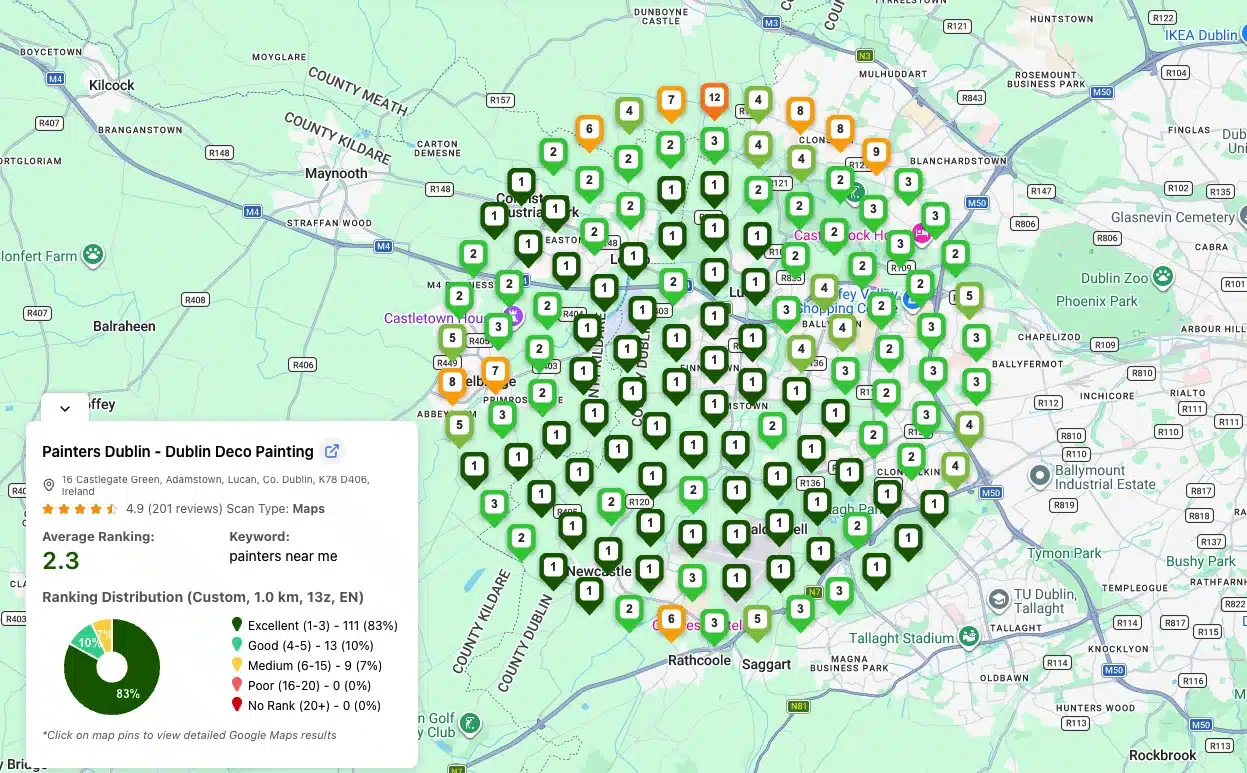
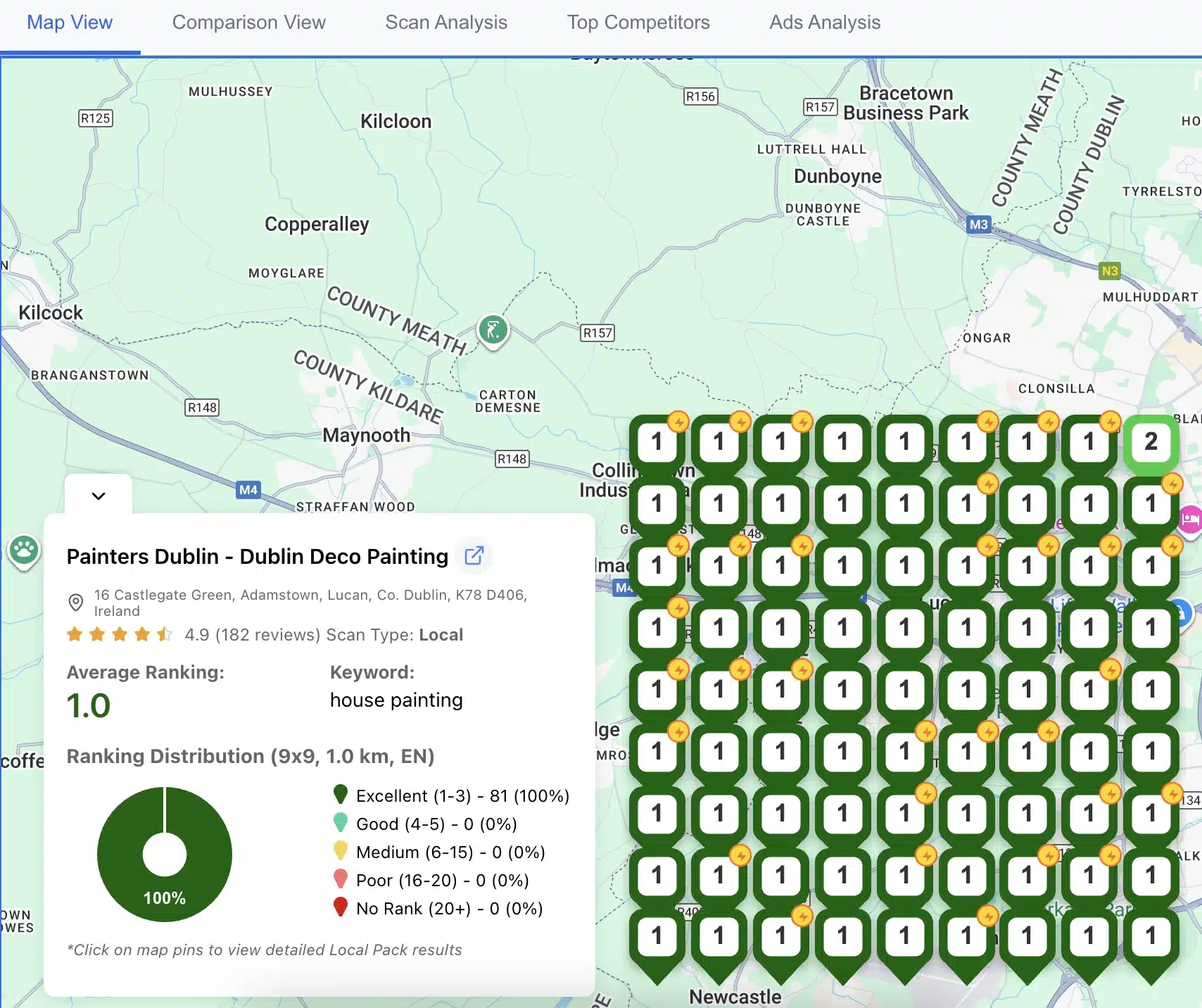
A search from your own phone shows one result from one spot, personalised to you. Customers search from all over your area, and each spot can return a different pack. Grid tracking repeats the same search from a grid of points around your business and maps your position at each one; our grid rank tracker explainer shows how it works.
1. Track positions in the pack and in Maps
Because the two results differ, track them separately. GTrack has two scan types, and you can run them together: a Maps scan checks rankings in Google Maps, and a Local Pack scan checks rankings inside Google's 3-pack in Search. Each scan maps your position at every grid point and shows your average rank and the competitors ahead of you. The $0 plan covers Maps scans with 200 credits a month, grids up to 5x5 and scheduled scans for 3 keywords, and your first scan needs no account. Local Pack scans start on the paid plans, from $19.99 a month. Start with the local pack rank tracker or the Google Maps rank tracker, then use our guides on reading a heatmap and how often to scan. If you want to compare tools first, see our local rank tracker comparison. To check that a tracker searches from the right spot, see which local rank tracker is most accurate.
2. Measure the actions, not only the rank
- Business Profile Performance report: searches, views, calls, direction requests and website clicks (what each metric means).
- UTM-tagged website link: Business Profile sessions and conversions in GA4, with calls and form fills set up as key events.
- Calls: the Performance report counts calls from the profile. If you add a call tracking number, it must ring your business directly, because Google's guidelines bar numbers that redirect callers to someone else; keep your main number as an additional phone so it still matches your citations.
- A monthly Looker Studio report that puts ranks, actions and leads on one page.
3. Watch the competitors in your pack
Each month, note the businesses that hold the pack across your grid: their categories, review count and pace, name changes, new photos and posts. When a competitor jumps, compare its profile with yours before you change anything. Our local SEO competitor analysis guide has a checklist.
4. Change one thing at a time
Change a category, a service list or the linked landing page, then wait two to four weeks and compare scans of the same grid. If you change five things at once, you will not know which one moved you.
Common Problems and Fixes
Local pack problems
You rank in Maps but not in the local pack
Likely causes: a competitor with more relevant categories or services, fewer or older reviews than the three businesses ahead of you, a weak or unrelated landing page, or a recent run of negative reviews.
Fixes: compare your profile field by field with the three pack businesses, match the primary category to the search, fill in services, build a steady review pace and strengthen the linked page with on-page local SEO signals.
Your pack ranking changes between similar searches
Likely causes: Google reads "plumber", "plumbing company" and "emergency plumber" as different intents, with different categories and different competitors.
Fixes: track each important variant as its own keyword, add the matching secondary categories and services, and give each main service its own page on your website.
Your ranking dropped after you changed the profile
Likely causes: a new name, address, phone number, category or website URL. Some edits also send the profile back to verification.
Fixes: update your citations to the new details, check that the profile still shows as verified, and look for edits Google applied on its own. Our Google Maps ranking drop guide walks through the checks in order.
Google Maps problems
The map pin is in the wrong place
Fixes: move the pin in the Business Profile editor, add the unit or suite number to the address, and upload an exterior photo that shows the entrance.
You are weak in "near me" searches
Likely causes: competitors physically closer to the searchers, or a primary category that doesn't match the search.
Fixes: you cannot fix distance, so win on relevance and prominence: category, services, reviews, and pages that mention the neighbourhoods you serve. A grid scan shows how far from your address you still rank.
Your listing is filtered out next to another listing
Likely causes: a duplicate profile, or two related businesses at the same address with the same category and phone number.
Fixes: remove or merge duplicates, give each real business its own phone number and website page, and use the category that fits each one.
Profile-level problems
Rankings fell after a Google update
Fixes: check the profile against Google's guidelines first, then compare yourself with the businesses that held their positions. Wait a few weeks before reacting; local results often settle after an update.
The profile was suspended or removed
Fixes: fix the violation before you appeal, gather proof of the business (signage, utility bill, business registration) and submit the reinstatement request. Our suspension guide covers the appeal.
You can't verify the profile
Fixes: use the verification method Google offers in the profile (often a video), make sure the address and category match what the camera will show, and contact Google Business Profile support if the option keeps failing.
Industry Notes for the Local Pack and Google Maps
The basics stay the same in every category. What changes is which fields customers look at before they choose.
Restaurants and cafes
- Pack: food photos, a menu link, attributes such as outdoor seating, takeaway and delivery, and reviews that mention dishes.
- Maps: exact hours (including holidays), reservation or ordering links, parking and accessibility details.
Retail shops
- Pack: product categories, products added to the profile, posts for sales and new stock.
- Maps: in-store pickup and delivery attributes, parking, and a clear storefront photo.
Service businesses (plumbers, electricians, HVAC)
- Pack: a specific primary category, every service listed, 24-hour availability only if it is true, licences on the website, before and after photos.
- Maps: service areas that match where you work, and calls answered during listed hours.
- If you offer plumbing and HVAC from one location, use one profile with both categories. Google's guidelines say "do not create more than one page for each location of your business."
Healthcare providers
- Pack: the right specialty category, practitioner profiles where Google allows them, booking links, and review replies that never confirm someone is a patient.
- Maps: entrance and parking instructions, accessibility attributes, and insurance details on your website, since the Maps "Ask" feature draws from it.
Hotels
- Pack and Maps: property and room photos, amenities as attributes, and a direct booking link.
- Google's guidelines allow a restaurant, cafe or bar inside a hotel to have its own profile, which gives it its own chance to rank.
Professional services (legal, financial, insurance, real estate, mortgage)
- Pack: a primary category for your main practice area, services listed per specialty, and individual practitioner profiles for agents, advisers or lawyers who meet clients in person.
- Maps: suite numbers, building entrance photos and appointment links.
- Google's guidelines say "a practitioner shouldn't have multiple Business Profiles to cover all of their specializations," so cover each specialty with services and website pages instead.
Local Pack Questions
What is the local pack in SEO?
The local pack is the map with three business listings that Google shows in search results for local searches. In SEO, "local pack SEO" means optimising a Google Business Profile, its reviews and the linked website so the business appears in those three slots. It is a separate ranking from the organic results under it.
Why is it called the local 3-pack?
Because it shows three businesses. Before August 2015 Google often showed seven listings, which SEOs called the 7-pack. The smaller layout is also called the snack pack, and the whole block is often called the map pack because of the map above the listings.
How does Google decide which businesses show in the map pack?
Google ranks local results by relevance (how well the profile matches the search), distance (how far the business is from the searcher or the place named) and prominence (how well known it is, including reviews, links and listings across the web). Because distance depends on where each person searches, a local pack rank tracker that scans from many points gives a truer picture than one search.
How does local pack ranking differ from organic local SEO?
The local pack ranks Business Profiles, so categories, services, reviews and distance matter most. Organic results rank web pages on content, links and technical SEO. They overlap, because Google uses your website's organic strength as part of prominence, but a business can rank #1 in the pack and on page two in organic results, or the other way round.
Can you pay to appear in the Google local pack?
You can pay for a sponsored listing inside the pack through Google Ads with a linked Business Profile, and it is labelled "Sponsored". You cannot pay for a better organic position: Google states there is no way to request or pay for a better local ranking.
What is the difference between the local pack and Google Maps?
The local pack is a three-listing block inside Google Search results. Google Maps is a separate app and website that shows a longer list for the area on the map, with filters and navigation. Both use the same Business Profiles and the same three ranking factors, but the map view and filters mean your positions often differ.