Google My Business Reviews Management Software for Agencies
Manage Google Reviews Faster Than Google Itself
GLocal is a Google Business Profile reviews management software built for agencies and multi-location businesses. Each business has its own review inbox, real-time monitoring, AI-generated replies, deleted review detection, keyword extractor and sentiment analysis.
- Reviews fetched every 10 min
- Faster than GBP notifications
- Deleted reviews tracked
See How Agencies Manage Reviews
No tab switching. No missed reviews. No guessing what Google removed.
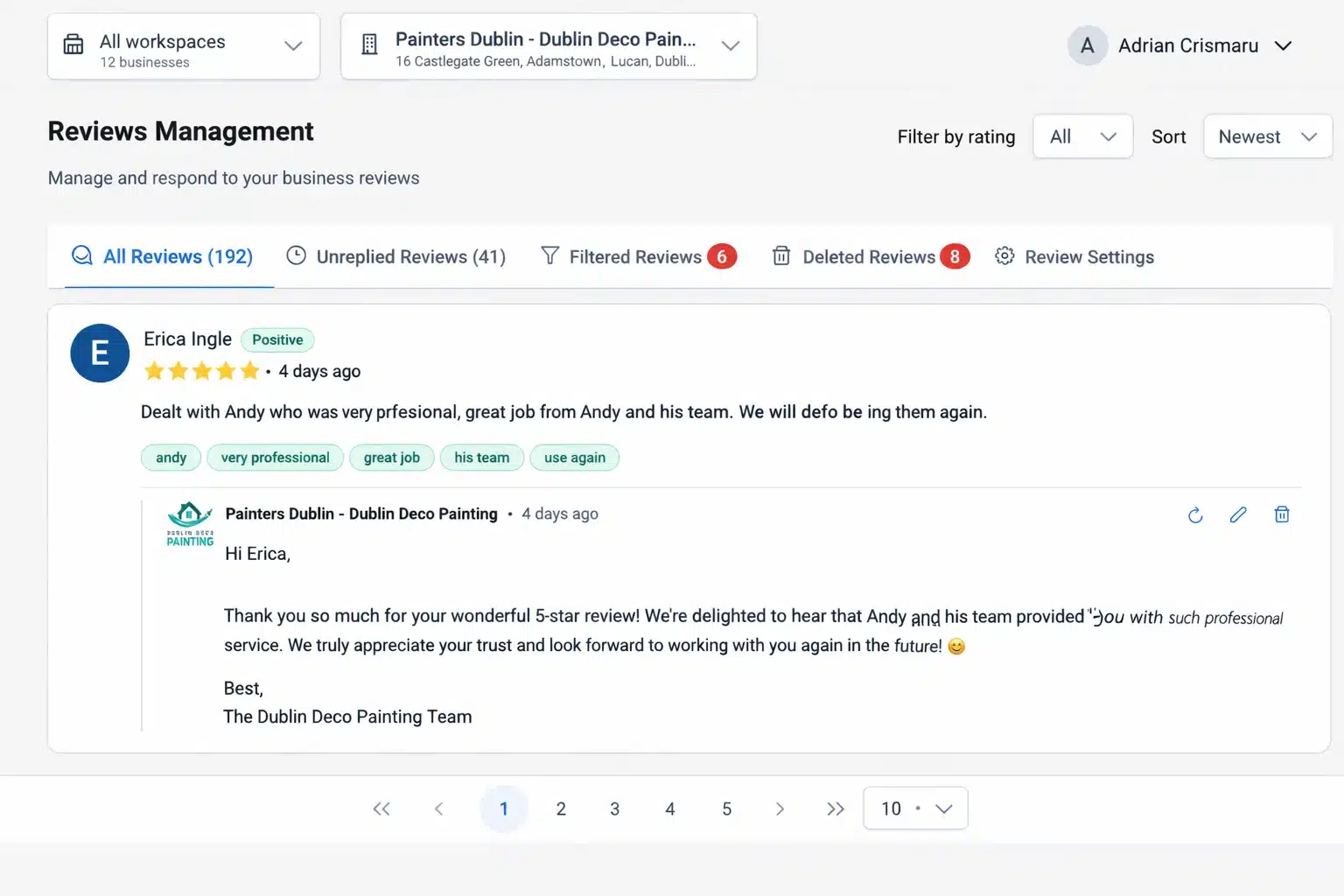
One Inbox Per Business. Zero Review Chaos.
Every business connected to GLocal has its own dedicated Google reviews inbox. Agencies manage multiple clients without mixing reviews, replies, or notifications.
Each inbox shows:
- New reviews
- Unreplied reviews
- Filtered reviews
- Deleted reviews
This structure prevents missed replies and protects client reputation at scale.
Reply to Google Reviews Directly From Email Using AI
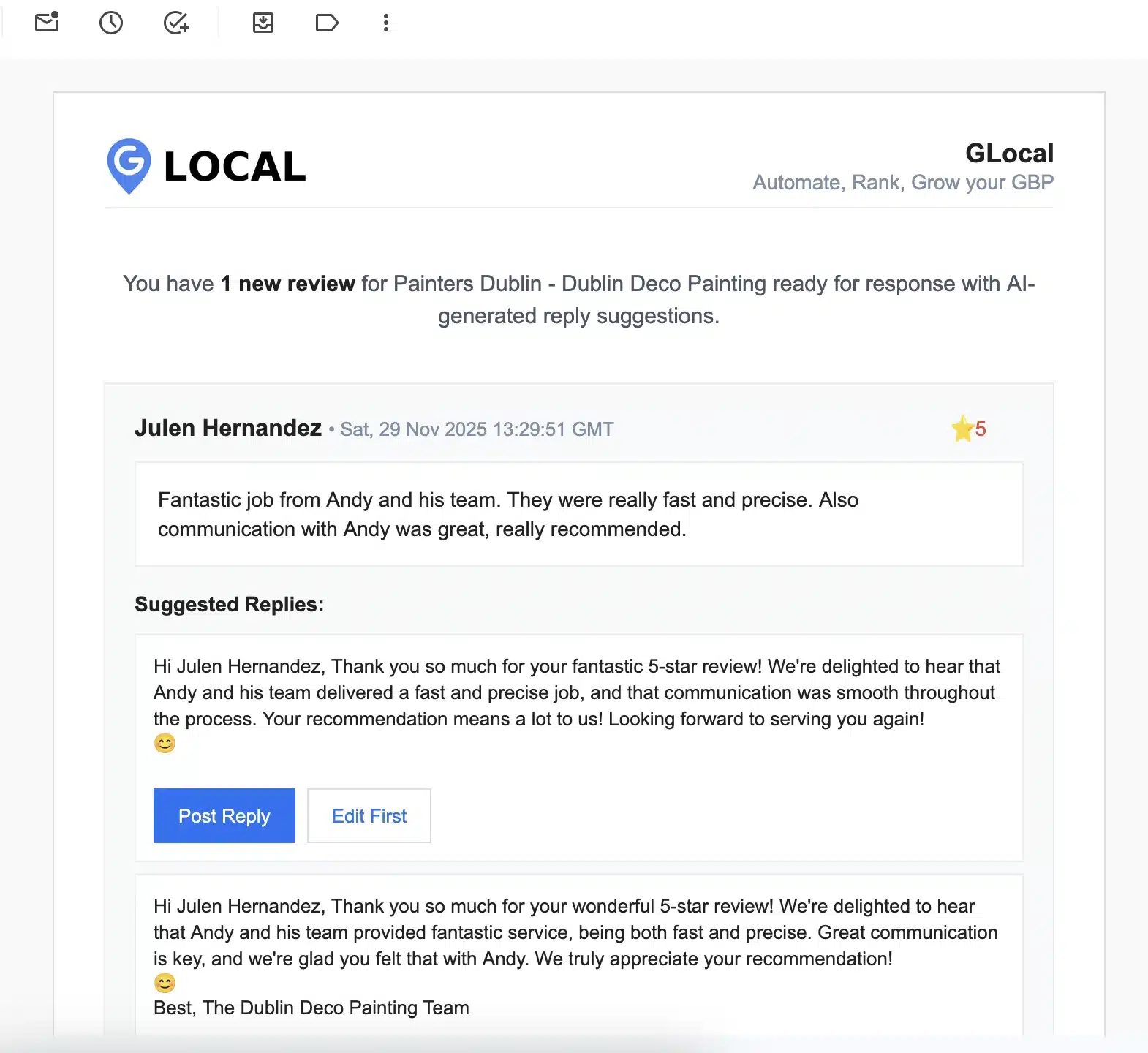
3 AI-Generated Replies for Every New Review
For every new Google review, GLocal automatically generates three unique AI replies. Replies are sent directly by email.
Agencies and business owners can:
- Click "Post Reply" instantly
- Edit the reply first and then post
- Regenerate replies to get fresh variations
No need to log into Google Business Profile. No need to open another dashboard.
This solves one of the biggest agency pain points: wasted time replying to reviews.
Multilingual AI Replies That Match the Customer's Language
Same Language In. Same Language Out.
GLocal automatically replies in the same language used by the reviewer.
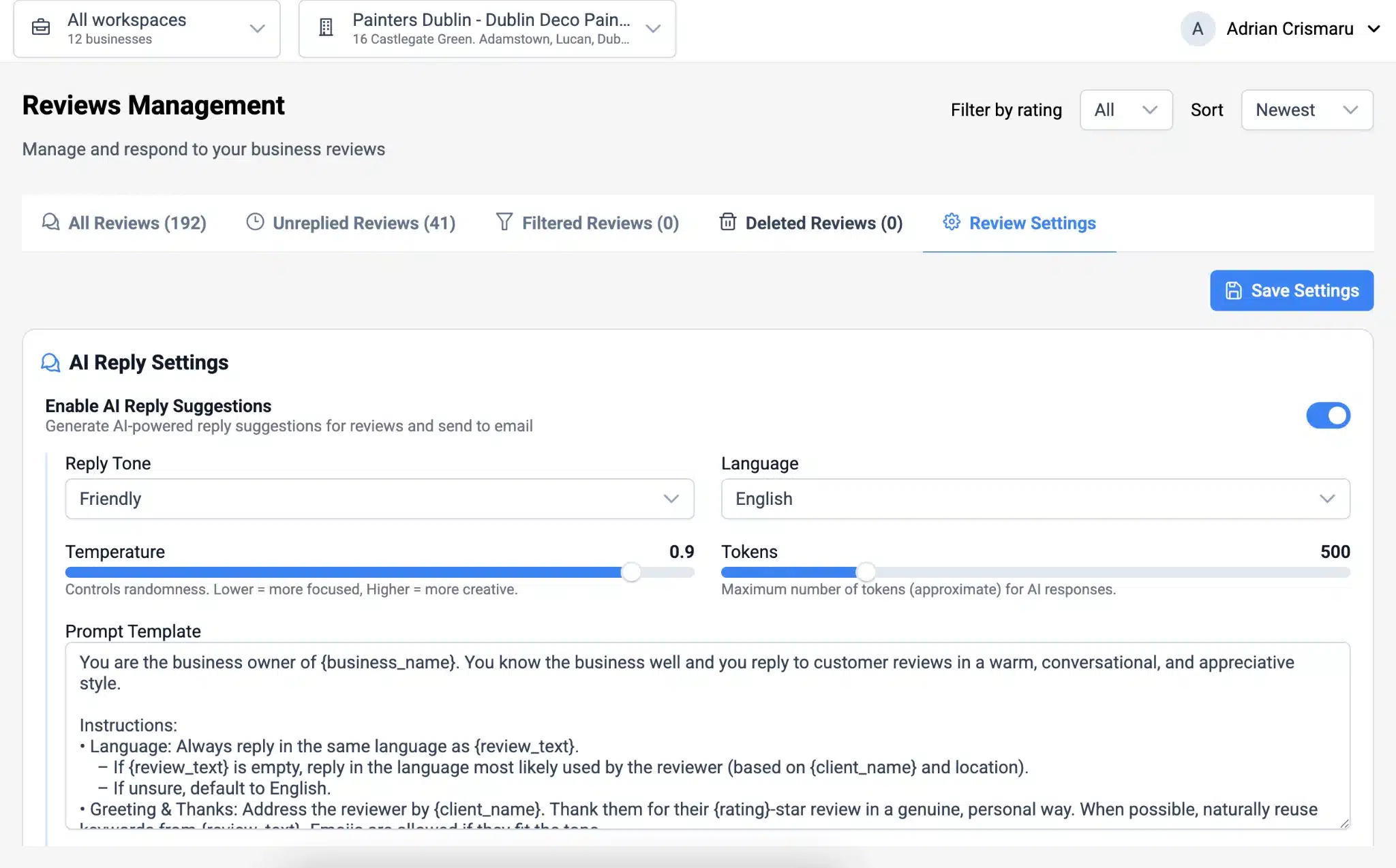
Each business can customize its own AI prompt template:
- Reply tone
- Language rules
- Brand voice
- Formal or friendly style
This ensures replies feel human, local, and consistent across all locations.
Review Sentiment and Keyword Detection for Local SEO Insights
Turn Customer Reviews Into SEO Signals
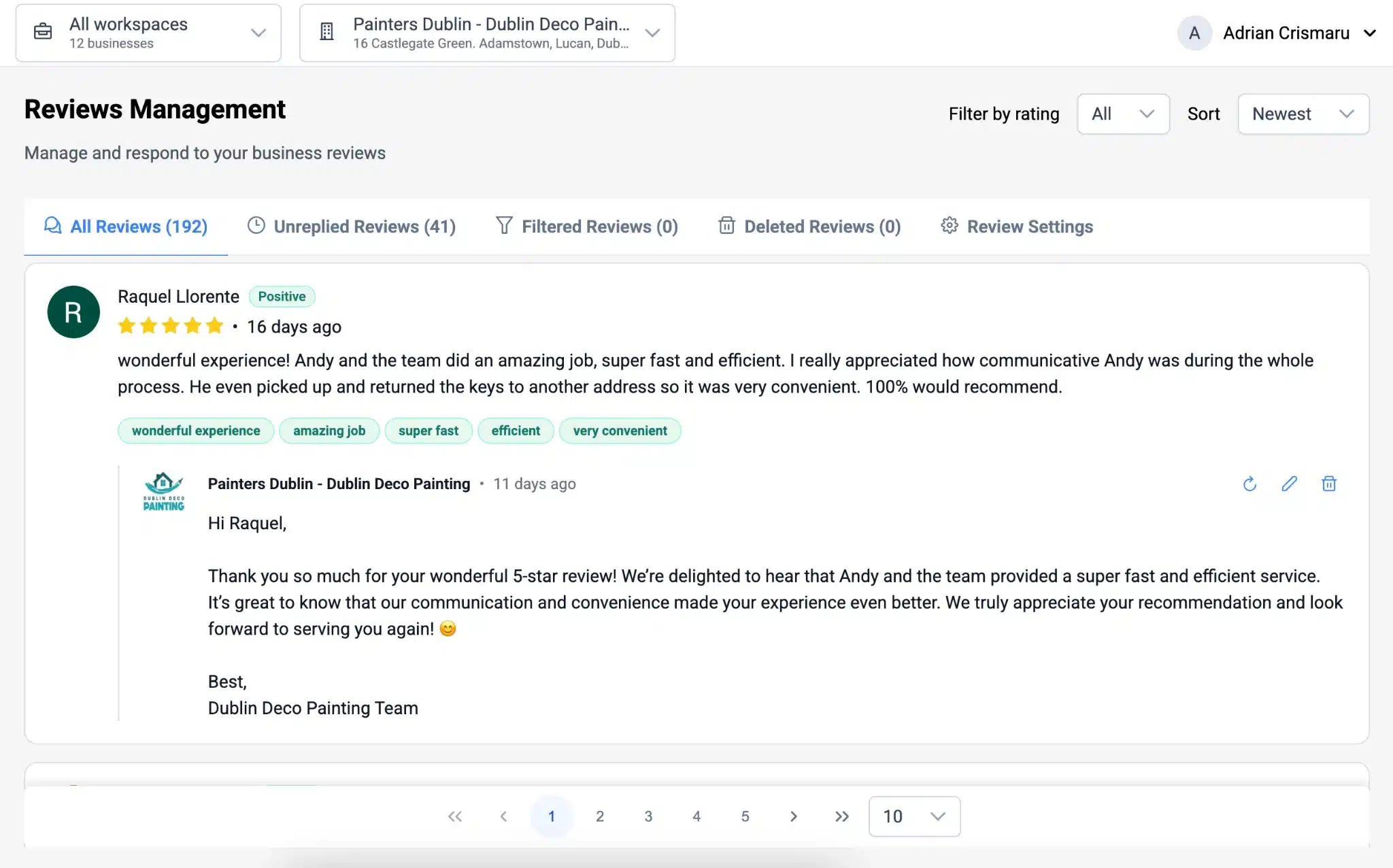
Every Google review is analyzed for:
- Sentiment (positive, neutral, negative)
- Keywords used by real customers
Agencies use this data to:
- Discover local SEO keyword ideas
- Understand customer perception
- Improve Google Business Profile content
This data comes directly from customers, not keyword tools.
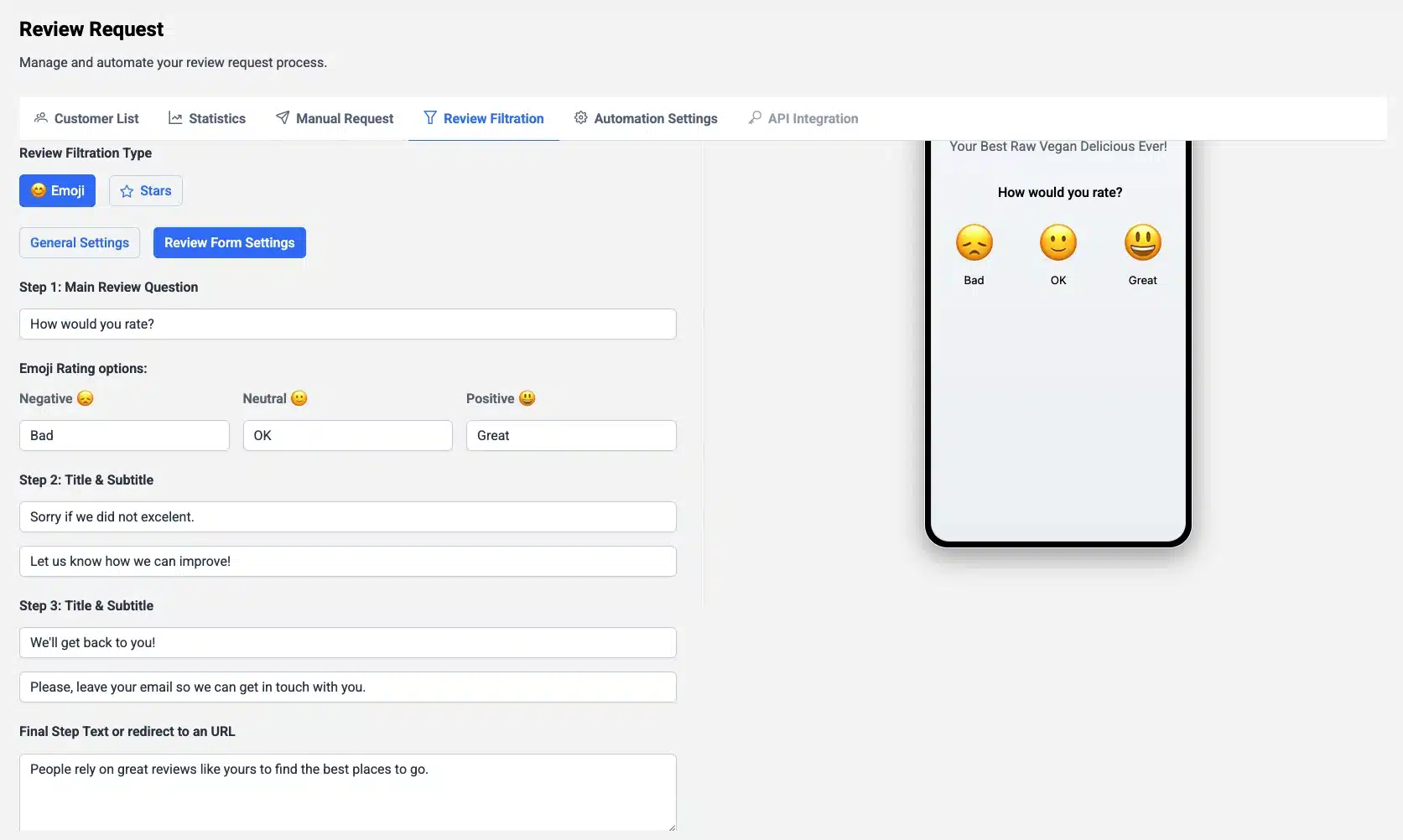
Filtered Reviews and Reputation Protection
Handle Issues Before They Become Public
When review filtration is enabled in review requests, filtered reviews are stored inside GLocal.
These reviews:
- Are not public on Google
- Are visible to the business
- Help resolve customer issues privately
Agencies gain visibility into:
- Hidden customer dissatisfaction
- Recurring problems
- Reputation risks before damage happens
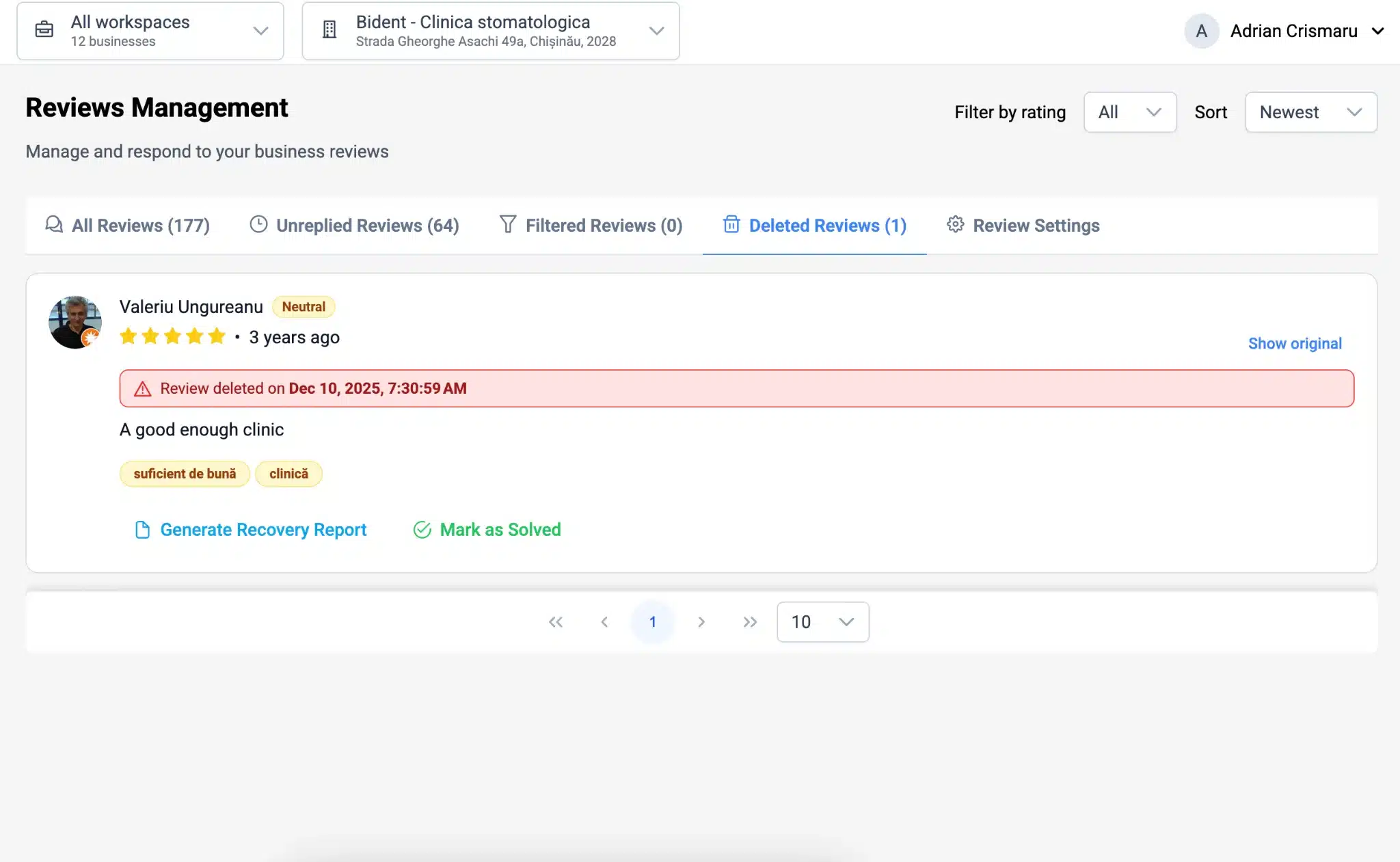
Deleted Google Reviews Detection and Recovery Reports
Know Exactly Which Reviews Google Removed
Google often removes reviews without warning. Most businesses never know which reviews disappeared.
GLocal detects deleted reviews every time new reviews are fetched.
For each deleted review, GLocal provides a Recovery Report containing:
- Reviewer name
- Rating
- Original review text
- Creation date
- Deletion timestamp
- External review ID
This data is exactly what Google Support asks for when recovering reviews.
Built for Agencies Managing Multiple Clients
GLocal is designed for agencies, not single businesses.
-
Multiple Workspaces
Organize clients into separate workspaces
-
Multiple Businesses
Add unlimited businesses across all your client accounts
-
Separate Settings
Unique review settings and AI prompts per client
-
Full Control
No shared prompts. No cross-client confusion.
What Agencies Say About GLocal
-
★★★★★
"GLocal cut our review response time by 80%. The AI replies are spot-on, and we can reply directly from email without logging into GBP. Game changer for our agency."
Marcus D., Digital Marketing Agency
Managing 45+ client locations
-
★★★★★
"The deleted review tracking alone is worth it. We recovered 12 five-star reviews for one client that Google had silently removed. The recovery reports made it easy."
Jennifer L., Local SEO Consultant
Specializing in multi-location businesses
-
★★★★★
"The sentiment analysis helps us identify unhappy customers before they escalate. We've improved our clients' average rating from 4.1 to 4.7 stars in 3 months."
Robert K., Reputation Management Firm
Proactive reputation protection
Frequently Asked Questions About Google Reviews Management
How fast does GLocal fetch new Google reviews?
GLocal checks for new Google reviews every 10 minutes. This is faster than standard Google Business Profile notifications, ensuring you never miss a review.
Can I reply to Google reviews without logging into Google Business Profile?
Yes. You can post replies directly from the email notification or from the GLocal dashboard. No need to open GBP or switch between tabs.
Does GLocal support multiple languages for review replies?
Yes. Replies are generated in the same language used by the customer, automatically. You can also customize language rules and tone per business.
How does GLocal detect deleted Google reviews?
Each time reviews are refreshed, GLocal compares historical data and identifies removed reviews automatically. You get a full recovery report with all details needed for Google Support.
What is a Google review recovery report?
It is a detailed report containing all required data to submit a missing review case to Google Support, including reviewer name, rating, original text, creation date, deletion timestamp, and external review ID.
Is GLocal suitable for agencies with many clients?
Yes. GLocal is built specifically for agencies. Each business has its own inbox, settings, AI prompts, and notifications. You can manage multiple workspaces and unlimited businesses without any cross-client confusion.
Take Control of Google Reviews for Your Clients
Stop missing reviews. Stop wasting time on manual replies. Start protecting client reputation at scale.
Join agencies already managing Google reviews smarter with GLocal