AI Visibility Tracker for Local Businesses and Agencies
GTrack AI Tracker is an AI visibility tracker: it asks ChatGPT, Perplexity, Gemini and Google AI Mode the questions your customers ask. It records whether each answer names you, which competitors it names instead, and which websites it relied on.
First campaign included with any paid GTrack plan · One per account, with one free manual scan
- 4 AI engines in every scan
- Up to 60 checks per scan (15 prompts x 4 engines)
- $39 a month per extra campaign
Why track your AI search visibility
More people now ask an AI assistant for a recommendation instead of searching and scrolling. If your business is not named in the answer, you lose customers you never hear about. An AI visibility tool shows you where you stand.
-
See if AI assistants recommend you
- GTrack writes realistic customer questions for your topics, as full sentences.
- Every question is put to ChatGPT, Perplexity, Gemini and Google AI Mode.
- Each answer is recorded: named or not, and in which position.
-
Know who is recommended instead
- The Brands tab lists every business the engines named, ranked by visibility.
- Share of Voice compares your share of checks with your top 5 competitors.
- This is your competition as the engines see it.
-
Find where to do the work
- The Sources tab shows the websites the engines relied on.
- Opportunities turns every missed question into a task.
- Progress compares scans, so you see whether the work paid off.
What the AI visibility report shows
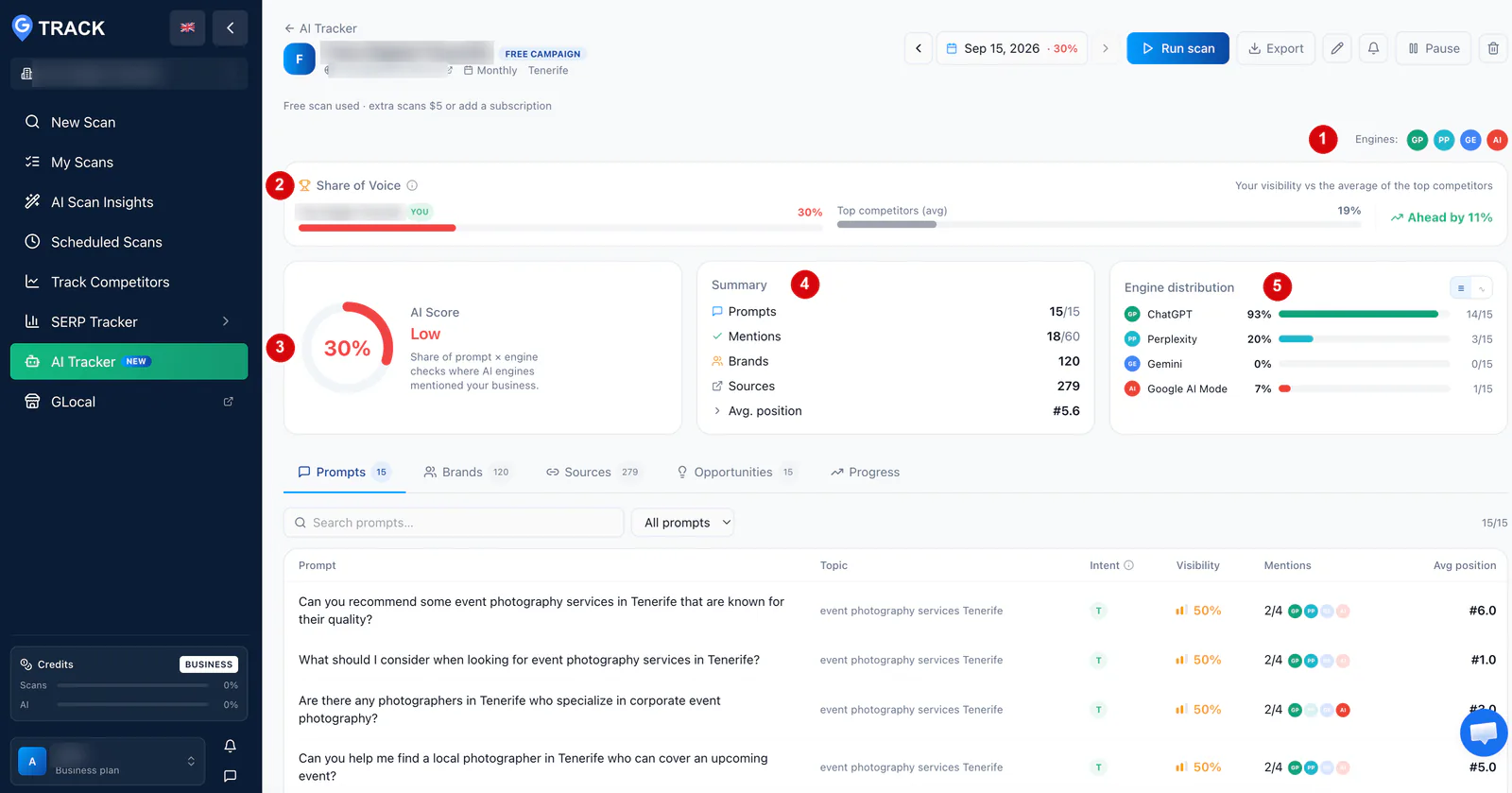
Four panels sit at the top of every campaign.
-
AI Score
Your AI visibility score: the share of all checks where an engine mentioned your business, with a Low, Medium or High band. One check is one prompt put to one engine. Mentioned in 18 of 60 checks is 30%.
-
Share of Voice
Your AI share of voice next to the average of your top 5 competitors, with the gap stated plainly.
-
Engine distribution
The same score for each engine. Being in 93% of ChatGPT answers and 0% of Gemini answers is a normal result.
-
Summary
Prompts checked, mentions, the number of brands and sources in the answers, and your average position among the businesses named.
Five tabs, five answers
Under the score, the report has five tabs. Each one answers a question.
-
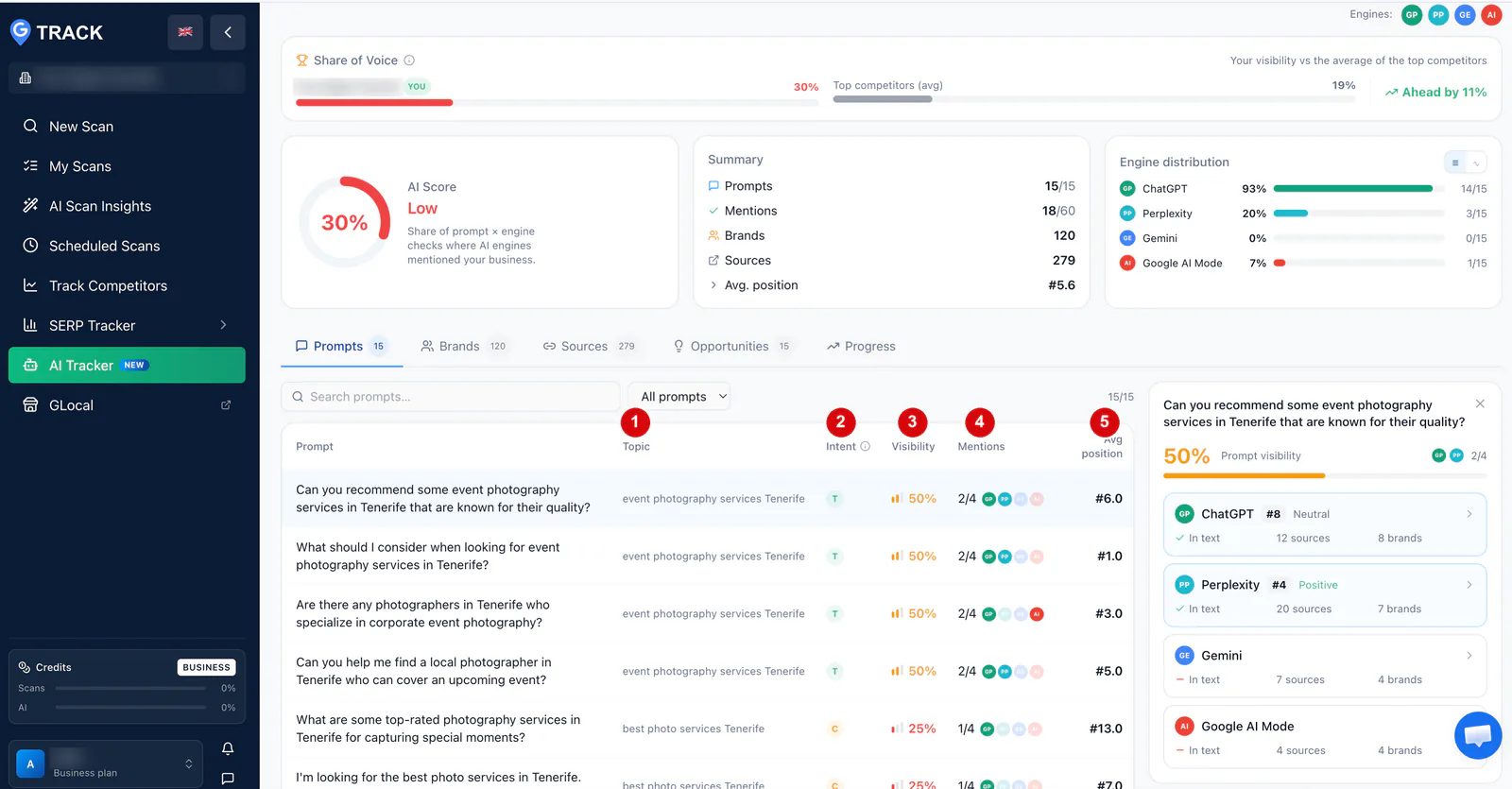
Prompts
How did each question go?
Every prompt with its topic, intent, visibility and average position. Click a row to see each engine: whether it named you, your position, the tone of the mention (Positive or Neutral), and the sources and brands in the answer.
-
Brands
Who are you up against?
Every business the engines named, ranked by visibility, with its mentions, engines and average position. You are marked in the list.
-
Sources
What do the engines read?
Switch between Domains and URLs to see how often each source was used, on how many prompts, and by which engines. Your own domain near the top is a good sign.
-
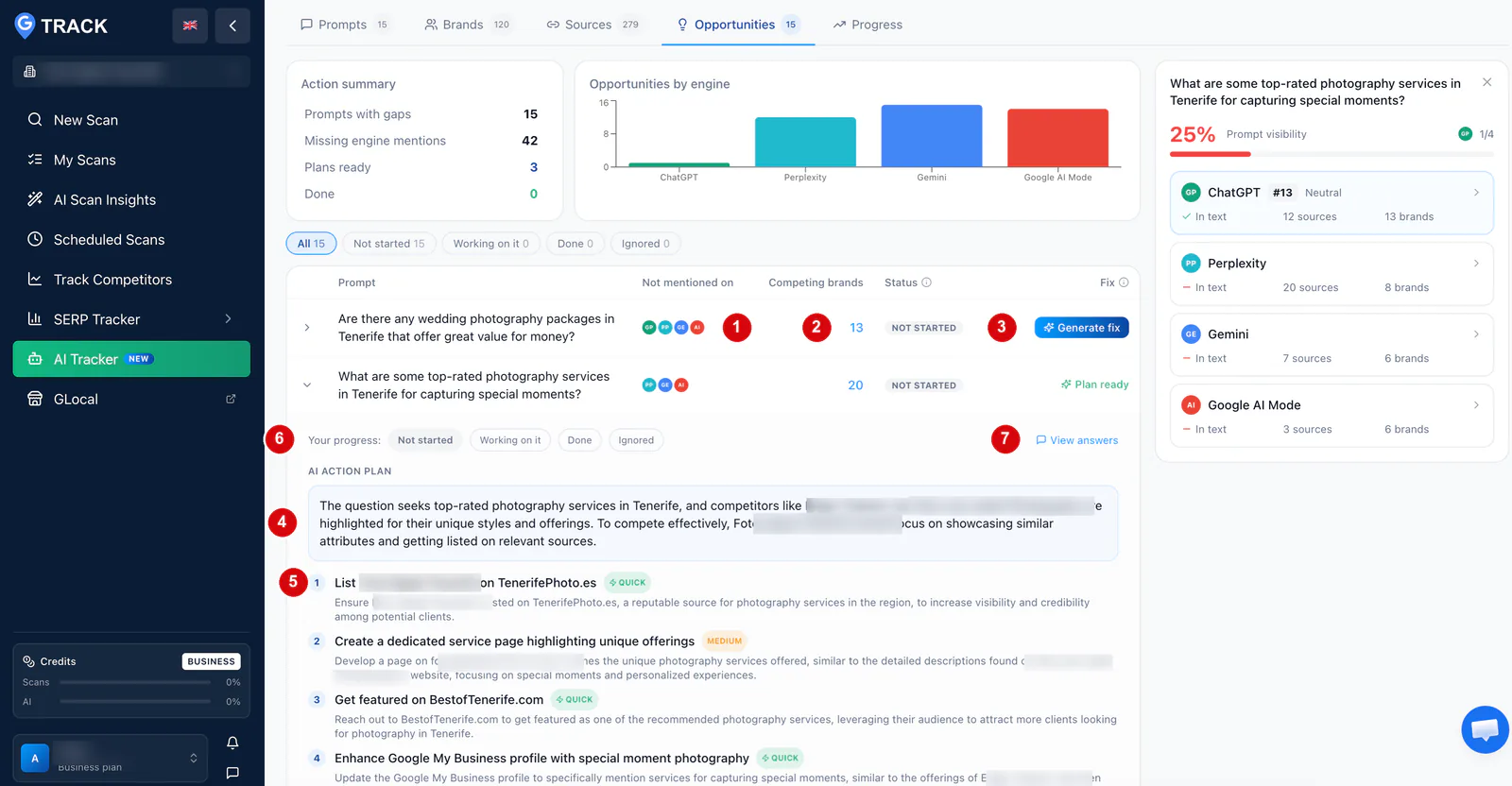
Opportunities
What should you fix first?
One row per prompt, with the engines that missed you. Generate fix writes an AI action plan: why competitors win, steps tagged Quick or Medium, and pages to create or improve. It uses your AI tokens.
-
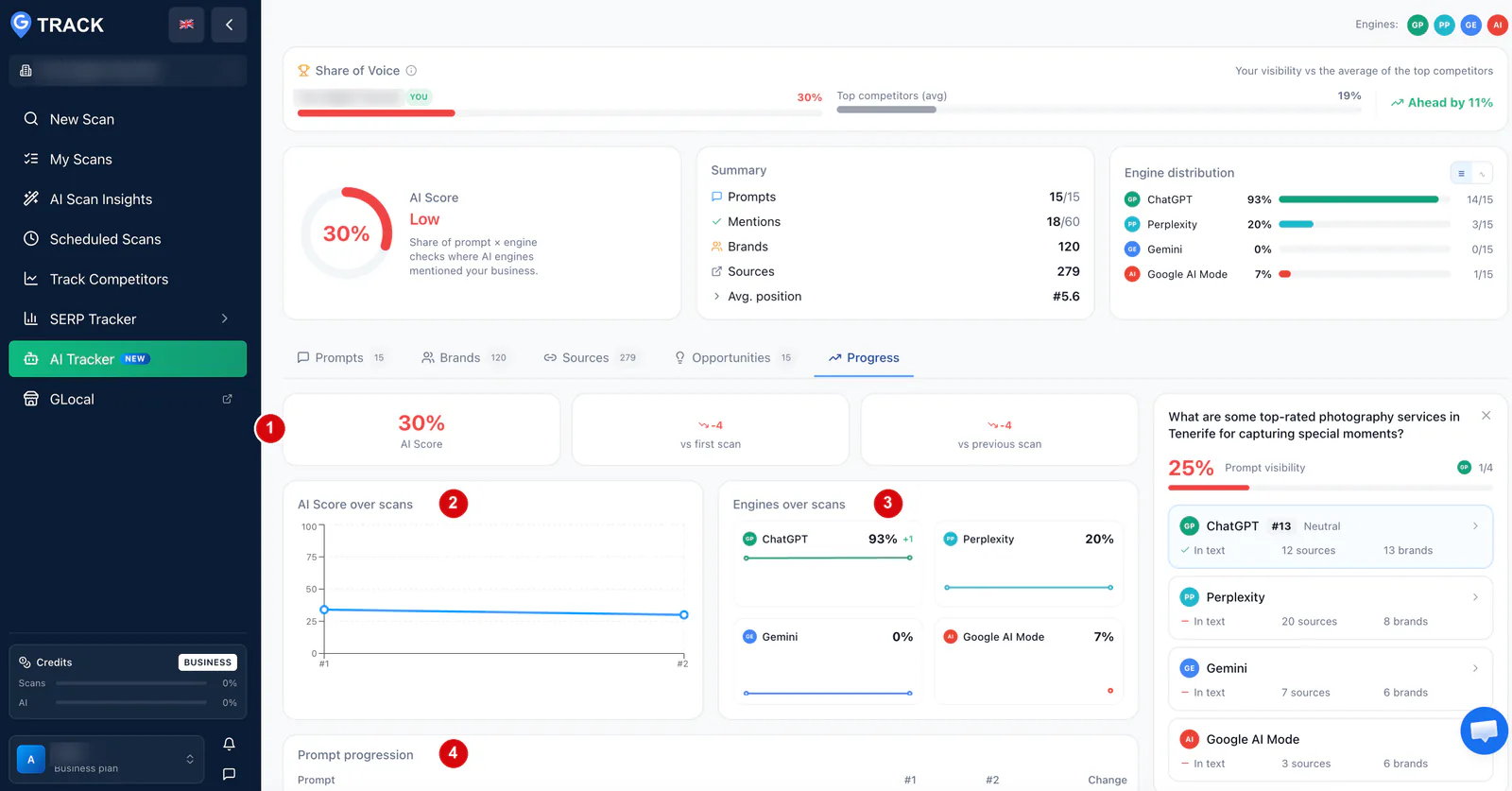
Progress
Is it working?
Your score against the first and the previous scan, the trend for each engine, and every prompt scan by scan. It needs at least two scans.
Four AI engines in every scan
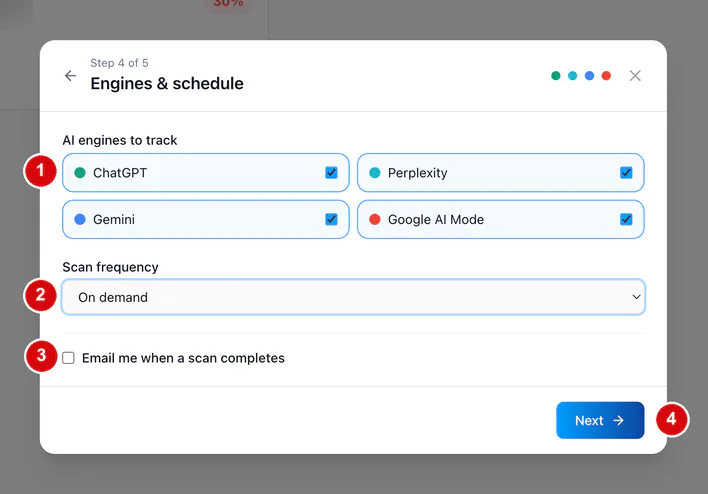
All four engines are on by default. Leave them on. Engines disagree far more than people expect, and it is normal to be named by one and invisible on another.
-
ChatGPT
The share of your prompts where ChatGPT names you, and your position among the businesses in each answer.
-
Perplexity
The same checks on Perplexity, with the cited websites in the Sources tab.
-
Gemini
Expect Gemini to differ from the other three. A 0% here next to a high score elsewhere shows where to work first.
-
Google AI Mode
Every prompt is put to Google AI Mode, and the report shows the share of prompts where it named you.
Every prompt is put to every engine: 15 prompts across 4 engines is 60 checks. AI Tracker tracks these four engines. It does not track Google AI Overviews, Claude, Copilot or Grok.
AI visibility scan vs Google Maps rank scan
AI Tracker is not a rank scan. A scan under New Scan measures where you rank on Google Maps across a geographic grid. An AI Tracker scan measures whether AI assistants recommend you. Neither replaces the other.
| Google Maps rank scan | AI Tracker scan | |
|---|---|---|
| What it measures | Where you rank on Google Maps for a keyword | Whether AI engines name your business in their answers |
| Unit | A rank at each point of a geographic grid | A check: one prompt put to one engine |
| Location | A grid of points around your business | One target location for the campaign, no grid |
| Where it is in GTrack | New Scan | AI Tracker, in the left sidebar |
| Billing | Uses the scan credits of your GTrack plan | Billed per campaign. No scan credits used |
Some people call this an LLM rank tracker, or a ChatGPT or Perplexity rank tracker. An AI answer has no fixed list of results, so AI Tracker reports whether you were mentioned and where you placed among the businesses named. For positions on the map, use the Google Maps rank tracker.
Find out what AI assistants say about your business
Setting up a campaign takes a few minutes. The first scan runs as soon as you launch.
First campaign included with any paid GTrack plan · One per account, with one free manual scan
Who is AI Tracker for?
-
Local businesses
Check whether AI assistants name you when someone in your area asks. Set your target location and the language your customers use.
-
Multi-location brands
Run one campaign per location, each with its own topics, prompts and schedule. Every campaign after the first is $39 per month.
-
Local SEO agencies
Set up one campaign per client. Export the report as a PDF for the client, or as a CSV for your own analysis.
AI Tracker vs asking ChatGPT yourself
You can type a question into an AI assistant and look for your name. It is hard to repeat, compare or report.
| Checking by hand | GTrack AI Tracker | |
|---|---|---|
| Questions | The ones you think of that day | Up to 15 prompts written from your topics |
| Engines | One at a time, in separate apps | ChatGPT, Perplexity, Gemini and Google AI Mode in one scan |
| Results | Notes or screenshots, if you keep them | Mentioned or not, position, tone, sources and brands |
| Competitors | The names you happen to notice | Every brand named, ranked by visibility |
| Over time | Hard to compare | The Progress tab compares scans, prompt by prompt |
| Repeating it | When you remember | On a schedule, with an email when a scan completes |
How to set up an AI visibility campaign in 5 steps
Open AI Tracker in the GTrack sidebar and click New campaign. The wizard takes a few minutes.
-
Campaign setup
Find your business on Google and GTrack fills in the name, domain, description and brand aliases. Set the target location and the prompt language. Add every spelling of your name as an alias, or those mentions are not counted.
-
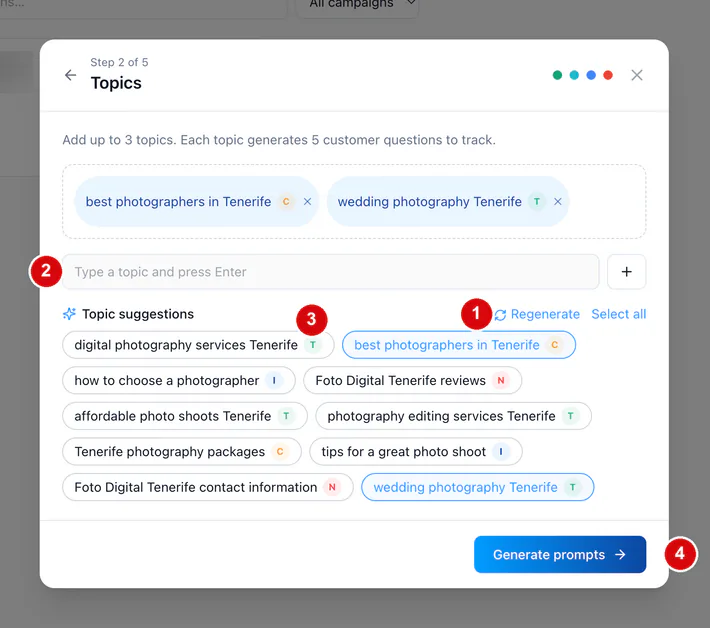
Topics
Pick up to three topics. GTrack suggests ten, each with an intent letter: T transactional, C commercial, I informational, N navigational. You can also type your own.
-
Prompts
GTrack writes five customer questions per topic. Delete the ones that do not sound like your customers and add your own.
-
Engines and schedule
All four engines are ticked. Choose how often the campaign runs and whether to get an email when a scan completes.
-
Review and launch
Check the summary and launch. The first scan starts right away and takes a few minutes.
AI Tracker pricing
AI Tracker is billed separately from your GTrack plan and does not use your scan credits. You need a paid GTrack plan to create a campaign. The Free plan cannot create one.
| Your first campaign | Every campaign after that | |
|---|---|---|
| Price | Included, one per account | $39 per month, each |
| Scan frequency | Monthly, or on demand | Monthly, weekly, every 3 days, or on demand |
| Manual scans included | One, in total | Three per month, per campaign |
| Extra manual scans | $5 each | $5 each |
- The included campaign has one free manual scan in total, not one per month.
- On a paid campaign the three manual scans reset on your payment date.
- Paid campaigns are billed per campaign: three of them come to $117 per month.
- Generate fix uses the AI tokens of your account.
What to do after your first scan
-
Check Share of Voice first
The gap to your competitors tells you more than the score.
-
Read the Brands tab
Look for names you do not recognise. A rival named by three engines when you are named by one is worth studying.
-
Start with the Quick steps
Pick two or three opportunities with the fewest competing brands and do the steps tagged Quick.
-
Work on the top sources
The directories, review sites and listings at the top of the Sources tab are what the engines read. Get listed and reviewed there. For your Google listing, use GLocal.
-
Judge by Progress
Two scans give a direction. Wait for three or four before you draw conclusions.
-
Expect a low first score
Very few businesses start high. The score exists to be moved.
Read more: how to use AI for local SEO, the local SEO trends around AI and zero-click results, and the local SEO guide.
AI visibility tracker: frequently asked questions
What is AI visibility?
AI visibility is how often AI assistants name your business when people ask them for a recommendation. If ChatGPT, Perplexity, Gemini or Google AI Mode names you, the customer sees you. If it does not, the customer never learns you exist. An AI visibility tracker measures this on a fixed set of questions.
How is AI visibility measured?
GTrack uses the AI Score: the share of all checks where an engine mentioned your business. With 15 prompts and 4 engines a scan has 60 checks. Mentioned in 18 of them, your AI Score is 30%. The report adds a Low, Medium or High band and the score of each engine.
How do I track AI visibility for my business?
Create a campaign in GTrack AI Tracker. Pick your business from Google, choose up to three topics, review the questions GTrack writes, and launch. Each scan puts every question to the four engines. Set a monthly schedule and compare scans in the Progress tab.
Why should I track AI brand visibility?
More people ask an AI assistant for a recommendation instead of searching. If you are not named, you lose those customers without knowing it. Tracking shows which questions you are missing from, who is recommended instead and which websites the engines rely on.
How do I track brand visibility in Google AI Mode?
Google AI Mode is one of the four engines in AI Tracker and it is on by default. The Engine distribution panel shows the share of prompts where AI Mode mentioned you.
How do I analyze my competitors' AI visibility?
Open the Brands tab. It lists every business the engines named in your campaign, ranked by visibility, with its mentions, the engines that named it and its average position. Share of Voice compares your share of checks with your top 5 competitors.
How do AI visibility tools work?
GTrack AI Tracker starts from your topics. It writes up to five customer questions per topic and puts each one to ChatGPT, Perplexity, Gemini and Google AI Mode. It then records whether you were named, which other businesses were named and which sources were cited.
How do I get recommended by ChatGPT?
No tool can promise a mention. You can find the questions where ChatGPT names competitors and not you. The Opportunities tab lists them, and Generate fix writes an action plan with Quick and Medium steps. The Sources tab shows the websites where it helps to be listed.
Is AI Tracker the same as a Google Maps rank scan?
No. A Google Maps rank scan in GTrack measures where you rank on the map across a geographic grid. AI Tracker measures whether AI assistants recommend you when asked. It has no grid and no map positions. The two sit side by side in GTrack.
How much does GTrack AI Tracker cost?
You need a paid GTrack plan. Your first campaign is included, one per account, with one free manual scan in total. Every further campaign costs $39 per month and includes three manual scans per month. Extra manual scans cost $5 each. It does not use scan credits.
Which AI engines does it track, and how often?
ChatGPT, Perplexity, Gemini and Google AI Mode. AI Tracker tracks these four engines and no others: Google AI Overviews, Claude, Copilot and Grok are not covered. The included campaign runs monthly or on demand. Paid campaigns can also run weekly or every 3 days. There is no daily schedule.
Can I share the report with a client?
Yes. Export downloads the full report as a PDF, a CSV or a PNG. The PDF is the one to send to a client, and the CSV is for your own analysis. An agency can set up one campaign per client, each with its own topics, prompts and schedule.
Start tracking your AI visibility
See which AI engines recommend your business.
First campaign included with any paid GTrack plan · One per account, with one free manual scan
- First campaign included with a paid plan
- Does not use your scan credits
- Help center and support