Google Review Monitoring: an Alert When a Review Lands, and When One Disappears
Google review monitoring should mean two emails you never have to go looking for. One arrives when a customer posts a review, with up to three reply drafts ready to send. The other arrives when a review that was on your profile yesterday is not there today. GLocal keeps its own copy of every review from the day it first sees it, so a vanished review is never just a smaller number.
No contract, cancel anytime · 30-day money-back guarantee · 50% off your first 3 months with code GLocal50OFF3Months
- 2 emails new and removed
- Up to 3 drafts per review
- 1 click Recovery Report
- From $29.99 a month

What slips past you without Google review monitoring
The Business Profile dashboard shows a count and a list. It does not tell you what changed since you last looked, and three things change without anyone telling you.
-
A review posted at 9 pm waits for someone to open the dashboard
Reviewers write when the job is fresh, which is evenings and weekends. The reply that would have read as attentive on Saturday reads as an afterthought on Wednesday, and the next customer who scrolls your profile sees the gap.
-
A review is removed and the only trace is a smaller count
Google sends no notice when its filters take a review down. Unless something kept a copy, the text, the rating and the review ID are gone with it, and so is any chance of asking for it back.
-
The same praise and the same complaint repeat, and nobody counts them
One review that says "waited forty minutes" is an anecdote. Eleven in a quarter are an operations problem. Read one at a time in the dashboard, they never add up to anything.
How to monitor Google reviews with GLocal, from the first import to the alert
There is nothing to install on your site and no one to train. Connect the profile and the review monitoring tool fills its own inbox.
-
Connect your Business Profile
Sign in with the Google account that manages the profile. GLocal imports every review that exists, and analyzes this first batch without using any of your AI tokens.
-
Every review is stored the moment GLocal sees it
Reviewer, stars, text, the created and updated timestamps and Google's own review ID are kept on GLocal's side. That stored copy is what makes the rest possible: a review can only be reported missing if something remembers it was there.
-
A new review arrives by email, with drafts
When a sync finds a review it has not seen, you get an email with the review and up to three suggested replies. The drafts use the tone you chose in Review Settings (Professional, Friendly Casual or Formal) and the reviewer's language. Post one as it is, or open it to edit first.
-
A review that is no longer on Google moves to the Deleted Reviews tab
When a sync cannot find a review GLocal has on record, the review is marked DELETED with the line "Detected as removed from Google on" and the date. If Alert on Review Deletion is switched on, an email goes out. The text, the rating and the ID stay readable in the tab.
-
Generate the Recovery Report, then Mark as Solved
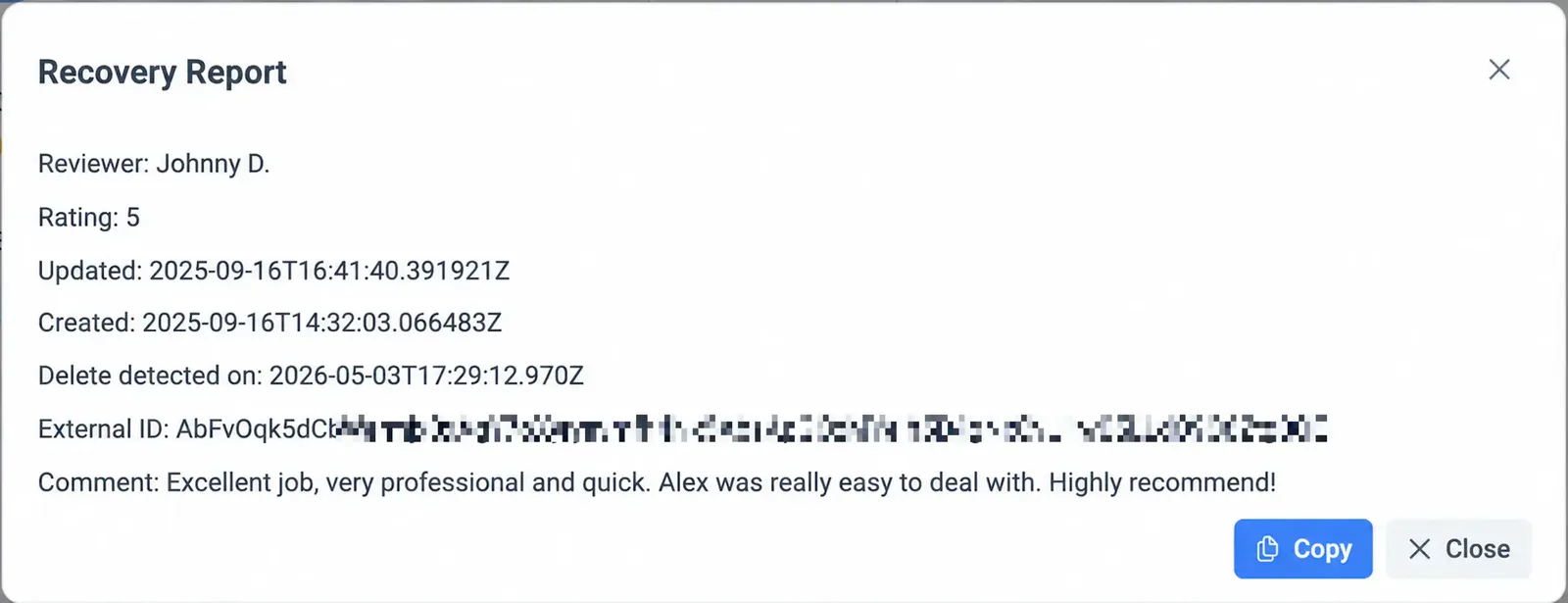
One click builds a report with the fields Google support asks for; the appeal itself is a separate guide. When the review is back, or you have decided to let it go, Mark as Solved clears it from the tab.
GLocal publishes no fixed sync interval: an alert goes out when the next sync finds the change.
Google review alerts that land in your inbox, not in a dashboard you forgot to open
There is nothing to install on your phone and nothing to log into before you can act: both Google review alerts are plain emails.
-
The new-review email, with the reply already drafted
The email names the business, shows the reviewer, the date and the stars, then the review itself, then the suggested replies. Post Reply publishes the draft you pick; Edit First opens it in GLocal so you can change a sentence before it goes live. Nothing is published until you press one of those buttons.
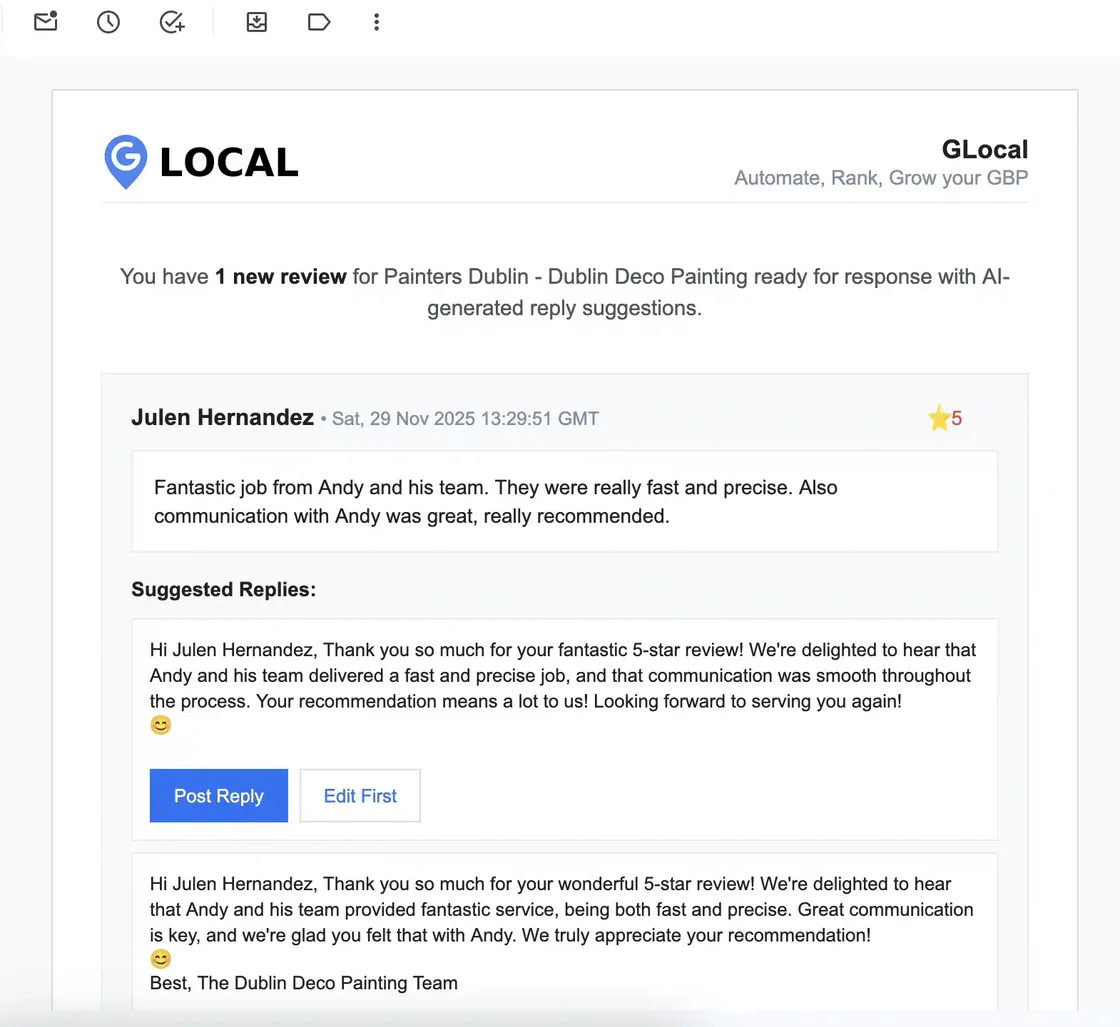
A new five-star review for a painting company, with two of the suggested replies. -
The deletion alert, and the tab behind it
When a review GLocal has on record is no longer on Google, you get an email and the review appears under Deleted Reviews. It still shows the stars, the text, the sentiment label and the keywords, with the detection date in red. Your original reply is kept under it.
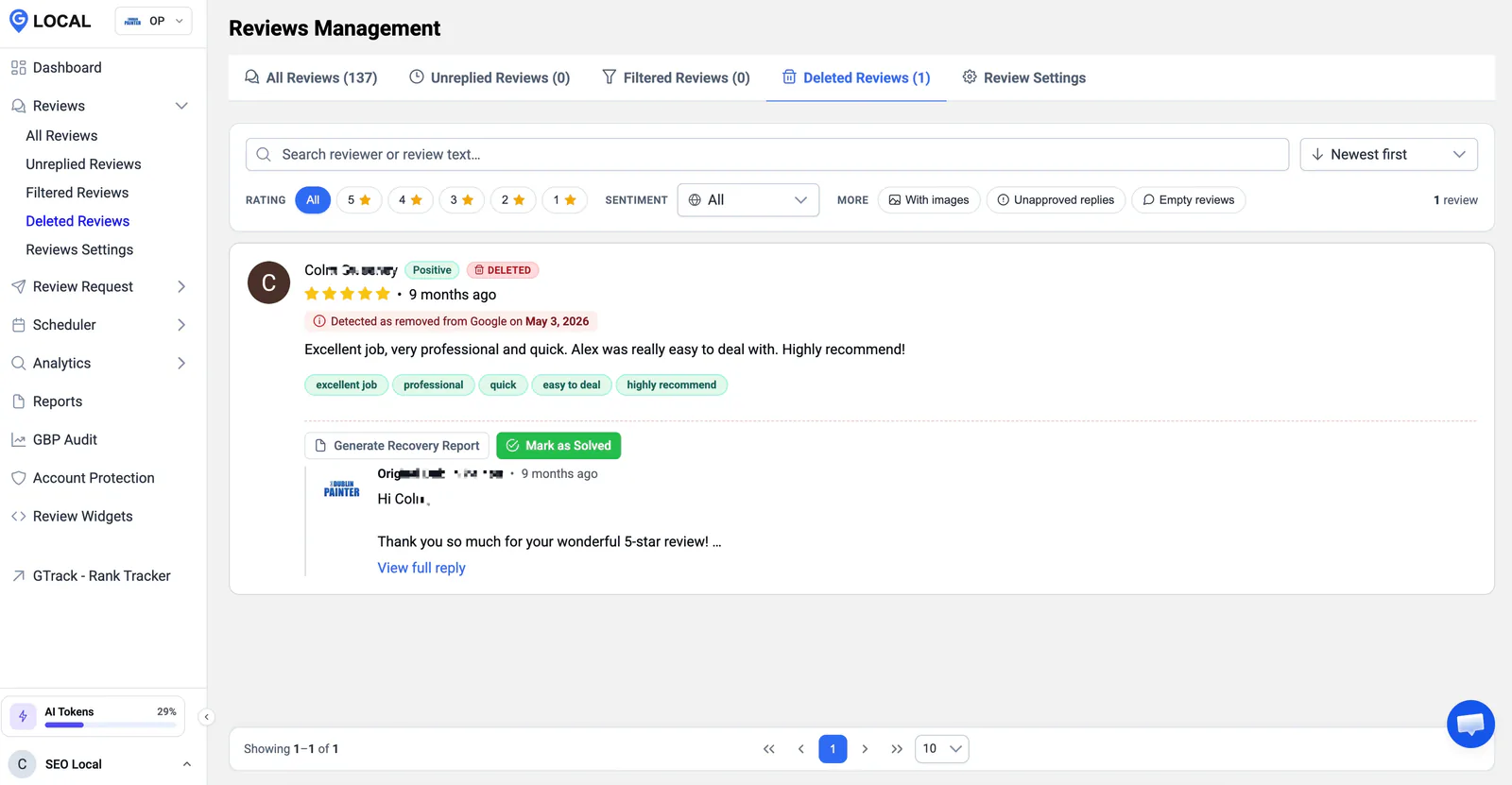
The Deleted Reviews tab: one five-star review detected as removed on May 3, 2026, with the two actions GLocal offers.
A Google review tracker that notices when a review disappears
Four things make a review disappear, and only one of them is a verdict on your business. A Google review tracker earns its keep by telling them apart.
Google's filters remove reviews that break its policies, sometimes long after they were posted and sometimes in a sweep that takes legitimate reviews with them. A reviewer can delete their own review, or edit it, which can register as a removal. A reviewer who closes their Google account takes every review they ever wrote with them. And Google occasionally pulls a review during a spam check and puts it back. From the dashboard these four look identical: one fewer review.
The Deleted Reviews tab gives each case a date, which is what separates a filter sweep from a customer who changed their mind. Reviews removed on the same day, across many profiles, point to Google. A single review gone a week after a difficult phone call points to the reviewer. Use the rating filter before you appeal anything: the five-star removals are the ones worth the form.
The Recovery Report is the appeal's raw material, not the appeal. One click copies the stored record, review ID included, into a block you paste into Google's form. Which form, what to write in each field and what Google answers in practice are in Deleted Google Reviews: How to Recover Them; this page stops where that guide begins.
What GLocal does not do is restore the review. Only Google can put a review back, and only after an appeal. What GLocal does is make sure you find out, and that you walk into the appeal with the review ID instead of a memory.
What Google review notifications tell you on their own, and what they leave out
Google review notifications, switched on under Customer activity in your Business Profile settings, email you about a new review. They say nothing about a removed one, and Google keeps no copy of what was removed.
| What you get | Checking by hand | Google's own emails | GLocal |
|---|---|---|---|
| Notice of a new review | When you next look | ||
| Reply drafts in the same email | |||
| Notice when a review is removed | |||
| The removed review's text, rating and ID kept | |||
| Date the removal was detected | Only if you log the count daily | ||
| Sentiment label and keywords on every review | |||
| Several profiles in one view, removals included | New reviews only | ||
| Works on Yelp, Facebook and other sites | If you check them |
GLocal watches Google reviews only. If most of your reviews live on another site, this is not the tool for them.
Who needs a review monitoring tool beyond their own phone
One owner with one profile can live in the Google Maps app. The three groups below cannot.
-
Owner-operators who reply between jobs
The email is the whole workflow: read the review, press Post Reply, back to work. The Deleted Reviews tab is the insurance you look at once a month.
-
Managers of several locations
Ten profiles mean ten profiles to open one by one in Google and one inbox in GLocal, with each location's reviews, labels and removals side by side. A sweep that hits three locations on the same morning is visible as a pattern, not three separate surprises.
-
Agencies answering for client profiles
Client profiles sit in workspaces, team members see only the workspaces they are assigned to, and every removal has a dated record you can show the client before they ask why the count dropped. The Agency plan covers 50 profiles and 10 seats.
Review monitoring software that leaves the reply to you
Monitoring is one part of the reviews side of GLocal, and the part this page relies on. Under each card sits the product summary in the help center's own words; the reply itself always stays with you.
-
The inbox is the record
Because every review is imported and kept, the inbox doubles as the archive that makes deletion detection possible. Filters by stars, sentiment, images and unapproved replies narrow 137 reviews to the three you need.
One inbox for every review. All your Google reviews are imported into one place, with separate tabs for unreplied reviews and for reviews that disappeared from your profile.
-
Drafts arrive with the alert
The reply drafts are generated when the review is detected, so the email that tells you about the review already contains the answer. You choose the tone once, in Review Settings.
AI reply drafts, approved by you. Every new Google review arrives by email with up to three reply drafts in a tone you set (Professional, Friendly Casual or Formal) and in the reviewer's language. You post one as is or edit it first. GLocal never posts a reply on its own.
-
The alert, the tab and the report
Alert on Review Deletion is a switch in Review Settings. The tab and the Recovery Report are always there, whether or not the email is on.
Deleted review alerts and a recovery report. GLocal alerts you when a review disappears and builds a Recovery Report (reviewer, rating, text, dates, review ID) you can send to Google support.
-
Labels that turn reviews into a trend
Every review is labeled Positive, Neutral or Negative and tagged with the words customers repeat. The Analytics tab charts the sentiment by day and ranks the keywords, so "punctual" and "waited" each get a count.
Sentiment and keywords on every review. Each review is labelled Positive, Neutral or Negative, and the AI pulls out the keywords customers repeat, so you can see what they praise and what they complain about.
-
One feed for many profiles
Profiles are grouped in workspaces with Owner, Admin and Member roles. A Member assigned to one client's workspace sees that client's reviews and nothing else.
Workspaces, team seats and roles. Business profiles grouped in workspaces, team members as Owner, Admin or Member, and Members limited to the workspaces they are assigned to.
-
Reviews readable by your own tools
The public API reads reviews per business profile with its own key, so the stored copies can feed a dashboard or a report you already run.
Public API. A REST API to add customers to a review request sequence and to read reviews, with one key per business profile and request logs.
What this page does not promise
- GLocal watches Google reviews only: Yelp, Facebook, Tripadvisor and other sites are not monitored.
- Alerts are emails. There are no text messages and no browser push notifications.
- No reply is ever posted on its own: Post Reply and Edit First are buttons you press.
- GLocal cannot restore a removed review. It gives you the record and the report; Google decides the appeal.
- No fixed sync interval is published.
Google review monitoring: the questions owners ask before they switch it on
What is Google review monitoring, and how do I do it?
Watching a Business Profile for two kinds of change: reviews that appear and reviews that disappear. How to monitor Google reviews by hand: open the profile every day, note the count, and remember it. How to do it with software: a stored copy of every review, a regular comparison with what Google currently shows, and a message to you when the two differ.
What happens to my reply when a review is removed?
It stays with the review in the Deleted Reviews tab, under the stars and the text, so the record shows both sides of the exchange when you write to Google.
How does GLocal know a review was deleted?
GLocal keeps its own copy of each review from the first time it sees it. When a later sync no longer finds that review on Google, the stored copy is marked as removed with the detection date and shown in the Deleted Reviews tab.
How quickly do the alerts arrive?
When the next sync detects the change. GLocal publishes no fixed interval, so this page does not quote one; the email and the Deleted Reviews tab show the date each change was detected.
Can GLocal get a deleted review back?
No tool can. Only Google restores reviews, and only after an appeal. GLocal gives you the record and the Recovery Report the appeal needs; the appeal procedure, form by form, is in the recovery guide linked on this page.
Do the AI reply drafts post on their own?
Never. The email shows the drafts with a Post Reply button for each and an Edit First button that opens the draft in GLocal. Until you press one, nothing is published; GLocal never posts a reply on its own.
Does monitoring use my AI tokens?
The first import analyzes every existing review without tokens. After that, each new review's sentiment, keywords and reply drafts use tokens from your plan's monthly allowance, and extra tokens can be bought as an add-on.
Which plans include review monitoring?
The plans differ in how many business profiles, workspaces and team seats they cover, how many review request emails they send and how many AI tokens they include, from Starter at $29.99 a month to Agency at $299. The pricing table lists each plan's limits; pick the one that fits your profile count.
What is the difference between review monitoring and review management?
Monitoring is the watching: alerts in, alerts out, and a record of what changed. Management is everything you do with the reviews: asking customers for them, replying, analyzing them. This page covers the monitoring part of GLocal; the Google review management tool page covers the rest, from review request emails to the analytics.
How do I see which Google reviews I have not replied to?
The Unreplied Reviews tab lists every review without an owner reply, with the same Generate AI Reply and manual Reply options as the inbox. Working it down to zero once a week is the simplest review routine there is.
Can I get the alerts by SMS, Slack or push notification?
No. GLocal's alerts are emails. Review monitoring software that pushes to Slack or sends texts exists, and GLocal is not it; if your team lives in a chat tool, set your mailbox to forward the alerts into it.
Does it monitor reviews on Yelp, Facebook or Tripadvisor?
No. GLocal manages Google reviews only. If you need alerts from other review sites, you need another tool beside it.
Start monitoring your Google reviews today
Connect the profile, pick a reply tone, and let the next review come to you.
No contract, cancel anytime · 30-day money-back guarantee · 50% off your first 3 months with code GLocal50OFF3Months
- 30-day money-back guarantee
- Set up in minutes
- Google reviews only, stated plainly