What you'll learn
- The 4 reasons Google removes reviews, and which ones come back
- How to find every deleted review in under 60 seconds
- The Recovery Report Google needs before any appeal closes fast
- The exact 3-step Google Support path to file an appeal that closes in 2-5 days
- How to cut future review deletions by 70% without breaking policy
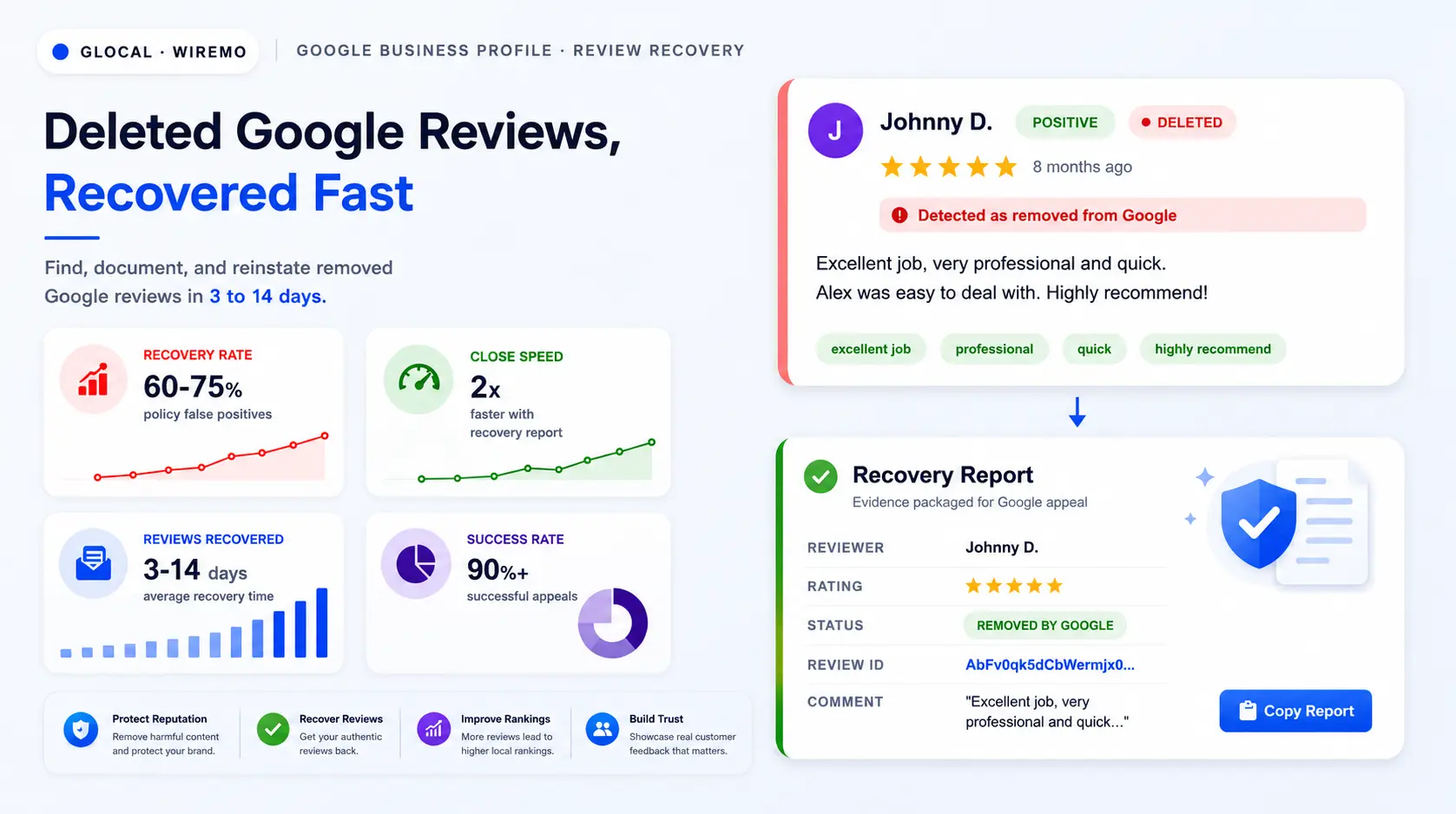
A deleted Google review is not always gone for good. The review text, the rating, the date, and the original Google ID still sit in archival logs. If you can hand Google that data with a clean appeal, the review often comes back within 3 to 14 days. Most businesses skip the appeal because they never logged the review in the first place.
This guide answers the operator question directly: how to spot deleted Google reviews fast, how to package the proof Google's review team actually reads, and how to file appeals that close in days instead of weeks. The fastest path uses a Recovery Report inside a Google Business Profile management tool. The manual path still works if you have time and patience.
Why Google Deletes Reviews
How Google Flags Reviews
Google's review system runs on automated policy checks plus user reports. A review can be removed within hours of going live or months later. The trigger varies, and the reason is rarely shown in your dashboard. Once a review disappears, your job is to figure out the cause before you decide whether to appeal.
The four causes account for almost every deletion you will see on a Google Business Profile:
CAUSE 1
Policy violation
Google's policy bans 11 content categories: spam, off-topic, conflict of interest, restricted content, hate speech, personal information, and 5 more. A single banned phrase can trigger removal.
CAUSE 2
Suspicious pattern
A burst of reviews from new accounts, repeated IPs, or wording that mimics other listings flags Google's spam detection. Velocity spikes look fake even when they are real.
CAUSE 3
Profile change
Renaming the business, merging two listings, or moving locations wipes reviews tied to the prior entity. This is the deletion type that rarely recovers.
CAUSE 4
Reviewer account change
If the reviewer deletes their Google account, gets suspended, or removes the review themselves, your business loses the count. The review ID still exists, but cannot be restored.
Each cause has a different recovery path. Policy and suspicion cases are appealable and recover in roughly half of cases when the appeal includes complete evidence. Profile changes and reviewer-side changes are usually permanent. Knowing which bucket a deletion falls into saves the appeal effort for cases that can actually win.
Critical
Reviews removed because the reviewer deleted their Google account, or because two listings were merged, rarely come back. Focus appeal energy on policy or suspicion removals, where Google's review team can restore based on evidence.
Spot Deleted Reviews Fast
Why Google Stays Quiet
Google does not notify you when a review disappears. The Business Profile dashboard updates the count silently. A profile with 248 reviews on Monday and 246 on Tuesday gives you no signal that 2 were removed, who left them, what they said, or when they died.
Detect Deletions With a Tool
To catch deletions, you need a tool that tracks review counts and IDs every day. Manual spreadsheets work in theory and fail in practice: nobody updates the log every day, and by the time you notice the drop, the original review text is gone from your browser cache. GLocal’s Google review monitoring does that comparison for you and emails you when a review is detected as removed.
Inside GLocal, the Reviews Management section has a dedicated Deleted Reviews tab. Every review Google removes is logged with the exact detection date, the original star rating, the comment text, the reviewer name, and the external Google review ID. You can filter by sentiment to triage positive removals first since those are the highest-impact recoveries.
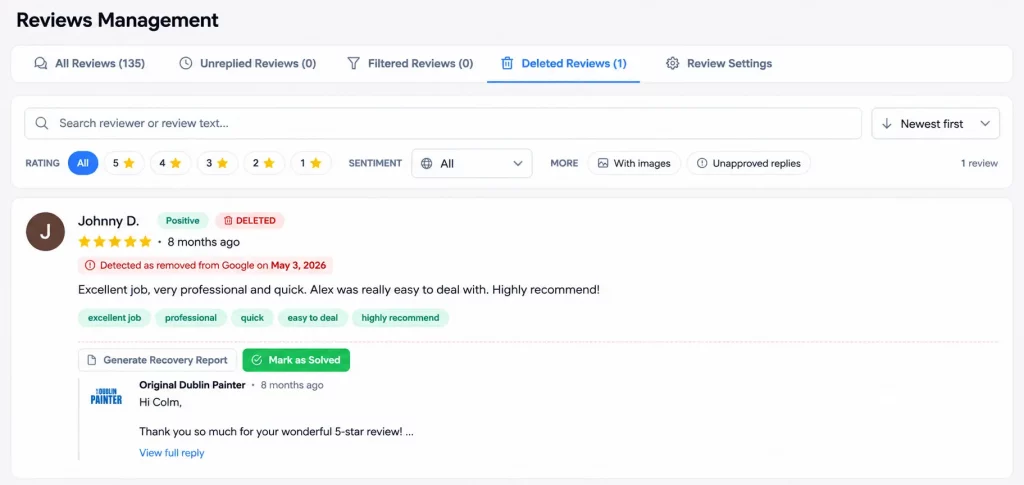
Compared to the manual methods most operators try, the tool-based approach pays back in the first week:
| Detection method | Detection lag | Comment text saved | Appeal-ready data |
|---|---|---|---|
| Manual count check | 1 to 4 weeks | No | No |
| Spreadsheet log (daily) | 24 hours | Partial | Partial |
| GLocal Deleted Reviews tab | Same day | Yes, full text | Yes, with review ID |
Generate a Recovery Report
What Google Asks For
When you find a deleted Google review worth recovering, Google's appeal form asks for proof: who wrote it, when it went live, what it said, the star rating, and the original review ID. Most businesses cannot supply any of this because they never logged the review while it was public. No evidence equals no recovery.
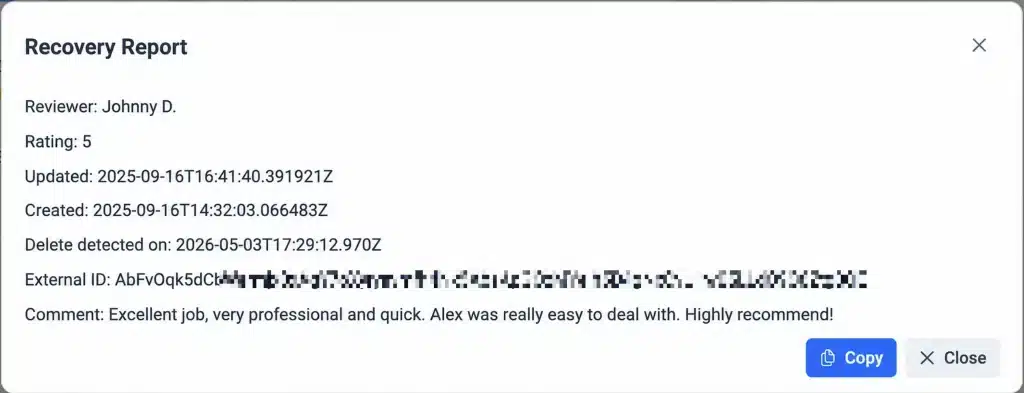
The Generate Recovery Report button inside the Deleted Reviews tab solves this problem in one click. The report packages everything Google's review team needs in a single block:
- Reviewer name as it appeared on the public review
- Original star rating (1 to 5)
- Full original comment text, preserved verbatim
- Created date and last updated timestamp
- Delete detection date (the moment GLocal noticed the removal)
- External Google review ID, the unique key Google uses internally
Using the Recovery Report
Keep the Recovery Report modal open or copy the full block to your clipboard. You will paste specific values from it into Google's appeal form in the next section (Appeal Deleted Google Reviews). Each labeled field in the GLocal Recovery Report (Reviewer, Rating, Review ID, Comment, Created, Detected) maps to a placeholder in the appeal template you will fill in. Appeals that arrive with the original review ID close roughly twice as fast as appeals with no ID, because the review team can pull the record from Google's internal logs without a back-and-forth round trip.
Good practice
Generate the Recovery Report within 7 days of detection. The further out you go, the harder it is for Google to cross-reference the review ID against the version of the policy engine that flagged it.
Appeal Deleted Google Reviews
The fastest path to appeal a Google-deleted review is the Business Profile Support Contact us form. Google's Help Center also lists a "review removal tool" linked from multiple support pages, but that tool only handles appeals on reviews you previously reported for removal, not reviews Google removed from your profile. Skip it and use the 3-step Contact us path below. End to end, it takes about 5 minutes per review.
Open the Support Ticket
START HERE
Open support.google.com/business/gethelp signed in as the Business Profile owner or manager.
Do not try to start from business.google.com, because Google retired that standalone dashboard and the URL now redirects to a "create a new profile" flow that is not what you want.
In Step 1, the business dropdown auto-populates with profiles tied to your Google account. Pick the right business. In the "Tell us what we can help with" field, paste this exact line:
Appeal a removed review and request reinstatement
That phrasing uses Google's own subtopic language, so the triage routes the ticket into the review-recovery queue rather than the generic support pool.
Below the description field, Google asks "Choose the best description of this issue" with 6 chips. Pick Review missing. The other 5 chips route to different teams entirely: Suspended business goes to profile-suspension specialists, Remove reviews routes to the opposite-action queue (taking reviews down), Posts removed handles GBP post content not reviews, Disabled business handles profile disablement, and Other gets the slowest generic triage.
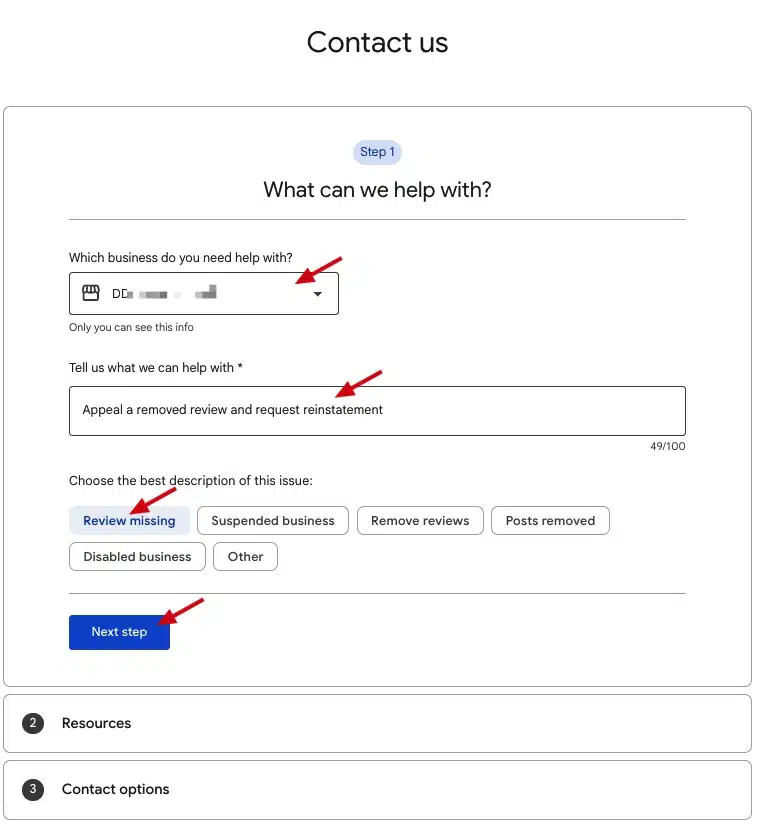
Click Next step. Step 2 shows related help articles. The only one worth opening in a side tab is "About missing or delayed reviews"; ignore "Fix suspended or disabled profiles" because it addresses a different issue. Click Next step again to advance.
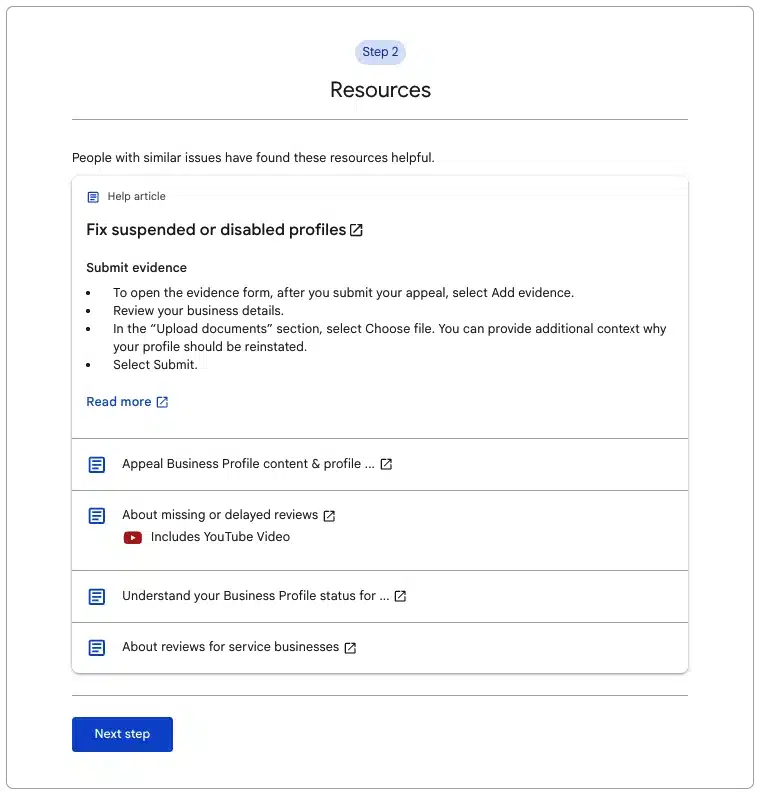
Email Your Recovery Report
Step 3 shows your contact channels. In most regions, Email is the only option offered for missing-review tickets, which is the right channel anyway because the Recovery Report does not fit a chat character limit. Click the Email tile.
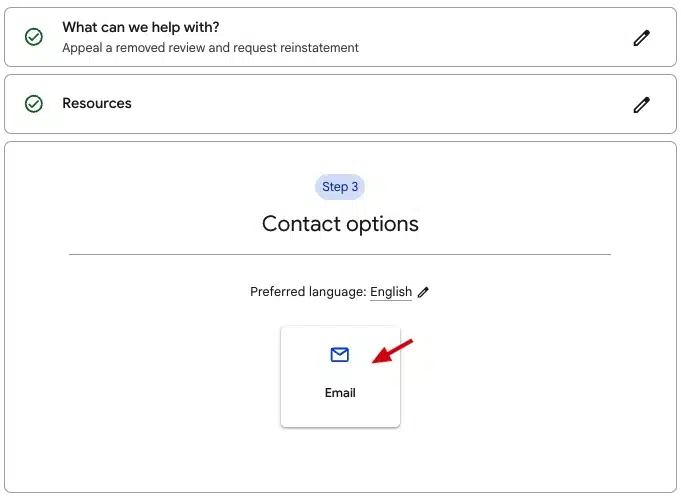
The email form is long. It splits into 3 groups. Fill the first 2 groups once per appeal, then the 3rd is the per-review section where the GLocal Recovery Report goes.
Group 1: Identity and business details
At the top of the form, Google shows a yellow "You're currently signed in as [email]" banner. Verify that email manages the Business Profile you are appealing on. If not, click switch accounts before filling anything else.
- What is your name: the person filing the appeal.
- What is your email address: the official email used to manage the Business Profile. Google replies on this thread.
- Your phone number: country code, then number. Google defaults to email but may call for clarification.
- Your relationship to the business: pick "I own this business" or "I manage this business". A wrong pick slows triage because the agent sends ownership-verification questions back.
- Business name: type the name exactly as it appears on Google Search and Google Maps.
- Business address: address as listed on the public Business Profile, with no extra punctuation.
- Business Profile ID: find it through the "using these steps" link Google provides next to the field. Without this ID, triage takes longer to confirm which profile you mean.
Group 2: Profile eligibility radios
Two Yes/No/I'm not sure questions Google uses to filter your case to the right agent:
- Has the profile recently been suspended or disabled? Pick No if your profile is healthy and live. Picking Yes reroutes the ticket to the suspension team, not the review team.
- Does the profile belong to an elementary, secondary, or high school? Pick No unless you literally run a K-12 school. Schools have a separate moderation flow.
Group 3: Missing review specifics (where the Recovery Report goes)
This is the section that actually decides your appeal. Every field below pulls from the GLocal Recovery Report you generated earlier.
- How many reviews are missing from the profile? Pick 1 (or the real count if you are appealing several at once, but submit one ticket per review for cleanest triage).
- Are new reviews being published on the profile? Pick Yes if recent reviews are still landing normally. That signals a healthy profile and isolates the deletion as a one-off case.
- Time frame: copy the Delete detected on line straight from your GLocal Recovery Report and paste it here (for example,
Delete detected on: 2026-05-03T17:29:12.970Z). That single line is enough: the timestamp tells Google exactly when the review disappeared, and the agent matches it to the Review ID below. - Reviewer Name(s): paste the reviewer name exactly as it appeared on the public review.
- Describe your issue: this is the load-bearing field. Open the GLocal Recovery Report modal, click Copy, then paste straight into this field. Type one closing line above the pasted block:
Please reinstate this review. We have no policy strikes on this profile.That one line plus the raw GLocal block is the whole submission. No retyping, no template needed. - Related Case IDs: leave blank unless you have a previous ticket for the same business and the same issue.
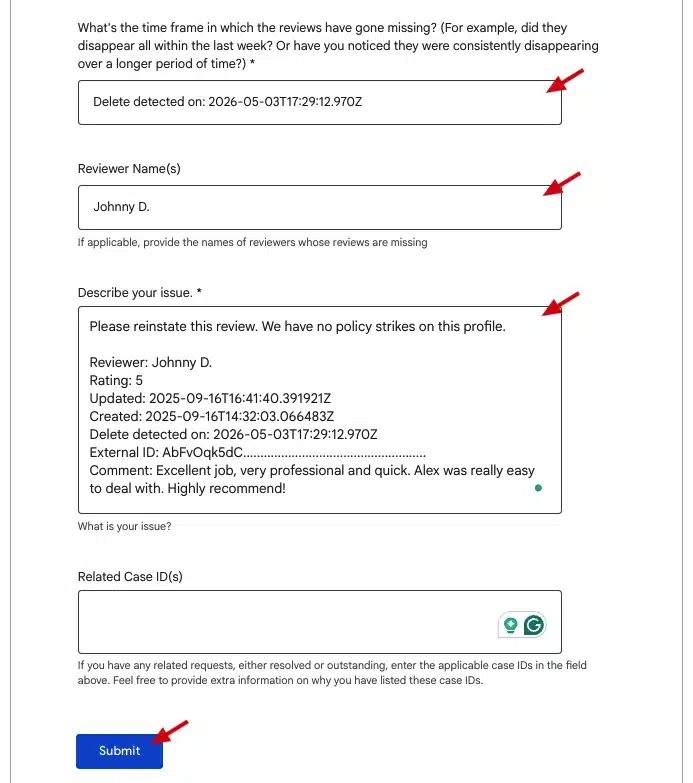
The Review ID is the single most important data point in the entire ticket. Google's review team can pull the exact record from their internal logs in seconds when they have it. Without it, the agent has to search by reviewer name plus date plus comment text, which is slower and sometimes returns no match. Triple-check that the ID transfers from your clipboard without auto-correct, because the string is case-sensitive and contains mixed alphanumeric characters.
Click Submit. Expected first response: 2 to 5 business days via email. Google will reply with either "review reinstated" or "removal upheld with reason X". If it is the second outcome and the cited reason does not match Google's actual policy, reply to the same email thread within 14 days to use your one re-appeal slot.
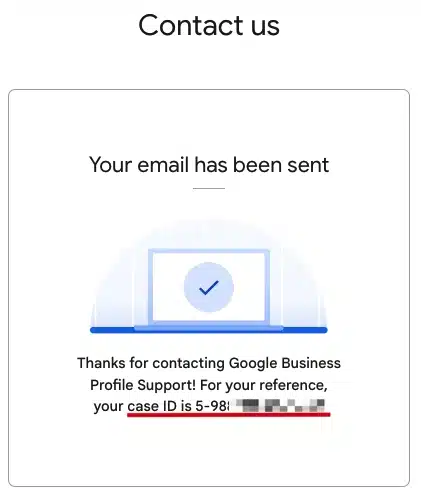
One appeal per review is the rule. Bundling 5 reviews into one ticket triggers an automatic denial flagged as a duplicate submission. If you have 30 deleted reviews to recover, submit them in batches of 5 to 8 per week to stay inside Google's rate limits.
If two consecutive Support tickets are rejected with templated denials, escalate by posting the Recovery Report in the Google Business Profile community forum and tagging a Product Expert. This is slower than email (1 to 3 weeks) but puts your case in front of someone with direct access to Google's internal triage team. Use it only when the email channel has stopped producing meaningful answers.
Deleted Review Recovery Outcomes
Outcomes by Removal Cause
Recovery is not guaranteed, and Google does not publish exact restoration rates. Based on patterns across hundreds of profiles, the realistic outcome map looks like this:
| Removal cause | Recovery likelihood | Time to restore |
|---|---|---|
| Policy false positive | High (60 to 75%) | 3 to 10 days |
| Suspicious activity flag | Medium (30 to 50%) | 5 to 14 days |
| Off-topic complaint | Medium (25 to 45%) | 7 to 21 days |
| Conflict of interest flag | Low (10 to 25%) | 10 to 21 days if overturned |
| Reviewer account deleted | Very low | Not restorable |
| Listing merge or move | Very low | Not restorable |
What Moves Your Recovery Rate
Two variables move recovery rates more than anything else. Evidence quality is the first: a Recovery Report with the original review ID outperforms a vague description by 2x to 3x on close rate. Profile health is the second: a Business Profile with no other policy strikes in the last 6 months gets faster decisions because Google's automated triage assigns higher trust to clean profiles.
How to Re-Appeal
If a first appeal is rejected with a templated denial, you have one re-appeal slot per review. State the Recovery Report data again, add any context the first response missed (a screenshot of the review while it was live, a payment record showing the customer was real, a date-stamped photo from the appointment), and reference the original ticket number. Re-appeals close around 30% of the time when the new evidence is meaningful.
Prevent Future Review Deletions
You cannot prevent every deletion, but you can shrink the surface area by 60 to 70% with three operational habits.
Habit 1: Stagger Review Requests
Asking 80 customers for a review on the same Monday morning sends a velocity signal that looks fake to Google's spam detection. Spread requests across the week with a daily cap. A GBP location hub like GLocal lets you cap daily emails (recommended: 15 to 25 per day for a single location), set trigger windows, and pick a send-time window that matches local business hours.
Habit 2: Stay on Profile
Do not rename the business unless there is a legal reason. Do not merge two listings unless Google's verification team instructs you to. Do not move the listed address unless the storefront has actually moved. Each of those actions wipes a slice of historical reviews. The same applies to bulk category changes: Google sometimes treats a category overhaul as a different business and quietly reflags older reviews.
Habit 3: Train for Specific Reviews
Reviews that name a product, a service, or a staff member by description survive spam filters better than generic praise. "Liam fixed the boiler pressure issue on the second visit and walked us through the gauge readings." "Great service" gets flagged. Train your team to ask the kind of question that produces specifics: "What was the most useful part of today for you?" beats "Could you leave us a review?" every time. Customers who have never posted one can follow this step-by-step guide on how to leave a Google review.
For monitoring rank impact across locations after a wave of deletions or recoveries, pair the review workflow with a free Google Maps rank tracker like GTrack to confirm whether the deletions actually moved your Maps positions. Sometimes the rank impact is zero. Sometimes it is significant. Knowing which lets you triage future appeals by ranking value, not just review count.
After a wave of recoveries, run the numbers through a review target calculator to see how the restored reviews move your overall star average. Two recovered 5-star reviews on a profile with 60 reviews shifts the rating math more than most operators expect. Three recovered 1-star removals do the same in reverse. The calculator turns the recovery work into a concrete rating delta you can track week over week, so deleted Google reviews stop feeling like an invisible drain on profile credibility.
FAQ Deleted Google Reviews
Does Google notify me when a review is deleted?
No. The Business Profile dashboard updates the review count silently. Without a tool that logs review IDs daily, the only signal is a number that drops without explanation. The GLocal Deleted Reviews tab fills this gap by flagging every removed review with full metadata the same day it disappears.
How long does the Google review appeal take?
Email tickets opened through the Business Profile Contact us form close in 2 to 5 business days for most cases. Complex cases or international time zones push that to 7 to 14 days. Forum escalations take 1 to 3 weeks. Appeals with a full Recovery Report close roughly twice as fast as appeals with no evidence, because the review team can verify against Google's internal logs without writing back to ask for missing fields.
Can I recover a review if the customer deleted their Google account?
Rarely. When a Google account is closed, every review tied to it is permanently removed from public listings. The review ID still exists in archival logs, but Google's policy does not allow restoration of reviews orphaned by an account closure. The same applies to suspended accounts.
What is the difference between deleted reviews and filtered reviews?
Deleted reviews were public on your Business Profile and then removed by Google or by the reviewer. Filtered reviews never reached the public Business Profile because they were intercepted by a review filtration page that routes lower ratings to a private inbox. They are two different data sets and live in two different tabs inside GLocal.
Can I appeal more than 10 reviews at once?
No. Each review needs its own appeal, with its own Recovery Report and its own review ID. Google rejects bundled requests as automated submissions and the bundled appeal counts as your one shot per review. Run appeals in batches of 5 to 8 per week to stay inside Google's rate limits and to keep each ticket readable.
How do I know if my review was deleted or just hidden temporarily?
Hidden reviews come back on their own within 72 hours, usually because they were caught by an automated quality check that resolved. Deleted reviews stay gone. If a review is missing for more than 7 days, treat it as deleted, generate the Recovery Report, and start the appeal. Waiting longer does not help recovery.