Automated review requests for your Google reviews
by email, from your own address, that stop the moment the review lands.
The customer was happy. They said they would write something. Then life happened. GLocal takes the asking off your plate with automated review requests. You add the customer. The review request email sequence goes out from your own Gmail or SMTP account on the days and at the hours you set. The moment GLocal detects their Google review, the remaining emails are canceled. Nobody is pestered, nobody is forgotten, and you can see per customer which ask worked.
No contract, cancel anytime · 30-day money-back guarantee · 50% off your first 3 months with code GLocal50OFF3Months
- Up to 10 steps per sequence
- 3 stop rules end a sequence by themselves
- Your own Gmail or SMTP never a GLocal address
- From $29.99 a month

Why automated review requests exist: the yes that never turns into a review
Three things are true at once for most small businesses: the customers are happy, the profile looks thin, and the old shortcuts for fixing that now cost more than they return.
-
Review requests by hand: the yes that never turns into a review
Asked in person, most customers agree. Most then forget. In BrightLocal's 2026 consumer survey, 28% of people say they always write a review when asked, up from 16% the year before, which still leaves most customers who agreed and then forgot (BrightLocal, 2026). The result is a profile that does not match the business: 47% of US small businesses have fewer than 20 Google reviews, even though 64% say they ask regularly (BrightLocal, 2026). The gap is not the asking. It is the follow-up nobody has time for.
-
Review requests the old way now draw deletions and posting blocks
On April 17, 2026 Google added clauses to its rating manipulation policy that name staff quotas, requests for reviews with specific content and pressure to review while on the premises. Sterling Sky's tracking of review posting blocks found the same triggers again and again: asks at the counter, QR codes at the point of sale, bursts of ten or more reviews a day. In every case tracked over 60 days, the block lasted the full 30 days whatever the appeal said (Sterling Sky, September 2026). The tactics that filled profiles in 2023 now empty them.
-
Review recency decides who ranks, and a thin profile ages fast
Recency of Reviews is the #11 local ranking factor in the Whitespark Local Search Ranking Factors 2026 survey, up from #93 in 2023 (Whitespark, 2026). Readers agree with the algorithm: 74% want to see reviews from the last three months, and 31% will only choose a business rated 4.5 or higher, up from 17% a year earlier (BrightLocal, 2026). A steady trickle of fresh reviews is now a ranking input, and a trickle is exactly what a schedule produces and a memory does not.
Review request email sequence: one sequence, step by step
A sequence is a list of timed emails that every new customer walks through. You build it once per business profile. Here is one, from the customer list to the report.
-
Add the customers to the review request sequence
Three ways in: type a name, an email and the service by hand, upload a CSV with the same columns (phone is optional), or let your own system add them through the API with a key per business profile. The day the job closes is the day the customer enters the sequence; nothing is sent to anyone you do not add.
-
Write up to 10 review request steps, each with its own delay and time window
Step 1 is timed from the moment the customer is added. Each later step is timed from the one before, so a one-day step followed by a two-day step sends on day 1 and day 3. Every step has its own delay, its own time of day and its own timezone. Two or three steps are enough for most sequences; the limit is ten.
-
Send review requests from your own Gmail or SMTP, under a daily cap you choose
Connect the Google account the customer already knows, or your own mail server with host, port, username and password, tested before you save. One sender is active at a time, and GLocal never sends from its own address. In Automation Settings you pick the maximum number of requests per 24 hours; anything above it simply waits for the next day.
-
Three stop rules end the review request sequence by themselves
First, GLocal detects a new Google review from that customer and cancels the emails still scheduled. Second, the customer clicks the "I already left a review" link in the footer of any email. Third, the customer unsubscribes, which always ends the sequence and cannot be switched off. A customer who reviewed you after the first email never hears about the second.
-
Read the review request stats per step and per customer
The Overview tab shows Requests sent, Open rate, Click rate and Reviews captured for the period you pick. It then breaks them down by step: how many opened step 1, how many opened step 2, how many clicked the last one, and how many of the sequence's customers ended in a review. Recent Activity lists every single request with its status, searchable by customer.
The first stop rule leans on the same checks that power Google review monitoring: GLocal looks at your profile every 10 minutes, so a review posted at noon stops the afternoon email.
Review request stats you see, and the review request link the customer sees
Two screens matter: the page the customer lands on when they click, and the email that tells you the review is in and the sequence has stopped.
-
Google review request link: a short link to a page that looks like yours
Every request email carries your Google review request link. You can send customers straight to Google, or to a short address of the form r.gorate.biz/yourbusiness. That address opens a page with your logo, business name and tagline, a star or emoji rating question, your own questions and a Review us on Google button. The questions give you the detail Google's star does not: what was good, what was not. By default every customer gets the same button to Google. The optional filtration setting is off by default and carries a warning, because routing unhappy customers away from Google is review gating and against Google's policy. This page assumes you leave it off.
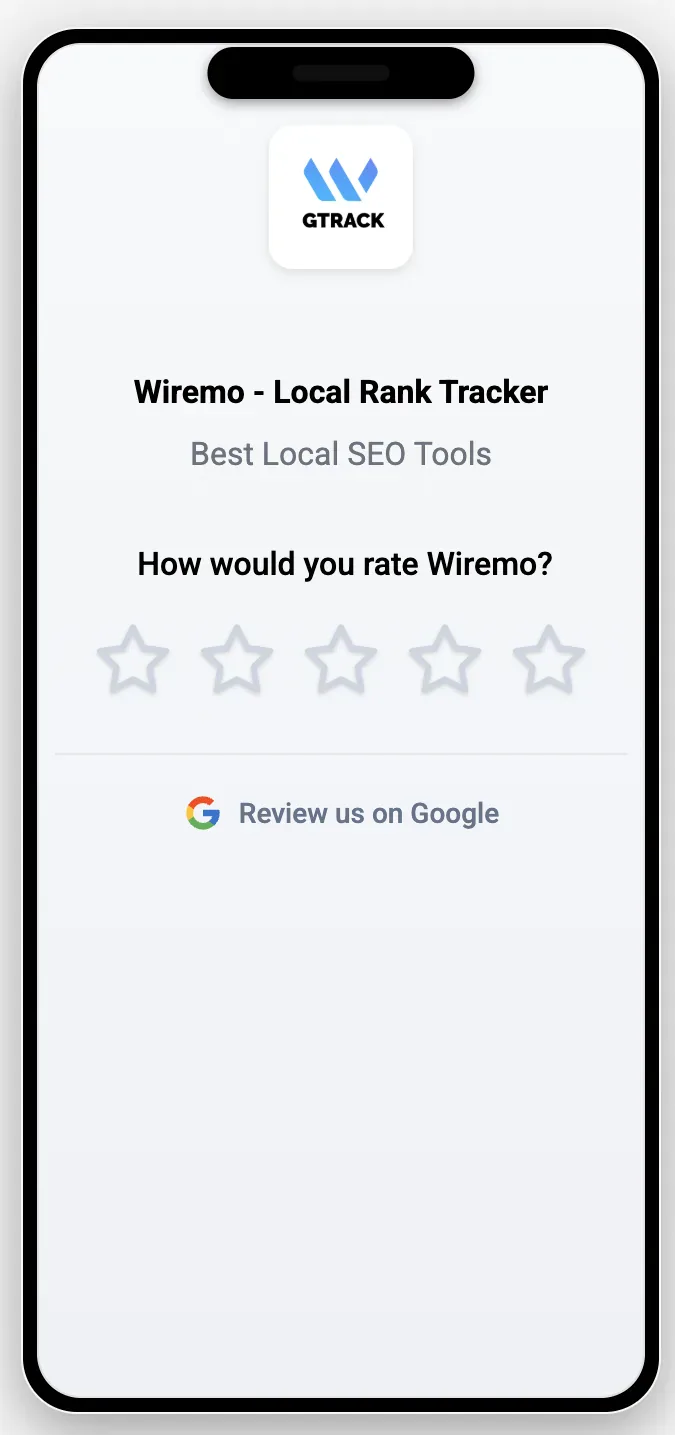
The review landing page on a phone: the business logo and name, a rating question and the button to Google. -
Review detected: the sequence stops and the reply draft arrives
When a check finds the customer's review, two things happen within minutes. The emails still scheduled for that customer are canceled, and you receive the new-review email with up to three reply drafts in the tone you chose. Post one as it is, or edit it first. The customer who was asked on Tuesday and reviewed on Wednesday gets a thank-you reply on Wednesday, not a third request on Friday.
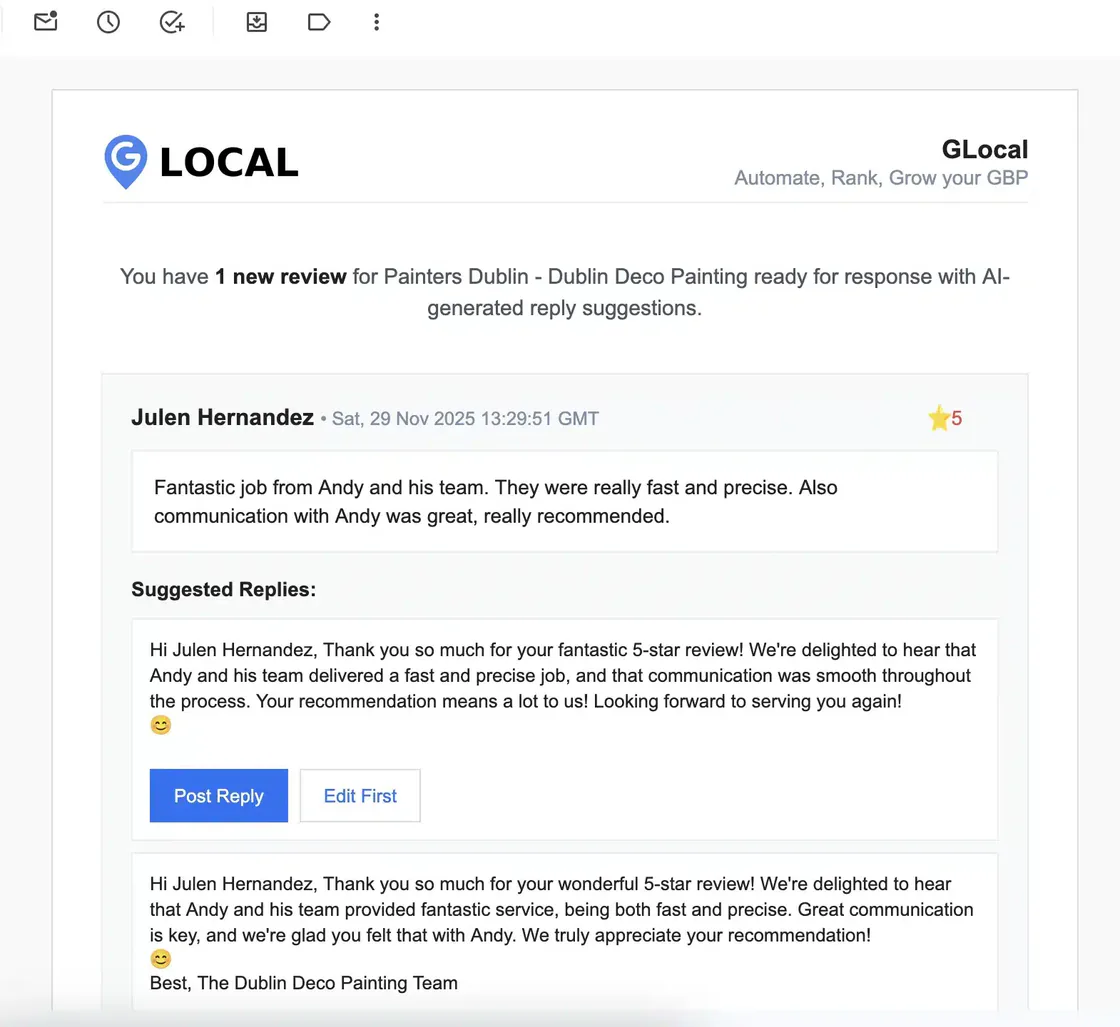
The new-review email: the review, then the suggested replies with Post Reply and Edit First buttons.
Review gating and the April 2026 Google review rules: what you can no longer do
Review gating is asking only the customers you expect to be happy, or showing the Google link only to those who rate you well first. It has been against Google's policy for years. In 2026 the policy grew teeth, and the list of forbidden shortcuts grew with it.
Google's rating manipulation policy forbids review gating and incentives of any kind. Since the clauses added on April 17, 2026, it also names three things that used to pass for best practice: asking staff to hit a number of reviews, asking for reviews that mention specific content, and pressing a customer to review while they are still on the premises. The counter tablet, the "leave us five stars and mention Maria" script and the end-of-month target are now named in the policy, not just frowned on.
The penalty is no longer theoretical. Google now emails owners that it found fake or incentivized reviews and that restrictions may follow, and it pauses new reviews on profiles where it detects a spike (Search Engine Roundtable, 2026). Sterling Sky's data on review posting blocks puts the common triggers in one list: in-store asks, QR codes at the point of sale, ten or more reviews a day, and a sustained jump in volume (Sterling Sky, September 2026). In one tracked case, 342 of 595 reviews were removed. In every case, the block ran its full 30 days.
Volume on a single day is a risk on its own. In a 2026 study of 4.9 million reviews across 9,048 profiles, a lone review carried a 1.15% daily chance of deletion. A review posted on a day with five to nine others carried 3.1%. The source is a vendor study, observational, not a controlled test (Reviewflowz and Cartelis, 2026). The authors' advice is one sentence: spread review requests across time.
Put the three findings together and the compliant way to ask writes itself. Ask every customer, not the ones you like. Ask later, by email, once they are off the premises. Spread the asks across the week with a daily cap, and stop the moment the review is in. That is what review request automation is for, and it is why a sequence beats a blast. The feedback page on the way to Google does not sort customers; it gives everyone the same button and gives you the detail behind the rating. Our guide How to Ask for Google Reviews has the wording and the timing by situation.
If the filter still removes one, you will know. GLocal keeps a copy of every review from the first time it sees it, checks your profile every 10 minutes, emails you when a review disappears and builds a Recovery Report with the fields Google support asks for. That is a separate feature with its own page; here it is the safety net under the asking. GLocal cannot make Google publish a review, lift a posting block or promise that any request complies with the policy. It can make sure you ask the way the policy allows, and that you find out fast when Google disagrees.
Review request software without texts, contracts or a sales call
Most review request software for local businesses sells text messages behind a demo. GLocal sells email from your own address at a published price. Here is where each way of asking stands.
| What you get | Asking in person or by hand | A texting tool like Podium or Birdeye | GLocal |
|---|---|---|---|
| Every customer asked, not just the ones you remember | The ones you remember | ||
| Follow-ups stop when the review lands | Check the vendor | ||
| Sent from your own address | Your own phone or mailbox | A vendor number | |
| No carrier registration, no per-text fee | Registration first; Podium's status page says it can take a couple of weeks | ||
| Published price, monthly, no contract | Free, in your time | Demo first. Podium Core is $399 a month (2026); Birdeye auto-renews unless you give 90 days' written notice (terms, 2026) | From $29.99 a month |
| Stats per customer and per step | Check the vendor | ||
| Text messages | From your own phone | Planned, not yet | |
| Works for Yelp, Facebook and other sites | If you ask | Varies by tool |
Competitor facts as published on their own sites and terms in 2026. GLocal asks by email only today and watches Google reviews only. If your customers never open email, or your reviews live on another site, this is not the tool for you.
How to get more Google reviews with automated review requests: who it fits
Every business below already has what a sequence needs: a name and an email address per customer. What they lack is the hour a week the follow-up takes.
-
Automated review requests for owner-operators with a customer list
A salon, a clinic, a studio, a garage. The booking system already holds the emails. Export last quarter's customers as a CSV, load them into one sequence, and let it run under a cap of ten or fifteen a day. The Starter plan covers one profile and 1,000 request emails a month, which is more than most lists need.
-
Automated review requests for trades with technicians in the field
The technician should not be asking for stars in the driveway: Google's 2026 policy names on-premises pressure, and 54% of trades businesses still sit under 20 reviews (BrightLocal, 2026). Add the customer when the invoice closes, by hand or through the API from your own system, and the first email arrives that evening from the office address. The owner sees, customer by customer, which asks turned into reviews.
-
Automated review requests for managers of several locations
Each business profile keeps its own sequence, its own sender and its own daily cap, so one location's busy week never spends another's quota. The Professional plan covers 10 profiles and 5,000 emails a month for $79; Business covers 20 profiles and 15,000 emails for $149. Team members see only the workspaces they are assigned to.
Review request automation from your own Gmail or SMTP
The sending runs through your account, not ours. That is what makes the email land where a stranger's address would not, and it shapes everything else on this list. Under each card sits the product summary in the help center's own words.
-
Review request email sequence from your own address
Review request automation in GLocal means your Gmail or your mail server does the sending, with GLocal doing the timing. Customers see the address they already know, and the daily cap spreads a busy week's asks over several days instead of one burst.
Email review request sequences. Timed email sequences of up to 10 steps, each with its own delay and time window, sent from your own Gmail or SMTP server (never from a GLocal address). A sequence stops when the review is detected, when the customer says they already left one, or when they unsubscribe. A daily cap protects your sender reputation. Customers come in by CSV, by hand or through the API.
-
Google review request link in every email
Point the request at Google directly or at your short r.gorate.biz address. The page behind it carries your branding and your questions. With the filtration setting left off, as it ships, every visitor sees the same button to Google.
A short branded review link. A short review address (r.gorate.biz/yourbusiness) and a feedback page with your logo, business name and tagline, an emoji or star rating and your own questions.
-
Review request stats: which ask worked
The review request stats, opens, clicks and captured reviews per step, tell you whether the second email earns its place or the first one does all the work. Recent Activity shows the status of every request, so a customer who asks "did you email me?" gets an answer in one search.
Request stats per customer. Sent, opened, clicked and reviews captured, per sequence step and per customer, so you know which ask worked.
-
Review requests triggered by your own system through the API
One key per business profile and request logs for every call. If your booking tool, CRM or invoicing software can send a web request when a job closes, it can start a sequence without anyone typing a name.
Public API. A REST API to add customers to a review request sequence and to read reviews, with one key per business profile and request logs.
-
Deleted review alerts: the safety net under the asking
A review you worked for can still be removed by Google's filter. GLocal notices the gap at the next check, emails you and keeps the record for the appeal. The monitoring page explains this in full; here it is the reason the stats stay honest.
Deleted review alerts and a recovery report. GLocal checks your profile every 10 minutes, emails you when a review disappears and builds a Recovery Report (reviewer, rating, text, dates, review ID) you can send to Google support.
-
AI reply drafts, ready when the review lands
The same email that confirms the sequence has stopped brings up to three reply drafts. Thanking a customer the same day closes the loop the request opened, and it is one more fresh signal on the profile.
AI reply drafts, approved by you. Every new Google review arrives by email with up to three reply drafts in a tone you set (Professional, Friendly Casual or Formal) and in the reviewer's language. You post one as is or edit it first. GLocal never posts a reply on its own.
What automated review requests in GLocal do not include
- GLocal does not send text messages today. Review requests go by email, from your own address. Text messages are planned, with no date.
- There are no named integrations with field-service, POS or accounting apps. Customers come in by CSV, by hand or through the API.
- GLocal manages Google reviews only, not Yelp, Facebook or other review sites.
- GLocal does not post replies automatically. Every reply is approved by you first.
- The feedback page links every customer to the same Google button by default. The optional filtration setting is off by default, carries a warning, and we recommend you leave it off.
- GLocal cannot make Google publish a review, lift a posting block or guarantee policy compliance.
- No free trial and no free plan. 30-day money-back guarantee, cancel anytime.
Automated review requests FAQ: the questions owners ask first
Can GLocal send the review requests as text messages?
Not today. Every request goes out as an email from your own Gmail or SMTP account. Text messages are planned, with no date. If your technicians text customers from their own phones, the email sequence picks up the ones who did not act on the text.
Is it allowed to ask every customer for a Google review?
Yes. Google's policy targets selective asking, incentives, staff quotas, requests for specific content and pressure while the customer is on the premises. Asking every customer, by email, after the visit, with the same link for everyone, is the way of asking the policy leaves open.
Can the feedback page keep unhappy customers off Google?
It can be switched on, and we recommend you do not. Showing the Google link only to customers who rate you well first is review gating, which is against Google's policy and one of the patterns behind review removals. The setting is off by default and shows a warning when you turn it on. Left off, every customer who opens the page gets the same Review us on Google button. Use the page's own questions to learn what went wrong, and answer the review when it comes.
Will my reviews get removed anyway?
Some may. Google's filter removes legitimate reviews too, and a 2026 vendor study found a review posted on a day with five to nine others ran almost three times the deletion risk of a lone review. The source is a vendor study, observational (Reviewflowz and Cartelis, 2026). Spreading the asks with a daily cap lowers that risk; it does not remove it. If a review disappears, GLocal emails you and keeps the record, which is the Google review monitoring side of the product.
I use ServiceTitan, Jobber or a POS system. Does GLocal connect to it?
There are no named integrations with field-service, POS or accounting apps. Customers come in three ways: typed by hand, uploaded as a CSV, or added through the API with one key per business profile. Any system that can send a web request or export a CSV can feed a sequence.
I have 15 reviews. How fast does this get me past 20?
No number is promised, because Google decides what gets published. The plain answer to how to get more Google reviews is to ask the customers you already served and never followed up with, and a sequence does exactly that. Loading the last 200 customers under a cap of ten a day is the quickest honest route most businesses have, and the stats show you within weeks how many asks turned into reviews.
Is there a free trial?
No free trial and no free plan. GLocal starts at $29.99 a month with a 30-day money-back guarantee, no contract, and the code GLocal50OFF3Months takes 50% off the first three months.
I run 8 locations. Which plan do I need?
Professional covers up to 10 business profiles, 3 workspaces and 3 team seats for $79 a month, with 5,000 request emails a month across them. Each profile keeps its own sequence, sender and daily cap. If you grow past 10, Business covers 20 profiles for $149.
How many review request emails can I send a month?
Starter includes 1,000 a month, Professional 5,000, Business 15,000 and Agency 50,000. Extra emails can be bought as an add-on. The daily cap you set per profile sits inside that monthly number; requests above the cap wait for the next day.
What counts as a captured review?
A new Google review from a customer in the sequence that GLocal detects after the request went out. GLocal checks the profile every 10 minutes. When a check finds the review, the customer is counted under Reviews captured and appears in the by-step view as a sequence that ended in a review, and the remaining emails are canceled.
Can I pause or stop one customer without touching the sequence?
Yes. The More menu on a customer's row shows their timeline and lets you pause and resume them. A request that is scheduled but not yet sent can be canceled, a customer can be marked unsubscribed and kept in the list, or deleted with their history. Switching the sequence's Active toggle off pauses everyone at once.
What happens when a customer says they already left a review?
Every request email has an "I already left a review" link in its footer. One click ends that customer's sequence, whether or not GLocal has found the review yet. You can switch this stop rule off; the unsubscribe link, by contrast, is always there and always ends the sequence.
Start automated review requests today
Load the list, write two emails, set the cap. The sequence does the rest and stops when the review is in.
No contract, cancel anytime · 30-day money-back guarantee · 50% off your first 3 months with code GLocal50OFF3Months
- 30-day money-back guarantee
- Set up in minutes
- Email today, text messages planned