A Google Maps ranking drop is one of the most stressful things a local business owner can wake up to. One day, you are in the local pack, taking calls. The next day, you are on page 2, and your phone is quiet. The panic instinct is to change everything at once. That is exactly the move that turns a recoverable two-week dip into a six-month slide. The right response is the opposite: slow down, run three diagnostic checks, then act on the one thing that actually moved.
TL;DR – What you'll learn:
- How to tell a real Google Maps ranking drop from normal day-to-day noise.
- The 6 most common causes of a sudden drop, and how to recognise each one.
- How to tell a Google algorithm update from a profile-side problem in 5 minutes.
- The right waiting period before you change anything (and why acting fast often makes things worse).
- A 4-step recovery plan matched to the cause, with realistic timelines.
This guide walks you through a panic-free Google Maps ranking drop diagnostic process. You will learn what a real drop looks like, what causes one, how to find the trigger, and how to recover without burning the profile down and starting over. By the end, you will treat a Google Maps ranking drop the way an emergency-room doctor treats a patient: diagnose first, treat second, monitor third.
Did Your Google Maps Ranking Actually Drop, or Is It Noise?
Before you do anything, confirm the Google Maps ranking drop is real. The local pack jitters by a few positions every day for almost every query, driven by background re-ranking, freshness updates, and the personalisation Google applies per session. A single scan that comes back 4 positions lower than yesterday is more likely noise than a real Google Maps ranking drop.
A real Google Maps ranking drop has three signatures. First, the gap is bigger than 3 positions. Second, the same gap shows up across multiple grid points, not just one. Third, the gap holds for at least two consecutive scheduled scans, not just one fresh check.
If only one of those three is true, you are almost certainly looking at noise. Wait for the next scheduled scan and re-check. If two or three are true, you have a real Google Maps ranking drop and can move into the diagnostic phase.
The first reaction to a single bad scan is almost always wrong. If you change your GBP category, edit your services, or stop posting because of one fresh scan, you have introduced a second variable on top of the original drop. Now you cannot tell which change caused which effect. Wait for the next scan.
A Google Maps position tracker running on a scheduled cadence makes this confirmation easy: you have history, you have a baseline, and you can see the drop in context instead of as an isolated spike.
What Causes a Sudden Google Maps Ranking Drop?
Once the Google Maps ranking drop is confirmed, the next question is what caused it. Almost every Google Maps ranking drop traces back to one of six causes. They are listed below in order from most common to least common, with how to recognise each.
Cause 1: A Google Algorithm Update
Google rolls out multiple local-pack-affecting updates per year. Most are unannounced. The signature: the drop affects multiple businesses in your category at the same time, not just yours. If you check the same query and the entire local pack has new businesses in it, the cause is structural, not yours. Cross-reference the date of your drop with Google's official search blog and the SEO-community update trackers.
Cause 2: A Change to Your Google Business Profile
Even small edits to a Google Business Profile can trigger a re-rank within 48 hours. Common triggers: a change to the primary category, an edit to opening hours, a removed or added service, a new address (even by one digit), a logo or cover photo swap, or a deleted post. Audit every change made to your profile in the last 30 days. If the drop date matches a profile edit date within 72 hours, you have your cause.
Cause 3: A New Competitor Opened Nearby
A new business within your 500-metre radius can push you out of the local pack for proximity-weighted queries. The signature: the drop is concentrated on grid points closest to the new competitor, with little change at the edges of your service area. Run the same search from a few points inside the affected zone and note who is now ranking above you. If a new name appears, you have your cause.
Cause 4: Your Review Velocity Collapsed
Google watches not just how many reviews you have but how recently you are getting them. A business that collected 8 reviews per month for a year and then went silent for 60 days sends a "no longer active" signal. The drop is gradual but accelerates after 90 days of silence. Use a Google review star calculator to set the monthly review target you need to hit before the velocity signal recovers.
Cause 5: A NAP Citation Broke or a Directory Closed
If your name, address, and phone (NAP) used to be consistent across the top 20 directories and one of those directories now shows a wrong number, an outdated address, or has shut down, Google's confidence in your data drops. The signature: the drop is small but persistent, and a citation audit reveals one or more mismatches. Run a local SEO website audit to catch the loudest of these in under five minutes.
Match the cause to the symptom shape, not to your hunch. Drops from algorithm updates affect every business in the pack. Drops from profile edits hit your business specifically. Drops from new competitors are concentrated in one corner of your service area. The shape tells the truth.
How Do You Tell a Google Update from a Profile Problem?
This is the single most useful question to ask about any Google Maps ranking drop, because the answer determines whether the cause is on Google's side or yours. The test takes five minutes.
Step one: run the same search from a search location inside your service area, set to a postcode you previously ranked well in (an incognito browser with a location override is fine for a one-off check). Look at the entire local pack, not just your position. Step two: compare today's pack to a saved screenshot from a week ago. Step three: count how many businesses in the pack are the same.
If 2 out of 3 businesses in the pack have changed, the cause is a Google update or a market-wide event. The fix is patience and small adjustments. If the pack is mostly the same but you are the one missing, the cause is something specific to your profile. The fix is a targeted profile audit.
| Pack changed? | Likely cause | First move |
|---|---|---|
| Many new businesses in the pack | Google algorithm update | Wait 14 days, no changes |
| Same businesses, you are missing | Profile-side problem (edit, suspension, filter) | Audit GBP changes in the last 30 days |
| One new business above you | New competitor inside your radius | Strengthen proximity signals, expand service area |
| Pack identical, you fell 1-3 | Normal variance, not a real drop | Wait, do not act |
How Long Should You Wait Before Acting?
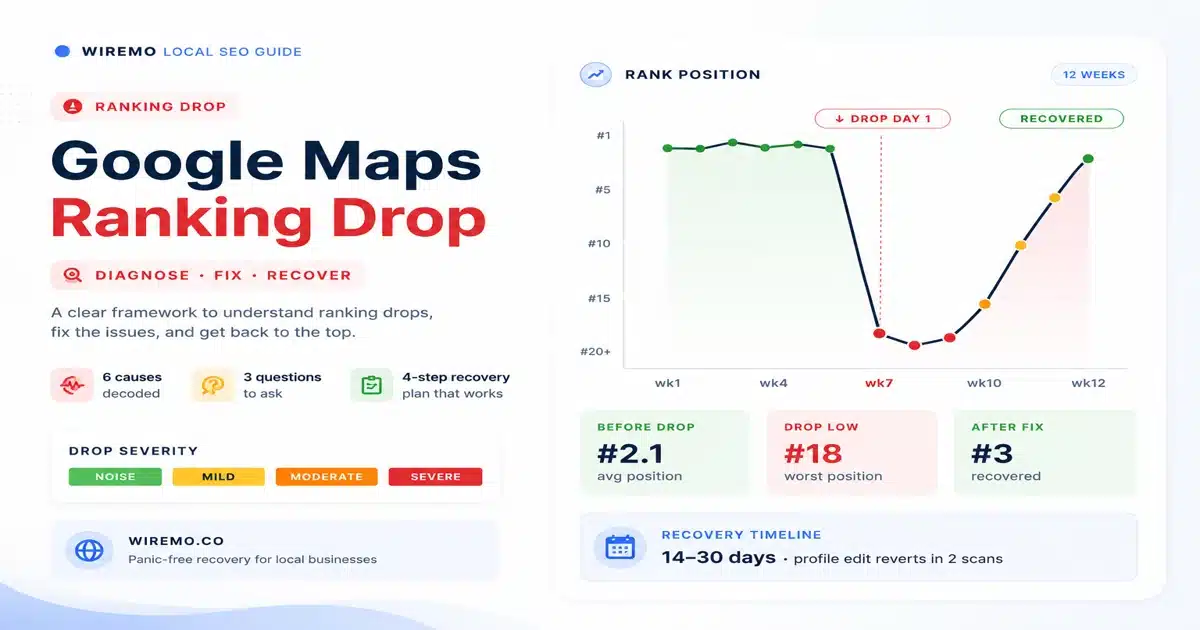
Waiting feels passive when your phone is quiet, and it is the most common Google Maps ranking drop mistake to skip the wait and act early. It is the correct move anyway. The right waiting period depends on the severity of the drop. Use the scale below to calibrate.
| NOISE | MILD | MODERATE | SEVERE |
| 1-3 positions | 4-10 positions | 11-20 positions | Out of pack |
| Do nothing. 1 scan wait. | Wait 14 days, 2 more scans. | Diagnose now, fix after confirm. | Audit immediately. Possible suspension. |
| Recovers on its own | 3-14 day recovery | 2-6 week recovery | 1-3 month recovery |
The hardest case to wait through is a mild drop. The phone is still ringing, just less. Operators want to act because they feel the loss. The data says wait, because mild drops self-correct more often than they compound. Only act on a mild drop if it persists for 14 days across three scans.
A severe drop is the only case where immediate action is justified, and even then, "action" means audit, not change. Find the cause before you change anything.
How Do You Recover from a Google Maps Ranking Drop?
Once you have confirmed the Google Maps ranking drop, identified the cause, and waited for the data to stabilise, the recovery plan has four steps. Follow them in order.
Step 1: Confirm the Google Maps Ranking Drop with Three Consistent Scans
Run three scheduled scans, separated by your normal cadence (weekly is standard). Use the same grid, same keywords, same time of day. Three consistent reads confirm a real Google Maps ranking drop. Two reads, and a guess does not.
Step 2: Pin the Exact Trigger Date
Note the day the drop first appears in your tracker. Then cross-reference three timelines: confirmed Google updates published on the official search blog, every edit to your Google Business Profile in the last 60 days, and the opening date of any new business within your 1km radius. The trigger date almost always matches one of these three.
Step 3: Match the Cause to the Right Fix
Use the diagnostic table below. Each cause has a specific fix and a realistic timeline. Do not skip steps. A profile-edit drop fixed with a citation cleanup will fail, because the cause and the fix are not aligned.
| Cause | Fix | Expected timeline |
|---|---|---|
| Google algorithm update | Wait 30 days. Most updates settle. Adjust only if the drop holds past day 30. | 30-90 days |
| Profile edit (category, hours, address) | Revert the edit. Wait 14 days. If recovery starts, the cause was confirmed. | 14-30 days |
| New competitor nearby | Expand service area, strengthen reviews in the affected zone, add neighbourhood-specific content. | 8-16 weeks |
| Review velocity collapse | Restart review cadence. Aim for 4-8 fresh reviews per month for 90 days. | 2-3 months |
| NAP citation broken | Audit top 20 directories. Fix or replace broken citations. | 4-8 weeks |
| Suspension or filter | Check your GBP for a suspension notice. If present, file a reinstatement request with documentation. | 3-12 weeks |
Step 4: Run the Recovery Plan with One Variable at a Time
The most common reason recoveries fail is that operators change five things at once. When the ranking comes back, they cannot tell which change worked. When it does not come back, they cannot tell which change hurt. Change one thing per 14-day window. Track. Confirm. Then change the next thing.
A GBP control panel helps you do this cleanly: it logs every profile change with a timestamp, so the recovery audit becomes automatic instead of retroactive.
Do not delete the profile and create a new one. A fresh profile loses every review, every citation, every photo, and starts at zero authority. The "fresh start" instinct is the single most damaging move a panicked operator can make. The correct path is always: diagnose, fix, monitor.
Once the recovery is underway, set up scheduled tracking so the next Google Maps ranking drop is caught the day it happens, not three weeks later. Most ranking drops are recoverable in days when caught immediately and stubborn after a month of silent decay.
Frequently Asked Questions
How long does a Google Maps ranking drop recovery usually take?
Google Maps ranking drop recovery time depends on the cause. A reverted profile edit recovers in 14 to 30 days. An algorithm update to Google Maps ranking drops settles in 30 to 90 days. A new competitor drop takes 8 to 16 weeks because you are working against proximity weight. A suspension reinstatement takes 3 to 12 weeks. The number to ignore is "a few days". Any recovery that arrives in under two weeks was either noise misread as a drop or a reverted edit.
Will my Google Maps ranking come back on its own?
Sometimes. An algorithm update Google Maps ranking drop settles by itself in about 60 percent of cases within 90 days. Profile-edit drops do not self-recover; the edit has to be reverted. New competitors do not self-recover; the competitive landscape has changed. Review-velocity drops do not self-recover; the underlying behavior has to restart. Diagnose first, then decide whether to wait or to act.
Should I delete the Google Business Profile and create a new one?
Rarely. A fresh profile starts at zero across every signal Google watches: reviews, age, citation network, photo count, post history, and click-through patterns. The Google Maps ranking drop you tried to escape stays put or gets worse. The only case where a fresh profile makes sense is if the existing one was hard-suspended and reinstatement has been denied twice. Even then, a transferred profile via a verified change-of-ownership is the better path.
Can a competitor's spammy listing tank my Google Maps ranking?
It can affect your rank if the spam works. A competitor with a keyword-stuffed name ("Joe's Plumbing 24/7 Emergency Dublin") can outrank a clean profile temporarily, until Google filters them or you report it. Use the "Suggest an edit" function on the competitor's profile to flag spam. Reports do work, especially when multiple businesses flag the same listing.
What if I am suspended, not just dropped?
A suspension is a specific case where your profile is hidden from public search entirely, not just ranked lower. You will see a banner in your GBP dashboard. If suspended, do not edit anything until you file a reinstatement request with documentation: business licence, utility bill, signage photos, and recent receipts. Reinstatements take 3 to 12 weeks. While suspended, your other local signals (citations, reviews, on-page) keep working, so the moment you are reinstated, your ranking often returns within two scans.