Google Maps SEO is the work of making your Google Business Profile the best answer for a local search, in the places where your customers are actually standing. Google ranks Maps results on three signals, relevance, distance and prominence, and the distance signal means your rank is different for every searcher. So the job has two halves: optimise the profile, and measure the result across your whole service area instead of from one spot.
How Google Maps ranking works
Google's own help article, Tips to improve your local ranking on Google, names the three factors and defines them plainly: relevance is "how well a Business Profile matches what someone is searching for", distance is "how far each business is from the customer who's searching", and prominence is "how well-known a business is". You control relevance almost completely, prominence over months, and distance not at all.
The Whitespark Local Search Ranking Factors survey for 2026 ranks the individual signals that local SEO practitioners weight most for the local pack and Maps. The top five, with the survey's scores, are: primary GBP category (227), proximity of the address to the point of search (225), keywords in the GBP business title (223), a physical address in the city of search (213), and being open at the time of search (189). The same survey notes that review and behavioural signals gained importance this year while on-page and link signals dropped a bit.
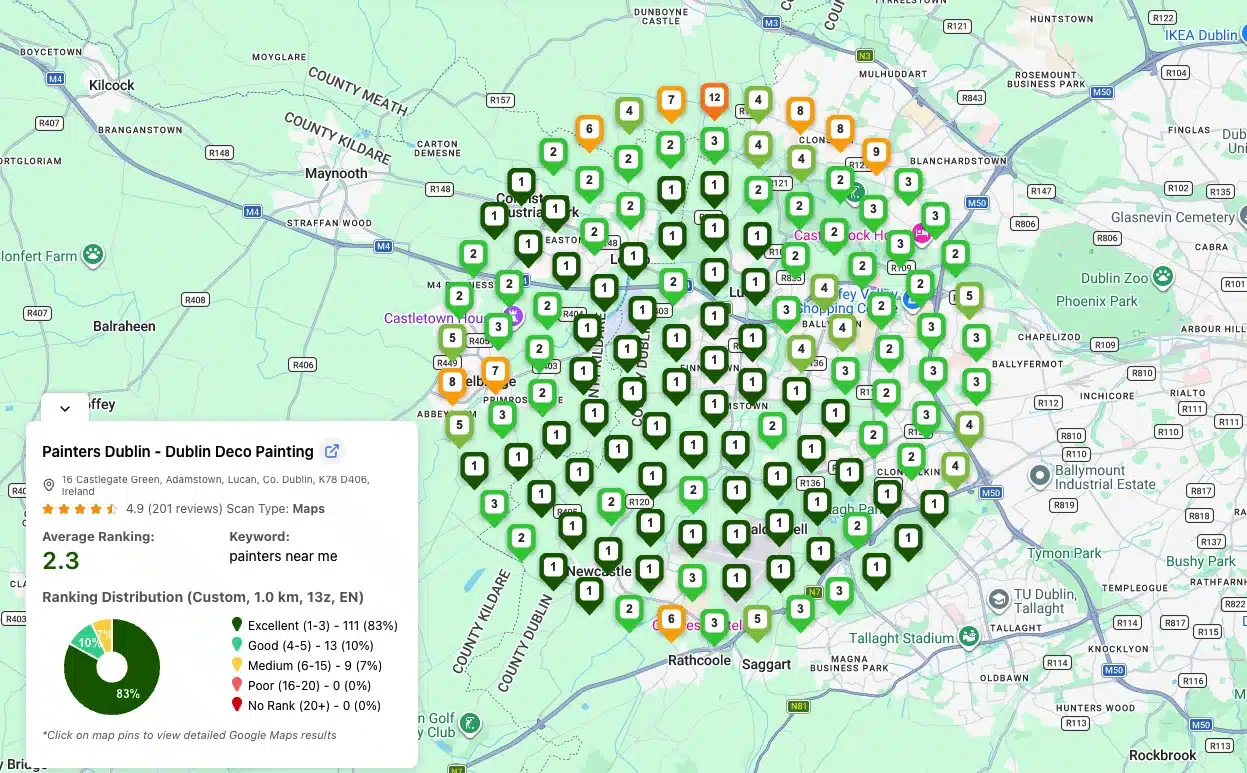
Three of those five are where you are or when the search happens, not optimisation. That is why the same profile ranks #1 at one end of a suburb and #14 at the other, and why the first thing to do is find out where you stand across the map, not at one pin. If you want the long version of that idea, read why your Google Maps ranking changes by location.
Important: Maps is still worth the effort even as AI answers spread. Ahrefs' own research, quoted in its Google Maps SEO guide, found that only 7.9% of local searches trigger an AI Overview. That leaves 92.1% of local searches on a classic result page.
Measure first: a grid scan before you change anything
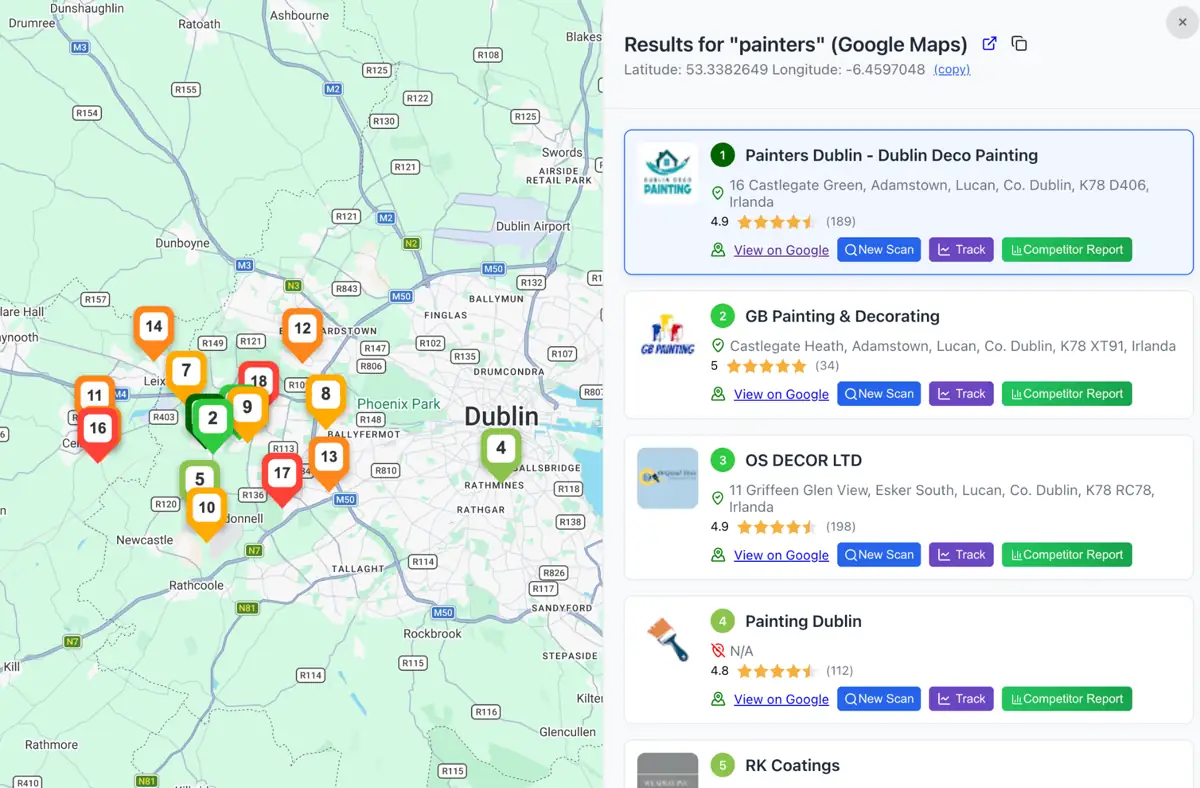
A single rank check from your desk tells you your rank at your desk. A grid scan drops pins across your service area, runs the same keyword from each pin and returns a rank per pin, so you see the shape of your visibility: strong in the centre and fading toward the edges, strong everywhere except one competitor's neighbourhood, or absent altogether for a keyword you assumed you owned.
The GTrack scan tutorial describes the setup: pick the business, add up to 5 keywords, choose a grid size such as 9x9 and a pin distance such as 1 km, or draw the area as a rectangle, circle or polygon. Results come back colour coded, "Green numbers mean strong rankings (top positions). Orange numbers show weaker visibility further from your location", with an average rank across the grid and a count of how many pins put you in the top 20.
In the Dulce Vegan Tenerife services case study, a bakery added custom services for two keywords it did not rank for and re-scanned the same 9x9 grid on a schedule. The case study records the services edit as the only change.
| Day | Grid average, "organic bakery" | Grid average, "custom cake" | What changed |
|---|---|---|---|
| Day 0 | Unranked (over 20) | Unranked (over 20) | Baseline scan before the edit |
| Day 4 | 11 | Over 20 | Custom services added to the profile |
| Day 9 | 1.1 | 3 | In the local pack across the 9x9 grid |
Without the baseline scan on day 0 there is no way to attribute the day 9 result to the services edit rather than to luck, a competitor's mistake or a Google update.
The Google Maps SEO checklist, in priority order
Work down this list in order. The items at the top move rankings the most per hour of effort, and each one is tied to a source you can check.
1. Primary category, then services
The primary category is the top-scored factor in the Whitespark survey, and Google's Business Profile guidelines tell you how to pick: "Use as few categories as possible to describe your overall core business from the provided list", choosing categories that complete the sentence "This business IS a" rather than "this business HAS a". A plumber who also sells water heaters is a plumber, with the retail category added only if that is a real business line.
Services sit under each category and are the fastest relevance lever you have. The Dulce Vegan table above records a services edit and nothing else. For the mechanics of choosing, see how to choose Google Business Profile categories.
2. Business name: real-world name only
Keywords in the business title score 223 in the same survey, which is exactly why Google polices them. The guidelines say "Your name should reflect your business's real-world name, as used consistently on your storefront, website, stationery, and as known to customers", and they prohibit adding marketing taglines, location information, phone numbers or URLs to it. The ranking lift from a stuffed name is real and so is the suspension. Use the name on your sign.
3. Reviews: steady flow, every one answered, no incentives
Google's ranking tips say it directly: "Positive reviews and helpful replies can help your business stand out", and replying "shows that you value their feedback". Reviews feed prominence, and replies are a visible engagement signal on the profile.
The rules matter as much as the volume. Google's Maps user contributed content policy prohibits offering "payment, discounts, free goods and/or services" in exchange for a review, and prohibits any attempt to "discourage or prohibit negative reviews, or selectively solicit positive reviews from customers". Ask every customer the same way, reply to every review, and keep the incentives out of it.
- Ask at the moment of satisfaction. Hand over the review link or QR code when the job is done, while the experience is fresh, and send the email request the same day.
- Reply within a day or two. A reply is public content on your profile. Mention the service and the area naturally, never a keyword list.
- Treat a review spike from a competitor as a signal. GTrack's competitor tracking watches review count, categories, photo count, post count and name changes on tracked competitors and can email you when one of them gains a spike in reviews.
4. Complete every field, and keep the hours true
Google's ranking tips are blunt: "Businesses with complete and accurate info are more likely to show up in local search results." Address, hours, category, attributes such as parking or Wi-Fi, and verification, which "tells Google that you're authorized to represent the business, so it's more likely to show up in search results".
Hours deserve special attention. "Business is open at time of search" is new to the 2026 edition of the Whitespark survey and landed at #5. A profile with wrong hours, or no special hours over a holiday, can fall out of the pack during the exact window customers are searching. If you run a grid scan while you are marked closed, expect the whole grid to look worse than it is.
5. Photos, videos and posts
Google's tips list photos and videos as a way to "show customers what you offer and tell the story of your business", and eligible retailers can add in-store products. Fresh media and posts keep the profile active for the people who open it, and they are the easiest item on this list to automate.
GLocal: If posting and photo uploads keep slipping, the Google Business Profile management software schedules posts with AI help, publishes photos and videos from a media library on a schedule you set, and drafts review replies in your tone. It manages the profile; it does not track rankings, so pair it with a scan.
6. NAP consistency and citations
Prominence is partly what the rest of the web says about you. Your name, address and phone number should appear in one format on your website, your profile and the directories that matter in your industry. Citations dropped a little in the 2026 survey, so treat this as hygiene: fix mismatches, close duplicates, and stop paying for bulk submissions that nobody will ever click.
7. The landing page your profile links to
On-page signals dropped in the survey too, but the page your profile points at still has to confirm what the profile says: the same services, the same area, the same phone number, and a title that names the service and the city. A profile that claims "emergency plumber" and links to a homepage about "home comfort solutions" is sending Google mixed relevance signals.
8. Service-area settings, if you have no storefront
If you go to customers instead of the other way round, Google's service-area business guidance applies: "If you don't serve customers at your business address, remove your address from your Business Profile", specify the service area by city, postal code or another area type, "You can have up to 20 service areas", and the overall boundary "shouldn't be more than about 2 hours of driving time from where your business is based". The proximity signal still applies to a hidden address, so a grid scan matters more for you, not less. There is a dedicated guide to service area business SEO on Google Maps.
Reading the grid: which fix each pattern points to
Once you have a scan, the shape of the colours tells you which item on the checklist to work on. Four patterns cover most cases.
- Green centre, orange edges. This is distance doing its job. You cannot move the address, so the fix is prominence: reviews from customers in the outer neighbourhoods, and a service-area or areas-served page that names them.
- Orange everywhere for one keyword, green for another. A relevance gap. The profile is fine, but this keyword is not represented in a category, service or description. That was Dulce Vegan's "organic bakery" on day 0.
- A hole around one competitor. Their proximity beats yours there. Open the comparison view, look at their category, review count and photo count, and close the gap on the signals you can move.
- Everything got worse at once. Check hours, suspension status and whether a Google update landed before you touch the profile. A scan run while you are marked closed will look like a ranking drop.
If you want the full pattern glossary, how to read a Google Maps heatmap decodes five of them with examples.
What to do next: scan, change one thing, re-scan
The loop that works is short. Run a baseline grid for your 3 to 5 money keywords. Make one change from the checklist, starting at the top. Wait at least a few days (the Dulce Vegan case moved on day 4 and settled on day 9). Re-scan the same grid, same keyword, same time of day, and compare. Then move to the next item.
You can run the first scan right now with the Google Maps rank tracker: the first scan is free and needs no account. After that the product page lists a Free plan at $0 with 200 credits a month, grids up to 5x5, 1 tracked competitor and public report links. One credit is one grid point for one keyword, so a 5x5 grid for one keyword costs 25 credits and the free allowance covers eight of those a month.
- Bigger areas on the paid plans. Square grids from 3x3 to 13x13 (9 to 169 points), or draw a rectangle, circle or freeform polygon for up to 1,000 points, with pin spacing from 100 m to 10 km. Paid plans start at $19.99 a month for Starter (5,000 credits), then Advanced at $29.99, Business at $59.99 and Pro at $99.99, all with a 30-day money-back guarantee.
- Re-checks without remembering. Every plan includes a scan scheduler with email alerts and seven frequencies, from daily to monthly (3 keywords per schedule on Free, 5 on Starter), so the "re-scan" step happens on its own. The scheduled scans guide recommends a consistent time of day so results compare cleanly.
- Before and after in one report. The comparison report lets you select up to 3 scans of the same keyword and shows the change per pin with colour-coded markers, exportable to PDF and shareable by link. Business and Pro plans add white-label URLs and branded reports for client work.
- Reviews as a running process. Once the profile is right, the checklist item that keeps paying is reviews. Wiremo's Google review request campaigns send a designed email with a star rating, generate your review link and QR code, send it now or on a schedule, and follow up with a reminder, on a 14-day free trial with no card.
For the question-by-question version of the profile work, with monthly review targets and a 30-day cadence, use the companion post on how to improve Google Maps ranking step by step. That post is the day-by-day version.
Frequently Asked Questions
Is there SEO for Google Maps?
Yes. Google Maps results are ranked, not listed, on relevance, distance and prominence, and Google publishes tips for improving all three: verify the profile, complete every field, keep hours accurate, manage and reply to reviews, and add photos. Google Maps SEO is the work of applying those tips and then measuring the effect across the area you serve.
How do I rank higher on Google Maps?
Start with the primary category and services, since the primary category is the top-scored factor in Whitespark's 2026 survey. Then keep a steady flow of reviews and reply to all of them, complete every profile field, keep hours accurate, post photos, and make the website page you link to match the profile. Measure with a grid scan before and after each change so you know which one worked.
How long does Google Maps SEO take to work?
It depends on the change. In the Dulce Vegan Tenerife case, a services edit moved the grid average for "organic bakery" from unranked to 11 in 4 days and to 1.1 in 9 days. Prominence work such as reviews and citations builds over months. Re-scan on a schedule rather than guessing.
Why does my Google Maps ranking change by location?
Because distance from the searcher is one of Google's three ranking factors, and the second highest scored factor in the 2026 Whitespark survey. Every searcher gets a result set computed from their own position, so your rank is a distribution across the map, not a single number. A grid scan shows that distribution.
Does a keyword in the business name help Google Maps ranking?
It scores highly in practitioner surveys, and it is against Google's guidelines unless the keyword is part of your real-world name as used on your storefront and stationery. Adding taglines, locations or services to the name can get the profile suspended. Put the keywords in categories, services and the description instead.
How do I check my Google Maps ranking for free?
Run a grid scan rather than searching from your own phone, which only shows your rank at your own location. GTrack's first scan is free with no account, and the Free plan gives 200 credits a month for grids up to 5x5, enough to check one keyword eight times a month or several keywords a few times each.