What you'll learn
- Whether you can add services in more than one language, and where the limits are
- What Google's guidelines say about a bilingual business name and description
- How Google translates reviews, and how a reader sees the original text
- What language settings change in Google Maps results, and how to check your rankings per language
Yes, you can add services in more than one language to a Google Business Profile, with limits. Your profile has one services list, one description and one business name. Google offers no separate version of the profile per language: you fill in one list for all your customers. You can type custom services in a second language, but Google's guidelines forbid repeating your business name in a second language or script.
Reviews work the other way around. Google translates them for the reader, based on the reader's language setting, and offers no setting to switch that off. Language is also absent from the three local ranking factors Google names. It does change the words a searcher types, though, and Google ranks you on how well your profile matches those words.
The rules below come from Google's help pages and API documentation, checked in October 2026, plus one forum thread where Google's documentation stops. Where Google documents nothing, we say so.
Can you add services in multiple languages on Google Business Profile?
Your services list has two kinds of entries:
- Suggested services. Google offers these per category. A plumber, for example, gets options such as "Install faucet" or "Repair toilet". In the Business Profile API, each one is a Google service type with its own ID.
- Custom services. You type these yourself: open your Business Profile, select Edit services, then Add more services, then Add custom service, and save.
Nothing in the dashboard lets you choose a language per service, and nothing gives you a second services list for Spanish or French speakers. Each custom service has one name, an optional description and an optional price, with no field for a second-language version.
Google's help page on services doesn't mention language at all. The rules it does set apply to custom service names: no profanity, no gibberish, no personal information, no prices and no phone numbers. Google rejects custom services that break policy automatically. So a custom service written in a second language is not against any published rule, as long as it names a real service you offer.
The Business Profile API reference shows how Google stores this. A custom service carries one label (name and description), and that label can carry a language code. The profile itself also has a language, which the API describes as "Immutable. The language of the location. Set during creation and not updateable." You never see that field in the dashboard, but it explains a problem some owners run into.
In a December 2023 Local Search Forum thread titled "Language changed on the GBP services", an agency asked why a Toronto client's profile was showing in Ukrainian. The forum moderator, Yan Gilbert, had run into the same problem. Google support told him there was no fix short of closing the listing and creating a new one. He deleted the services and added them back, but they "were re-translated after saving". He left it as it was, because "it does not have any effect on the visibility". Another member's explanation was that the client had probably created the profile from a Google account set to another language. That fits the API field above, though Google has not confirmed it. If you create a profile for a client, do it from an account set to the language the business operates in.
How to handle services for a bilingual customer base
Keep the full services list in the language most of your customers search in. Then add custom services in the second language for the few services those customers ask for most. For example, a dental clinic in Miami with many Spanish-speaking patients could keep "Teeth cleaning" and add "Limpieza dental" as a custom service. Translating the whole list doubles its length, and your customers scroll through both versions to find the service they want.
Use real service names, meaning something a customer can book. Our guide to adding products and services to Google Business Profile covers the rest of the setup.
Business name and description in more than one language
The business name has the strictest rule. Google's guidelines for representing your business list "repeating the same business name in multiple scripts or languages, even if it appears this way on physical storefront signage" as not allowed, with examples like "Burger King バーガーキング". Use the one name your customers know you by. A second-language version of the name breaks the guidelines.
The description is more flexible. You get one field with a 750-character limit, and the guidelines say nothing about language. They do say what not to put in it: links, low-quality or distracting content, and text that focuses on promotions, prices or sales. You can write it in your main language and add one short line in the second language, such as a sentence saying your staff speak Spanish. Writing the whole description twice cuts each version to about 375 characters, which leaves little room to say what you do.
Categories come from Google's fixed list, so you pick them rather than write them. See how to pick and check your Google Business Profile categories.
How Google translates reviews, and how to see the original
Google Maps and Search have translated reviews automatically since 2017. In Google's announcement, the Maps team wrote that "Google will translate the review into the language you've set on your device" and that "most people will see the translated review in the language they prefer and then see the review in the native language below". On Maps, a translated review is marked as translated, with an option to see the original.
How do I stop Google Maps from translating reviews?
Google documents no setting that turns review translation off. You have two ways to read reviews as they were written:
- Open the original on each review. Under a translated review, tap or click the option to see the original. It shows the text in the reviewer's language.
- Change the language Google Maps uses. Google translates into the language your device or Maps is set to, so reviews already written in your Maps language appear as written. Google's help page on changing Google Maps languages gives the steps:
- On a computer: open Google Maps, click Menu in the top left, choose Language, then pick a language.
- On iPhone or iPad: open the phone's Settings app, tap Google Maps, then Language.
- On Android, Google's help page says "By default, Maps uses your system's default language". The language option inside the Maps app on Android sets the navigation voice, so change the phone's language instead. Android 13 and later also let you set a language for a single app under App languages in the phone's settings (the path differs by phone), if Google Maps appears in that list.
On a computer, the language setting also changes how place details display. Google's help page says "Map labels will be shown in your country's local language, but you'll find place information in the language you selected."
What this means if you own the business
You can't stop Google translating your reviews for the people who read them. You can control your replies. Reply in the language the reviewer wrote in, so the reviewer reads your exact words. Our free Google review reply generator writes reply drafts in the same language as the review. Edit them before you post. How to respond to Google reviews covers tone and timing.
If you want more reviews from customers who speak your second language, ask them the same way you ask everyone else. Google's review policy bans offering anything in return for a review, such as payment, discounts or free services, and bans asking only the customers you expect to leave a good one.
Do language settings affect Google Maps rankings?
Google names three local ranking factors in its help page on local ranking: relevance ("how well a Business Profile matches what someone is searching for"), distance ("how far each business is from the customer who's searching") and prominence ("how well-known a business is"). Language is not on the list, and Google publishes no rule that ranks a business higher for a searcher's device language.
Language still reaches rankings through relevance. Someone who searches "dentista cerca de mí" types different words from someone who searches "dentist near me". Google does not publish how it matches a Spanish query against an English profile, so test it on your own business before you change anything. Location changes the results too: the same search in the same language returns a different list a mile away. Why your Google Maps ranking is different by location explains that part.
To see where you rank for each language, run the same keyword in both languages and compare:
- Google Search, by city and language. The free UULE generator builds a Google search URL for any city, with a language parameter you choose. Open it to see the results, including any local pack, that a searcher in that city gets in that language.
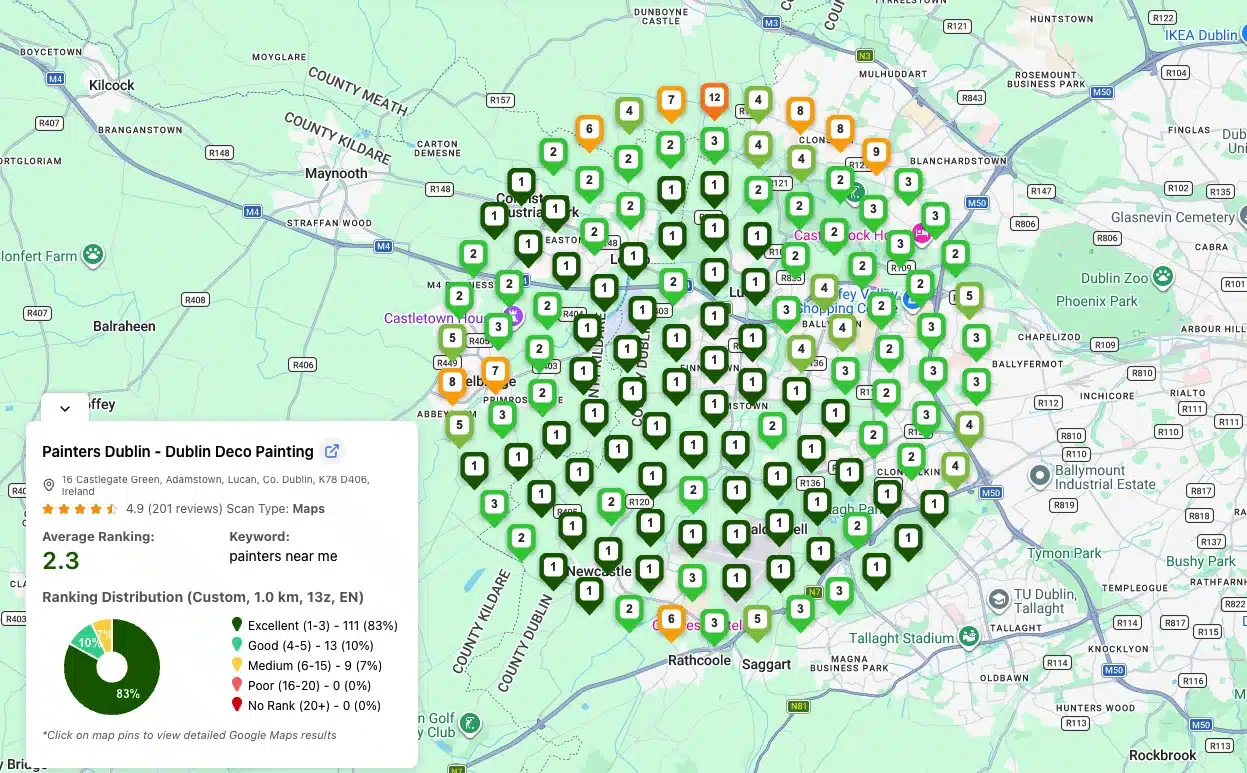
- Google Maps, across your service area. GTrack runs geo-grid scans of Google Maps rankings. Its Advanced Settings panel lets you set the scan language (and zoom level) on the Advanced plan ($29.99/month) and higher. The Starter plan doesn't include it. Scan your Spanish keyword with the language set to Spanish and your English keyword with English, and you get one map per language.
A setup for a business that serves customers in two languages
- Find the keywords in each language. Start with the free local SEO keyword generator: pick your business on Google Maps and it writes 100 keyword ideas in 5 intent groups. The first 20 show at once; add your email to get all 100, free. Then decide which of those services people search for in your second language. How to master local keyword research goes further.
- Keep the name as customers know it. One name, one script.
- List services in your main language. Add custom services in the second language only for the services those customers ask for most.
- Write the description in your main language, with at most a short line in the second.
- Give your website a page per language. Your Business Profile links to one website address, and your website can carry the full translation. Google's documentation on localized versions explains how to mark language versions with hreflang.
- Reply to reviews in the reviewer's language.
- Check your rankings in both languages before and after a change, with the same keyword list each time.
Frequently asked questions
Can you add services in multiple languages on Google Business Profile?
Yes, as custom services. Google gives each profile one services list with no per-language version, so a translated service sits next to the original in the same list. Google's services rules don't mention language. They ban profanity, gibberish, personal information, prices and phone numbers in custom service names. Add second-language services only for your main services instead of translating the whole list.
Can I write my Google Business Profile description in two languages?
Google's description guidelines don't address language, so you can. You have 750 characters in total, though, and two full versions leave about 375 each. A full description in your main language plus one short line in the second leaves room to describe what you do.
Can my business name appear in two languages?
No. Google's guidelines don't allow repeating the business name in multiple scripts or languages, even when your storefront sign shows both.
Does Google translate my business information automatically?
Google translates reviews into the reader's language and shows the original on request. Google Maps help says that when you change the Maps language on a computer, "you'll find place information in the language you selected", while map labels stay in the local language. Google doesn't publish which profile fields it translates, so check your own profile with Maps set to another language.
Do language settings change Google Maps rankings?
Google's ranking factors are relevance, distance and prominence, and language isn't one of them. The words a person searches with differ by language, and that changes which profiles match. Track the same keyword in each language to see your positions: GTrack sets the scan language on its Advanced plan and above.
Check your Google Maps rankings with GTrack: your first scan is free, without an account.