Review Management for Restaurants
In a busy room, review management for restaurants is a service habit, not a project: the ask happens at the table while the check is on it, every review gets a reply before the next service, and the Google Business Profile stays accurate. Restaurants collect reviews faster than almost any local business, which is exactly why most of them go unanswered. This page shows what the server says, what to send to booked guests, what to write back to a wrong order or a delivery complaint, and how GLocal runs the email and reply side.
No contract, cancel anytime · 30-day money-back guarantee · 50% off your first 3 months with code GLocal50OFF3Months
- $29.99 a month
- 30-day money-back
- 3 AI reply drafts per review

Why reputation management for restaurants is a volume game
A room doing 300 covers on a Saturday serves more people in one Saturday than a plumber meets in a month, and every one of them can post a star rating from the parking lot. That volume is why reputation management for restaurants works differently from any trade: no single review matters much, the stream does.
-
One bad Saturday arrives as a cluster
A short-staffed service does not produce one complaint. It produces a handful of reviews on Sunday morning, all about the same wait, and Google's Most relevant sort favors recent reviews, so the cluster leads your profile for a week or more. The fix is not a better reply; it is enough good reviews landing behind them to push them down.
-
Most restaurant reviews are a star with no text
A large share of what lands on a restaurant profile is a rating with nothing written. There is nothing to answer, but each one moves the average, and Google's own guidance lists review count and score among the factors in local ranking. The reviews with text are the ones Google quotes in the card, so a few detailed ones are worth more than their count suggests.
-
Servers get named, the kitchen gets blamed
Guests write about the person who took the order and the plate that came out, by name and by dish. The review describes one shift; the rating belongs to the profile for years. Asking has to be something the whole floor does, not something your best server happens to be good at.
-
Delivery complaints land on your Google profile
A cold order, a courier who took forty minutes, a missing side: the guest never saw your dining room, but Google is what their phone shows when they want to complain. Complaints about third-party orders end up as your Google reviews, and the next reader cannot tell which orders were yours to control.
How to get more Google reviews for restaurants when the ask happens at the table
Nobody on the floor has time for a campaign, so the ask has to live inside service. The six habits below are how to get more Google reviews for restaurants without slowing a table turn: one line from the server, a QR on the check, and the follow-ups done by email after the guest has gone.
-
The server's line, at the check drop
The moment is the check, not the goodbye. One sentence from the person who served the table: "If you enjoyed tonight, a Google review helps a place our size more than you'd think. The code on the receipt takes you straight there." Said once, with the check, by every server, every table.
-
A QR code on the receipt and the table tent
Print the short review link as a QR code on the receipt footer, the table tent and the pickup counter. Guests scan it while they wait for the card to come back, which is the one moment nobody at the table is doing anything. The free Google review QR code generator makes the code from your link.
-
Text booked guests the same night
A reservation gives you a phone number, so the host stand sends a short text after close with the review link. GLocal does not send texts, so this one is typed on the restaurant's phone; the text templates below are sized for it.
-
Email the next morning, from your own address
Reservations and online orders also leave an email. Export last night's list, import it into GLocal, and the first email goes out before lunch from your Gmail or SMTP account. Morning is when the guest has already told a friend about the meal and has a minute to tell Google.
-
One reminder on day 3, then stop
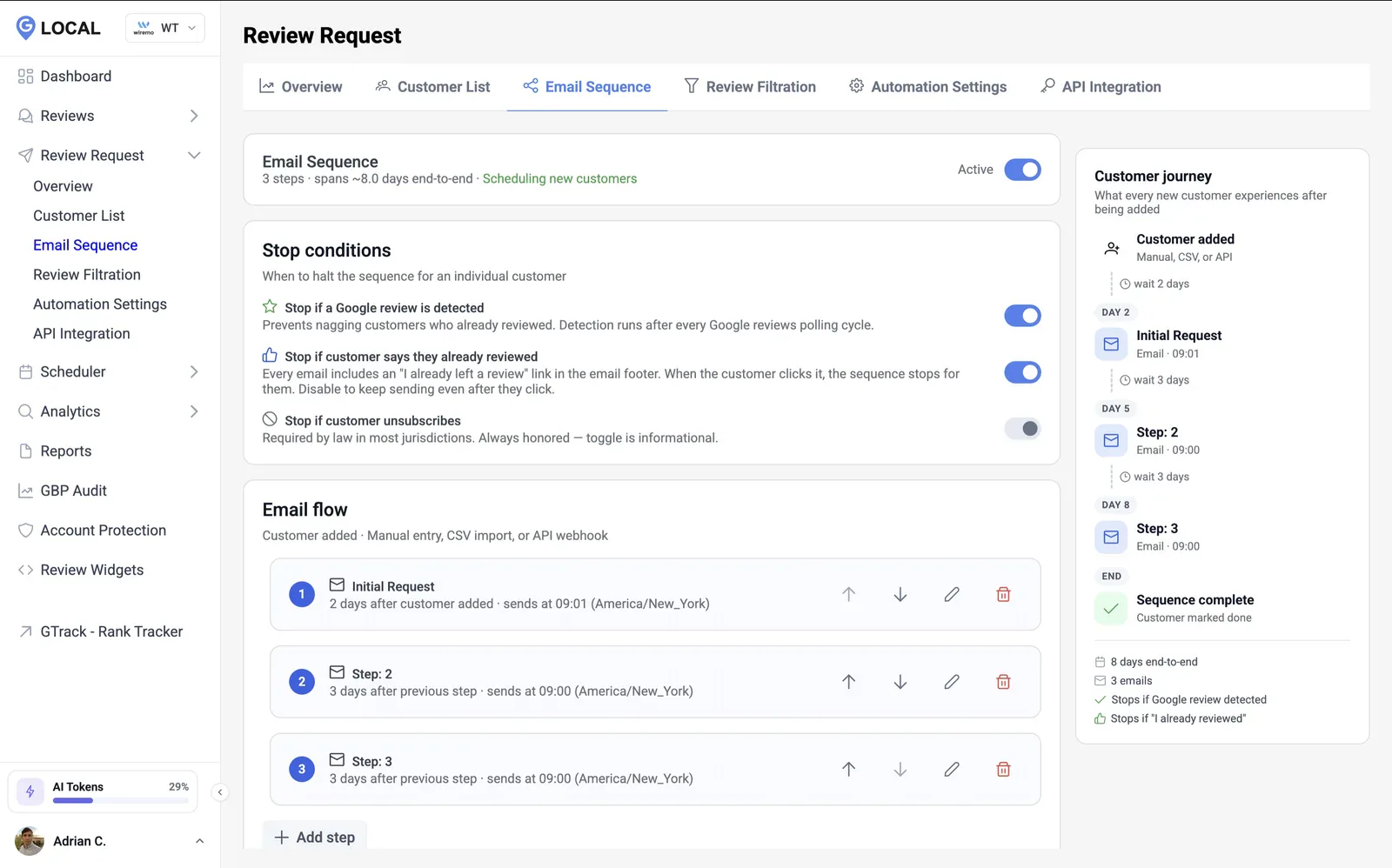
A second email three days later, and that is the end. A regular who reviewed you on Tuesday is never nudged on Friday: GLocal drops a guest from the sequence the moment it detects their review, or when they click that they already left one or unsubscribe.
-
Skip the ask on a comped table
If you took a dish off the check, the guest waited past their booking or the manager had to visit the table, leave them out of the sequence and let the manager's apology be the last word. A review request sent the morning after a comp reads like you did not notice.
Put the ask in pre-shift: the line, the QR, and who texts the booked tables. Servers who ask get named, and named servers get reviews, so share the ones that come in with the floor.
Review request text for restaurants: the receipt QR, the table tent, the server's line
Walk-in guests leave no number behind, so the table ask and the receipt QR do most of the work for them. For guests who booked or ordered directly, each review request text for restaurants below is paired with the email for your GLocal sequence: each one short, tied to that visit, and followed by a single reminder at most.
-
1. Same night, after a reservation
Text after close, from the restaurant's phone. Email as step 1 of the sequence, sent the next morning.
Text message, sent by hand from the host stand phoneHi [First name], thanks for joining us at [Restaurant] tonight. If the evening was a good one, a Google review would mean a lot to the team: [Review link]. Hope to see you again soon.
Email, step in your GLocal sequenceThanks for dining with us last night, [First name] Hi [First name], Thanks for booking a table at [Restaurant] last night. We hope the food and the service were what you came for. If they were, would you take a minute to leave us a Google review? Mentioning the dish you liked or who looked after you helps the next person deciding where to eat. [Review link] If something was not right, reply to this email instead and it comes straight to me. [Owner name] [Restaurant], [Phone]
-
2. After a pickup or catering order placed with you directly
Online orders and catering through your own site or phone. Text when the order is marked collected; email that evening.
Text message, sent by hand from the host stand phoneHi [First name], [Restaurant] here. Thanks for ordering with us today. If everything traveled well, a quick Google review helps us a lot: [Review link]. Thank you.
Email, step in your GLocal sequenceHow was your order from [Restaurant], [First name]? Hi [First name], Thanks for ordering directly from [Restaurant]. Orders placed with us are the ones we pack and time ourselves, so we would like to know how it arrived. If it was good, a Google review that mentions what you ordered helps the next person choosing between us and the apps: [Review link] If anything was missing or cold, reply here and we will put it right on your next order. [Owner name] [Restaurant]
-
3. Day 3 follow-up, no review yet
The single reminder, three days after step 1, only to guests who have not reviewed; once GLocal detects the review, step 2 is never sent.
Text message, sent by hand from the host stand phoneHi [First name], [Restaurant] once more: if dinner the other night is worth a few words, here is our Google review link: [Review link]. Either way, thanks for coming in.
Email, step in your GLocal sequenceStill thinking about dinner at [Restaurant], [First name]? Hi [First name], One more note from [Restaurant], and the last one. If your visit is worth a few words, a Google review that names a dish or a server is what people in [Neighborhood] read when they pick a table tonight. [Review link] We will not ask again. Thanks for coming in, and the kitchen hopes to feed you again soon. [Owner name] [Restaurant]
Replace the bracketed fields with your own details; in GLocal's email editor, [First name] and [Review link] become the editor's variables, so each guest sees their own name and link. The text messages are not sent by GLocal: they go by hand from the host stand phone. Guests who walk in and pay cash leave no address behind; for them the receipt QR and the server's line are the whole ask.
What restaurant reputation management looks like at 300 covers a night
Google is where the near me search happens, but a restaurant's reputation is spread across more sites than any trade's. Yelp is still read for restaurants specifically, and its ratings feed Apple Maps. TripAdvisor decides for visitors in a tourist town. OpenTable reviews come only from seated bookings, which makes them a second, hard-to-fake stream that booking-heavy rooms should show off and walk-in rooms do not get. Facebook carries the neighborhood groups, and the DoorDash and Uber Eats ratings decide order volume inside the apps. Restaurant reputation management is keeping all of that roughly consistent while Google gets most of the attention, because Google is what the phone shows at 6 pm.
The routine that fits a restaurant week: before lunch service, reply to everything from last night, starting with anything under four stars. On Monday, read the keyword tags for the week (a dish name, wait, cold, portion, loud) and take the ones that repeat to the kitchen and the host stand. Once a month, spend ten minutes on Yelp and TripAdvisor checking hours, the menu link and the phone number, and answering anything under four stars there. Monitoring is pointless if nothing from it reaches pre-shift.
One bad night moves the rating less than it feels like it should, and a restaurant recovers faster than any trade because of volume. A profile at 4.6 with 300 reviews that takes six 2-star reviews from one Saturday drops to 4.5 (the true average is 4.549, which Google shows as 4.5); the same six reviews on a profile with 60 reviews push it to 4.4. Getting the larger profile's true average back to 4.6 takes 39 five-star reviews. A room serving 1,500 covers a week that asks at every table and converts one guest in fifty adds about 30 reviews a week; if three in four of those are five stars and the rest four stars, the true average is back at 4.6 within a month (4 weeks: 1962/426 = 4.61), and at that velocity the cluster is buried under newer reviews long before then. Recency and volume protect a restaurant's rating; no single review can.
Removal is rarer than owners hope. Google's review policy removes reviews that are off-topic, from someone with a conflict of interest (a competitor, a former employee), spam, or carrying threats or personal data. A real guest who hated the risotto stays, and so, in most cases, does a complaint about a cold delivery order, because the guest did eat your food. Flag what qualifies from your Business Profile, reply publicly while the flag is pending, and if one of your own legitimate reviews vanishes, GLocal's recovery report gives Google support the review ID and the dates it asks for.
Restaurant review management software that lives in your Google Business Profile
GLocal is Google Business Profile management software, and on this page that means the desk side of the routine: the inbox, the reply drafts, the email follow-ups and the profile itself. As restaurant review management software it leaves the table ask to your servers and never posts a reply without a manager approving it.
-
Three drafts per review, in the reviewer's language
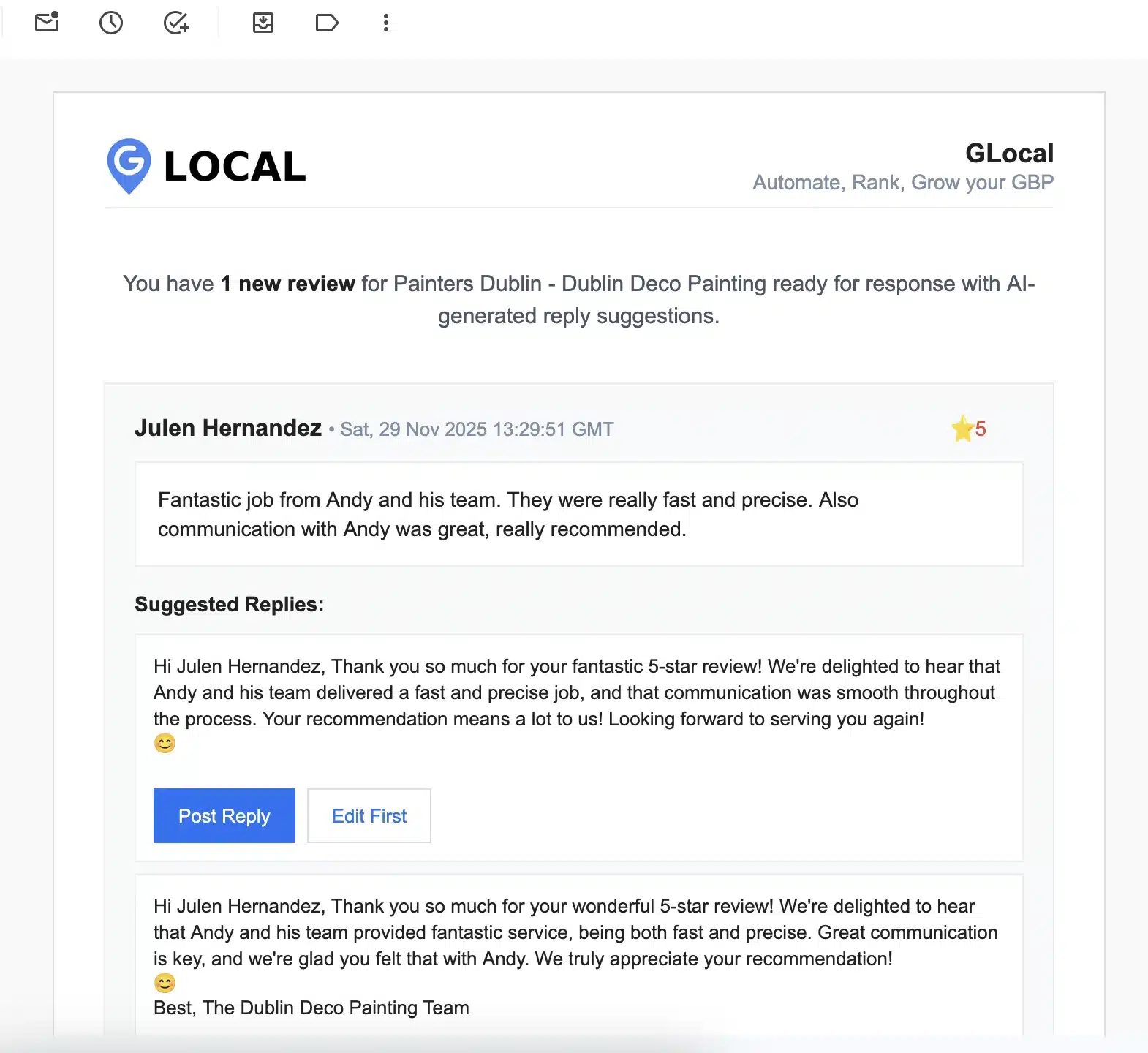
Sunday morning after a full Saturday can mean a dozen new reviews that mention dishes, servers and the wait. GLocal emails three drafts for each, in the tone you chose and in the language the guest wrote in, so a manager clears them before the lunch rush.
AI reply drafts, approved by you. Every new Google review arrives by email with up to three reply drafts in a tone you set (Professional, Friendly Casual or Formal) and in the reviewer's language. You post one as is or edit it first. GLocal never posts a reply on its own.
-
The Unreplied tab is the pre-shift list
Every Google review in one place, with the ones still waiting for an answer on their own tab. After a busy weekend that tab is where a manager starts Monday, and it empties in the time it takes to drink a coffee.
One inbox for every review. All your Google reviews are imported into one place, with separate tabs for unreplied reviews and for reviews that disappeared from your profile.
-
The dish that keeps coming up
The keywords pulled from reviews tell you whether the same burger, the same wait or the same word (cold, loud, slow) is repeating across a month. When a complaint repeats under Negative, the fix belongs in the kitchen or at the host stand, not in the reply.
Sentiment and keywords on every review. Each review is labelled Positive, Neutral or Negative, and the AI pulls out the keywords customers repeat, so you can see what they praise and what they complain about.
-
Emails to booked and online-order guests, from your own address
The reservation email and the day-3 reminder go in as a two-step sequence; the pickup version is the same two steps with template 2 as step 1. Last night's reservation export loads as a CSV, the sequence ends for any guest whose review GLocal detects, and the daily cap keeps your Gmail or SMTP sender reputation intact through a week of full books.
Email review request sequences. Timed email sequences with as many steps as you want, each with its own delay and time window, sent from your own Gmail or SMTP server (never from a GLocal address). A sequence stops when the review is detected, when the customer says they already left one, or when they unsubscribe. A daily cap protects your sender reputation. Customers come in by CSV, by hand or through the API.
-
One short link for the QR and the host stand text
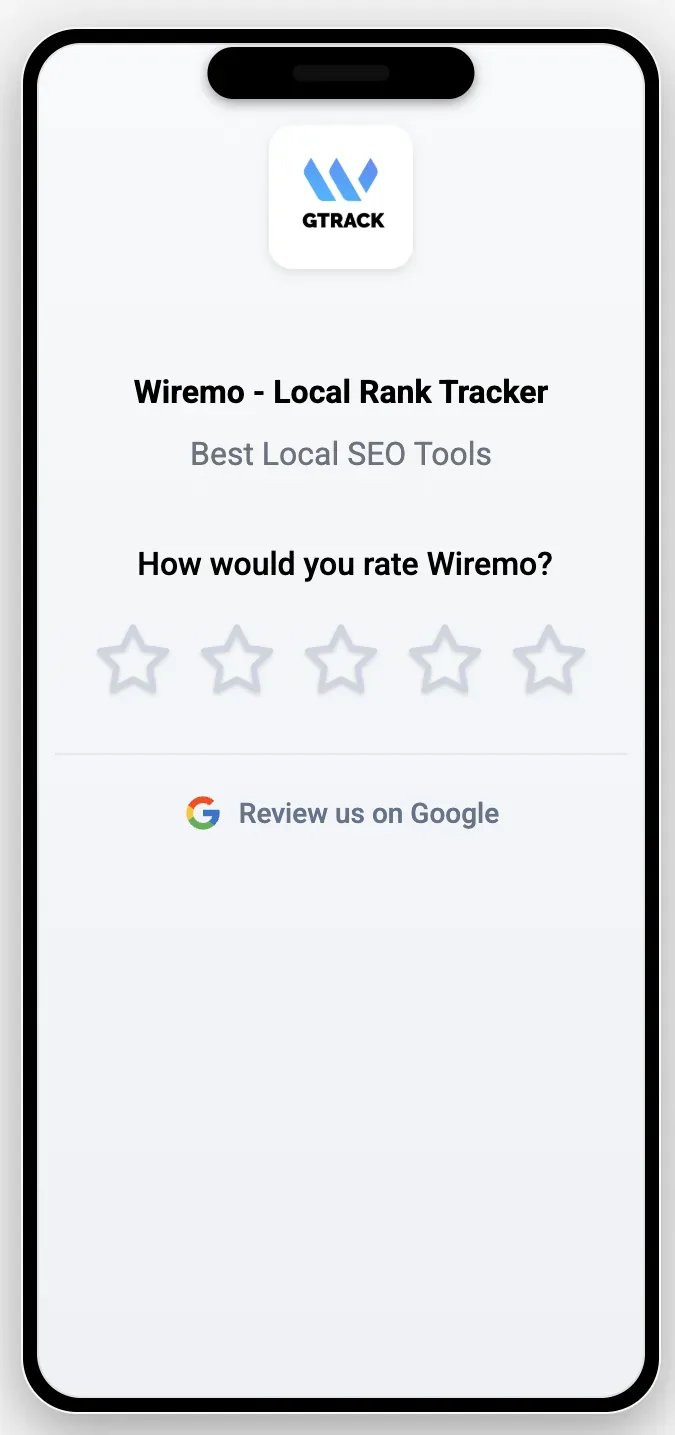
One short link does every job on this page: the receipt QR, the table tent and the host stand text. Because the feedback page shows your logo and your restaurant's name, a guest scanning a code at the table is not left wondering whose form it is.
A short branded review link. A short review address (r.gorate.biz/yourbusiness) and a feedback page with your logo, business name and tagline, an emoji or star rating and your own questions.
-
When a guest's review vanishes
A first-time Google reviewer who writes about one dinner is exactly the profile Google's filters remove, and restaurants collect those by the dozen. When one of yours vanishes, GLocal tells you and assembles the review ID, text and dates Google support asks for.
Deleted review alerts and a recovery report. GLocal alerts you when a review disappears and builds a Recovery Report (reviewer, rating, text, dates, review ID) you can send to Google support.
-
Menu photos and specials on a schedule
A gallery of plate photos, uploaded once, goes out on the daily or weekly quota you set, and a weekend brunch special or a holiday menu is scheduled as an Offer or Event post for the date you pick. To someone comparing three cards at 6 pm the profile looks like a restaurant that is open and busy.
Google posts and photos on a schedule. Update, Offer and Event posts, drafted with AI from your own prompt, scheduled in your timezone, plus photo and video posting on a daily, weekly or monthly quota from a media gallery.
-
Six checks on the profile a diner compares
The audit scores the parts a diner sees before the reviews: the primary category (the cuisine, not just Restaurant), the secondary categories, hours that match the kitchen's, the description and the photos, and it offers AI rewrites for the description and the services list.
Business Profile audit. An on-demand audit of six areas (name, address and phone; categories and services; description; hours; attributes; reviews and media) with a score and warnings, and AI rewrites for your description and services.
-
A second location, a second manager
Two rooms, two profiles, two general managers: each profile keeps its own inbox, sequences and posts, and a manager can be limited to the workspace of their own restaurant while the owner sees both.
Workspaces, team seats and roles. Business profiles grouped in workspaces, team members as Owner, Admin or Member, and Members limited to the workspaces they are assigned to.
The page the receipt QR opens
The QR on the receipt opens a page carrying your logo and your restaurant's name, with the stars, the Review us on Google button and nothing else to read. A guest finishes it before the server is back with the slip, which is the only idle minute a restaurant visit has.
What GLocal does not do, so you are not surprised
- GLocal does not send text messages. Review requests go by email, from your own address.
- GLocal does not post replies automatically. Every reply is approved by you first.
- No Toast, Square, OpenTable or Resy connector exists; last night's reservation or online-order export is the CSV you import, and the API covers a custom POS setup.
- GLocal manages Google reviews only, not Yelp, Facebook or other review sites.
Where Google review management for restaurants pays off: the near me searches
Diners rarely search a restaurant by name; they search a cuisine or a meal plus near me, and restaurants near me alone is searched about 6,110,000 times a month in the US. On those results the map pack comes first, with a rating, a review count, a filter for 4.0 and up, and a line quoted from a recent review. That card is where Google review management for restaurants is judged, before anyone opens a website.
| Search | US searches a month | What the reviews do here |
|---|---|---|
| restaurants near me | 6,110,000 | A pure map-pack search with a rating filter. Three cards show the star, the count and a review snippet, so a 4.3 with hundreds of reviews often out-pulls a 4.8 with a few dozen. |
| pizza near me | 2,770,000 | Map pack plus the delivery apps. Recent photos of the actual pie decide the tap, and DoorDash complaints show up here as Google reviews. |
| breakfast near me | 2,370,000 | A time-of-day search. Open now and the latest reviews about weekend wait times are what the snippets quote. |
| sushi near me | 1,130,000 | Chains and directories compete here. Words like fresh and clean in reviews get pulled into the card's "what people are saying" line. |
| best restaurants near me | 885,000 | Best triggers the rating sort and lines like "Rated 4.7 for ambiance". Review count and recency are the whole argument. |
| brunch near me | 457,000 | Weekend-heavy. One slow Saturday is a cluster of 2-star reviews that leads the profile under Google's Most relevant sort for the following week. |
| dinner near me | 267,000 | An evening search. The date night and romantic attributes Google shows come from review text, as do the servers' names. |
| steakhouse near me | 227,000 | A premium category. Price-level and worth-it sentiment in the reviews steer the click more than the stars do. |
| mexican restaurant near me | 217,000 | A cuisine search. Google's justifications quote dish names (tacos, margaritas), so reviews with text beat no-text stars. |
| happy hour near me | 212,000 | Listicles compete with the pack. Reviews that say happy hour are what get that attribute surfaced on your card. |
| italian restaurant near me | 72,000 | A cuisine pack. Recent reviews with a photo of the pasta and a visible reply rate keep the card in the top three. |
| family restaurants near me | 20,000 | The family-friendly attribute and reviews that mention kids are what get a restaurant into this pack at all. |
These are national numbers; your neighborhood gets its share, and the map pack three blocks away is a different pack. GTrack, the Google Maps rank tracker runs a free scan that shows where your profile ranks across the blocks you draw from.
US monthly search volumes: Ahrefs, October 2026.
Review management for restaurants: questions owners ask us
Should a restaurant respond to every Google review?
Yes, and the order matters: anything under four stars first, before the next service, then the praise, then the no-text ratings with a one-line thank you. The reply is read by the next person comparing three cards, not by the guest who wrote it, so even a short answer on a silent five-star tells them someone is watching the room. Reply before you argue, and never argue in public.
How do I reply to a Google review about a DoorDash or Uber Eats order?
Say what you control and what you do not, without blaming the courier in a way that reads as an excuse. For example: "Hi Jordan, sorry the order arrived cold. We pack and hand over every order hot; the forty minutes it spent on the road after that is the part we cannot see, and we have raised it with the platform. If you order directly from us next time, reply here and the first delivery is on us." It acknowledges the complaint, explains the handoff in one line, and points the next reader to ordering direct.
A review names one of my servers. What do I write?
If it is praise, name the server back and say you will pass it on; it is the cheapest staff recognition there is. If it is a complaint, name the role and the fix, never the person: "the section was over-sat and we have changed the floor plan", not "we have spoken to Chloe". The guest wants to know it was heard; the next reader wants to know it will not happen to them; the server does not deserve a public write-up.
Can I remove a review about a delivery order from my Google profile?
Usually not. The removable cases are the ones in Google's review policy listed above, and a cold delivery order is not one of them. A guest who ordered your food through an app and got it cold had a real experience of your restaurant, so Google will generally keep it even if the courier caused the problem. Flag it only if it is clearly about a different business or the courier alone, and reply publicly either way.
What are the four elements of reputation management for a restaurant?
Ask, monitor, respond, fix. Ask at the table and by email so the volume of good reviews keeps up with the room; monitor Google first and Yelp, TripAdvisor and the delivery apps on a schedule; respond to everything before the next service; and fix the thing the reviews repeat, because a wait or a cold dish that comes up every week is an operations problem wearing a review's clothes.
What is the best reputation management company for restaurants?
There are two kinds, and the better one depends on who will do the work. An agency or a chains-only platform takes the whole job off your hands, with a retainer and usually a demo call before you see a price. Software like GLocal is for an owner or a manager who will spend ten minutes a day on it: review requests by email from your own address, three reply drafts per review for you to approve, and your Google Business Profile in one place, from $29.99 a month with the price on the page.
How much does restaurant reputation management cost?
Done for you, expect a monthly retainer in the hundreds of dollars, or an enterprise quote if you run a group. Done yourself with restaurant review management software, GLocal's Starter plan is $29.99 a month for one profile with 1,000 email review requests and 20,000 AI tokens a month, the Professional plan is $79 a month for up to 10 profiles, and there is a 30-day money-back guarantee, no contract, and 50% off the first three months with the code GLocal50OFF3Months. There is no free trial.
Can GLocal send review requests by text message?
No. Email only, from your own Gmail or SMTP account. A text to a booked guest is typed by hand on the host stand phone with the short review link pasted in, and walk-in guests, who leave no number, get the receipt QR and the server's line instead.
Does GLocal reply to reviews automatically?
No. A new review reaches you by email with up to three drafts, in the tone you chose and in the language the guest wrote in; a manager posts one as it is or edits it first, and until then nothing is on the profile. AI is a good first draft for a review that names a dish and a server, and a poor last word, so the approval step stays.
Start managing your restaurant's reviews with GLocal
Review requests from your own email, three reply drafts for every review, and your Google Business Profile in one place.
No contract, cancel anytime · 30-day money-back guarantee · 50% off your first 3 months with code GLocal50OFF3Months
- 30-day money-back guarantee
- Replies are never posted without you
- Help center and email support