Review Management for Dentists
In a dental practice, review management for dentists means three habits: ask every patient at checkout, reply to every review within a day without confirming that the reviewer is a patient, and keep the Business Profile accurate. Patients spend most of the visit with the hygienist, decide how they feel in the parking lot, and write one-star reviews about the bill, not the dentistry. Below: the moments to ask, the texts and emails to send, what a public reply may and may not say, and which parts GLocal takes off the front desk.
No contract, cancel anytime · 30-day money-back guarantee · 50% off your first 3 months with code GLocal50OFF3Months
- $29.99 a month
- 30-day money-back
- 3 AI reply drafts per review

Why reputation management for dentists starts with the one-star review nobody saw coming
Most patients leave a dental practice feeling fine and say nothing. The ones who write are the delighted few and the angry few, and the angry few are rarely angry about teeth. Good reputation management for dentists is built around that pattern, and around a rule no other local business has to follow: a public reply must not confirm anything about the person who wrote the review.
-
The one-star review is about money or time, not teeth
Quoted one amount, billed another. Told the insurance would cover it, then sent a balance. A long wait in the chair before anyone came in. The numbing wore off halfway through. The filling was fine; the estimate, the claim or the wait was the surprise, and that is what gets written up.
-
A reply can cost more than the review
HHS OCR has fined dental practices for what they wrote under a review (the resolution agreements are public): a Dallas practice paid $10,000 in 2019 over Yelp replies, a California practice paid $23,000 in 2022, and a North Carolina practice was given a $50,000 civil money penalty for one Google reply that named the patient and their treatment. Replying is still the right move; replying with the chart open is not.
-
Patients review the hygienist by name
A patient spends most of the appointment with the hygienist and a few minutes with the dentist, so the hygienist and the front desk are the names in the five-star reviews. The practice gets the rating, but the asking has to be a habit of the whole team, because the hygienist who is praised this year may be at another office next year.
-
Fear sends patients to the reviews first
Someone searching for an implant or a root canal is scared of pain and of the bill, and reads reviews to find out whether the quote held and whether anyone was gentle. Google's own help page lists review count and score among the local ranking factors, and a best dentist near me search filters on rating before the searcher sees a single pin.
How to get more Google reviews for dentists: checkout, the hygiene visit, the handoff
The ask fits the visit you already run; nothing here adds a step to the schedule. If you want to know how to get more Google reviews for dentists without a campaign, it is six habits spread across the people a patient meets on the way out.
-
Let the hygienist hand it off
The hygienist has the relationship. One line at the end of the appointment is enough: if today went well, the front desk will text you a link to leave us a Google review. Said in the room, the ask is expected by the time the patient reaches the desk.
-
Ask at checkout, when the next visit is booked
The patient is standing at the desk, the card has gone through and the six-month visit is on the calendar. That is the moment. The coordinator mentions the review link once, without a script, and sends it before the patient reaches the parking lot.
-
Text the link from the front desk phone
The coordinator sends the short review link from the practice phone while the patient is still at the counter; a link that arrives before the car door closes gets opened, one that arrives at dinner gets ignored. This is the one manual step: GLocal has no texting, so the message comes from your own phone, with the text templates below pasted in.
-
Email the same evening, from the practice address
That evening GLocal sends step 1 of your sequence through the practice's own Gmail or SMTP account, so it arrives from the address patients already know from appointment reminders. For a hygiene-recall patient this is usually the only ask that lands, because recall visits are quick and the desk rarely has a free moment to mention the link.
-
Follow up once, on day 3, then stop
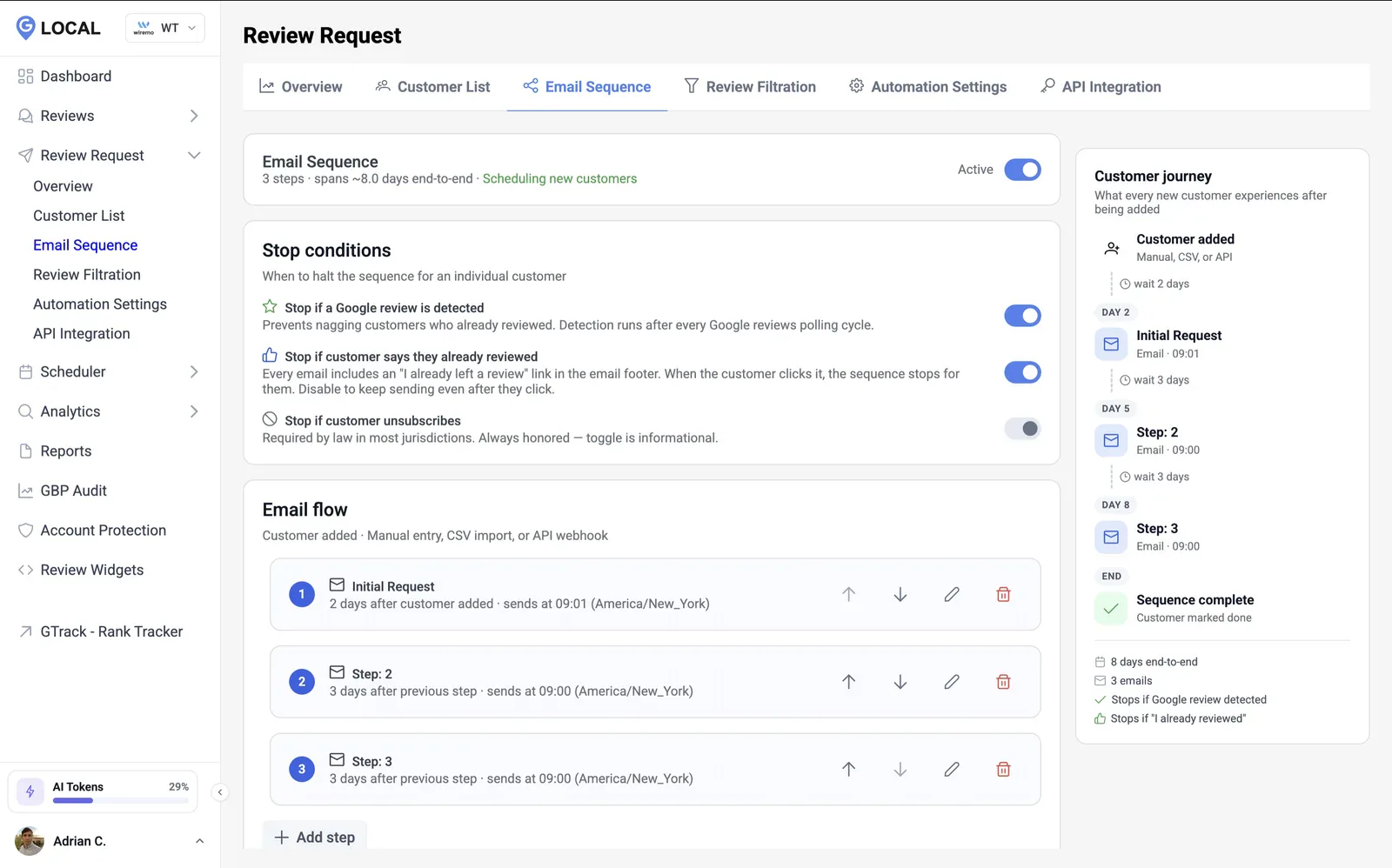
One reminder, three days after the visit, then the sequence is over. GLocal watches the profile and stops the moment the patient's review shows up; a click on already reviewed or unsubscribe stops it too. A patient who hears from the practice a third time about a review tells people about that, not about the cleaning.
-
Skip anyone with an open balance or a pending adjustment
An insurance claim under dispute, a crown that needs a remake, a denture coming back for a fit: keep those patients out of the sequence until it is settled. Fix it first, then ask. Asking for a review while the balance is still being argued about hands the patient a place to argue it in public.
Put a QR code to the same review link on the checkout counter and the appointment card; the free Google review QR code generator makes one in a minute. For a child's visit, ask the parent, and never mention the child in a reply.
Review request text for dentists you can paste today, with the matching email
Three pairs, one for each moment a patient is asked. In each pair, the review request text for dentists goes out from the front desk phone by hand and the email is the matching step of your GLocal sequence, so a patient who ignores the text still gets asked once more by email. None of them mentions what was done at the visit, which is deliberate: a request that names a procedure can be forwarded, screenshotted or read by someone else at that address.
-
1. Same day, after a treatment visit
The text goes while the patient is at the counter; the email is step 1 of the sequence and lands that evening.
Text message, from the front desk phoneHi [First name], this is [Front desk name] at [Practice]. It was good to see you today. If you have a moment, a Google review helps a small office more than most people realize: [Review link]. Thank you!
Email, step in your GLocal sequenceThanks for visiting [Practice] today, [First name] Hi [First name], Thank you for coming in today. We hope the visit was as easy as we try to make it. Would you consider leaving us a short Google review? Most families in [City] read them before they book a first appointment, and yours would help them decide. [Review link] If anything about today fell short, reply to this email instead and we will call you to put it right. [Dentist name] [Practice], [Phone]
-
2. After a hygiene visit, in the recall confirmation
The regular six-month patient. Text at checkout if the desk has a moment; the email goes out that evening with the next-visit confirmation.
Text message, from the front desk phoneHi [First name], [Front desk name] from [Practice] here. Thanks for keeping up with your visits. If [Hygienist name] took good care of you today, a Google review would mean a lot to the team: [Review link].
Email, step in your GLocal sequenceThank you from the team at [Practice], [First name] Hi [First name], Thanks for coming in today. Your next visit is booked, and we will remind you closer to the date. In the meantime, if [Hygienist name] and the team took good care of you, a short Google review that mentions who you saw would help other families in [City] choose a practice with confidence: [Review link] If anything was not as it should be, reply to this email first; a call from us fixes more than a public review does. [Dentist name] [Practice], [Phone]
-
3. Day 3 follow-up, no review yet
A single reminder, three days on, as step 2 of the sequence; GLocal cancels it the moment the review is on the profile.
Text message, from the front desk phoneHi [First name], a final note from [Practice]. If you have a moment, here is the link for a Google review: [Review link]. No pressure at all, and thank you for choosing our practice.
Email, step in your GLocal sequenceDid we earn a review, [First name]? Hi [First name], One last note from us. If you were happy with your visit, a Google review would mean a great deal; it is what most people in [City] read before choosing a dentist. [Review link] We will not ask again. Thank you for being part of [Practice]. [Dentist name] [Practice]
Replace the bracketed fields with your own details. In GLocal's email editor the patient's name and their personal review link come from the editor's variables, so [First name] and [Review link] are filled in per patient. The text messages are sent by hand from the front desk phone, because GLocal only sends email. Keep procedures, dates and balances out of every message.
Dentist online reputation management beyond Google: Healthgrades, Zocdoc and Yelp
Google is the first screen, because that is where dentist near me is typed, but a dental SERP has a second screen. Under the map pack, searches like dentist reviews and most specialty near me searches (implants, orthodontist, pediatric) show Healthgrades and Zocdoc listings in the organic results, with their own star ratings. Yelp still feeds Apple Maps and Siri. Facebook matters for pediatric and family practices, where parents ask a local group before they search at all.
Dentist online reputation management is a short monthly routine on those sites and a daily one on Google. Claim the Healthgrades and Zocdoc profiles for every dentist in the practice, not only the owner, so a search for the associate's name does not land on an unclaimed page. Keep the practice name, address and phone identical everywhere. Set a ten-minute check on the first of the month: anything under four stars on any site gets a reply the same week, written to the same rule as the Google replies above.
The arithmetic of a bad review is gentler than the feeling. Sixty reviews at 4.9 stay at 4.8 after one one-star review (295 stars over 61 reviews); nine reviews at 4.9 fall to 4.5, which is why a young profile needs volume before it needs anything else. Every five-star review afterwards moves the average by the gap to 5 divided by the new review count: small per review, large per month. A two-hygienist practice seeing about 120 recall patients a month that asks all of them and converts one in six gets 20 new reviews a month, enough to push a bad week off the first screen by the next quarter.
Removal is the exception. Google takes a review down only when it breaks Google's review policy: the writer was never a patient, works for a competitor, is describing another office, or included threats or personal data. A review that is harsh about the bill or the wait is none of those and stays up. Report it from the Business Profile, track the report in Google's review management tool, and reply publicly in the meantime, without stating facts from the chart to prove your case, because the reply is what the next patient reads whatever happens to the flag. The opposite case, a legitimate review that vanishes, is where GLocal's deleted-review report earns its place: it gives Google support the reviewer, rating, text and dates needed to restore it.
Review management for dentists once the patient has left: what GLocal does
GLocal is Google Business Profile management software, and in a dental practice it takes over everything in the routine above that happens after the patient has left the counter: the evening email, the reminder, the reply drafts, the watch on the profile. The front desk asks and texts the link; the dentist approves replies from a phone. Nothing reaches the profile without that approval, which is the point of review management for dentists, where a careless reply has a price.
-
Three drafts per review, posted only by you
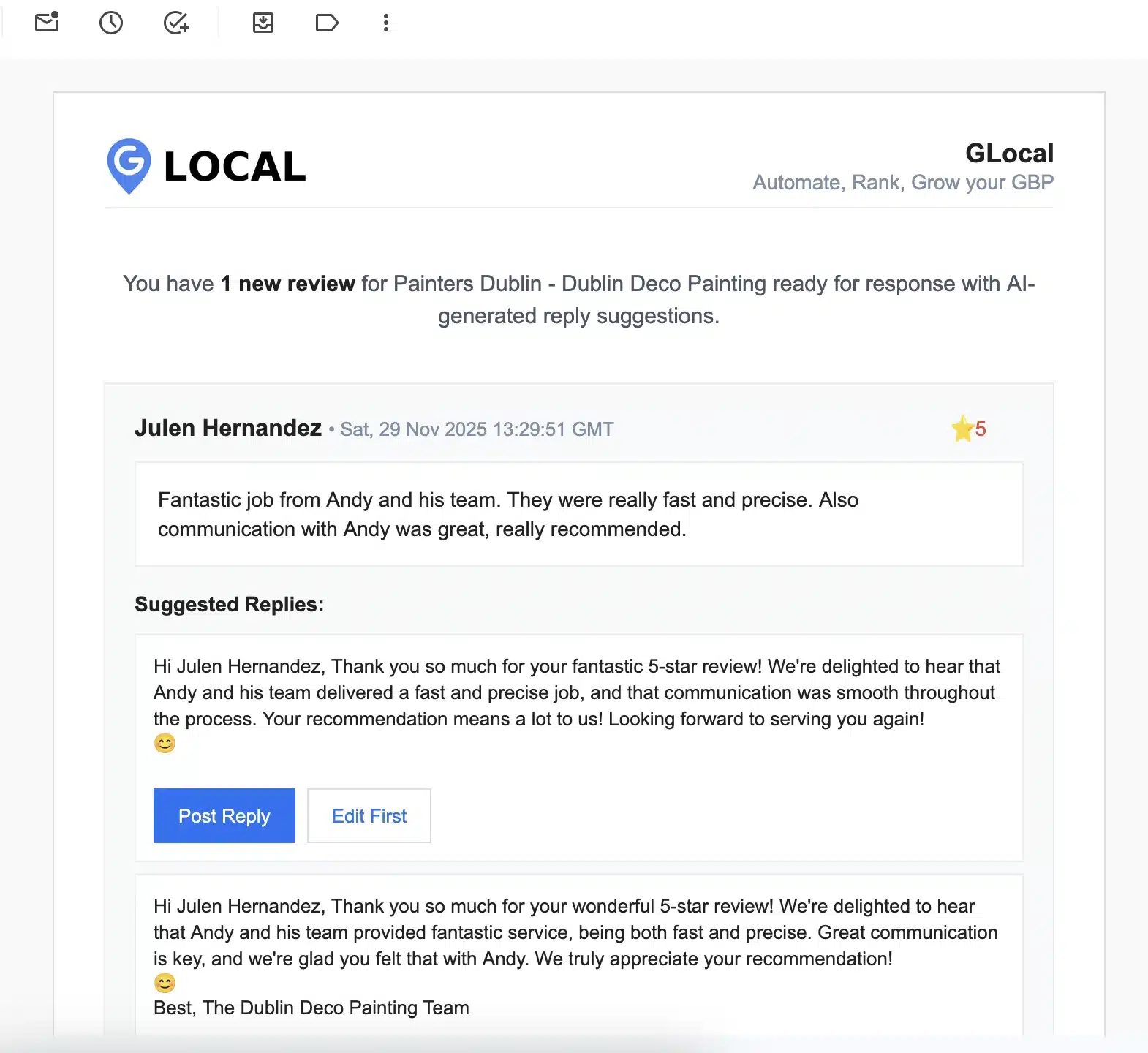
Dental reviews name hygienists, mention bills and sometimes describe treatment. GLocal emails you up to three drafts in the tone you set; you read each one against the rule above, delete anything that refers to the reviewer's care, and post from your phone between patients. GLocal never posts on its own.
AI reply drafts, approved by you. Every new Google review arrives by email with up to three reply drafts in a tone you set (Professional, Friendly Casual or Formal) and in the reviewer's language. You post one as is or edit it first. GLocal never posts a reply on its own.
-
The evening email and the day-3 reminder, from the practice address
Load the two emails above as a sequence from the practice's Gmail or SMTP account. GLocal stops it when the review appears, and the daily sending cap means the address you also use for recall reminders is never flagged as bulk mail.
Email review request sequences. Timed email sequences with as many steps as you want, each with its own delay and time window, sent from your own Gmail or SMTP server (never from a GLocal address). A sequence stops when the review is detected, when the customer says they already left one, or when they unsubscribe. A daily cap protects your sender reputation. Customers come in by CSV, by hand or through the API.
-
One short link for the front desk text and the QR code
The coordinator texts the short review link at checkout and the same link sits behind the QR code on the counter. Because the page shows the practice's own logo and name, a patient does not mistake it for a survey company's link.
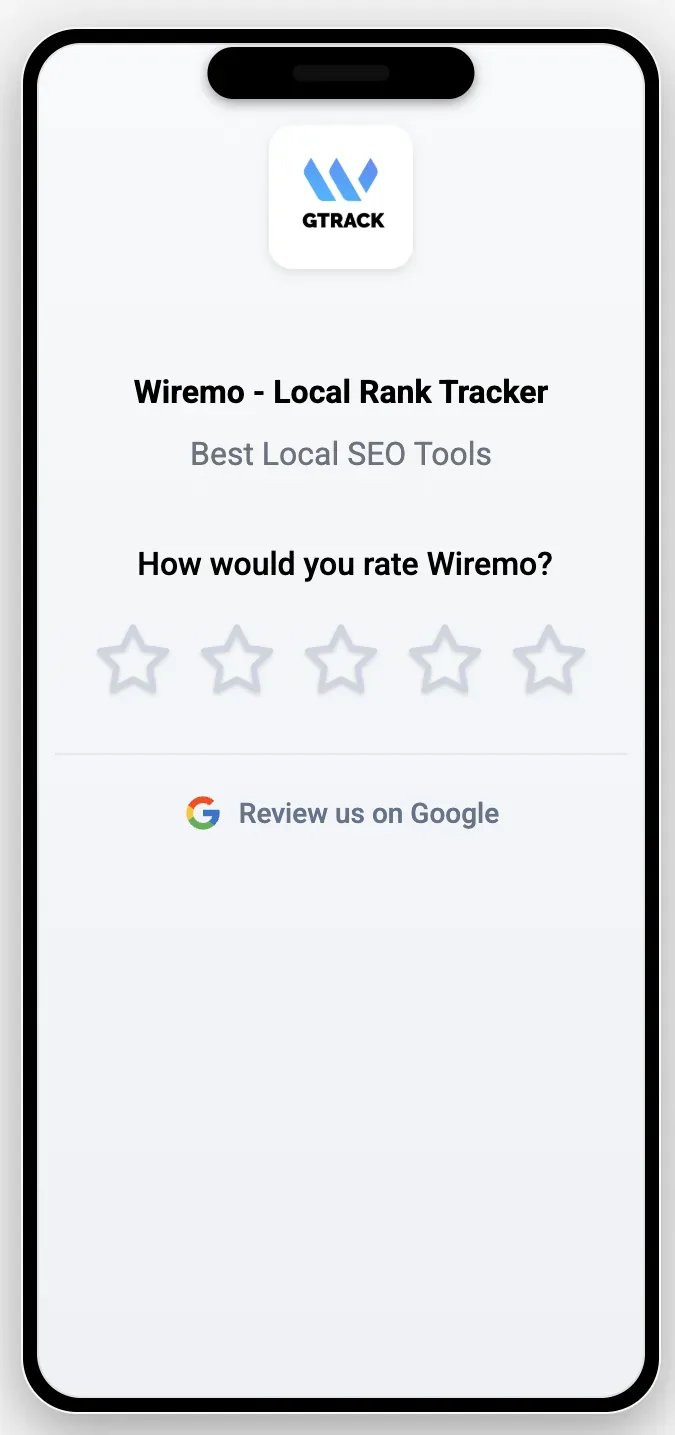
A short branded review link. A short review address (r.gorate.biz/yourbusiness) and a feedback page with your logo, business name and tagline, an emoji or star rating and your own questions.
-
Every review answered within the week
Open the Unreplied tab on Monday morning and it is the week's to-do list. A practice with two or three dentists gets reviews in a steady trickle rather than bursts, and this is where you make sure each one has a reply within the week.
One inbox for every review. All your Google reviews are imported into one place, with separate tabs for unreplied reviews and for reviews that disappeared from your profile.
-
See which complaints repeat
Keywords like billing, insurance, wait, upsell or a hygienist's name surface across reviews. When insurance keeps turning up under Negative, the fix belongs in the estimate conversation at the treatment plan, not in better replies.
Sentiment and keywords on every review. Each review is labelled Positive, Neutral or Negative, and the AI pulls out the keywords customers repeat, so you can see what they praise and what they complain about.
-
An alert when a review is filtered
A patient's first Google review is often their only one, and first reviews are the ones Google's filter removes. GLocal notices the drop, alerts you, and assembles the recovery report (reviewer, rating, text, dates, review ID) that Google support asks for before it will look.
Deleted review alerts and a recovery report. GLocal alerts you when a review disappears and builds a Recovery Report (reviewer, rating, text, dates, review ID) you can send to Google support.
-
The profile scored, category by category
The audit scores six areas of the profile, and for a practice the one that matters most is categories and services: pediatric, cosmetic, emergency, the services list, with AI rewrites for the description and the services. A dentist listed only as Dentist loses the orthodontist near me and emergency dentist near me searches to practices that filled the categories in.
Business Profile audit. An on-demand audit of six areas (name, address and phone; categories and services; description; hours; attributes; reviews and media) with a score and warnings, and AI rewrites for your description and services.
-
Office photos and seasonal offers on a schedule
Photograph the operatories, the team and the waiting room once and load them into the gallery; GLocal publishes them on the weekly or monthly quota you choose. A whitening offer before wedding season or a back-to-school checkup reminder goes out as an Offer or Update post on the date you pick.
Google posts and photos on a schedule. Update, Offer and Event posts, drafted with AI from your own prompt, scheduled in your timezone, plus photo and video posting on a daily, weekly or monthly quota from a media gallery.
-
One inbox per location for a group practice
A DSO or a multi-office group puts each location's profile in its own workspace. The office manager sees and replies to her own location's reviews, the regional lead sees all of them, and nobody posts a reply for an office they do not run.
Workspaces, team seats and roles. Business profiles grouped in workspaces, team members as Owner, Admin or Member, and Members limited to the workspaces they are assigned to.
The page the front desk's text message opens
The link in the front desk's text opens a feedback page that carries the practice logo and name and asks one question. The patient taps a star, then taps Review us on Google, and the Google review form opens on their phone while they are still at the counter.
What GLocal does not do, so you are not surprised
- GLocal does not send text messages. Review requests go by email, from your own address.
- GLocal does not post replies automatically. Every reply is approved by you first.
- GLocal does not connect to Dentrix, Eaglesoft or Open Dental. Patients reach the sequence by CSV import from your practice software, by hand at the desk, or through the API.
- GLocal manages Google reviews only, not Yelp, Facebook or other review sites.
- GLocal makes no HIPAA compliance claim. What a reply says is decided by the person who approves it, so the rule on this page applies whoever writes the draft.
Dental reputation management starts in the searches that fill a schedule
These are the searches a new patient types, with US monthly volumes; dentist near me alone runs to about 810,000 a month nationally. Nearly every one of them opens with the map pack, where a practice is three lines: name, star rating with review count, and a snippet of one review. That map pack is where dental reputation management is won or lost, long before anyone reads your website.
| Search | US searches a month | What the reviews do here |
|---|---|---|
| dentist near me | 810,000 | Pure local pack. Star rating and review count are the only differences between three otherwise identical pins. |
| best dentist near me | 88,000 | The word best triggers Google's rating filter; practices with a low rating or few recent reviews are gone before the searcher scrolls. |
| dental implants near me | 82,000 | High-ticket and fear-driven. Searchers read reviews for pain, cost surprises and whether it was worth it before they call. |
| pediatric dentist near me | 81,000 | Parents screen reviews for how the team handles a scared child and whether the hygienist is named and praised. |
| teeth whitening near me | 72,000 | Elective. Reviews that mention results and sensitivity decide between a dentist and a retail whitening bar. |
| orthodontist near me | 66,000 | A long treatment, so reviews about appointment flexibility, payment plans and insurance claims drive the choice. |
| emergency dentist near me | 59,000 | A same-day decision from a phone in pain. The most recent review and a they saw me the same day line win the call. |
| dentures near me | 45,000 | Older patients and caregivers. Reviews about fit, remakes and cost transparency matter more than the star average. |
| dental cleaning near me | 41,000 | Routine and price-sensitive. Reviews that mention upselling or deep cleaning pressure lose the booking. |
| cosmetic dentist near me | 39,000 | Visual proof matters. Reviews with before and after photos and a named dentist outperform plain ratings. |
| invisalign near me | 24,000 | Brand-led. Reviews decide between many certified providers, and mentions of total cost and refinements swing it. |
| dentist reviews | 7,800 | The searcher wants a review site, so your Healthgrades, Zocdoc and Yelp profiles are the landing page here, not Google. |
Volumes are national; a practice sees its local share. Where the profile actually ranks across the neighborhoods patients drive in from is a different question, and a free scan with GTrack, the Google Maps rank tracker answers it.
US monthly search volumes: Ahrefs, October 2026.
HIPAA compliant review responses and other questions dentists ask
Can a dentist respond to a negative Google review without violating HIPAA?
Yes, if the reply says nothing about the reviewer. Do not confirm they are a patient, and do not mention a procedure, a date, a balance, an insurer or anything from the chart, even if the reviewer wrote it all themselves. Thank them, say you take the concern seriously, and give a name and a phone number to call. HHS OCR has settled with dental practices for $10,000 and $23,000 over Yelp replies and imposed a $50,000 penalty over a Google reply, so the rule is not theoretical. GLocal emails you up to three drafts and posts nothing until you approve, so you can strike any line that refers to a visit before it goes live. GLocal makes no HIPAA compliance claim; the content of a reply is the practice's responsibility, and this page is not legal advice.
How do I encourage patients to leave positive reviews?
Ask every patient, at checkout, right after the next visit is booked, and have the hygienist mention it in the room first. Text the short link from the front desk phone before they leave, email the same evening from the practice address, and send one reminder on day 3. Never offer a discount or a gift for a review, and never ask for a positive one; ask for an honest one and let the care do the rest.
Is it legal to ask only happy patients for a review?
Google's policy does not allow discouraging negative reviews or selectively soliciting positive ones, a practice called review gating, and some dental marketing tools still sell it as a feature. The safer habit is to ask everyone, call anyone who is unhappy the same day, and keep open billing disputes out of the sequence until they are settled. Nobody's review is blocked.
Which review sites matter most for a dental practice?
Google first, because dentist near me and every specialty near me search opens with the map pack. Then Healthgrades and Zocdoc, which appear in the organic results under the pack and own the dentist reviews search. Yelp feeds Apple Maps, and Facebook carries the parent-group recommendations that never become a review. Claim all of them for every dentist in the practice, keep the name, address and phone identical, and reply to anything under four stars the same week. GLocal manages the Google reviews; the others are a monthly manual check.
How much does reputation management cost for a dentist?
Dentist reputation management is sold two ways. A dental marketing agency does it on a retainer, usually several hundred dollars a month and often bundled with ads. Software the practice runs itself is the other way, and GLocal is that: the Starter plan is $29.99 a month for one profile (1,000 email review requests and 20,000 AI tokens a month), with a 30-day money-back guarantee, no contract, and 50% off the first three months with the code GLocal50OFF3Months. There is no free trial, so the guarantee is the trial.
Can GLocal text patients the review link?
No. GLocal's review requests are email only, sent from the practice's own Gmail or SMTP account. The text at checkout is sent by the coordinator from the practice phone with the short review link; the email sequence then follows up with the patients who never opened it.
Will GLocal post replies to our reviews by itself?
No. Each new review arrives by email with up to three drafts in the tone you chose. The dentist, or whoever approves replies, posts one as it is or edits it first, and in a dental practice that edit is the HIPAA check: strike anything that refers to the reviewer's care. GLocal never publishes a reply on its own.
Can I get a bad review of my practice removed from Google?
Only when it breaks Google's review policy: a writer who was never a patient, a competitor, a review meant for another office, or threats and personal data. A review that is merely unfair about the bill or the wait does not qualify. Report it from the Business Profile, track it in Google's review management tool, and reply publicly while you wait, without quoting the chart to prove your point. Count on days to weeks and expect most reports to be refused. If a legitimate review vanishes instead, GLocal's deleted-review report gives Google support what it needs to put it back.
We are a group with six offices. Does one account cover all of them?
Yes. The Professional plan covers up to 10 business profiles, 3 workspaces and 3 team seats for $79 a month; the Business plan covers 20 profiles, 5 workspaces and 5 seats for $149. Put each office's profile in its own workspace: its reviews, request sequence, posts and settings stay separate, the office manager is a Member limited to that workspace and replies only for her own location, and the owner or regional lead sees every office from one login.
Start dentist reputation management with GLocal this week
Review requests from the practice's own address, a draft waiting for your approval on every review, and the Business Profile kept accurate, in one place.
No contract, cancel anytime · 30-day money-back guarantee · 50% off your first 3 months with code GLocal50OFF3Months
- 30-day money-back guarantee
- Replies are never posted without you
- Help center and email support