A multi-location rank tracker has one job. Tell a brand operator, at any time, where each store actually shows up on Google Maps and which markets need attention this week. The job sounds simple. Most multi-location teams still try to do it with screenshots, hand-built spreadsheets, or one rank tracker bought per store. None of those approaches scales past about five locations.
TL;DR – What you'll learn:
- What a real multi-location rank tracker actually tracks across stores
- How to set up a per-location grid without drowning the team
- How to roll up location KPIs to the brand level without losing detail
- How to spot weak markets and compare locations side by side
- The daily, weekly, and monthly reporting cadence that ops teams use
- The mistakes that quietly cost chains and franchises their ranking ground
For chains, franchises, and single brands with 10 to 50 locations, the question is not whether you can track each store. The question is whether you can track all of them in one place, see the problems early, and act on them this week. That is what a real multi-location rank tracker delivers. It is also where most generic rank-tracking tools fall short.
This guide walks through the whole setup. From the first per-location grid to the monthly board report. It is built for in-house operators running their own stores, not for agencies juggling many clients. Both operations look similar from the outside but break differently at scale, so this article stays on the operator path.
What a Multi-Location Rank Tracker Actually Tracks
A multi-location rank tracker pulls Google Maps ranking data for every store, every keyword, every day or week. Then it organises that data into three views that brand teams can act on. Without those three views, the tool is just a single-location tracker repeated many times. That is exactly the pattern that breaks past five stores.
The Three Layers a Multi-Location Rank Tracker Must Cover
Every multi-location rank tracker worth using ships three layers of data:
- Location layer. Where each store shows up across its local grid, for every tracked keyword, on every scan date.
- Market layer. How stores in the same city or metro compare to each other, and to local competitors within the same radius.
- Brand layer. Weighted averages and trend lines across the full portfolio, so leadership can see the brand position without scrolling through 30 store dashboards.
If any of those three layers are missing, the tool is the wrong shape for a multi-location business. You can patch it with spreadsheets for a while. The patches do not survive a real ops review.
Three layers or none.
A multi-location rank tracker has to cover the location layer, the market layer, and the brand layer. The location layer alone is just a single-store tracker. The brand layer alone hides the markets that need action. The market layer joins them.
Why Screenshots and Spreadsheets Break Past Five Stores
A single ops manager can take screenshots of five store rankings on a Friday afternoon. Past ten stores, the math turns ugly. Ten stores by three keywords by four grid points equals 120 manual checks every week. Past thirty stores, it is 360 weekly checks. Nobody runs that pattern for long. The work slips. The data goes stale. The brand loses visibility on which markets actually need help.
That is the silent cost of skipping a real multi-location rank tracker. The tracking does not stop because someone decided to stop. It stops because the manual process collapsed under its own weight.
Why a Multi-Location Rank Tracker Wins
A single-location tracker answers one question. "Where am I in this town?" A multi-location rank tracker answers a different question. "Across all my stores, where are the problems, where are the wins, and what should leadership do about it this week?"
That difference shapes everything else. The data model. The scan cadence. The dashboard. The alerts. The reports.
Volume vs Depth Tradeoff
Single-location trackers tend to go deep. Big keyword lists. Daily scans. Detailed grid overlays. That depth is useful for one store. Apply the same depth to fifty stores, and the tool buries the operator in data nobody reads.
A multi-location rank tracker has to flip the tradeoff. Fewer keywords per store, picked for relevance and revenue, scanned at a sensible cadence. Then surfaced in dashboards that show exceptions, not everything. The job is to point the brand at the five stores that need attention. Not to dump 500 charts in one folder.
The Aggregation Layer Most Tools Skip
This is the part most tools quietly skip. They give you one dashboard per location and call it multi-location. It is not. Without an aggregation layer that rolls every location into market and brand views, you still have to do the math by hand.
Google's own guidance for chains and franchises assumes brand operators are looking at the portfolio, not at one store at a time. A serious multi-location rank tracker should match that assumption out of the box.
The table below shows the structural differences between a single-location tracker and a real multi-location rank tracker.
| Capability | Single-location tracker | Multi-location rank tracker |
|---|---|---|
| Data model | One profile, deep keyword list | Many profiles, a lean keyword list per profile, plus market and brand rollups |
| Dashboard default view | Location detail page | Brand overview, drill down to market, then location |
| Alerts | Per-keyword drop or rise | Weak-market flag, location-level outliers, brand-wide trends |
| Reporting | PDF for one store | Brand-level rollup, per-market view, white-label client export |
| Scan cadence | Daily for everything | Tiered by store priority (daily, weekly, monthly) |
The Location Grid for Google Maps Rank Tracking
The setup phase is where most multi-location programs either become powerful or collapse. The trap is to copy the single-location playbook (large keyword list, dense grid, daily scans) and run it across thirty stores. The output is data nobody reads.
A clean setup follows three steps. Lock the location list. Pick the right grid per location type. Set scan cadence by store tier. A good chain rank monitor built for brands handles all three inside the same interface.
Build the Location List Once and Lock the Format
The location list is the foundation. Get it wrong, and every report downstream is wrong. The list should be a single source of truth, ideally exported from the same system the brand uses for store openings and closings.
For each store, capture the basics:
- Store ID and brand name
- Full address and postal code
- Primary GBP category and any secondary categories
- Region or market grouping (city, metro, district)
- Priority tier (flagship, standard, low-volume)
- Local manager contact for reply and escalation
For chains running more than fifty stores, Google's bulk verification process lets the brand manage the full list as one entity inside Google Business Profile. The rank tracker should map cleanly to that same structure.
Pick the Right Grid Radius Per Location Type
The grid is the visual scan around each store. A square of measurement points that show where the store ranks at each spot. A bigger grid catches more reach. A smaller grid is sharper at the centre and cheaper to scan.
The right grid is not the same for every store. Three rules of thumb that hold up at scale:
- Urban store, 1 to 2 km drive time → small grid, 3 km radius, 5x5 points
- Suburban store, 3 to 5 km drive time → medium grid, 5 km radius, 7x7 points
- Rural store, 10 to 20 km drive time → large grid, 10 km radius, 7x7 points
Pin the right pattern per tier and lock it. Resist the urge to make each location's grid different. Locked patterns are what make weekly reporting comparable.
Set Scan Cadence by Store Tier
Daily scans for fifty stores burn the budget for no extra signal. Most stores do not move that fast. A tiered cadence keeps costs in check while still catching real drops in time.
| Location type | Grid pattern | Scan cadence | Keywords per store |
|---|---|---|---|
| Flagship urban | 1 km, 5x5 | Daily | 5 to 8 |
| Standard urban | 3 km, 5x5 | Weekly | 3 to 5 |
| Suburban | 5 km, 7x7 | Weekly | 3 to 5 |
| Rural / low-volume | 10 km, 7x7 | Bi-weekly | 2 to 3 |
For the keyword list itself, pull from real customer queries, real category terms, and local intent phrases. A local keyword generator tool seeded with the brand category will surface 80 percent of the high-value terms in a few minutes. Cut anything that does not match search behaviour around your real stores.
Multi-Location Rank Tracker Rollup
The rollup is where the work of a multi-location rank tracker pays off. Leadership and ops do not have time to scroll through thirty store dashboards. They want one screen that answers two questions. "Is the brand position improving or declining?" And "which markets need action this week?"
That screen is the rollup view. A real multi-location rank tracker builds it automatically every time the data refreshes.
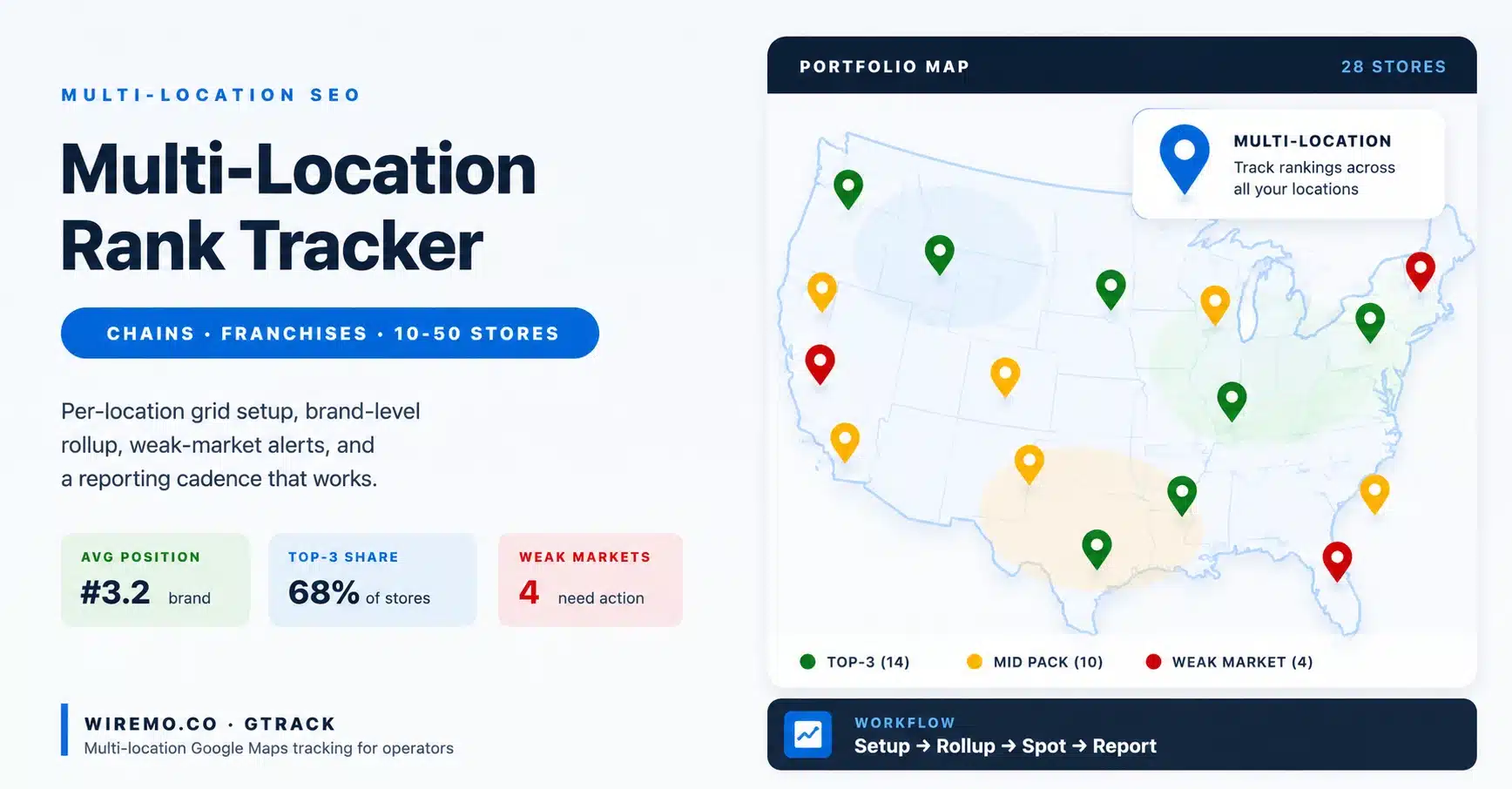
The Four Brand-Level KPIs Every Multi-Location Rank Tracker Should Show
Out of the dozens of metrics a tracker can show, four matter at the brand level:
- Average pack position. Weighted across stores and keywords. Plain to read on a single-line chart.
- Top-3 share. The percentage of tracked store-keyword pairs sitting in the local pack. The cleanest single trust signal a board can see.
- Weak-market count. Number of markets where the average position is below the brand baseline. This is the action list.
- Net week-over-week movement. Brand-level delta in position. Tells leadership whether the past week was up or down without needing details.
Anything beyond those four belongs in the drill-down. Not the rollup.
How the Dashboard Should Be Structured
Three views, in order:
- Brand overview. Four KPIs above the fold. One line chart. One weak-market alert list.
- Market view. Each city or metro has a card, ranked by health score. Click into a card to see the locations inside that market.
- Location view. The familiar single-store tracker page, but reached via the rollup, not as the front door.
When the front door is the brand overview, ops teams scan it in 60 seconds and know where to look. When the front door is the location page, they spend their morning clicking around.
| Level | Metric | Who reads it |
|---|---|---|
| Brand | Average pack position, top-3 share, weak-market count, net WoW | CMO, ops director, board |
| Market | Health score, position spread, competitor presence | Regional manager, local SEO lead |
| Location | Grid scores, keyword detail, review pattern | Store manager, on-the-ground operator |
Pair the rank tracker with a Google profile management tool for posts, photos, replies, and Q&A across every location, and the weekly review tightens up fast. The rank data sits in one window. The profile actions sit in another. The team stops jumping between tabs every time a market needs a push.
Locations with Local Rank Data
The whole point of running a multi-location rank tracker is to surface the markets that need help. Without an apples-to-apples comparison, a market that looks weak might just be in a tougher competitive set. And a market that looks strong might just be cruising on low competition.
The Weak-Market Signal Pattern
A real weak-market signal looks like three things together, not one in isolation:
- The average pack position in that market is two positions worse than the brand baseline
- The gap has held for at least three consecutive scans
- At least one direct competitor has gained a position in the same market over the same window
One scan with a position drop is not a signal. It is noise. Three scans with a consistent drop plus competitor movement is the signal. Tools that alert on a single scan create alert fatigue and get muted.
One store dropping two positions on one keyword is rarely worth a meeting. Pull the data, note the date, and wait for the next scan. Local pack volatility is normal. Acting on a single move trains the team to chase noise.
A whole market dropping two positions across three scans is a strategic problem. Look at the competitor set, the local GBP edits, the reviews, and the local content. One of those three usually explains it.
Apples-to-Apples Location Comparison
Comparing two stores at the brand level is only useful if the comparison is fair. Two stores in different markets, with different competitor density, different population, and different category mix, are not directly comparable.
Three filters make the comparison fair:
- Same market tier. Compare urban flagship to urban flagship, suburban to suburban.
- Same competitor density. Tag each store with how many direct competitors sit within the grid radius.
- Same keyword set. Pull only keywords that both stores actually track, and that match local intent in both places.
When the filter is applied, the comparison goes from "store A is worse" to "store A is two positions behind store B for the same keyword set in the same competitor density". One sentence. Specific. Easy to act on.
For spot checks outside the tracker, a geo-targeted SERP checker shows what a customer in a specific market actually sees on Google, with the location parameter baked into the URL. Useful when a manager swears their store should be visible, but the rank tracker shows otherwise.
Multi-Location SEO Reporting Cadence
A multi-location rank tracker is only valuable if someone reads the output. The wrong cadence either floods the team with reports nobody opens or starves leadership of signal until something has already broken. The cadence below is the one most chains and franchises settle on after a few quarters of trial and error.
Daily: Anomaly Alerts Only
The daily report should not be a report. It should be a short alert list, sent only when an anomaly fires. A real anomaly is a position drop of three or more for a flagship store, a competitor moving into the local pack, or a scan failure. Most days, the alert list is empty. That is the correct outcome.
Weekly: The Snapshot
The weekly snapshot is the workhorse. One screen. Four brand KPIs at the top, the weak-market list in the middle, and the top three movers (up and down) at the bottom. Five minutes to read. Ten minutes to act on.
Monthly: The Board Report
The monthly report is for leadership. It tracks brand-level trends, weak-market resolution, and competitor share over time. One PDF. Three pages. Same shape every month, so leadership can read it without a primer.
| Cadence | Format | Reader | Decision triggered |
|---|---|---|---|
| Daily | Anomaly alert email or Slack message | Local SEO lead, store manager | Investigate today if fired |
| Weekly | One-screen snapshot, four KPIs + weak-market list + top movers | Ops director, regional managers | Plan the week's actions |
| Monthly | 3-page PDF, brand trend + market scorecard + competitor share | CMO, board, franchise leadership | Budget and strategy review |
The shape of the reports matters more than the content. Same shape every cadence, every week, every month. Readers learn the pattern and process it in seconds. Change the shape every cycle, and the team has to re-learn the report instead of reading it.
Most multi-location rank tracker programs do not fail because the tool is bad. They fail because the team falls into the same three patterns at every scale. The card below names the mistakes so they can be avoided from day one.
Frequently Asked Questions
How many locations before a multi-location rank tracker is worth it?
Five is the practical threshold. Below five, a good single-location tool plus a shared spreadsheet works. From five upward, the manual rollup starts breaking down, and a proper multi-location rank tracker pays for itself fast in time saved, fewer missed drops, and cleaner ops reporting.
How is a multi-location rank tracker different from an agency tracker?
An agency tracker organises data by client, with each client running one or more locations under separate access. A multi-location rank tracker organises data by brand, with all locations belonging to the same operator and rolling up to one brand view. Both can scan the same Google Maps grids, but the reporting layer is different.
Should every location run the same keyword list?
Not exactly. Start with a brand-core keyword set every store tracks (3 to 5 terms), then add local intent terms per market on top. The brand-core set is what makes brand-level rollup possible. The local set is what makes each store dashboard useful to the local operator.
How often should chains and franchises scan Google Maps rankings?
Daily for flagship stores in competitive markets. Weekly for standard urban and suburban stores. Bi-weekly for rural or low-volume locations. Daily across the whole portfolio, the budget for noise burns.
Can a single tool handle both rank tracking and Google Business Profile management?
Not always, and that is fine. GTrack and GLocal are two separate apps with separate billing, but a brand can run both side by side while keeping the weekly review in a single workflow. The point is not one tool. The point is one workflow.
What is the biggest mistake multi-location brands make with rank tracking?
Treating it as a vanity exercise. The brand-level chart goes on the slide deck, but nobody acts on the weak-market list. The fix is to put the weak-market list at the top of the weekly snapshot and tie each weak market to a named owner with a deadline.