The Google My Business Customer Service Number USA you have been searching for does not exist as a public hotline, and here is the truth most websites will not tell you upfront. Google does not publish a public dial-in customer service phone number for Google Business Profile support. There is no "1-800" hotline you can call to immediately reach a Google Business support agent. Any website that advertises a dedicated Google My Business Customer Service Number USA helpline is almost always a third-party service or, in many cases, an outright scam designed to phish for your login credentials or charge you for "verification" services Google already offers for free.
TL;DR - What you'll learn:
- Why does Google not publish a public Google My Business customer service number for the USA?
- The 5 real Google support channels that actually work, with response times for each.
- How to use the callback feature so a verified Google agent calls you instead.
- How to spot and avoid the most common fake "GMB support" phone-number scams.
- The exact information to have ready before you open a Google Business support ticket.
So how do you actually get help? Google routes every Business Profile support request through its official Contact Us page at support.google.com/business/gethelp. From there, the path you take depends on your issue, but every legitimate channel runs through that page or through the Google Business Profile dashboard inside your account. Below is the full map of what works, what does not, and how to use each channel correctly.
GMB Customer Service Number
The first thing to accept is that the Google My Business Customer Service Number USA does not exist as a public, dial-in line because Google made a deliberate product decision years ago to handle Business Profile support through online channels rather than a phone hotline. The reasoning is volume. Google Business Profile has over 200 million active business listings worldwide. A phone hotline at that scale would either need thousands of agents staffed 24/7 across every language Google operates in, or it would mean wait times measured in hours rather than minutes. Google chose to invest in self-serve tooling, AI-assisted triage, and asynchronous channels (chat, email, community) instead.
For a small-business owner who needs help fast, this can feel frustrating. The honest take is that the asynchronous channels work better than they seem, and the callback option (which we will get to) is the closest thing to a real phone line, and the closest thing to a Google My Business Customer Service Number USA that actually works. The trick is knowing which channel to pick for which kind of problem. Pick the wrong channel, and you sit in a queue. Pick the right one, and most issues are resolved in 24 to 48 hours.
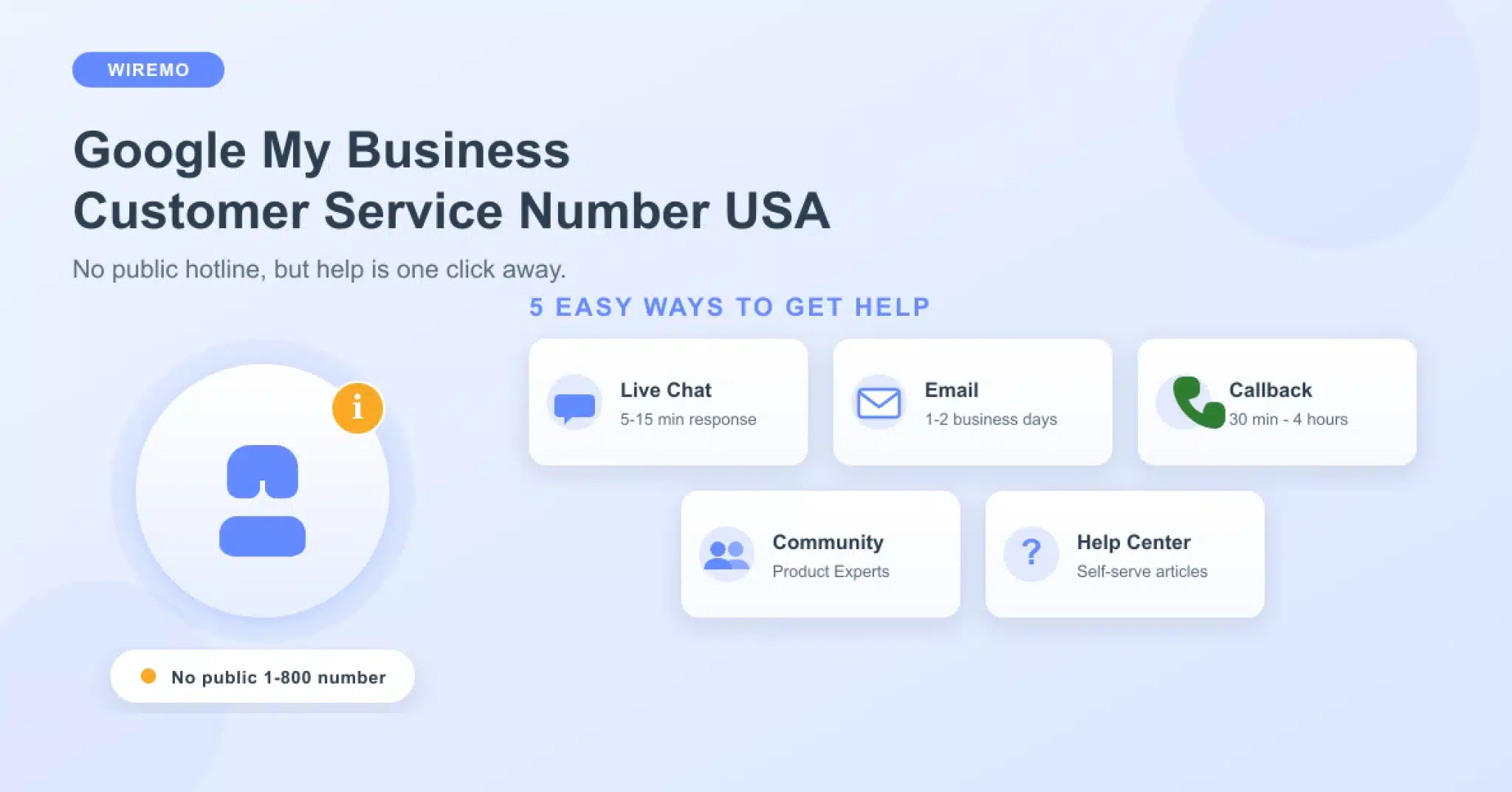
| Channel | Typical response time | Best for |
|---|---|---|
| Help Center articles | Instant | Common how-to questions, policy lookups |
| Live chat | 5-15 minutes | Account-specific issues, quick fixes |
| Email support | 1-2 business days | Complex issues, documentation needed |
| Callback request | 30 min - 4 hours | Verification, suspension, ownership |
| Community forum | Hours to days | Edge cases, Product Expert insight |
Official GMB Support Channels
Five channels make up the complete Google Business Profile support stack. Each has its own niche. Using them in the right order, starting with the cheapest channel that fits the problem, gets you a resolution faster than escalating to chat or callback for every issue.
Help Center articles (instant)
The Google Business Profile Help Center at support.google.com/business/gethelp hosts the official documentation for every common task. Verification steps, profile edits, photo policies, review removal rules, post guidelines, hours updates, attribute changes, and NAP corrections. Most "how do I" questions have a step-by-step Help Center article that resolves the issue in two minutes. Before opening a chat or email ticket, search the Help Center first. The article often answers the question and avoids the queue entirely.
Live chat (5 to 15 minutes)
Live chat is the fastest synchronous channel. To reach it, sign in to the Google account that owns your Business Profile, open the Contact Us page, select your issue category, and the chat option appears for eligible issue types. Not every issue qualifies. Issues with a clear self-serve resolution route you back to the Help Center first. Account-specific issues like profile suspensions, ownership disputes, or unusual policy violations open the chat channel directly. Wait times are usually under 15 minutes during US business hours.
Email support (1 to 2 business days)
Email is the default for issues that require documentation. Verification appeals, suspension reinstatement requests, trademark disputes, and ownership transfer escalations. Google responds via email within 1 to 2 business days, often faster. The advantage of email is a written record. Keep every email Google sends in a folder so you can reference the case number and the support agent's recommendations later.
Callback request (the closest thing to a phone line)
For certain issue types (most often verification, suspension, and ownership), Google offers a callback option. You enter your phone number on the Contact Us page, Google queues your request, and a verified Google support agent calls you back from a legitimate Google number, usually within 30 minutes to 4 hours during business hours. This is the closest thing to a phone hotline that exists, and it works in your favour because the agent calls you when they are ready to handle your case, rather than you waiting in a queue.
Community forum (hours to days)
The Google Business Profile Community at support.google.com/business/community is staffed by Product Experts (volunteer power users) and occasional Googlers. It is the best channel for edge cases, policy interpretation, and unusual situations where you want a second opinion from someone who has seen the same problem before. Product Experts cannot perform account actions, but they can often diagnose what is wrong faster than a chat agent because they have seen the pattern a hundred times.
💡 INSIDER TIP
If your account uses Google Workspace, you can also escalate Google Business Profile issues through Workspace admin support, which has a faster SLA than consumer Google support. Worth knowing if your business email runs on Workspace.
GMB Phone Number Scams
Every week, business owners get tricked by fake "Google customer service" phone numbers. The pattern is consistent. The scammer either places ads on Google or Bing that rank above the real Help Center, or they call the business directly, claiming to be from Google. Either way, the goal is the same. Get the business owner to hand over their Google account credentials, pay for "verification" services Google offers for free, or sign up for SEO services that have nothing to do with Google Business Profile management.
The numbers to NOT trust include 1-844-491-9665, 1-866-237-0455, 1-855-836-1738, and any other number presented as a dedicated Google My Business Customer Service Number USA or Google Business Profile helpline. These are not Google numbers. Google's actual corporate switchboard is 650-253-0000, but it will not connect you to Business Profile support. The operator will redirect you to the online Help Center every time.
⛔ STOP
Google will never ask for your Google account password over the phone. If a caller claiming to be from Google asks for your login, your verification code, or payment for any kind of "premium" listing service, hang up and report the number at support.google.com/business/gethelp. Legitimate Google support never asks for credentials.
How to verify a callback is real
If you requested a callback through the Contact Us page and Google rings you back, the caller will reference the case number you generated, will not ask for your password, and will only ask for the business name and the email address tied to the profile so they can pull the case file. A real Google agent will direct any sensitive actions back to your dashboard rather than asking you to make changes over the phone. If anything about the call feels off, ask the agent for the case number, hang up, and verify the case exists in your Google Business Profile dashboard before continuing.
GMB Phone Number Callback
The callback feature is underused because most business owners do not know it exists. It is the single best way to get a real human on the phone about a Google Business Profile issue. Here is the exact path.
Step-by-step: how to request a callback
- Sign in to the Google account that owns or manages the Business Profile.
- Open support.google.com/business/gethelp.
- Pick the business listing the issue applies to.
- Choose the issue category (verification, suspension, ownership, profile edits, etc.). Not every category exposes the callback option.
- If a callback is available for that category, you will see "Get a call from us" or "Request a callback" as one of the contact options. Click it.
- Enter the phone number you want Google to call. Use a number you will answer; an unanswered callback usually closes the ticket and forces a fresh request.
- Optionally pick a time window during US business hours. The default is "as soon as possible."
- Submit. Google queues the request, and a verified agent calls back, usually within 30 minutes to 4 hours.
What to have ready before the call
Have these details open in a tab when the call lands so the agent does not have to spend time on basics:
- The exact business name and address as it appears on the profile
- The Google account email that owns the profile
- The case number from the support ticket (it appears on the confirmation screen after you submit)
- Any error messages or screenshots from the dashboard
- The verification status of the listing if the issue is verification-related
- The dates of any recent profile edits if the issue is suspension-related
Having the case number alone often cuts call time in half. Google's agents pull the file by case number, not by business name.
GMB Customer Service Tips
A handful of habits get faster, better responses from Google Business Profile support across every channel.
Pick the right channel for the right problem. Self-serve issues go to the Help Center. Quick account fixes go to chat, documentation issues go to email. Anything involving verification, suspension, ownership, or a regulatory dispute goes to callback. Edge cases and policy interpretation go to the community forum. Routing the right issue to the right channel cuts response time in half.
Write a clean issue description. Lead with the action you took, the result you saw, and the expected outcome. "I edited the business hours on 12 May. The listing was suspended within 24 hours. The hours change was accurate and matches the hours posted on the storefront." That sentence gives the agent everything they need. Long emotional descriptions, vague summaries, and multiple unrelated issues in the same ticket slow the agent down and increase the round-trip count.
Keep one ticket per issue. Open one ticket per distinct issue. Mixing a verification problem with a review-removal request in the same ticket means the agent can only resolve one half and bounces the other half to a different team. Two tickets resolve in parallel and finish faster than one tangled ticket.
Manage your profile actively, so support is the exception, not the rule. Most support tickets exist because something on the profile drifted (hours, categories, photos, posts) and Google's automation caught it. A Google Business Profile campaign manager like GLocal handles the ongoing posts, photo uploads, and review replies that keep the profile healthy. The fewer flags the automation fires, the fewer support tickets you need to open.
💡 INSIDER TIP
Run a quick health check on the profile before opening any support ticket. A free Google Business Profile audit tool surfaces the most common reasons Google flags a listing, so you can fix the root cause first and avoid an unnecessary support round-trip.
GMB Support Quick Reference
A quick decision table you can bookmark. Match your issue to the column on the left and use the suggested channel on the right.
| Issue type | Best channel | Typical resolution time |
|---|---|---|
| Profile suspended | Callback request | 3-7 business days for reinstatement |
| Verification stuck or rejected | Callback request | 1-3 business days |
| Ownership dispute | Email + callback | 5-14 business days |
| Review removal request | In-product flag, then email if rejected | 3-10 business days |
| Duplicate listing | Live chat or email | 2-5 business days |
| Profile edit not saving | Help Center, then live chat | Same day |
| Hours or category change rejected | Live chat | 1-3 business days |
| Photo or post removed | Help Center policy lookup | Self-resolve via policy compliance |
| General "how do I" question | Help Center or community forum | Instant |
For multi-location brands and agencies handling many profiles, layering ongoing rank monitoring on top of the support workflow catches drops before they need a support ticket. A Google Maps rank tool like GTrack flags ranking shifts within days, which is often the first signal that something on the profile has changed and needs attention from Google Business support. For verification specifics, Google's verification documentation covers every method (video, postcard, phone, email, search console) so you can pick the path with the fastest turnaround for your business type.
Frequently Asked Questions
Is there a Google My Business Customer Service Number USA?
No. The Google My Business Customer Service Number USA does not exist as a public, dial-in line. Google does not publish a phone number for Google Business Profile support in the USA. Any "1-800" number advertised online as a Google My Business helpline is a third-party service or a scam. The only legitimate phone contact is the callback feature you request through support.google.com/business/gethelp, where a verified Google agent calls you back.
What is the difference between Google My Business and Google Business Profile?
Google rebranded "Google My Business" to "Google Business Profile" in late 2021. The service is the same; only the name has changed. Both terms still appear in search and across support pages because the rebrand is gradual. When you see "GMB" or "GBP" in articles, they refer to the same product.
How long does Google take to respond to a Business Profile support request?
It depends on the channel. Live chat connects within 5 to 15 minutes during US business hours. Email responses arrive within 1 to 2 business days. Callbacks typically come within 30 minutes to 4 hours of the request. Suspension and verification cases can take 3 to 7 business days to fully resolve, even after the initial response.
Can I escalate a Google Business Profile issue if support does not resolve it?
Yes. If a chat or email response does not solve the issue, reply to the same case thread and ask to escalate. Reference the case number. For verification, suspension, and ownership disputes, the Google Business Profile Community at support.google.com/business/community has Product Experts who can advise on the right escalation path. Persistent issues sometimes also get attention through the Twitter handle @GoogleMyBiz, but the official route is the Contact Us page.
What information do I need to open a support ticket?
The business name and address exactly as they appear on the profile, the Google account email that owns or manages the profile, a clear one-paragraph description of the issue (what you did, what happened, what you expected), any error messages or screenshots, and the case number once the ticket is created. Having this ready when chat or callback opens cuts resolution time significantly.
Are third-party "Google My Business support" services legitimate?
A handful of agencies legitimately help businesses manage their Google Business Profile (posts, photo uploads, review replies, citation cleanup), and that work is real. But any third-party that claims to provide "Google My Business support" as a direct line to Google is not what they appear to be. Google does not authorise third-party support providers to act as a customer service hotline. If a service charges to "verify" your listing or to "speak directly to Google" on your behalf, it is a scam.