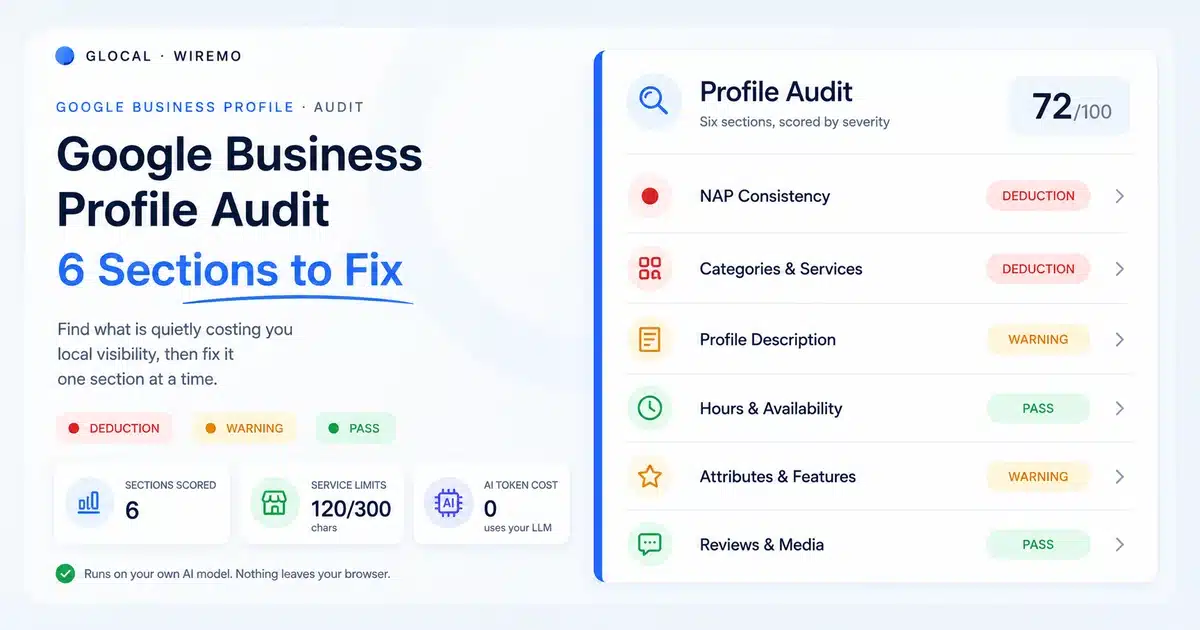
Want a score for your own profile, not only a checklist? The free Google Business Profile audit runs 32 checks across six areas plus a 29-rule Google policy scan. Search for your business, sign in with Google, and get a graded report with fixes in about a minute. The guide below explains how to check each part by hand.
What you'll learn
- The six sections every Google Business Profile audit should cover, in priority order
- Why is inconsistent name, address, and phone data quietly caps your local ranking
- The exact character limits Google enforces on services, and how to use them
- What to fix in your description, hours, and attributes before anything else
- How to run the whole audit in minutes instead of guessing what is broken
Most local businesses never audit their Google Business Profile. They claim it, fill in the basics, and move on. Then the rankings stall, the calls slow down, and nobody can say why. The profile looks fine at a glance, so it gets blamed last.
Here is the uncomfortable part. A profile that looks complete and a profile that ranks are two different things. Google scores your profile on signals most owners never check: whether your business name matches your other listings, whether your categories are the right ones, and whether your services use the words customers actually search. A Google Business Profile audit is how you find those gaps before they cost you the top of the map.
This guide walks through the six sections that matter, in the order you should fix them. Start at the top. The first two carry the most weight, and the last four compound once the foundation is right.
Google Business Profile Audit
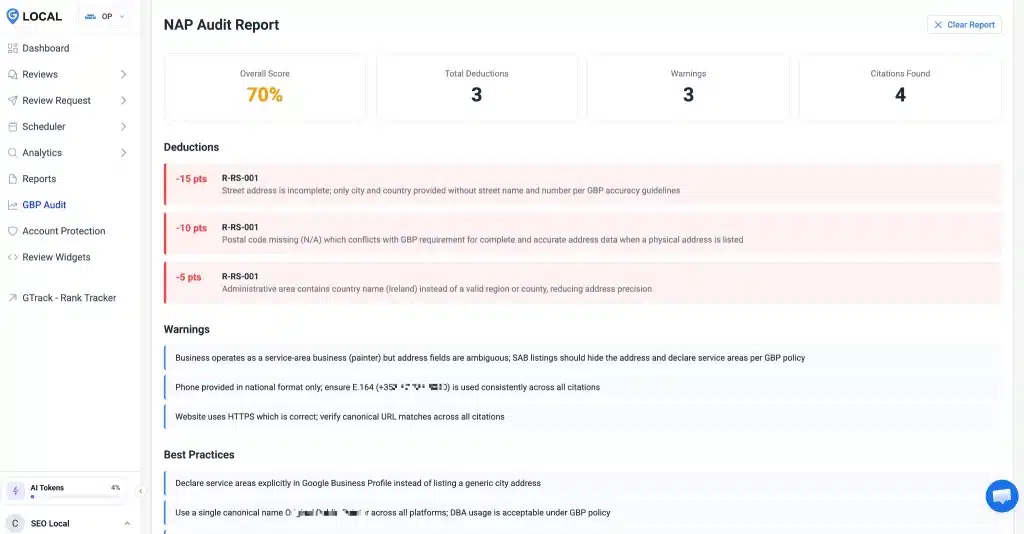
An audit is not a vibe check. It is a structured pass through every part of your profile that Google reads, scored against what a strong listing in your category looks like. Done well, it returns three things: deductions for what is broken, warnings for what is weak, and best practices for what to do next.
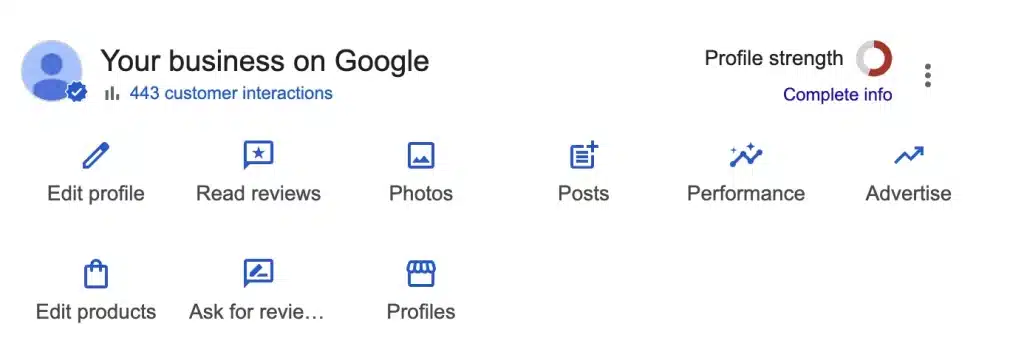
You can run this by hand, section by section, with the checklist below. Or you can let the software do the structured pass for you. A GBP marketing console like GLocal runs the six-section audit using your own AI model, copies the prompt out, and pastes the results back in, so the analysis costs you nothing in tokens and never leaves your browser. If you want a fast first read before you commit to anything, a GBP health scan will surface the obvious deductions in a couple of minutes.
However you run it, the report breaks into three severity levels. Treat them in order.
| Severity | What it means | Example |
|---|---|---|
| Deduction | Broken or missing, it actively costs ranking | Wrong primary category, mismatched phone number |
| Warning | Present but weak, leaving visibility on the table | Thin description, no services listed, stale photos |
| Best practice | The fix that moves you ahead of a complete-but-lazy competitor | Keyword-rich services, weekly posts, fresh media |
The six sections below follow that logic. Clear the deductions first, because a single wrong category or a mismatched phone number can hold down everything else you do.
The six sections, in order
- Name, address, and phone consistency
- Categories and services
- Profile description
- Hours and availability
- Attributes and features
- Reviews and media
Audit NAP Consistency First
NAP stands for name, address, and phone number. It is the most boring part of your profile and the one that does the most quiet damage. Google cross-checks the name, address, and phone number on your profile against every other place your business appears online. When those details disagree, Google trusts your listing less, and a listing it trusts less ranks lower.
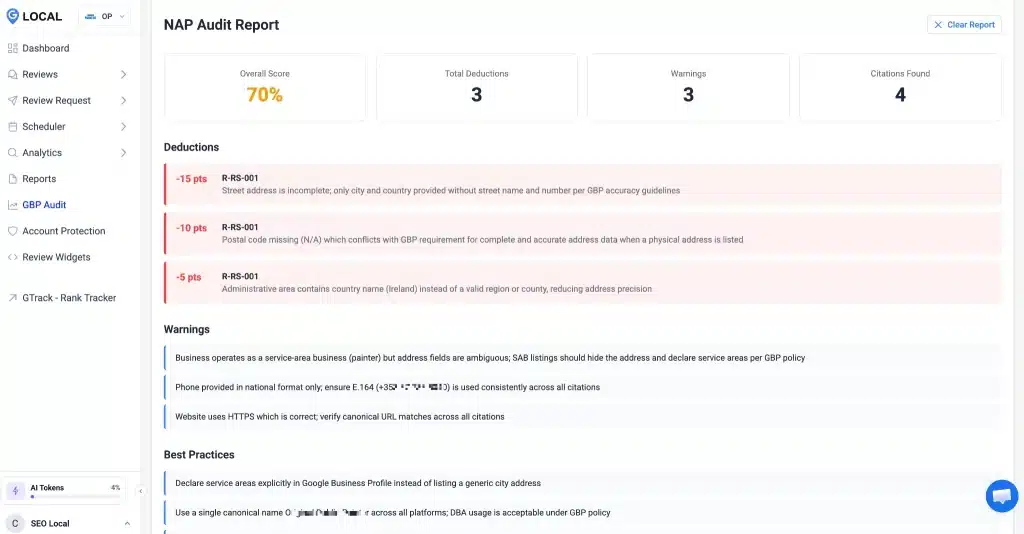
The classic failures are small. Your profile says "Ave," your website says "Avenue." One listing has the old suite number. A tracking phone number appears on the profile, while the real line appears everywhere else. None of these feels like a problem. All of them chip at the consistency signal that local ranking leans on.
Critical: never keyword-stuff your name
Your business name on the profile must be your real-world name, nothing more. Adding "Best Plumber Chicago" to a name that is really "Smith Plumbing" is a direct policy violation, and it is one of the fastest ways to get a profile suspended. Fix it before it gets flagged.
Run the check this way. Open your profile, your website, and two or three of your biggest listings side by side. Confirm the name is identical, the address is formatted the same way down to the abbreviation, and the phone number matches the digits. Google's own guidance on representing your business is worth reading once so you can set this up the way the system expects; you can find it in Google's business information guidelines.
Fix the mismatches at the source, then move on. This section rarely needs touching again once it is right, which is exactly why it pays to get it right first.
Fix Categories And Services
If NAP is the foundation, categories are the steering wheel. Your primary category tells Google what searches you should appear for at all. Pick "Restaurant" when you are really a "Barbecue Restaurant" and you compete in the wrong, broader pool while specialists outrank you for the exact terms your customers type.
Set one specific primary category, then add secondary categories only for services you genuinely offer. Do not pad the list. Each extra category dilutes focus, and an irrelevant one can pull you into searches you will never win. When you are unsure which exists, Google maintains the full set, and the rules are laid out in Google's category guidelines.
Services are where most profiles leave the easiest wins sitting untouched. Each service is a small block of text Google can match against a search, and each one has hard limits. Use them fully.
| Field | Limit | How to use it |
|---|---|---|
| Service name | 120 characters | Lead with the exact term a customer searches |
| Service description | 300 characters | Add the problem you solve and the area you cover |
Write each service the way a customer would search for it, not the way your internal pricing sheet names it. "Emergency Drain Cleaning" beats "Service Call Tier 2" every time. If staring at an empty services list stalls you, GLocal's audit can generate three ready-to-edit service entries inside the limits, and you regenerate until they sound like you.
Service descriptions failed more often than any other check in our study of 286 Google Business Profiles: 160 (56%) listed no services or described fewer than half of them in 40 or more characters.
Good practice: one search term per service
Give every service its own entry rather than cramming five offerings into one. Separate entries give Google more specific terms to match, and they read more clearly to the customer scanning your profile on a phone.
Rewrite Your Profile Description
The description does not carry the ranking weight categories that they do, but it is the first thing a human reads when they are deciding whether to call you or the next result. Treat it as sales copy with a job, not a corporate boilerplate paragraph.
Most descriptions fail in one of two ways. They are empty, which wastes the slot entirely. Or they are a wall of keywords that reads as if a robot wrote it, which earns nothing and turns off the reader. The fix is the middle path: a clear, specific paragraph that names what you do, who you serve, and where, in plain language a real person would use.
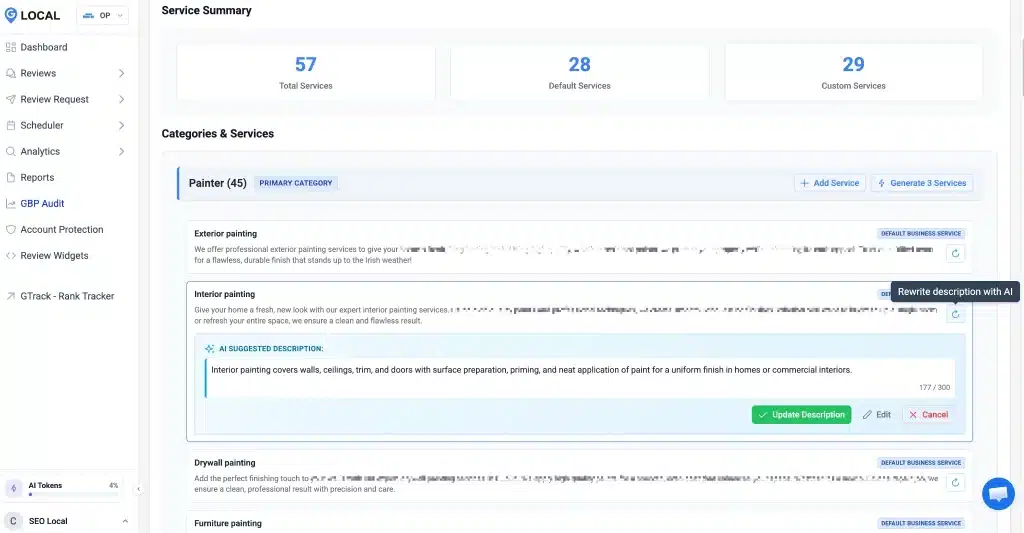
Open strong. The first sentence is what shows before the reader taps to expand, so lead with the single most useful thing about your business. Name your main service and your service area in that opening line, then use the rest to cover what makes you the obvious local choice. Skip the awards nobody recognizes and the founding-year trivia. Answer the question the customer is actually asking, which is whether you can solve their problem nearby and soon.
Audit Hours And Availability
Wrong hours are the fastest way to turn a hard-won ranking into a one-star surprise. A customer finds you, drives over, and meets a locked door at a time your profile swore you were open. That is a lost sale and often a bad review, both from a field you could have fixed in thirty seconds.
Check three things here. Your regular weekly hours are current. Your special hours are set for upcoming holidays, because a profile that still shows normal hours on a public holiday is a trust problem waiting to happen. And any secondary hours, like a kitchen that closes before the dining room, reflect how you actually run.
One practical note. Inside an audit tool, hours are usually shown for review but edited on Google directly, so use the audit to spot the gap and the profile itself to close it. The point of the section is catching the holiday you forgot, not editing in two places.
Check Attributes And Features
Attributes are the small tags that tell customers and Google how your business operates: wheelchair accessible, free Wi-Fi, outdoor seating, women-owned, and accepts walk-ins. They feel minor. They are not. Attributes feed the filters customers use to narrow a map search, and they can be the deciding detail when two listings otherwise look the same.
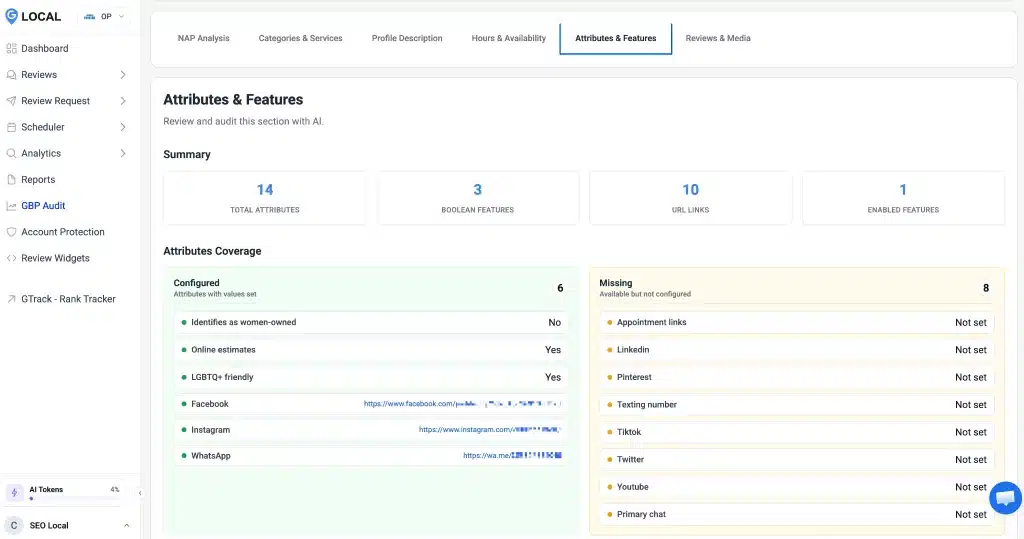
The audit job here is coverage. Most profiles fill in a handful of attributes and leave the rest blank, which means they vanish from every search a customer filters by an attribute they never set. Go through the full list for your category and switch on everything that is genuinely true. Do not invent any. A false "wheelchair accessible" is a real-world betrayal, not a marketing hack.
Like hours, attributes are often view-only inside an audit and edited on the profile itself. Use the audit to see what is missing, then turn them on at the source. This section takes ten minutes once and rarely needs revisiting.
Audit Reviews And Media
The first five sections get your profile correct. This one keeps it alive. Google rewards profiles that show ongoing signs of a real, active business, and the two loudest signals are reviews and fresh media.
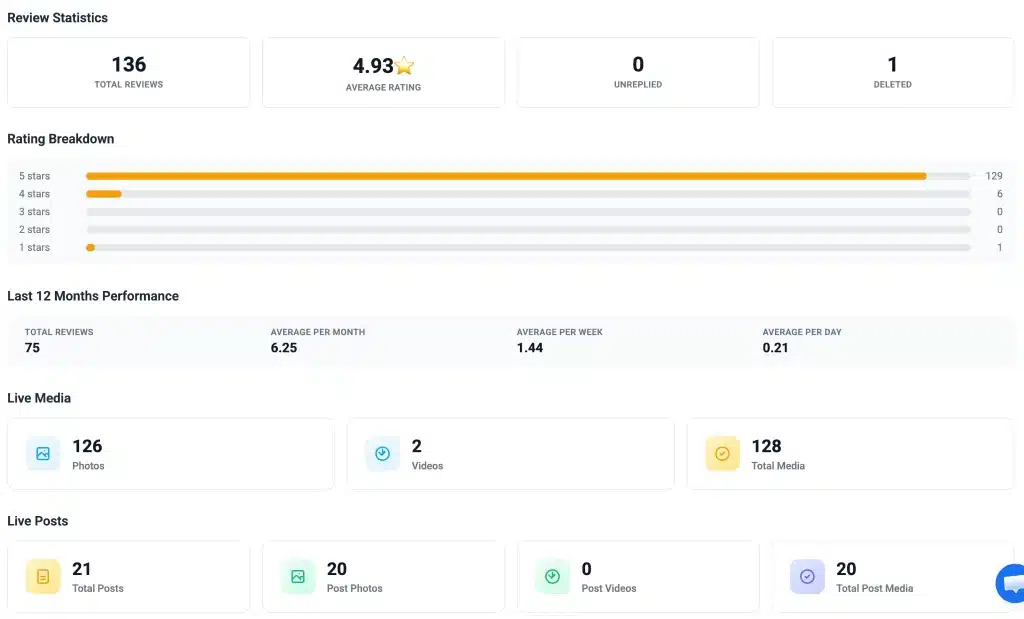
On reviews, the audit checks more than the star number. It looks at whether reviews are recent, whether they are answered, and whether new ones arrive steadily rather than in one ancient burst. A reply to every review, good or bad, tells Google and the next customer that someone is paying attention. In the media, it checks that photos are recent and plentiful, because a profile whose newest photo is two years old reads as neglected.
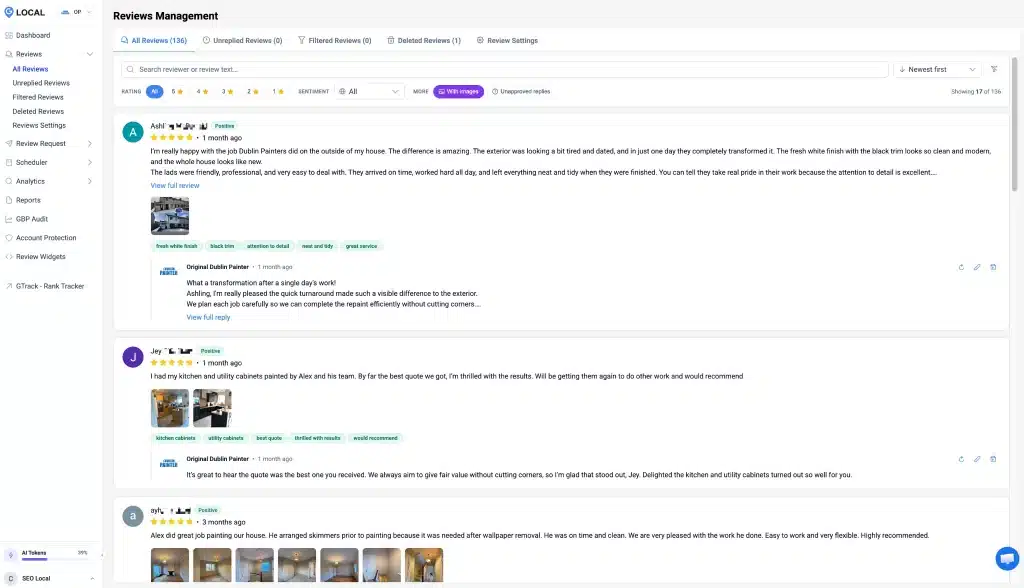
This is the section you never finish, and that is the point. Set a routine: reply to every new review within a day or two, and add fresh photos every few weeks so the profile never goes quiet. The audit will flag the gap; the routine is what closes it for good.
Once the profile itself is clean, audit the website behind it too, since the two reinforce each other in local search. A quick site SEO check catches the on-page issues a profile audit cannot see. And once the fixes are live, watch whether they actually move you. A Google Maps ranking software like GTrack shows your real position across the map grid, so you can prove the audit paid off instead of hoping it did.
You have the checklist. Now get the score. The free Google Business Profile audit scores your name, categories, services, hours, attributes, reviews, photos and posts in 32 checks, and flags the Google policy problems that get edits rejected or profiles suspended. Sign in with Google (the audit only reads the profile) and get a graded report in about a minute.
Google Business Profile Audit Questions
How often should I audit my profile?
Run a full audit every quarter, and a quick reviews-and-media check monthly. The foundation sections, name and address, and categories rarely change once correct. The living sections, reviews, and photos drift fast and need a more frequent look.
How long does a Google Business Profile audit take?
A first manual pass through all six sections takes about an hour if your profile is mostly built. With a tool that runs the structured analysis for you, the read itself takes minutes, and the time goes into applying the fixes rather than hunting for them.
How do I audit my profile without a tool?
Open your profile next to your website and your biggest listings, then walk the six sections in order. Confirm the name, address, and phone match to the digit, check that your primary category is the most specific one, read the description as a customer would, and verify hours, attributes, and recent reviews. A simple checklist keeps the pass honest.
Which section matters most for ranking?
Categories carry the heaviest ranking weight because the primary category decides which searches you appear in at all. Name, address, and phone consistency comes a close second, since it governs how much Google trusts the listing. Fix those two before anything else.
What is NAP consistency, and why does it matter?
NAP is your name, address, and phone number, and consistency means they read identically everywhere your business appears online. Google compares your profile against those other sources, so small disagreements like "Ave" versus "Avenue" or an old suite number quietly weaken the trust signal local ranking depends on.
How many categories should I add?
Set one specific primary category, then add secondary categories only for services you truly offer. Two or three relevant secondaries cover most businesses. Padding the list with loosely related categories dilutes your focus and can pull you into searches you will never win.
Why is my complete profile still not ranking?
Complete and competitive are not the same thing. A profile can have every field filled and still lose on the wrong primary category, an inconsistent phone number, thin services, or stale reviews. An audit separates "looks finished" from "actually competes" and shows you which signal is holding you back.
How many photos should I add, and how often?
There is no magic number, but a profile with a few old photos reads as neglected. Add a handful of fresh, real photos every few weeks so the profile keeps showing signs of an active business. Recency matters more than volume here.
Should I reply to every review?
Yes, the good ones and the bad ones. A reply tells Google and the next customer that someone is paying attention, and it turns a negative review into a chance to show how you handle problems. Aim to respond within a day or two, while the review is still fresh.
Can a bad profile get my listing suspended?
Some issues can, yes. Keyword-stuffing your business name, listing a fake address, or claiming attributes you do not offer are the common triggers. A clean audit is also the cheapest insurance against suspension, because it catches those violations before Google does.
A Google Business Profile audit is not a one-time project you finish and forget. It is a short, repeatable pass that keeps the profile honest and the rankings earned. Clear the deductions, sharpen the warnings, and the best practices compound from there. Start with the first two sections today, and you will likely move the needle before you reach the sixth.