What you'll learn
- Where to find Google Business Profile Insights and how far back the data goes
- The customer action metrics that tell you whether the profile drives real business
- How to read the search keywords people use to find you, and which are growing
- What the words inside your reviews reveal about demand and reputation
- How to turn the numbers into one or two decisions a month, not a spreadsheet habit
Your Google Business Profile is quietly logging almost everything that happens on it. Every call, every tap for directions, every search term that surfaced your listing, all recorded. Most owners never look. They check the star rating, glance at the review count, and close the tab.
That is a wasted asset. The data sitting in your profile answers the questions you actually care about: where customers come from, what they search to find you, and whether your last change moved anything. Google Business Profile Insights is the report that holds those answers, and reading it well takes about ten minutes a month.
This guide walks through the six metrics worth your attention, what each one means, and the one decision each should drive. Skip the vanity numbers. Focus on the handful that change how you spend your time.
Google Business Profile Insights
Insights is the performance report attached to every profile. It pulls directly from how people find and interact with your listing on Google Search and Maps, then charts it over time. You reach it from the profile itself, or from a dashboard that pulls the same data through Google's API.
Two limits shape how you read it. First, the data runs back about 18 months, the maximum Google's API returns, so that you can compare this quarter to the same quarter last year, but no further. Second, it lags two to three days behind real time. A profile analytics console like GLocal pulls it all into one view with year-over-year comparisons and a CSV export per tab, which beats screenshotting the native report every month. For the official definitions of each metric, Google documents them in its guide to profile performance.
The report splits into three areas: what customers do, what they search, and what they say. Read together, those three views are what make Google Business Profile Insights more than a scoreboard, because each one points at a different lever you can actually pull. The next sections take each in turn.
Profile Performance Metrics
The first view is customer actions, the things people actually do after they find you. These are the closest thing your profile has to a conversion number, because each one is a person taking a step toward becoming a customer. In the Metrics tab, the Business Profile Interactions panel totals them at a glance. The profile below logged 132 interactions over three months, made up of 113 website clicks, 19 phone calls, and zero direction requests, each shown with its change against the previous period.
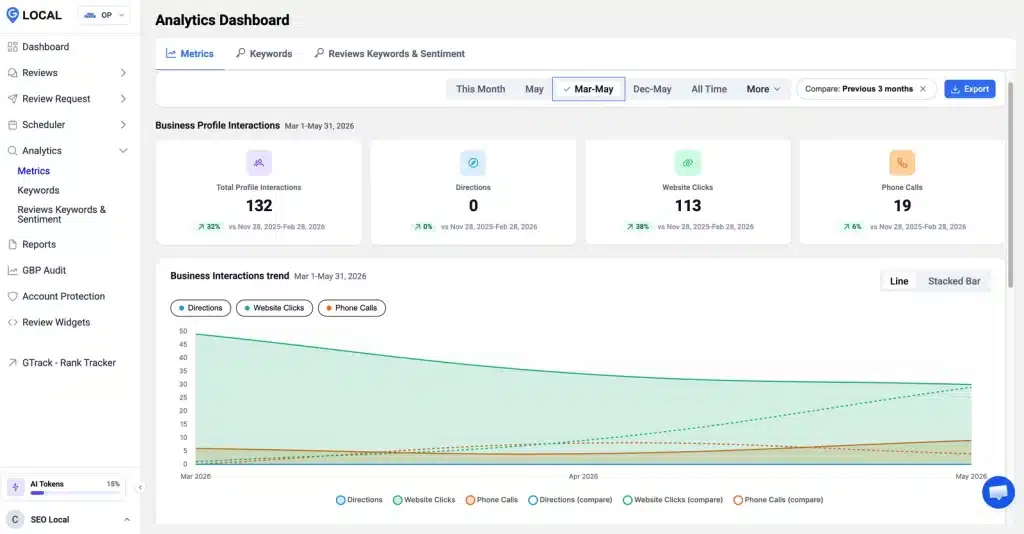
Read the mix, not just the total. This profile earns clicks and calls but no direction requests, which is normal for a business that travels to the customer rather than one people visit. The trend chart under the cards plots each action over time, with a switch between line and stacked bar so you can see whether one action is carrying the rest.
| Metric | What it means | What to watch for |
|---|---|---|
| Calls | Taps on your phone number | Spikes by day of week or hour, so you staff the phone |
| Directions | Requests for routes to your address | Where requests come from, which shows your real catchment |
| Website clicks | Visits sent to your site from the profile | Drops after a site change that may have broken the link |
| Bookings and menu open | Taps on a booking link or menu | Whether the feature earns its place on the profile |
Read these as trends, not single days. One quiet Tuesday means nothing. A steady three-month slide in website clicks means something changed, and it is worth finding out what.
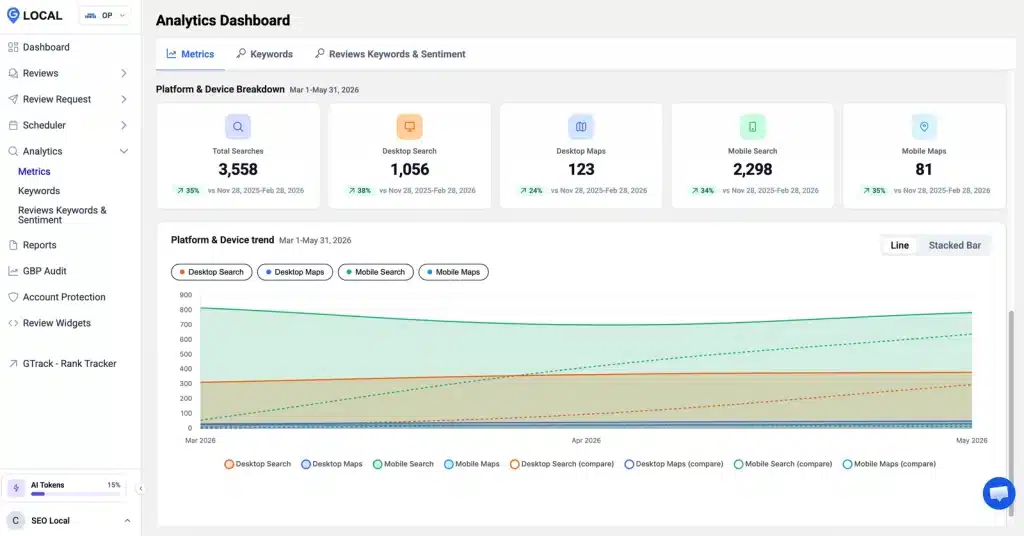
A second panel, Platform and Device Breakdown, shows where those people found you. In this profile, total searches reach 3,558, and the split is the story: 2,298 came from mobile search against 1,056 on desktop, with far fewer from Maps. That tells you most customers meet your profile on a phone, so your photos, business name, and the first line of your description have to land on a small screen first.
Critical: never react to a single day of data
Insights lags two to three days behind, and daily numbers swing for reasons that have nothing to do with you. Judge changes on a rolling window of weeks, compared against the same period last year. A one-day dip is noise, not a problem to solve.
Profile Search Keywords
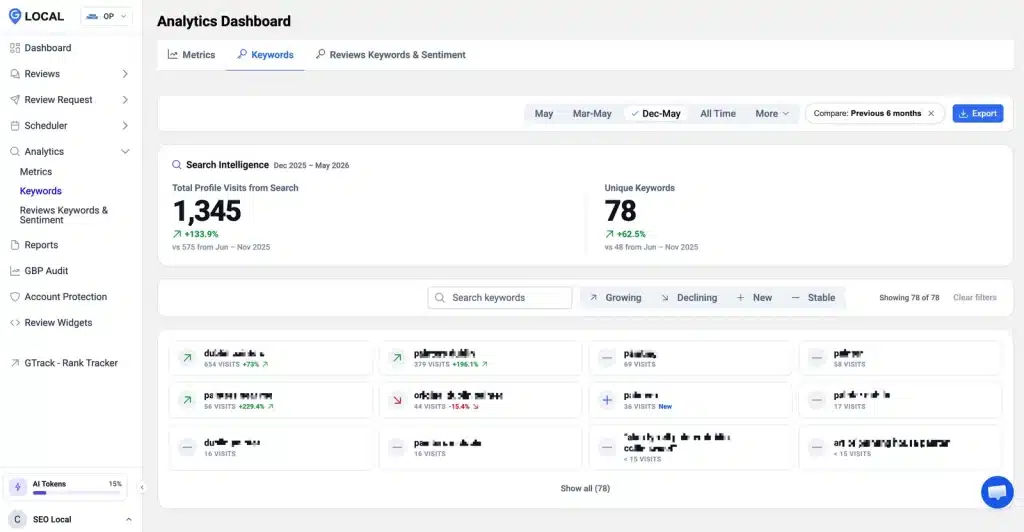
The keywords view is the most underused part of the whole report. Labelled Search Intelligence, it shows the actual terms people typed to reach you, a direct line into how customers describe what you sell. The profile below drew 1,345 profile visits from search across 78 unique keywords, up 133.9 percent on the prior six months, and you will often find people searching for something you never thought to mention.
Sort the terms with the Growing, Declining, New, and Stable filters. A growing or new term is a demand signal, a phrase worth adding to your services, your description, or a post. A declining term that used to bring you traffic is an early warning that a competitor is taking that ground. When a search term points to a service you offer but barely describe, feed it into a local SEO keyword finder to find the related phrases worth covering next.
Good practice: turn search terms into profile copy
If a phrase keeps surfacing your listing, it belongs in your services and description in the customer's own words. The keyword view hands you the exact language. Use it, instead of guessing what people type.
Reviews Keywords Sentiment
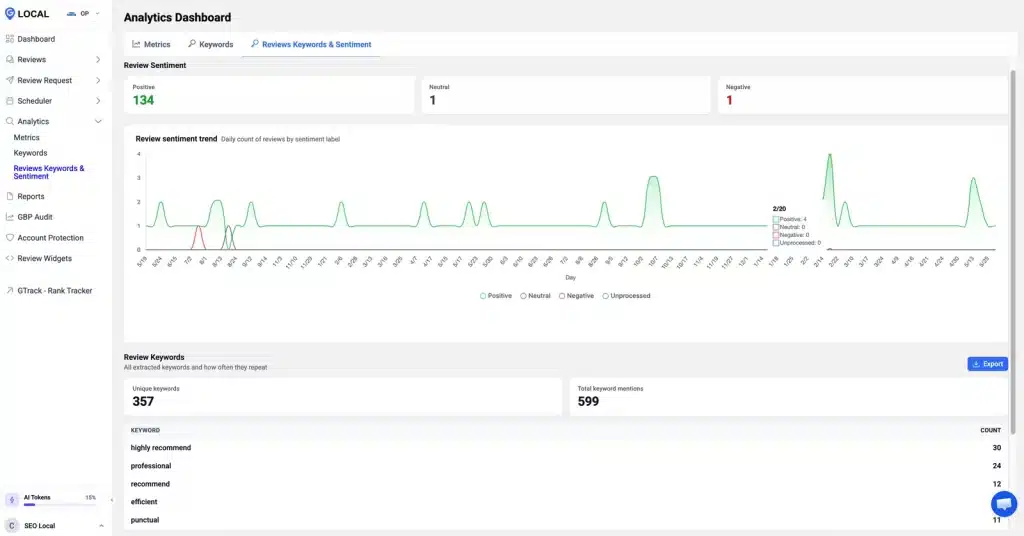
The third view reads your reviews in bulk. The Reviews Keywords and Sentiment tab sorts every review into Positive, Neutral, or Negative, then extracts the words customers use most. The profile below sits at 134 positive reviews against a single neutral and a single negative, with a daily trend line charting sentiment over time.
Below the sentiment sits the review keywords list: here 357 unique words across 599 mentions, led by "highly recommend" at 30, "professional" at 24, then "recommend", "efficient", and "punctual". That is a fast read on what people praise and what they complain about, in their own language.
This matters for two reasons. The praise words are your selling points, proven by customers rather than claimed by you, and they belong in your marketing. The complaint words are your operational to-do list. If "wait" or "parking" climbs in your review keywords, that is a problem the data found before it cost you a star.
There is a strategic layer here that most owners miss. The language inside your reviews is the same language people use to search, so the praise words that keep showing up are often the exact terms you want surfacing in the keywords view, too. When the words your customers write and the words they search start to line up, your profile is speaking the market's language, and Google Business Profile Insights makes that overlap visible in one place. Watch the sentiment trend as well as the frequency: a word that is climbing in volume but slipping in sentiment is a warning that something good is turning bad while you still have time to fix it.
Profile Insights Benchmarks
Raw numbers mean little without a baseline. The honest benchmark for any metric is your own history, which is exactly why the 18-month window matters. Compare this month to the same month last year, and the seasonal noise cancels out.
A few rules of thumb help. Customer actions should roughly track your impressions; if views climb but actions stay flat, the profile is getting found but not chosen, which points at photos, reviews, or the description. If a single action type collapses while the rest hold steady, suspect a broken link or a feature change, not a market shift. Steady, gentle growth across the board is the shape you want, and it usually follows steady work on the profile.
Resist the urge to compare your business profile insights against another company's. You do not see a competitor's raw numbers, and even if you did, a different category, location, and review base would make the comparison meaningless. The only fair scoreboard is your own past. Set a simple expectation for each metric, something like "calls should grow month over month against last year," then let the report tell you whether you are on track. When a number beats its own history three months running, whatever you changed is working, and you should do more of it.
Act On Profile Insights
Data you never act on is just a tidier way to feel busy. The point of the report is to drive one or two decisions a month, then to check whether they worked. Pull the numbers, find the one trend that stands out, make a change, and watch the next month for a response.
Build it into a short routine, so it actually happens. A workable Google Business Profile Insights review takes about fifteen minutes: open the report, compare each metric to the same month last year, and write down the single biggest mover, up or down. Then ask one question of it. If calls are down, is the number correct and easy to tap? If a search keyword is climbing, does your description use that exact phrase? If a praise word is rising in your reviews, are you featuring it in your posts? One observation, one change, one thing to recheck next month. That loop, repeated, is what separates owners who read Google Business Profile Insights from owners who act on it, and it compounds faster than any single big push.
Insights tells you what is happening on the profile, but it does not show where you actually rank on the map. For that, pair it with a local visibility scanner like GTrack, which shows your position across a grid of nearby points over time. Insights tells you customers are acting; the rank grid tells you whether they can find you in the first place. Read together, they turn a monthly glance into a real feedback loop.
The owners who win with Insights are not the ones who check it daily. They are the ones who read it once a month, act on the single clearest signal, and let the data, not a hunch, decide what to fix next.
Google Business Profile Insights Questions
Where do I find Google Business Profile Insights?
Open your profile while signed in to the Google account that manages it, then look for the performance or insights view on Search or Maps. You can also pull the same data into a management dashboard through Google's API, which keeps every profile's numbers in one place.
How far back does the data go?
About 18 months, which is the maximum Google's API returns. That window is enough to compare this quarter to the same quarter last year, so seasonal swings cancel out, but you cannot pull a multi-year history from the report itself.
Why do my Insights numbers lag?
Insights refreshes two to three days behind real time. That is normal. It is also why you should never judge performance on yesterday's figures or react to a single day. Read the trend over weeks, not the most recent point on the chart.
Which metric matters most?
Customer actions, because each one is a person taking a step toward your business. Calls, direction requests, and website clicks are closer to revenue than views or impressions. Track those first, then use the keyword view to understand what is driving them. Within customer actions, weigh the ones that match how you actually win work. A plumber should care most about calls, a restaurant about direction requests and menu opens, and a service that books online about website clicks. Pick the one or two that fit your model and judge the profile mainly on those.
What are the keywords in Insights?
They are the search terms people typed that surfaced your profile. They reveal how customers describe what you sell, which is often different from how you describe it. Growing and new terms are demand signals worth adding to your services and description.
Are profile views a good metric to track?
Views are a weak signal on their own. A profile can collect plenty of views and still earn few calls or clicks. Watch views only in relation to actions; if views rise while actions stay flat, the issue is conversion, not visibility.
How often should I check Insights?
Once a month is plenty for most businesses. A monthly read lets real trends emerge while sparing you from chasing daily noise. Set a recurring time, export the data, act on the clearest signal, and move on.
Google Business Profile Insights turns a guessing game into a measured one. Read the customer actions, mine the search keywords, listen to the words inside your reviews, and compare against your own history rather than a single day. Do that once a month, act on the one signal that stands out, and the profile stops being a listing you maintain and becomes a channel you manage, measure, and grow on purpose.