Track Google Maps Ranking too often, and every random Google refresh looks like an emergency. Track it too rarely and a real ranking collapse hides for ten weeks before anyone notices. Both errors cost you the same thing: the ability to read your own data.
Most local businesses fall on one side or the other of that window, and neither side is recoverable without a deliberate timing choice. The right answer sits inside a narrow band that changes with your industry, your competitive density, and the kind of question you are trying to answer with the data. This guide settles the frequency debate in three head-to-head match-ups so you can pick a schedule and stop second-guessing it.
TL;DR – What you'll learn:
- The three variables that decide your real rank tracking frequency (not what the tool defaults say).
- When daily scans pay for themselves, and when they only burn credits.
- Why weekly is the steady schedule most local businesses actually need.
- How to pair a slow trend schedule with fast spot-check scans when something looks off.
- A decision matrix you can apply to your own business in under five minutes.
The short version: most service-area businesses are best served by a weekly scheduled scan on a fixed day and time, with one monthly comparison snapshot for reporting and an unlimited number of manual spot checks layered on top. Restaurants, retail, and any business with intraday demand often need a second weekly slot at peak hours. Multi-location brands and agencies with 20+ locations usually drop to biweekly per location to keep credit spend sane. Below is the reasoning behind each choice and the exact thresholds that should push you up or down a tier.
Track Google Maps Ranking
How often you track Google Maps ranking depends on what the data has to do for you, not on what the tool can do. There are exactly three jobs that local rank data does: it catches sudden drops fast enough to fix them, it shows whether your optimisation work is moving the needle, and it produces an artefact for client reporting or internal review. Each job has its own ideal rhythm, and a single scan schedule rarely serves all three well. The cleanest setup runs one routine for the trend line and a second, faster timing for spot diagnosis.
The trap most operators fall into is treating ranking as a single number that needs to be checked constantly. Google Maps ranking is proximity-weighted, day-and-time sensitive, and influenced by signals that drift slowly (reviews, photos, profile age) and signals that drift fast (categories changes, competitor posts, GBP suspensions). A daily scan picks up every fast signal but buries the slow ones in noise. A monthly scan smooths the slow signals but lets a category change sit unnoticed for four weeks. The point of this guide is to pick the right pair of schedules for what you actually need to know, then build a small process around the answer.
| The job | What you need from the data | Ideal schedule |
|---|---|---|
| Catch sudden drops | Notice a 5+ position shift inside 7 days | Weekly scheduled + alert on drift |
| Measure SEO progress | Clean trend line, low noise, comparable across months | Monthly comparison snapshot |
| Diagnose a complaint | Right-now position from the client's actual location | Manual spot scan, run today |
| Build a client report | Comparable before-and-after for a 30-day window | Monthly + comparison report |
Rank Tracking Frequency Basics
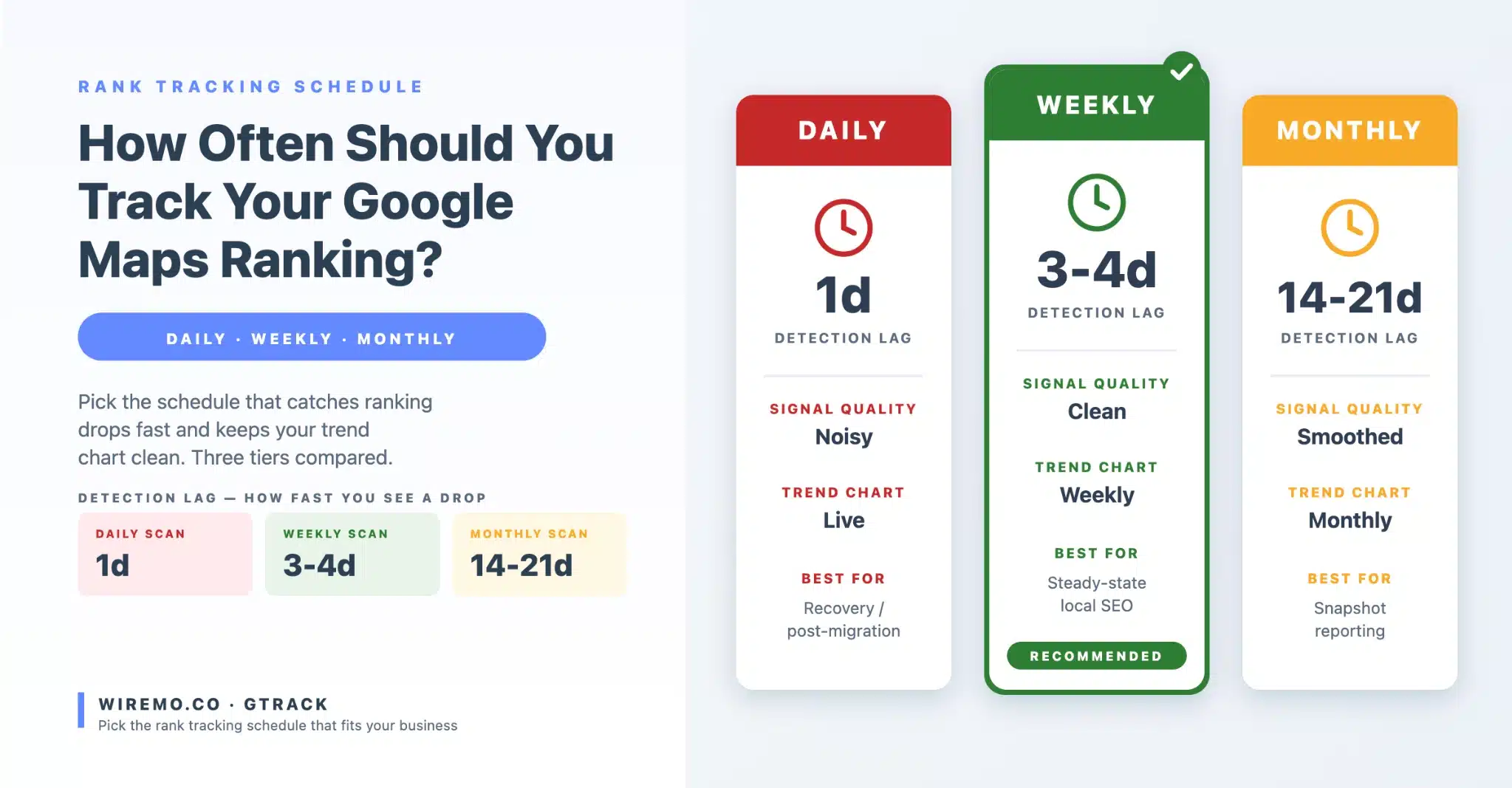
Daily rank tracking sounds responsible. In practice, it is responsible only in a narrow set of circumstances, and it punishes everyone else with credit burn and noise. Google's local algorithm does not refresh your ranking every 24 hours in a way that produces a clean daily signal. Position 3 on Tuesday, position 7 on Wednesday and position 4 on Thursday is almost always the same true ranking expressed through different searcher profiles, weather, time-of-day, and competitor activity. A daily chart smooths out only if you look at a rolling 7-day median, which is the same as scanning weekly in the first place.
Weekly is the workhorse schedule for local businesses. A single weekly scan on a fixed day and time produces a trend line clean enough to catch real movement but cheap enough to keep running for the life of the engagement.
Weekly also matches the pace of the inputs you actually control. Reviews accumulate weekly. GBP posts publish weekly. Photo uploads happen weekly in any healthy account. Citation builds settle over a few weeks. Aligning the measurement schedule with the input schedule makes the cause and effect readable.
According to Google's documentation on Performance reports, profile-side data refreshes on a roughly daily basis, but ranking-relevant signals tend to consolidate over multi-day windows. Weekly granularity catches what matters without picking up daily noise.
| Dimension | Daily scans | Weekly scans |
|---|---|---|
| Credit cost (9x9 grid, 1 keyword) | ~2,430/month | ~324/month |
| Signal-to-noise ratio | Low (daily algorithm jitter dominates) | High (weekly average is stable) |
| Alert speed on real drop | 1 day | 3-4 days on average |
| False-positive rate | High (5+ position swings, no cause) | Low |
| Worth it when | Active suspension, recovery push, post-migration window | Steady-state local SEO engagement |
When daily scans actually earn their credits
Three situations justify daily scans for a defined window. First, you are 14 days post-suspension reinstatement and need to confirm Google has rebuilt your ranking profile. Second, you are in week one of an aggressive recovery push after a category change or major NAP correction and want to detect the rebound day-by-day. Third, you have just migrated to a new GBP, merged duplicate listings, or moved physical location, and the first 30 days need close watching. Outside these windows, switch back to weekly. The credit savings fund a much wider keyword set or grid, both of which deliver more decision value than daily granularity ever could.
⚠ Caution Tape
A daily scan schedule on a 13x13 grid with 5 keywords burns through a Pro plan's monthly credit allowance in 7 days. Run the math before turning on anything daily. Most agencies that quote daily tracking quietly run weekly behind the scenes.
Google Maps Tracking Schedule
If weekly is the workhorse, monthly is the snapshot. Both have a place. The mistake is using one when you need the other. A monthly schedule is too slow to be useful as your only ranking signal, but it is exactly the right rhythm for the comparison report most clients actually want to see. Pair them rather than picking one.
Monthly snapshots smooth out the random week when a competitor ran a promotion or when Google rolled out a small local update. They produce a believable thirty-day before-and-after. A monthly comparison scan run on the same calendar day every month (the first Tuesday, for example) gives you a clean line graph that survives client review. Weekly trends sit underneath that monthly snapshot for diagnosis when something on the monthly line looks wrong. The two schedules work together because they answer different questions: weekly answers "is anything urgent happening this week?" and monthly answers "did our work compound over the month."
| Dimension | Weekly scans | Monthly schedule |
|---|---|---|
| Credit cost (9x9 grid, 1 keyword) | ~324/month | ~81/month |
| Detects a sudden drop within | 3-4 days | 14-21 days |
| Clean for trend reporting | Yes, with rolling 4-week median | Yes, native |
| Risk of missing a category change | Very low | High |
| Best for | Active diagnosis, optimisation work | Reporting, retainer reviews, baselines |
The "weekly trend + monthly snapshot" combo most operators should run
Set one weekly scheduled scan on a fixed weekday and time. Run on a 9x9 grid at 1km spacing for service businesses, smaller for tight urban geographies, larger for service-area businesses covering a metro. Set a second scheduled scan that fires monthly on the same calendar day, ideally a quiet midweek morning, on the same grid and keyword set as the weekly.
The monthly scan is the one you embed in client reports. The weekly scan is the one you actually use during the month to spot drops. Both feed the same dashboard so you can flip between "tactical view" (weekly granularity) and "narrative view" (monthly snapshots) without changing tools.
▣ Field-Tested
For local engagements lasting six months or longer, the weekly-plus-monthly pair beats any single-tier plan. The weekly catches problems before they show up on a monthly chart. The monthly is what survives the client meeting.
Scheduled Rank Tracking
Scheduled scans give you the trend line. Manual spot-checks give you the answers to client questions. The two are not interchangeable, and neither should replace the other. A scheduled scan that fires every Tuesday at 10 a.m. is the structural truth of your account. A manual spot-check is the response to "my friend in Sandyford couldn't find us yesterday afternoon" or "did we drop after Google announced the policy change?" Both are essential. Most teams under-run manual scans because they associate scanning with a calendar event rather than a diagnostic event.
A good geo-grid rank tracker like GTrack supports both flavours cleanly. The scheduled scan runs in the background, populates the historical chart, and never needs your attention. The Run Scan Now button on a scheduled scan card lets you trigger an immediate manual run once every 24 hours without breaking the weekly slot.
That is the single most underused feature in local rank tracking. You can pull a fresh data point any day a client asks a question, and the next morning's scheduled scan still fires on its normal slot. The trend line stays clean, the spot-check answers the question, and you never have to choose between hygiene and responsiveness.
|
Scheduled Scan
The trend. Fires automatically on the schedule you pick. Same parameters every time.
|
Manual Spot-Check
The diagnosis. Fires on demand when a client asks, a competitor moves, or Google announces something.
|
Tracking Frequency Trade-Offs
Scan frequency is a budget exercise as much as a strategy one. A 9x9 grid costs 81 credits per Maps scan, doubling to 162 for a Local Pack scan. Multiply by the number of keywords you track per scan, then by the number of times that scan fires in a month, and the credit math drives the practical ceiling on schedule. A single-location business tracking 5 keywords weekly on a 9x9 grid costs around 1,620 credits per month, well inside any paid plan. The same business pushed daily costs to about 12,150 credits per month and immediately collided with plan limits.
The accuracy curve is not linear. Doubling your scan frequency does not double your decision quality. It roughly halves your false-negative rate (catching a drop a few days earlier) at the cost of doubling your false-positive rate (reading noise as signal). For most local businesses, weekly hits the sweet spot where the false-negative rate is low enough, and the false-positive rate is acceptable. Pushing to daily adds days of detection speed but burns credits and introduces decision fatigue. Pulling back to monthly saves credits, but produces a 14 to 21-day blind window in which a real ranking collapse can sit unaddressed.
| Schedule | Credits/mo (1 kw, 9x9) | Detection lag | Best fit |
|---|---|---|---|
| Daily | ~2,430 | 1 day | Active recovery / post-migration windows only |
| Every other day | ~1,215 | 2 days | High-volatility verticals, paid media co-tracking |
| Weekly | ~324 | 3-4 days | Default for steady-state local SEO |
| Biweekly | ~162 | 7-10 days | Multi-location accounts, per-location tracking |
| Monthly | ~81 | 14-21 days | Stable retainers, snapshot reports only |
⚠ Caution Tape
A monthly-only schedule is the most common reason agencies miss a category change. By the time the monthly chart shows a drop, the cause is three weeks old, and competitors have already filled the gap. If credits force a monthly schedule, layer in opportunistic manual spot checks every two weeks at a minimum.
Set Your Tracking Schedule
The decision comes down to three inputs: industry volatility, geographic spread, and whether the data feeds a client or an internal team. High-volatility verticals such as legal injury, emergency plumbing, locksmith, and high-ticket cosmetic dental see weekly rank shifts driven by paid spend, recent reviews, and competitor activity. They benefit from a tighter schedule (every other day to weekly). Low-volatility verticals such as established dental practices, accountants, opticians, and most B2B services move slowly and tolerate a weekly or biweekly schedule without losing signal.
Geographic spread compounds the cost side. A single-location business runs one weekly scan and one monthly snapshot. A 20-location brand runs 20 scans on each schedule, which makes weekly across the board expensive enough to push some locations to biweekly. The honest pattern for multi-location accounts is to put flagship locations on a weekly basis, mid-tier locations on a biweekly basis, and long-tail locations every month with manual checks. A GBP scheduling tool like GLocal pairs naturally with this approach because the schedule of profile updates (posts, photo additions, review replies) typically lines up with the schedule of the most useful scan refresh.
| Business shape | Primary schedule | Secondary schedule |
|---|---|---|
| Single-location service business | Weekly scheduled | Monthly snapshot for review |
| High-volatility vertical (legal, emergency, cosmetic) | Every other day | Monthly snapshot for client report |
| Multi-location brand (5-20 sites) | Weekly on flagships, biweekly on mid-tier | Monthly rollup chart |
| Multi-location brand (20+ sites) | Biweekly per location | Weekly on flagships only + manual checks |
| Restaurant, retail, intraday-demand business | Weekly morning + weekly evening | Monthly snapshot |
| Recovery / post-suspension window | Daily for 14 days, then drop to weekly | Manual scans on demand |
While you are setting a schedule for scans, set a matching rhythm for the inputs that move the needle. Weekly profile posts pair naturally with a weekly scan slot because the post lands days ahead of the scan, and any signal lift is visible in the very next scheduled run. A free GBP post generator takes the friction out of the posting side, so the input timing does not slip behind the measurement window.
▣ Field-Tested
Lock the schedule in writing during the first client kickoff. Routine drift, where weekly slowly turns into "whenever the team remembers," is the single most common reason ranking trends look wrong six months in. The schedule is part of the engagement contract, not a tool setting.
When to change your schedule mid-engagement
Your schedule is not permanent. Three triggers should push you to change it. First, a clear regime change in the business (new location, category change, post-suspension reinstatement, multi-week paid campaign) warrants a temporarily tighter rhythm for 14 to 30 days. Second, a credit ceiling collision (you are about to run out of monthly credits with a week left) warrants a temporary pullback for the remainder of the month. Third, a strategic pivot (the client wants to compete in a new geographic area or service line) warrants resetting the baseline at the new frequency rather than mixing data from two regimes.
Whatever the trigger, document the change and the date. Annotate the chart so the discontinuity is visible. Google's product updates blog is worth scanning monthly for ranking-relevant feature releases that might push you to a tighter schedule for a few weeks. A note on the chart that says "switched to weekly after the March category restructure" is worth more than a clean line that hides a methodology shift.
Lock the schedule, then stop thinking about it
Schedule decisions feel like ongoing tactical choices. They should be one-time setup decisions. Pick the primary rhythm (weekly for most businesses), pick the secondary one (a monthly snapshot for reporting), set them as scheduled scans on the same day and time every cycle, and stop revisiting the choice unless a real trigger shows up.
The cognitive overhead of "should I scan today" is exactly the kind of friction that quietly kills tracking discipline in month four of an engagement. A locked schedule with manual spot-checks layered on top is the durable answer. Set it once, run it for the life of the engagement, and spend your attention on the optimisation work the data is supposed to inform.
Frequently Asked Questions
How often should I check my Google Maps ranking manually?
For active client management, run a manual spot-check whenever a real question shows up: a client report, a competitor move, a Google announcement, or a complaint that the business is hard to find. Outside those triggers, the scheduled weekly scan is enough. There is no value in opening the tool every morning to "see where we are." That habit usually leads to overreaction to noise.
Does Google update Maps rankings daily?
Google does not publish a fixed refresh interval for local rankings. Some signals (reviews, photos, Q&A) update almost in real time, while ranking-relevant signals consolidate over multi-day to multi-week windows depending on the factor. This is why daily scan deltas are usually noise, and weekly trends are usually signal.
Is monthly tracking enough for local SEO?
Monthly tracking is enough for reporting, but not enough for diagnosis. If a category change, suspension, or competitor move happens on day 2 of the month, you will not see it until day 32 at the earliest. Pair monthly snapshots with weekly scheduled scans (and unlimited manual spot-checks) for the full picture.
How many keywords should I track at each frequency?
Track every keyword you would actually report on at your primary schedule (weekly for most businesses, biweekly for multi-location accounts). Drop exploratory keywords to monthly. A focused 5-keyword headset every week is more valuable than a diluted 20-keyword set you never look at.
What is the cheapest way to track Google Maps ranking accurately?
Biweekly scheduled scans on a 7x7 grid for one to three head keywords, supplemented by manual spot-checks when something looks off. This combination produces a defensible trend line at minimal credit cost. It is the right call for a low-volatility single-location business or for tracking long-tail locations inside a multi-location account.
Should I scan more often during a Google update rollout?
Yes, temporarily. When Google announces a confirmed local or core update, switch to every-other-day or daily schedule for the 14-day window around the rollout. This is exactly the kind of regime change that justifies a higher schedule. Drop back to weekly once the rollout settles, and your trend line stabilises.