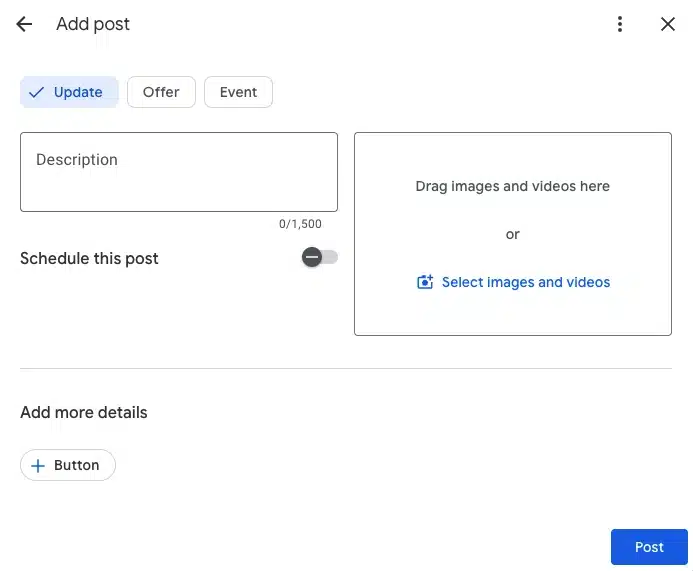
Every day, millions of people open Google looking for somewhere to go, something to eat, or someone to call. They're not browsing. They're deciding. And what often tips that decision is whether your business looks active right now.
Google Business Profile Posts put you in front of them at that moment. A post about tonight's happy hour. A post about the World Cup tour package is still available this weekend. A post with a first-visit discount that answers the exact question someone just typed in.
The best practices in this guide come directly from Google's product team, including the product manager who built the updated post tool, plus the new scheduling and recurring post features that launched in late 2025.
What Google Business Profile Posts are (and why they matter in 2026)
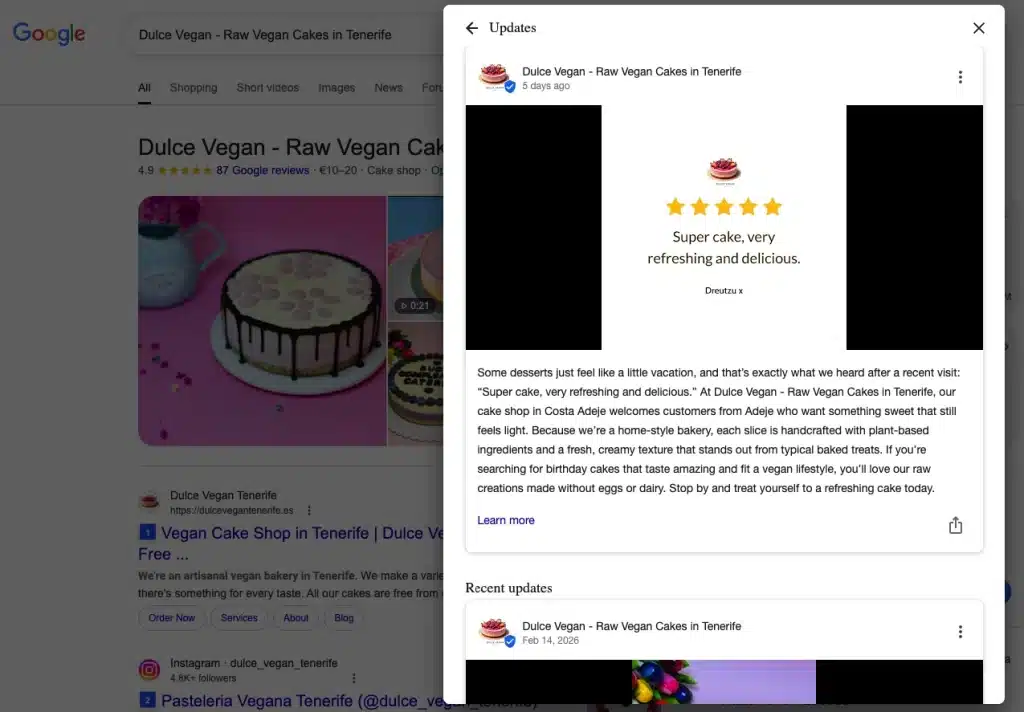
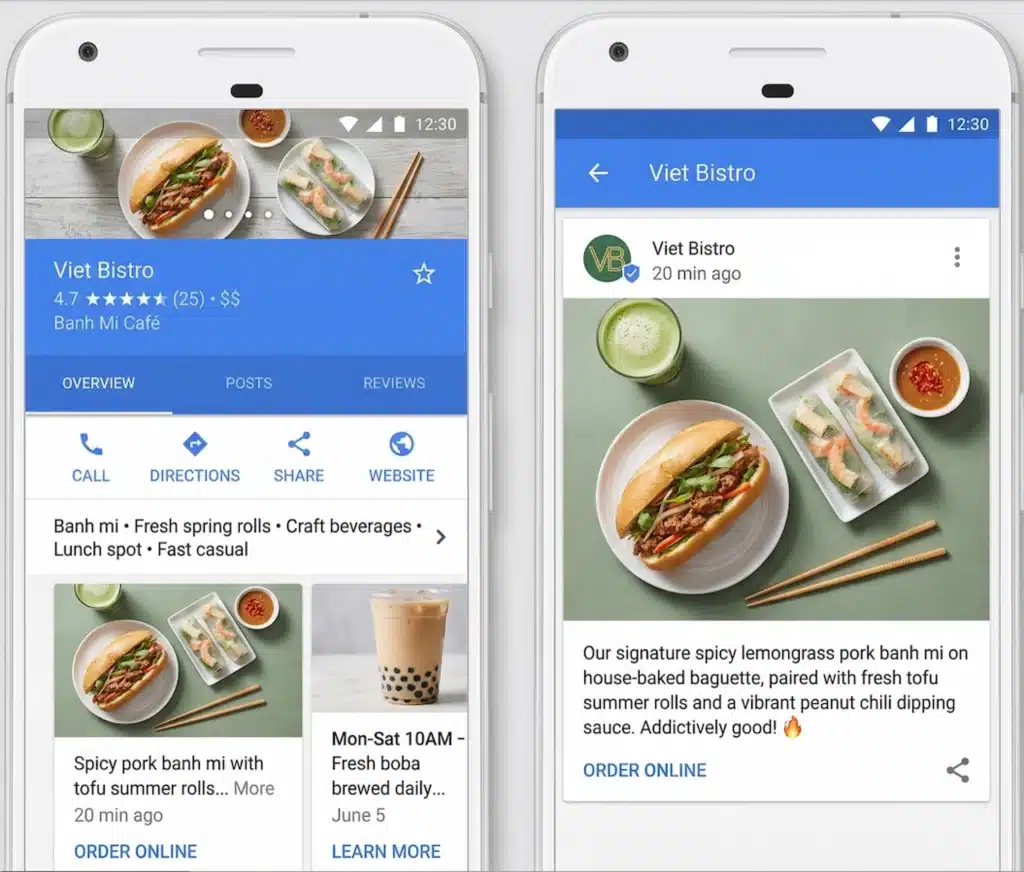
Google Posts are short updates you publish directly to your Google Business Profile. They appear in Google Search and Google Maps, right where someone is already looking at your business. No ad spend. No algorithm to fight.
On desktop, posts appear in a scrollable carousel below your business description in the knowledge panel. On the Google Maps app, your most recent post can appear directly in the photo carousel, sitting alongside your business photos. On mobile search, users can swipe through all your recent posts.
For food and drink businesses in the US, Canada, Australia, and New Zealand, Google now features timely posts — things happening tonight, tomorrow, or this week — in high-visibility placement on the search page. Google's own data shows this drives a 9% increase in profile engagement. The same treatment is expanding to leisure businesses, with more categories to follow.
Tip: Posts don't directly improve your ranking position. But a post about "trivia night every Thursday" or "pan-seared scallops on special tonight" can get your listing in front of people searching for exactly that, reaching customers your standard profile information never would.
The 3 post types and when to use each one
Picking the right post type changes how information is displayed to customers and affects whether Google surfaces your post in relevant searches. Don't just pick one at random.
| Post type | Use it for | Extra fields |
|---|---|---|
| Updates | General news, press mentions, behind-the-scenes, shout-outs, new hires, menu changes | Text, image, CTA button |
| Offers | Promotions, discounts, limited-time deals, happy hour, seasonal specials | Start date, end date, coupon code, terms. Adds a visual expiration tag that creates urgency. |
| Events | Live music, workshops, tasting nights, tours, charity events, seasonal experiences | Title, start date, end date, start and end time. Specificity helps Google surface your event in relevant searches. |
Updates are the most common post type on Google. They're fine for general content, but Offer and Event posts unlock richer displays. When you fill in start times, end times, and expiration dates, Google can build better visual experiences around your post without guessing. That's a real advantage for getting featured.
Tip: For events, always add start and end times even though they're optional. It gives Google the data it needs to show your event to people searching for things to do at that specific time.
What to post: real examples by business type
Most Google Posts guides use restaurants as the default example. But the same three post types work across any local business — the content just looks different. Here's how salons, home service businesses, and dental practices can use each type effectively.
Beauty and wellness (salons, spas, barbershops)
People searching for a salon or spa on Google are usually ready to book. They're comparing options in their area and your post is competing against whoever shows up next to you. Every post should make booking the obvious next step.
| Post type | Example | CTA button |
|---|---|---|
| Update | We just added Sunday appointments. Same-day slots available this week — grab one before they go. | Book |
| Offer | First visit? 20% off any color service this month. No code needed — just mention it when you book. | Book |
| Event | Bridal prep evening — Saturday, March 15, 6pm to 9pm. Trial hair, makeup, and a complimentary glass of wine. 8 spots only. | Book |
Home services (plumbers, HVAC, electricians, locksmiths)
Home service searches are almost always urgent. Someone's furnace has stopped, a pipe has burst, or a circuit keeps tripping. They're not browsing — they need someone available right now. Posts that lead with availability and speed win.
| Post type | Example | CTA button |
|---|---|---|
| Update | Same-day furnace and AC repairs available this week. Licensed and insured, serving all of [City] and surrounding areas. | Call now |
| Offer | Spring AC tune-up for $89 this month (regular price $149). Book before April 30 — slots filling fast. | Call now |
| Event | Free home energy check — Saturday March 29, 10am to 2pm. We'll inspect your HVAC system and flag anything before summer. 10 slots available. | Book |
Healthcare and dental (dentists, physical therapists, clinics)
Healthcare searches on Google tend to be high-intent and local. Someone searching "dentist near me accepting new patients" or "physical therapist for lower back pain [city]" is ready to book. Posts that address a specific concern or make the first step easy — a free consultation, a new patient offer — convert well here.
| Post type | Example | CTA button |
|---|---|---|
| Update | Now accepting new patients, most insurance plans welcome. Evening and Saturday appointments available — no long wait. | Book |
| Offer | New patient special: exam, cleaning, and X-rays for $99. Available throughout April for first-time patients. | Book |
| Event | Free 15-minute back pain consultation — Thursday March 27, 5pm to 7pm. Walk in or grab a slot online. No obligation. | Book |
Notice the pattern across all three: lead with what's available or what you're offering, be specific about dates and terms, and make the CTA a single tap. The business type changes but the structure doesn't.
Best practices that come directly from Google's product team
Post at least once a week, Monday through Friday
Weekly posting signals to Google that your business is active, and it signals to customers that you're open and ready for them. Going weeks without anything makes your profile look stale.
Stick to Monday through Friday during business hours. That's when people are in planning mode — looking for somewhere to go to lunch, a service provider to call, or a place to spend the weekend. Most discovery happens mid-week, not Saturday night.
Front-load your value in the first 80 to 100 characters
On mobile, Google cuts off post text after roughly 80 to 100 characters. The rest sits behind a "more" link you have to earn.
Don't open with "Hello everyone, hope you're having a great week." Open with "50% off all appetizers tonight" or "Last 5 spots for the World Cup stadium tour." Put the actual offer in the first 10 words.
Use real photos and video, not stock
Customers have a built-in radar for stock photos and don't trust them. A slightly imperfect photo of your actual storefront, team, or food will outperform a polished stock image. Posts using real photos get 5.6 times more clicks than posts using stock photography.
Video works the same way. Keep it under 30 seconds. People want a quick feel for your business, not a produced ad.
Photo requirements:
- Format: JPG or PNG
- File size: 10 KB to 5 MB
- Recommended resolution: 720 x 720 px
- Minimum resolution: 250 x 250 px
- Quality: In focus, well lit, no heavy filters. The image should represent reality.
Video requirements:
- Duration: Up to 30 seconds
- File size: Up to 75 MB
- Resolution: 720p or higher
GLocal: GLocal supports video uploads via the Google Business Profile API directly through its scheduler, so you can include video in scheduled and recurring posts without manually uploading each one through the Google interface.
Always include a call-to-action button
Every post needs to tell the customer what to do next. Use the built-in CTA buttons rather than putting a phone number in the post text, which will get your post rejected.
- Restaurants and salons: "Book" or "Order online" cuts the friction between intent and action.
- Complex services: "Learn more" sends people to your website where you can explain properly.
- Plumbers, locksmiths, emergency services: "Call now" is what these customers need. One tap.
Google is not Instagram — write for intent, not entertainment
On Instagram or TikTok, people are scrolling to be entertained. On Google, someone just typed "dinner near me." They're ready to decide right now.
A behind-the-scenes video of your chef prepping is good Instagram content. On Google, that same slot should be: "Tonight: pan-seared scallops. Happy hour starts at 5pm. Reserve your table." Don't try to build a vibe. Give them the answer and a specific way to act on it.
Avoid the formatting that gets posts rejected
Google's spam filters are stricter than other platforms. Three things get posts removed most often:
- Phone numbers in the post text. The single most common rejection reason. Use the "Call now" button instead — your number is already on your profile.
- ALL CAPS and excessive punctuation. Multiple exclamation marks and shouting headlines trigger filters and look unprofessional.
- Hashtags. They do nothing on Google. They don't make posts discoverable and only take up space. Save them for social media.
What's new in 2026: scheduling, recurring posts, and multi-location publishing
The updated Google Post tool launched fully in late 2025 and adds three features that cut down how much time posting actually takes.
Post scheduling
You can now set an exact date and time for a post to go live. Before this, posting at the right moment meant doing it manually, using a third-party tool, or skipping it entirely. Now you can sit down on a Monday, create posts for the whole week or month, and move on.
Schedule posts to go live Monday through Friday during business hours, when customers are in planning mode.
Recurring posts
Currently in testing and rolling out through 2026. You configure a post once with a repeat schedule — daily, weekly on specific days, or a custom pattern — and the post tool handles publication automatically for up to a year.
Weekly trivia night, standing happy hour, monthly special: set it up once. Google moves the publication date so the post stays current on the days you've specified.
Multi-location publishing
You can now create one post and copy it to all your locations in a single step. This currently works for accounts managing up to 100 locations.
One limitation: the tool doesn't support unique URLs per location. If each branch needs its own location-specific link, you'll need to update those manually after copying, or handle it through a third-party tool.
GLocal: If you're managing posts, reviews, and profile information across multiple Google Business Profile locations, Google Business Profile management software like GLocal handles scheduling, video uploads, multi-location publishing, and performance tracking from one dashboard.
How long do posts stay live?
Longer than most people expect. Update posts stay visible on your knowledge panel for up to six months. Offer posts stay live until their end date. Event posts stay live through the end of the event.
After six months, Update posts move behind a "view previous updates" link rather than disappearing. Posts from years ago are still discoverable this way.
This means your old posts still exist. A post with wrong information, a phone number in the text, or an expired offer you never closed can still be found. Review your post history occasionally and delete anything out of date. Keeping your profile updated also helps avoid verification issues. If Google flags your business, you may be asked to complete a GBP video verification, a process where you show your location, signage, and operations to prove your business is legitimate.
Do Google Posts help your ranking?
Posting more often doesn't directly move your position in the local pack. Volume alone isn't the signal.
What posts do is expand which searches you can appear in. A customer searching "trivia night near me" or "happy hour downtown Thursday" can find your listing through a relevant post, even if you don't rank for those terms in the standard local pack.
There's also a 2026-specific factor. Around 40% of local searches now show AI Overviews — Google's AI-generated summaries at the top of results. These pull from active, well-maintained Google Business Profiles, and posts are a primary source. A business posting consistently with specific, locally relevant content has a higher chance of showing up in those summaries than one that hasn't posted in weeks.
Tip: Want to know how your business actually ranks across your service area, not just in one search? A Google Maps rank tracker like GTrack shows you a geo-grid heatmap of where you appear across different locations, so you can see exactly where posts and profile activity are moving results.
Common questions about Google Posts
Are emojis allowed?
Yes. Posts with emojis get twice as many clicks as those without, according to post performance research. Use them as accent points, not as a substitute for words.
How often is too often to post?
Post when you have something a customer would actually care about: an offer, an event, a piece of news, a timely update. A "Hello, hope everyone's having a great week!" post adds nothing and looks like filler. Once a week with real content beats five times a week with noise.
Can I track how my posts are performing?
Google doesn't offer post-view metrics as a standalone number in Business Profile Insights. Clicks on CTA buttons — calls, bookings, website visits — roll up into your overall Business Profile performance dashboard. Add UTM parameters to any links in your posts and you can track those clicks in Google Analytics and attribute them to specific posts.
What are the image and video specs for posts?
For photos: JPG or PNG, between 10 KB and 5 MB, recommended 720 x 720 px (minimum 250 x 250 px). Images should be in focus, well lit, and not heavily filtered. For video: up to 30 seconds, up to 75 MB, 720p or higher.
Does automated posting get penalized?
No. Manual posting, native scheduling, recurring posts, or a third-party tool — there's no penalty for any of it. Automating your schedule removes the manual effort that causes most businesses to stop posting consistently.
Start posting with a plan
The businesses that get the most from Google Posts aren't the ones who write the cleverest copy. They're the ones who show up consistently, pick the right post type, put the value up front, and give every post a clear action to take.
With native scheduling and recurring posts available, the manual effort that used to make consistent posting hard is mostly gone. Create a week of posts in one session. Set a recurring offer for your weekly special. Copy one post across all your locations in a single click.
Your profile is already live on Google. Make sure it looks active when someone's making their decision.