TL;DR: The Agency Playbook in 6 Lines
- Set up one workspace per client and lock the grid to the service area, not the metro.
- Match report cadence to retainer size: daily for crisis, weekly for reputation work, bi-weekly for new builds, monthly for steady-state.
- Run a clean baseline grid on day one before any optimisation. That is the "before" you will defend the retainer with later.
- Build a one-page client report: 3 KPIs, 2 grid screenshots, 1 next-month action. Skip everything else.
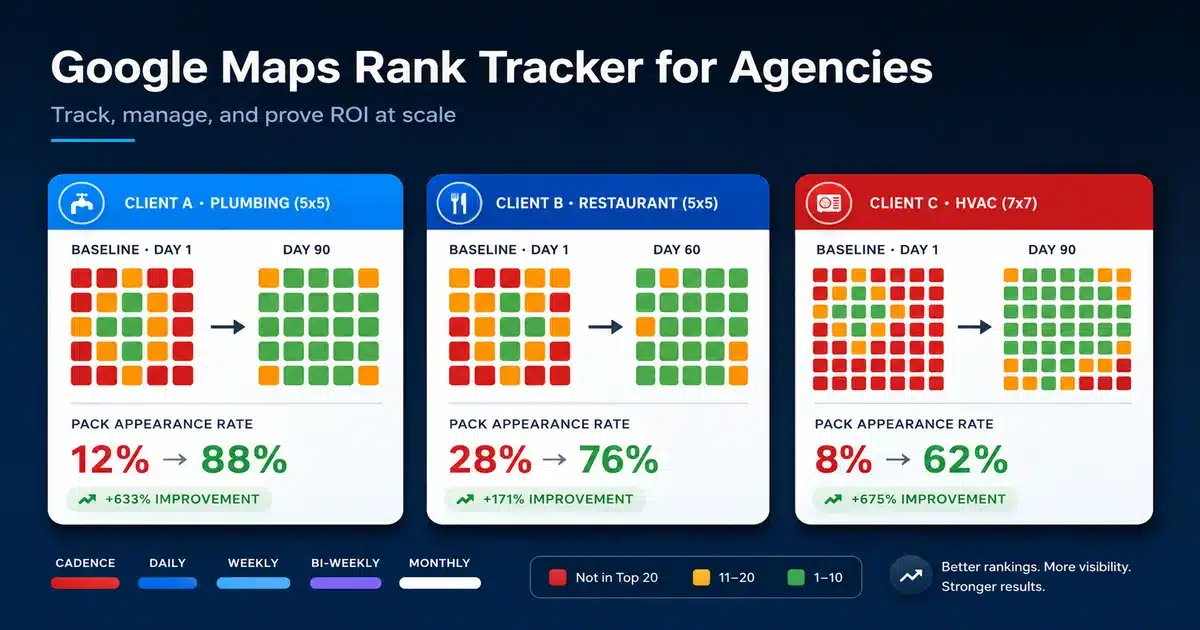
- Compare grids at 30, 60, and 90 days. Tile-by-tile shifts are proof that the average-position chart will never show.
- Use the same grid evidence to upsell GBP management work where rankings are blocked by profile problems, not ranking signals.
Step 1: Set Up Your Multi-Client Rank Tracker Workspace
Agencies that fail at local rank tracking usually fail at setup. They build one Google Maps rank tracker for agencies on the cheap, scatter the logins across three tools, and end the quarter with no comparable data. The fix is to run every client inside the same local pack rank tracker with a consistent structure, then attach the right grid geometry per business.
Three setup decisions decide whether the rest of the workflow holds together:
- One workspace per client, not per location. A regional plumber with 4 service zones is one workspace with 4 grids. A 3-brand portfolio is 3 workspaces. This keeps reporting clean later.
- Lock grids to the service area, not the metro. A 9x9 grid covering the entire metro tells you nothing actionable. A 5x5 covering the actual revenue zone shows you exactly which neighbourhoods to attack.
- Standardise keywords per client across two tiers. Tier one: the head term (e.g., "plumber Dublin"). Tier two: 3 to 5 commercial intent variations (e.g., "emergency plumber Dublin", "boiler repair Dublin"). Long-tail keywords below 100 monthly searches add noise to the grid average and waste credits.
For onboarding, run a free GBP audit on each client before you begin tracking. If you manage multiple client profiles inside a single Google account, Google's documentation on managing multiple Business Profiles covers the access and ownership setup you should standardise from day one. Two reasons. First, you spot any profile-level problems that will block ranking improvements, no matter how good your strategy is. Second, the audit itself becomes part of the first deliverable, which justifies the onboarding fee.
| Client Type | Grid Size | Spacing | Keywords to Track |
|---|---|---|---|
| Single-location service business (plumber, dentist) | 5x5 | 0.2 to 0.5 km | 1 head + 3 variations |
| Multi-location retail/restaurant brand | 5x5 per location | 0.5 to 1 km | 1 head + 2 variations per location |
| Service-area business with wide zones (HVAC, roofer) | 7x7 | 1 to 2 km | 1 head + 4 variations |
| Law firm with practice areas | 9x9 | 1 to 5 km | 1 head + 3 per practice area |
Step 2: Choose Report Cadence (Daily, Weekly, Bi-Weekly, or Monthly)
Cadence is the single most negotiated line item on a local SEO retainer. Get it wrong, and you either drown the client in noise or starve them of proof. The right answer is dictated by the engagement type, not by client preference.
Cadence at a Glance · share of mature retainers
| DAILY | Crisis recovery, suspension reinstatement, and launch monitoring | |
| WEEKLY | Reputation-management retainers, review-velocity work | |
| BI-WEEKLY | First 90 days of any new SEO engagement | |
| MONTHLY | Steady-state retainers past month 3 (default for 70%) |
The four supported cadences and when each one makes sense:
- Daily grid scans: reserved for crisis recovery, suspension reinstatement, post-merger rebrands, or new physical location launches. Daily data is only useful when something is actively moving day to day. Most retainers should never see daily reports.
- Weekly grid scans: the right cadence for reputation-management retainers and accounts where review velocity is the lead lever. Reviews shift Prominence signals within 7 to 14 days, so a weekly cadence lets you correlate review work to ranking movement without lag.
- Bi-weekly grid scans: the standard cadence for new SEO engagements in the first 90 days. It gives you fast feedback during the high-change onboarding phase without flooding the client's inbox.
- Monthly grid scans: the default for steady-state retainers past month 3 and for paid-search-heavy accounts where local SEO is the secondary channel. Monthly is what 70% of mature engagements should sit on.
The most common mistake here is matching cadence to retainer size instead of the engagement phase. A $5K/month client in steady state should still be on monthly grid scans. A $1.5K/month client in crisis still needs daily. The data does not care about your invoice.
Critical Warning. Never lock yourself into "daily reports forever" in a contract. Daily scans burn credits, generate noise, and make grids look unstable because of normal day-to-day variance. Quote daily cadence as a 60-day diagnostic phase, then step down to weekly or bi-weekly.
Step 3: Run the Baseline Grid and Capture the "Before"
Day one of any new engagement, before a single optimisation lands, run a clean baseline scan on every keyword tier across every grid. Generate a whitelabel share link for the baseline scan and save it to the client folder. Anyone with the link can view the baseline plus the full date-selector history of every subsequent scan, with no GTrack login required. The link becomes the "before" you will reference in every quarterly review for the next 12 months.
Three rules for a baseline that holds up later:
- Run the baseline on a Tuesday or Wednesday, not a Monday morning or Friday afternoon. Weekend search behaviour skews grid data for restaurants, contractors, and entertainment categories.
- Pull the baseline twice within the same week, then average. A single scan gets caught in normal SERP volatility. Two scans 48 hours apart produce a defensible baseline.
-
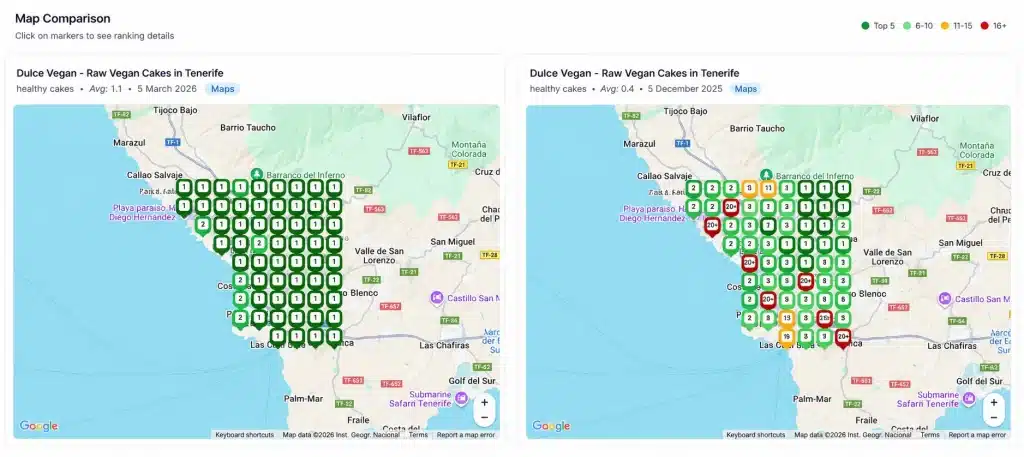
The share link's hover preview already shows the date, keyword, average ranking, and grid coverage at a glance, so when the client questions in month 6 whether the "before" was really that bad, you have one click of proof.
If the client has already been doing some local SEO work, your baseline is still day one of your engagement. Do not try to manufacture a worse-looking baseline by waiting for a quiet period. Honest baselines outperform inflated ones over the life of a retainer.
Good practice. Skip the export-and-save workflow. GTrack's whitelabel share link gives the client a live view of the scan (single or scheduled) that updates on every run, with a date-selector history that flips between baseline and current scans. The link works without a GTrack login, can be revoked anytime from Manage Shared URLs, and uses your agency's custom domain on paid plans.
Step 4: Build Local SEO Reporting for Agencies That Clients Actually Read
The standard agency report (15 to 30 slides of GA4 screenshots, GSC averages, and untranslated SEO jargon) gets opened, not read. The version retainers renew on is one page. Three KPIs at the top, two grid screenshots in the middle, and one next-month action at the bottom. Done well, local SEO reporting for agencies is the single highest-leverage deliverable in the whole engagement.
The 3 KPIs that matter for local SEO clients:
- Median grid position across the head keyword. This is the only ranking number worth showing the client. It is the one Google Search Console hides from them.
- Pack appearance rate: the percentage of grid tiles where the client shows in the top 3. A retailer might start at 12%, hit 38% at month 3, and 60% at month 6. This number is intuitive for non-technical clients and maps cleanly to revenue.
- Phone calls or direction requests from the profile. Pull this from the Business Profile performance report and merge it onto the grid trend. When the pack appearance rate rises, and calls rise with it, the report writes itself.
Skip impressions, average position from GSC, click-through rate, backlinks, and "we wrote 4 blog posts this month". None of these answers the question the client is actually paying you to answer, which is "am I getting more business from Google?".
| Section | Show | Skip |
|---|---|---|
| Headline KPIs | Median grid position, pack rate, calls | Impressions, average position, CTR |
| Visual proof | Before grid + current grid, side by side | Line charts with no context |
| Activity log | 2 to 3 high-leverage actions taken | Every task in the project sheet |
| Next month | 1 specific action with a why | "Continue ongoing optimisation" |
Step 5: Use Before-and-After Grids to Defend the Retainer
Retainers churn at month 4 and month 9. Month 4, because the honeymoon is over and the client wants proof. Month 9, because procurement asks for a renewal justification. Both moments are won with the same artefact: a side-by-side baseline grid versus the current grid, annotated with the tile-level shifts.
A tile-by-tile narrative reads like this. "At baseline, the client appeared in the top 3 on 8 of 25 tiles, mostly clustered near the storefront. After 90 days of profile, review, and on-page work, the client appears in the top 3 on 17 of 25 tiles, with new coverage in the two neighbouring postcodes where there were no rankings at all in March." That paragraph, with the two images underneath, will renew a retainer faster than any traffic chart.
If the grid did not move, the same artefact tells you the truth and forces a strategy change. A flat grid at month 3 usually points to a profile-level block that no amount of citation-building will fix. That is the moment to expand the engagement into managing GBP at scale work, where the day-to-day GBP signals (post cadence, Q&A density, photo recency, review reply velocity) are the actual unblock.
Track every grid comparison artefact in a shared library across your agency. Junior strategists pulling a renewal deck for the first time should not be designing the format. A library of 30 to 40 before-and-after pairs becomes a sales asset for new pitches, too.
Step 6: The 90-Day Rollout Where Agencies See the First Real ROI
The agencies that get real lift from grid tracking are the ones that integrate it into their delivery process within the first quarter. The pattern that works:
- Week 1. Migrate every active client to a single Google Maps rank tracker workspace with standardised grids and keyword tiers. Run baselines on each. Block 2 hours per client; do not try to do all of it in one day.
- Week 2 to 4. Build the one-page report template inside your reporting tool. Run the first round of monthly reports for every client using the new format. Expect 2 or 3 clients to ask follow-up questions; that is the report doing its job.
- Week 5 to 8. Spot the clients with flat grids despite active work. These are your candidates for a GBP-management upsell. Pitch the second product as the missing piece, not as a price hike.
- Week 9 to 12. Pull the first round of 90-day before-and-after grid comparisons. Use them as evidence on the next renewal call and as case study material on your agency site. Two or three strong renewal saves in this quarter typically cover the cost of the tooling for the year.
The financial math on this is uncomplicated. If your average retainer is $2,500/month and grid tracking saves one churn per quarter, the protected revenue alone justifies the tooling 10x over. The second-order effect (faster onboarding, fewer "why does the GSC chart say X" calls, cleaner renewal pitches) is where agencies actually compound.
For broader tooling decisions across the agency stack, browse the full set of free local SEO tools to find supporting pieces (schema generators, audit tools, review calculators) that pair with grid tracking without adding to your monthly software cost.
Frequently Asked Questions
How many clients can one strategist manage with grid-based rank tracking?
A single mid-level strategist comfortably handles 12 to 18 local SEO retainers when grid tracking, GBP management, and reporting all live inside the same platform. The bottleneck is usually report writing, not data collection. With the one-page report template above, a strategist can produce 15 monthly reports in a single afternoon.
Is local SEO reporting for agencies really worth the extra production time?
Yes, and the math is easy. A one-page report takes 20 minutes once you have the template. A client who reads it and renews on time is worth the entire month's retainer. The agencies that skip reporting (or hide behind 30-slide decks) churn 30 to 40% of accounts at month 4, when the proof gap shows up.
Should I share raw grid data with the client or just the report summary?
Share the report summary. Offer the raw grids as an appendix on request. Most clients want the answer, not the data set. The 10% who want the raw data are usually internal marketing managers who will use it well, and they should have access.
What do I do when the grid shows progress, but the client says, "I'm not getting more calls"?
Pull GBP Insights to see whether profile actions (calls, direction requests, website clicks) moved with the grid. If actions moved but the client's perception did not, the disconnect is usually in how the client answers the phone or qualifies leads, not in your work. If actions did not move while the grid did, you may be ranking on the wrong keywords for the client's revenue. The grid average is a means, not the end.
Is grid tracking worth it for clients in less competitive small towns?
Yes, but use a smaller grid. A 3x3 over a small market is more useful than a 5x5 that includes vast empty areas. The point is to see where you appear inside the actual catchment, not to fill a screenshot.
How do I price grid tracking into the retainer?
Most agencies absorb the per-client tooling cost into a flat retainer rather than line-iteming it. Cheap tooling line items invite the client to question them. A retainer that delivers grid evidence as part of monthly proof rarely gets negotiated as a line item.
How does the cadence change once a client hits the goals we set in the proposal?
Step the cadence down. A client that reached top 3 pack appearance on 80% of tiles can move from monthly to quarterly grid scans, with continued GBP and review work in the background. This is a sign of maturity, not of a smaller retainer. The conversation framing is "we shift the scan frequency to a maintenance cadence because we are defending position now, not building it."
For agencies serious about scaling local SEO delivery without scaling headcount, the playbook is mechanical: pick a Google Maps rank tracker for agencies that handles multi-client setup, lock in cadence by engagement phase, build the brutally simple one-page report, and use before-and-after grids that defend the retainer in writing. Spin up a workspace, run the first baseline, and the rest of the system installs itself within the first quarter.