TL;DR: What Drains Tracking Accuracy Over Time
- GSC averages mislead: Search Console reports a blended position across all search locations, not your actual Maps rank.
- Grid drift kills comparability: Change the grid size or centre between scans, and your "trend" is no trend at all.
- Scan timing matters: Friday evening and Tuesday morning produce different local packs for restaurants, services, and retail.
- Keyword set hygiene: Adding or removing tracked keywords mid-engagement invalidates the trend line.
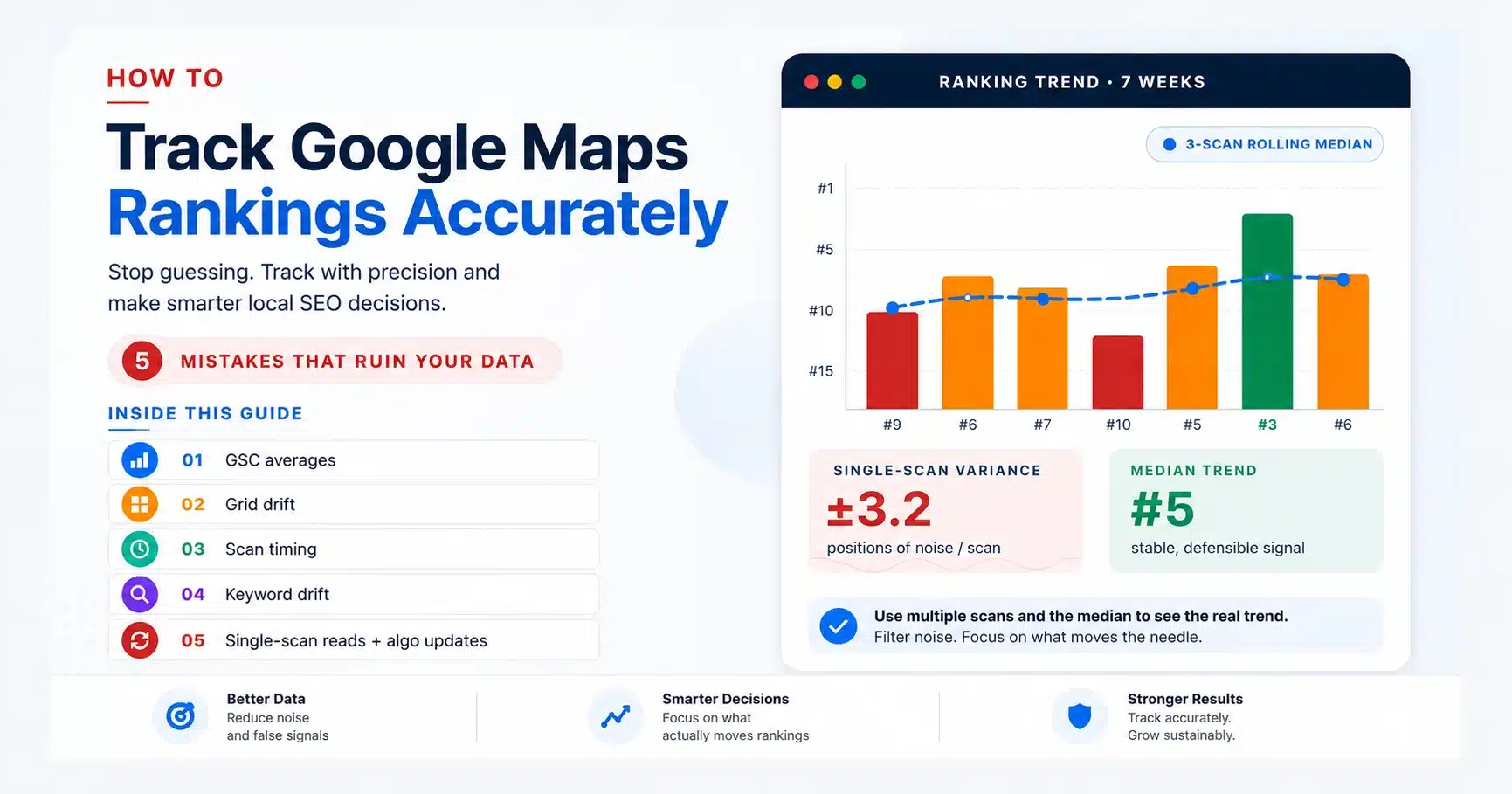
- Single scans are noisy: Use a 3-scan rolling median, not the latest number. Mark algorithm updates and resets the baseline.
- Self-audit: If you can answer "yes" to all six questions in the audit at the bottom of this guide, you are tracking accurately.
To track Google Maps rankings accurately, you have to fight two things: Google's per-search personalisation and your own tracking habits. The first is structural; the second is fixable, and the difference between a tracking setup that produces decisions and one that produces noise is a small set of process choices.
Most agencies and operators set up a rank tracker in week one, run scans on autopilot for six months, then wonder why the data does not match what the client actually sees on their phone. The mistakes below are the five that compound over an engagement, each quiet enough to ignore in any single scan, yet large enough to break a quarterly review.
This guide is structured as five mistakes and their fixes, with a self-audit checklist at the end. You can run on your current tracking setup in two minutes. By the end you will know exactly which habits are quietly ruining your data and what to change before the next monthly scan, so you can track Google Maps rankings accurately for the rest of the engagement.
Mistake 1: Trusting Search Console's Average Position as Your "Real" Ranking
Google Search Console reports an average position across every search where your business appeared, blended across every location, device, time of day, and personalisation profile. For a national e-commerce site, that number is meaningful. For a local business with proximity-weighted rankings, it is a fiction. A dentist with a real ranking of #3 inside a 1km radius of the clinic and #28 across the rest of the city will see a Search Console "average position" of around 11, which is true of nobody and useful to nobody.
The right way to use Search Console for local SEO is as a directional impressions and click-through-rate signal, not a ranking signal. To track Google Maps rankings accurately, you need a tool that returns a real position from a defined location, not an average across every search Google has ever logged for your domain. Google's own documentation on the Performance report is explicit that position is an average across all impressions, not a fixed ranking. Treat that number as it is documented, not as what it implies.
|
What GSC reports
11.4
A single blended "average position" across every search location, device, and time of day. True for nobody.
|
What the grid shows
#3 inside 1 km of the clinic
#7 within 1-3 km
#28 across the wider city
The proximity-weighted position your client actually experiences.
|
⚠️ Critical Warning: If your monthly client report leads with the GSC average position number, you are reporting a fiction. The client searches from their office and sees a different number. The moment they compare your report to their phone, the gap erodes trust.
✅ Good Practice: Pair Search Console (for impressions, CTR, query trends) with a grid-based Maps ranking tool that returns a real position from each grid point in your service area. The grid is what your client actually experiences; GSC is what Google measures across the haystack.
Mistake 2: Changing Your Grid Size or Centre Between Scans
The first 30 days of a new engagement are when most agencies make this mistake. The baseline scan runs as a 5x5 because it was fast, the month-3 scan runs as a 7x7 because someone read that 7x7 is "more accurate," and the month-6 scan runs at a slightly different centre because the office moved 200 metres. None of these scans is comparable. The "trend" line you draw between them is a fiction.
A grid is a geographic experiment. The control variables are grid size, point spacing, and the precise latitude and longitude of the centre. The dependent variable is your ranking at each point. The moment you change any control variable, your comparisons collapse. A 5x5 at 0.5km covers a 2km × 2km square. A 7x7 at 0.5km covers a 3km × 3km square that includes neighbourhoods, the 5x5 never measured. Comparing the two is comparing different cities. If the goal is to track Google Maps rankings accurately over a six- or twelve-month engagement, the grid you lock at baseline is the contract you have to honour through every subsequent scan.
|
Month 1 baseline · 5×5
25 points · 2 km × 2 km
|
Month 3 "upgrade" · 7×7
49 points · 3 km × 3 km
|
||||||||||||||||||||||||||||||||||||||||||||||||||||||||||||||||||||||||||
| Not comparable: 24 of the month-3 points sit in neighbourhoods that the baseline never measured | |||||||||||||||||||||||||||||||||||||||||||||||||||||||||||||||||||||||||||
⚠️ Critical Warning: Never change grid parameters mid-engagement without flagging it as a hard reset. The historical data becomes a separate dataset. Reporting them in a single line chart is malpractice.
✅ Good Practice: Lock grid size, spacing, and centre coordinates in a one-page client setup document at baseline. If you ever need to change them (new physical location, service-area expansion), mark the date in your timeline and start a fresh baseline. Older data lives on its own page, not blended with the new one.
Mistake 3: Scanning on Inconsistent Days or Times
The local pack you see at 9 a.m. on Tuesday is not the local pack you see at 6 p.m. on Friday. For restaurants, services with extended hours, contractors, and most retail, time-of-day signals (open now, recently visited, recent searches in the area) shift the candidate set and the weighting. Run your baseline on a Tuesday morning and your month-3 scan on a Friday evening, and you have introduced a confounding variable that has nothing to do with your optimisation work.
The temporal hygiene rule is simple: pick one day and one time window for every scan in the engagement, and run it on that schedule for the whole engagement. Teams that track Google Maps rankings accurately treat the scan schedule as a fixed variable, not a convenience window. Tuesday or Wednesday between 10 a.m. and 2 p.m. local time is the most reliable window for service businesses because it strips out weekend effects, morning rush, and evening discovery patterns. Restaurants benefit from a separate evening scan if dinner traffic is the revenue centre, but only as a parallel track, never as a replacement.
|
Baseline scan
Tuesday
10:00 AM
Steady-state weekday pack. Few "open now" boosts, low recent-search bias, and no weekend planners.
|
Month 3 scan
Friday
6:00 PM
Discovery rush. "Open now" boosts, weekend planners, and recent-search signals dominate ranking weight.
|
| ±2-3 positions of noise added with zero strategy change | |
⚠️ Critical Warning: If you let the scan run "whenever the tool fires it," you are adding 1 to 3 positions of noise to every scan for no upside. The variance hides the signal you are trying to measure.
✅ Good Practice: Schedule scans for the same weekday and time window every cycle. If you need to spot-check a competing time slot (lunch vs dinner, weekday vs Saturday), run it as a separate dated comparison using a free SERP checker with location spoofing rather than mixing the data into your main trend line.
Mistake 4: Adding or Removing Keywords Without Resetting Your Baseline
A retailer opens a new product line in month four and asks you to "just add it to the tracker." You add three new keywords. The next monthly report shows the average ranking dropped two positions, and the client asks why your work is suddenly going backwards. The answer is mathematical: the three new keywords entered the average at positions 22, 31, and 18, dragging the mean down even though every original keyword improved. You have produced a chart that misrepresents your own work.
The fix is to tier keywords from baseline so you can track Google Maps rankings accurately against a constant set, while still capturing the upside of new opportunities on a parallel track. Tier one is the locked head keyword set you report against for the life of the engagement. Tier two is exploration keywords that go on a separate track, with their own baselines, never blended into the headline ranking number. Remove a keyword (because the client deprecated a service, for example) and the same rule applies: cut the historical data from the active line, archive it, and continue the trend with what remained constant.
|
🔒 Tier 1 · Locked baseline
Reported as a headline ranking
|
🔍 Tier 2 · Exploration
Separate tab, own baseline
|
| Action | Wrong way | Right way |
|---|---|---|
| New service launched | Add to existing keyword track, dilute mean | Open Tier 2 track with its own baseline |
| Service deprecated | Drop the keyword; mean instantly improves | Archive historical data, continue the trend with the remaining keywords |
| Competitor enters the market | Add the competitor's keyword to your list | Track on a separate exploration list; only promote if it converts |
⚠️ Critical Warning: A keyword set that grows over time produces a mean that drifts independently of your optimisation work. You will read the chart as a failure when the underlying head terms are improving.
✅ Good Practice: Treat the Tier 1 list as immutable for the life of the engagement. If the client needs new keywords tracked, set up a Tier 2 list with its own report tab. GBP management tool changes that introduce new services should also generate a Tier 2 entry, not a Tier 1 edit.
Mistake 5: Reading One Scan as the Truth (or Ignoring an Algorithm Update)
A single grid scan is a snapshot. A rolling 3-scan median is a measurement. To track Google Maps rankings accurately, you report the measurement and reference the snapshot only as supporting context. The difference matters because Google's local pack has natural day-to-day volatility of plus or minus 1 to 3 positions for most queries, driven by spam-filter cycles, freshness recalculations, and per-session weighting. Acting on a single bad scan inside that natural variance means changing strategy because of noise. Within two weeks, the noise resolves, and the original strategy was working all along, but the client is now mid-pivot.
The same logic applies, with bigger stakes, to algorithm updates. Google rolls multiple local-pack-affecting updates per year. After a confirmed update, the relationship between your historical baseline and your current scans may no longer hold; what looked like a "drop" can be a sector-wide re-shuffle that has nothing to do with your specific work. Google's official search blog is the canonical record of confirmed updates; mark every update date on your tracking timeline and treat the post-update window as a soft baseline reset until the dust settles.
| #9 | #6 | #7 | #10 | #5 | #3 ★ | #6 |
| wk1 | wk2 | wk3 | wk4 | wk5 | wk6 | wk7 |
| ✗ Single-scan reading: "We jumped from #10 to #3, strategy is working." Then week 7 lands at #6 and the client asks why you reversed course. | ✓ Rolling-median reading: wk1-3 = #7, wk2-4 = #7, wk3-5 = #7, wk4-6 = #6, wk5-7 = #5. A real trend line. |
⚠️ Critical Warning: Never recommend a strategy change based on a single bad scan inside a 14-day window. If you act on noise, you will spend the next month walking back changes that were never warranted. Wait for the next scheduled scan to confirm direction.
✅ Good Practice: Report on a 3-scan rolling median, not the most recent scan. Annotate Google update dates on every chart you produce. When the client asks why the ranking moved last week, your answer is either "we are inside a confirmed update window" or "we are inside normal variance," not "we panicked."
The Self-Audit: Are You Tracking Google Maps Rankings Accurately Right Now?
Run these six checks on your current tracking setup. Every "no" is a leak in your data quality, and every "yes" is a habit that lets you track Google Maps rankings accurately month after month. Most agencies score 3 or 4 out of 6 the first time they run this; getting to 6 takes one focused afternoon.
Tracking-Accuracy Self-Audit
| 1 | Do you use grid-based tracking, not Search Console "average position," as your headline ranking number? |
| 2 | Have your grid size, spacing, and centre coordinates stayed identical across every scan since baseline? |
| 3 | Does every scheduled scan run on the same weekday and time window? |
| 4 | Is your Tier 1 head keyword set the same today as it was at baseline, with new keywords on a separate Tier 2 track? |
| 5 | Do you report on a 3-scan rolling median, not the latest single scan? |
| 6 | Are Google algorithm update dates annotated on your tracking timeline, with a soft baseline reset after each one? |
Score yourself out of six. A 6 means you can hand the data to a sceptical client and defend every number. A 4 or below means at least one mistake on this list is quietly making your tracking less honest than your strategy. Fix the lowest-scoring rule first, run the next scheduled scan, then move down the list, and within one cycle, you will track Google Maps rankings accurately enough to make every monthly review a conversation about strategy instead of a conversation about data quality.
Frequently Asked Questions
How often should I track Google Maps rankings for accurate data?
For most local businesses, a single weekly scan is enough to track Google Maps rankings accurately on an ongoing basis, with a fresh grid run within 48 hours after any major optimisation change, so you have a clean before/after data point. Daily scans add credit cost without a proportional signal because the local pack does not move that fast for most queries. The cadence that produces the most accurate tracking is "consistent enough to spot real trends, infrequent enough not to drown in noise."
Why does my rank tracker show a different ranking than what I see on my phone?
Because your phone uses your exact GPS coordinates, your full personalisation history, and your current Wi-Fi network as inputs into the local pack. A rank tracker uses a defined coordinate (the centre of your grid or a specific grid point), no personalisation, and a clean session. Both are correct; they are measuring different searches. The phone tells you what one specific customer (you) sees. The tracker tells you what a representative sample of customers across your service area sees. The phone is anecdotal; the tracker is structural.
Is there a free way to track Google Maps rankings accurately?
Yes, for a single spot check: use any incognito session combined with a location-spoofed browser to simulate a search from a specific postcode. Useful for one-off verification. Not viable for ongoing tracking because manual spot checks cannot produce comparable data across weeks, and you have no historical record. For ongoing accuracy, a scheduled grid scanner is the only honest option.
What is the minimum scan history needed to track Google Maps rankings accurately?
Three consistent scans separated by your normal cadence. One scan is a snapshot. Two scans are a line that you cannot tell from the noise. Three scans on the same day of the week, same time, same grid, let you compute a rolling median and a variance estimate. Real strategic decisions should rest on at least three scans, ideally five.
How do I track competitor rankings without breaking my own tracking accuracy?
To track Google Maps rankings accurately for a competitor without contaminating your client's data, run competitor tracking on a parallel scan with the competitor as the target business, same grid, same keywords, same cadence. Never mix competitor data into your own client report's headline metric. The competitor view is most useful in the Compare report alongside your own movement, where the question is "did we close the gap" rather than "what is our rank."
Do mobile and desktop scans need to be tracked separately?
Yes, if your client's customers split meaningfully across both. For most service businesses, the mobile signal is dominant, and a single mobile-default tracker is enough. For business-to-business categories where desktop searches drive most enquiries, run parallel mobile and desktop tracks. Mixing the two in a single trend line is another version of Mistake 4: you are tracking different things on the same chart.