

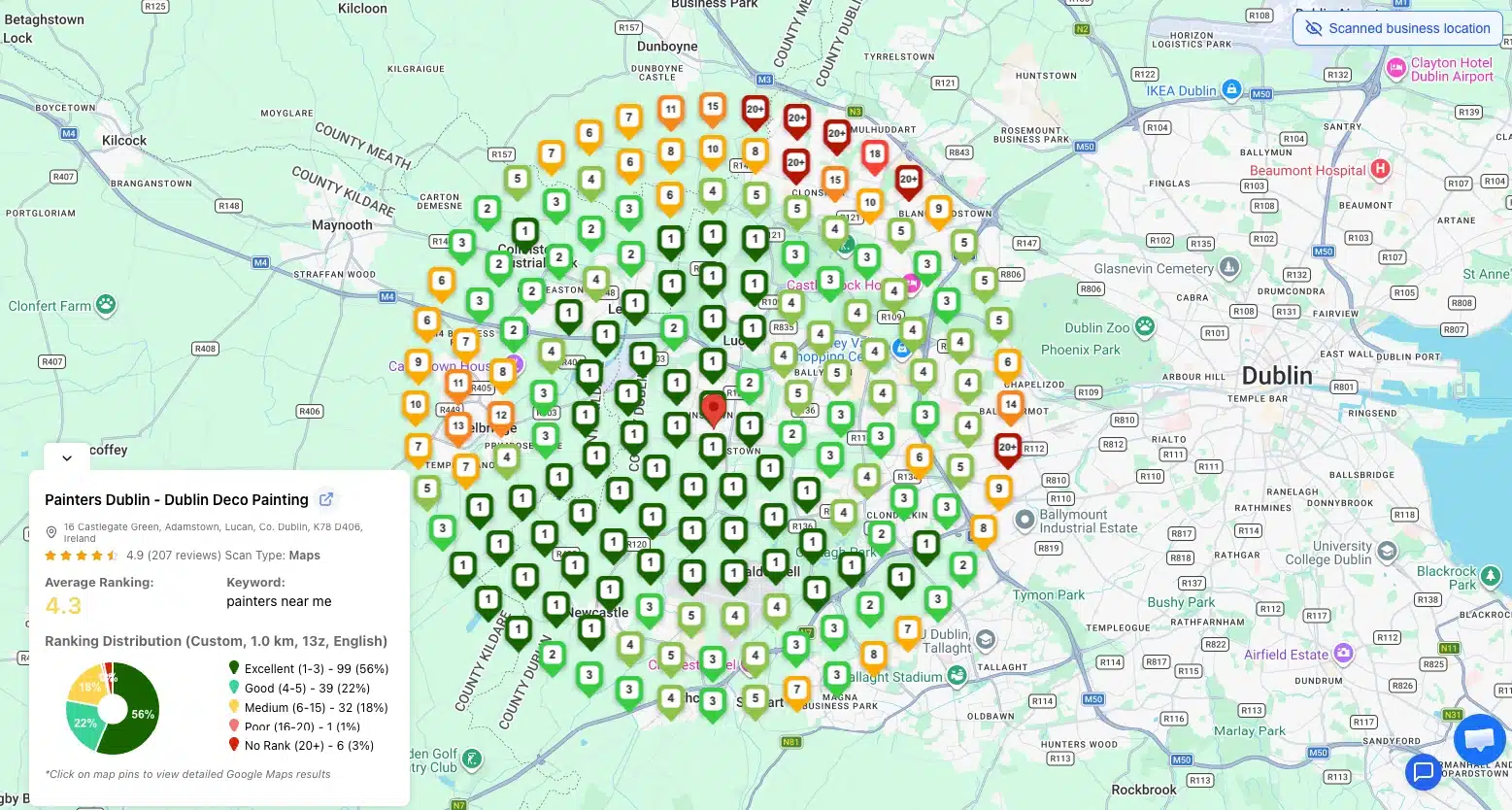
TL;DR: What a Google Maps Grid Rank Tracker Does in 30 Seconds
- What it is: A local SEO tool that runs the same keyword from many simulated locations across a geographic grid, then maps each result as a colored heatmap point.
- Why it matters: Google Maps rankings change by physical location. Standard tools report one blended average that hides where you actually win and lose.
- How it works: 25 to 49 simulated searches per keyword, each from a different latitude/longitude, returning your local pack position from each spot.
- What you get: A heatmap with green (top 3), yellow (4-10), and red (11+) showing exactly where in your service area customers can find you.
- The payoff: Spot the weak zone, fix what is different from the local winner there, re-scan in 7 days. Most service-area businesses close 60-80 percent of their visibility gap in three weeks.
Your business ranks number one on Google Maps. At least, that is what you see when you search for it on your phone, sitting at your front desk. Walk three blocks east and search the same keyword, and you have vanished from the local pack entirely.
That is not a glitch. That is how Google Maps actually works, and it is exactly why a flat "you rank #4" number from any standard tool is misleading. Google determines the local pack based in part on where the searcher is located. Two people typing the same query from different sides of the same city see different results. A Google Maps grid rank tracker is the only kind of tool built to expose that, and in the next 10 minutes, you will know exactly what it is, how it works under the hood, and how to read the data it produces.
This guide covers what a Google Maps grid rank tracker is, the mechanics behind every grid point, what the colors on a grid heatmap actually mean, how to choose a grid size, and how to act on the data once you have it. By the end, you will understand why grid-based tracking has become the standard way local SEO professionals measure visibility, and how it differs from the average-position numbers that used to count as "data."
Why Standard Rank Tracking Lies to Local Businesses
Most rank trackers were built for a world where one search returns one set of results. That world does not exist for local queries. When someone types "best pizza near me" or "emergency plumber Chicago," Google personalizes the local pack to the searcher's location, and the results can vary dramatically. Google's own local ranking guidance confirms that distance from the searcher is one of the three core ranking factors, which is why Google Maps ranking by location is never a single number for a single business.
Sarah owns a dental practice in Austin. She uses Google Search Console daily and sees her average position for "dentist near me" hovering around 9. That feels close to page one, so she leaves things alone. What she does not see: in three of her surrounding zip codes, she actually ranks at position 3, but in the four zip codes furthest from her office, she ranks at 28. Her real average is being pulled down by neighborhoods where she is effectively invisible. Search Console reports one blended number and hides the geographic distribution entirely.
This is the core problem a Google Maps grid rank tracker solves. Instead of one position, you get a position from every point on a geographic grid laid across your service area. Suddenly, the truth shows up: you are dominant in three neighborhoods, average in two, and invisible in four. You now know exactly where to focus.
If you have ever wondered why your phone shows different results than what your tracking tool reports, the answer is in the next section.
What a Google Maps Grid Rank Tracker Actually Does and How It Works
A Google Maps grid rank tracker, sometimes called a geo grid rank tracker, is a local SEO tool that runs the same keyword search from many simulated geographic locations and records your business's position for each one. The output is a heat map, a grid of colored dots laid over a map of your service area, where each dot represents your local pack ranking from that specific spot.
Think of it as 25 or 49 separate Google Maps searches happening at the same time, each from a different point in the city, all reported on one screen.
The Grid Concept Explained
A grid is a regular pattern of points overlaid on a map. The most common configurations are 5x5 (25 points) and 7x7 (49 points), though some tools support 9x9 (81 points) or larger. You pick the center, usually your business address, and the spacing, often 1 mile or 1 kilometer between points.
Each point on the grid acts like a separate searcher physically standing at that exact spot. The tool queries Google Maps from that simulated location and reads where your business appears in the results.
How Each Grid Point Gets Tested
At every grid point, the tool sends a query to Google with a precise latitude and longitude. Google returns the local pack and Maps results as they would appear to a real user standing there. The tracker scans those results for your business, records the position, and stores it.
Run this for 49 points, and you have 49 distinct rankings for the same keyword. The grid then renders the result visually, normally as colored circles, so you can see your geographic ranking footprint at a glance.
If you want to see this in action against your own address, our Google Maps rank tracker shows you a live grid for any keyword in under five minutes, no setup required.
✅ Good Practice: Always run your first grid scan on the head keyword you would most love to own (e.g., "dentist near me" or "plumber Phoenix"), not on a long-tail variant. The head term gives you the most honest read of your geographic strength because that is where the competition is heaviest.
Step 1: Simulated Geolocation
The tracker tells Google, "I am querying from coordinates 41.882, -87.629." Google responds with whatever local pack and Maps listings it would show to a user physically located at that point. This is not a hack or workaround; it is the same mechanism Google uses to power "near me" searches from any device.
You can also do this manually with our free Geolocation Spoofing Chrome extension, which lets you fake your browser's location to any latitude and longitude, so you can verify what searchers in a different postcode actually see on Google Maps.
Step 2: Keyword Queries Per Grid Point
For a 5x5 grid with one keyword, that is 25 queries. For 7x7, it is 49. Add a second keyword and the count doubles. The tracker batches and runs these queries in parallel, normally completing a full grid scan in two to five minutes.
This is why a grid rank tracker costs more than a traditional local rank tracker in raw API terms: you are making 25 to 49 separate searches every time you check one keyword instead of one. The trade-off is geographic accuracy that no other method produces.
Step 3: The Heatmap Output
Once all queries finish, the tracker maps each point's position onto a color scale and lays it over a map of the area. The colors are usually:
- Green: top 3 (in the local pack)
- Yellow or orange: positions 4 through 10
- Red: position 11 or worse, or not ranking at all
A glance at the map tells you everything: where you are winning, where you are middling, and where you have a problem.
Reading a Grid Report: What the Colors Mean
A grid heatmap is the most readable piece of data you will ever look at in local SEO. There is no spreadsheet to decode, no average to calculate. You see your city, your service area, and exactly where each spot ranks.
A few patterns show up consistently across thousands of local businesses:
- Solid green near the business address, fading to yellow and red toward the edges. This is the most common pattern. It means you have proximity working in your favor near your physical location, but lose visibility further out. Larger service-area businesses care about this most because customers further out are still trying to find you.
- Patchy green and red across the whole grid. Often signals strong competitor density. Some areas have a much stronger local competitor and Google is choosing them over you for the in-area searches.
- All red with green only on your exact dot. You only rank when someone is essentially standing in your parking lot. Almost no service-area business will survive on this footprint; it is a sign that your Google Business Profile or on-page signals are not optimized for the broader area.
- Even green across most of the grid. Rare and a sign of a dominant local authority. You are doing something competitors are not, like aggressive review velocity, complete category and attribute selection, or strong local citations.
⚠️ Critical Warning: If your grid is solid red outside a one-mile bubble around your address, do not invest more in paid ads until you fix the underlying GBP and on-page signals. You will be paying for clicks that drop into a profile that customers do not trust, which destroys ROAS and trains Google that your listing is low-quality.
Marcus runs an HVAC company on the west side of Phoenix. The first grid scan he ran showed solid green in a tight bubble around his shop and deep red across the eastern half of the metro. He spent the next 90 days targeting his Google Business Profile services list, photos, and review responses toward the keyword variations searchers used in those eastern zip codes. The second grid scan, run on the same keyword and the same grid, showed green and yellow stretching seven miles further east. He could not have spotted that opportunity without seeing the geographic gap on the map first.
What Counts as a "Good" Grid Result?
There is no universal benchmark, but a useful rule of thumb is the 60-60-3 guide. Aim for at least 60 percent of grid points showing green or yellow, with at least 60 percent of the green concentrated within a 3-mile radius of your business address. Most healthy local businesses fall into that range.
Lower than 60 percent green or yellow means there is real geographic territory where you are not competitive, and the next step is to figure out why. Higher than 80 percent green over a 5-mile radius is dominance, and your goal becomes defending the position rather than expanding it.
If you want to diagnose what is actually causing weak grid points, our local SEO audit flags the on-page and citation gaps holding your site back.
Grid Size and Spacing: Choosing the Right Setup
Grid setup is one of two settings, but both meaningfully change what your data tells you.
| Setting | Common Values | What It Affects |
|---|---|---|
| Grid size (number of points) | 3x3 (9), 5x5 (25), 7x7 (49), 9x9 (81), 11x11 (121) | Coverage area and detail |
| Spacing between points | 0.20 mi, 1 mi, 5 mi | How wide an area does each grid cover |
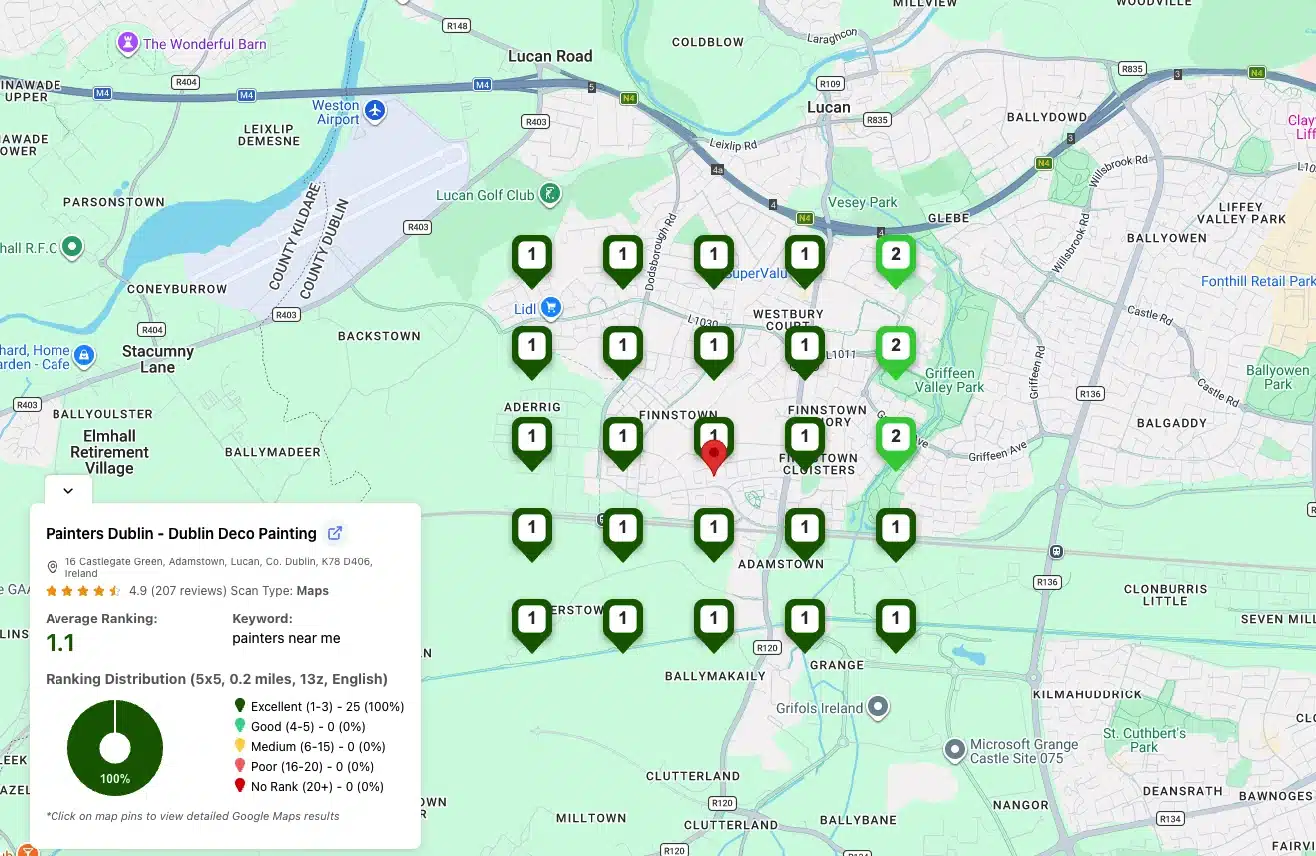
Small, dense grids (5x5 at 0.2 mi) suit hyper-local businesses where the entire customer base lives within a few miles. Restaurants, dentists, hair salons, and yoga studios fit here. You want high precision, close in, not broad coverage.
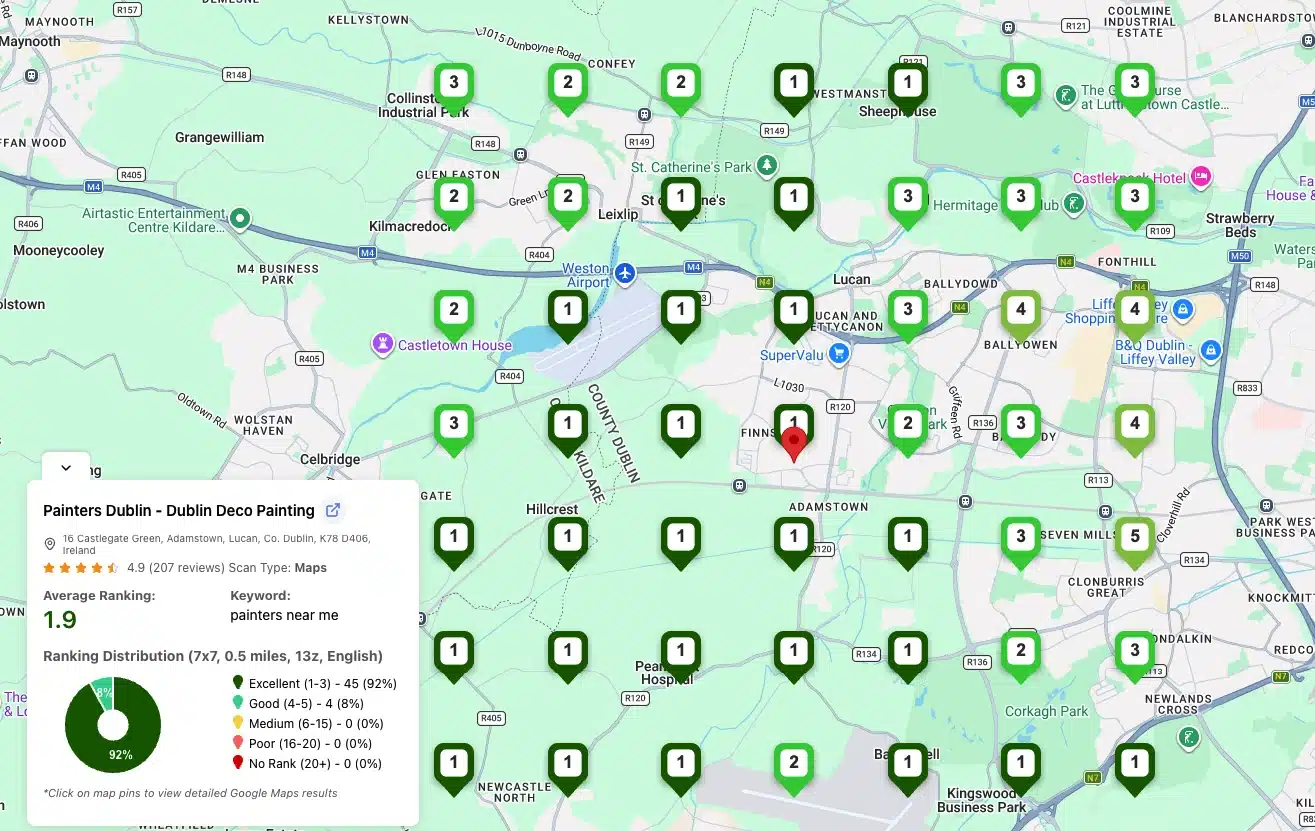
Medium grids (7x7 at 0.5 mi) suit service-area businesses with a defined city radius. HVAC companies, plumbers, locksmiths, and movers. You need to see the ranking across an entire metro core.
Wide grids (9x9 or 11x11 at 1 mi) suit multi-location chains, regional service businesses, or anyone whose service area covers an entire metro region or beyond. The trade-off is that you sacrifice precision close in because the grid points are too far apart.
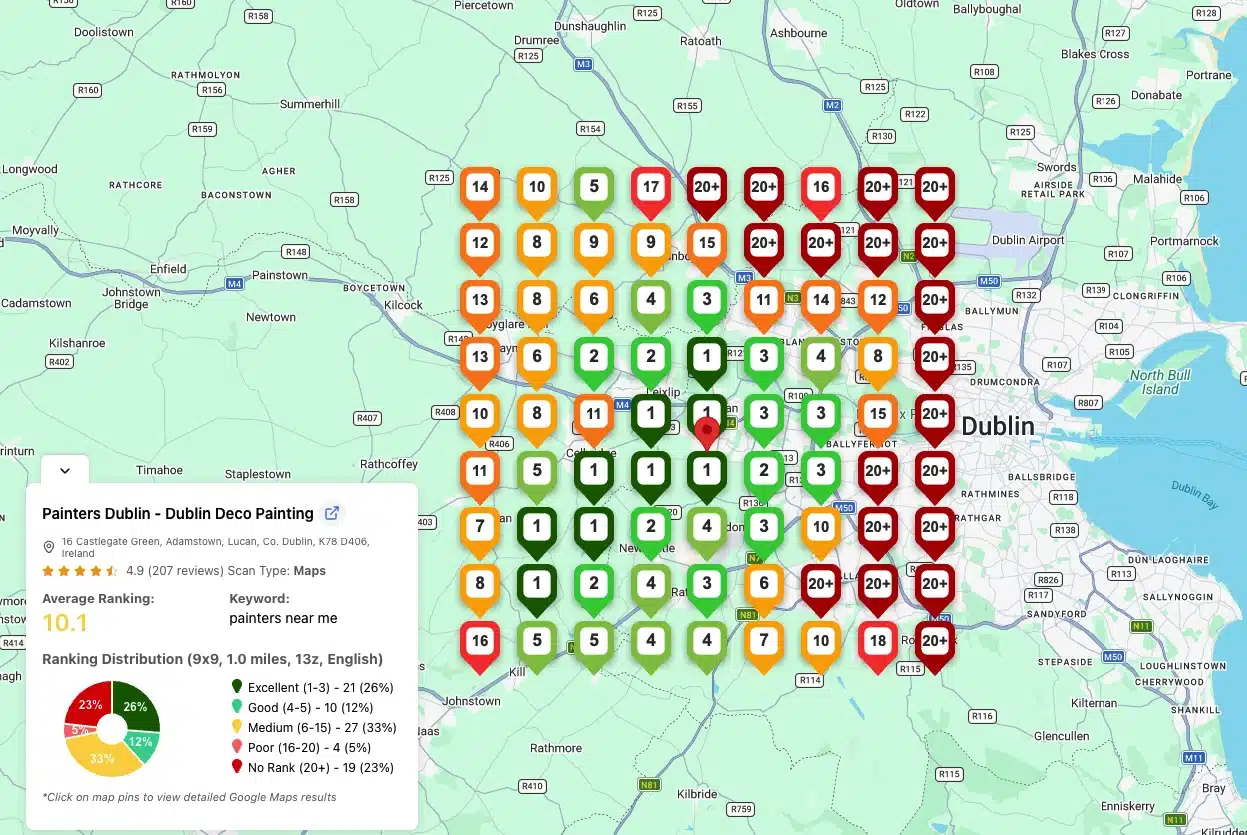
A small business owner does not need an 11x11 grid. A multi-state plumbing franchise probably does. Match grid size and spacing to where your customers actually search from, not the largest grid the tool allows.
If you are not sure which keywords to even put into the grid, our local keyword generator suggests location-modified variants for any service or product category in seconds.
What to Do With Your Google Maps Grid Rank Tracker Data
Tracking is not the goal, action is. A grid report is only as useful as the decisions you make from it. Here is the standard playbook local SEO professionals follow after every scan.
1. Identify the Weakest Zone
Look at the largest red or red-orange cluster on your grid. That is your worst-performing area. Note the cardinal direction relative to your business address (north, southwest, etc.) and the zip codes that fall inside it.
2. Search That Zone the Way a Customer Would
Type the same keyword into Google while your phone is in airplane mode, then enable a VPN or use a tool that lets you spoof your location into that weak zone. See who shows up at the top instead of you. These are your real local competitors for that specific neighborhood.
3. Compare Your Google Business Profile to the Winners
Open the profile of the number one result in the weak zone next to yours and compare:
- Number of reviews and average rating
- Number of photos and how recent they are
- Whether they have used Google Business Profile posts in the last week
- Their main category and additional categories
- Their listed services and whether descriptions are filled in
- Their attributes (women-owned, wheelchair accessible, etc.)
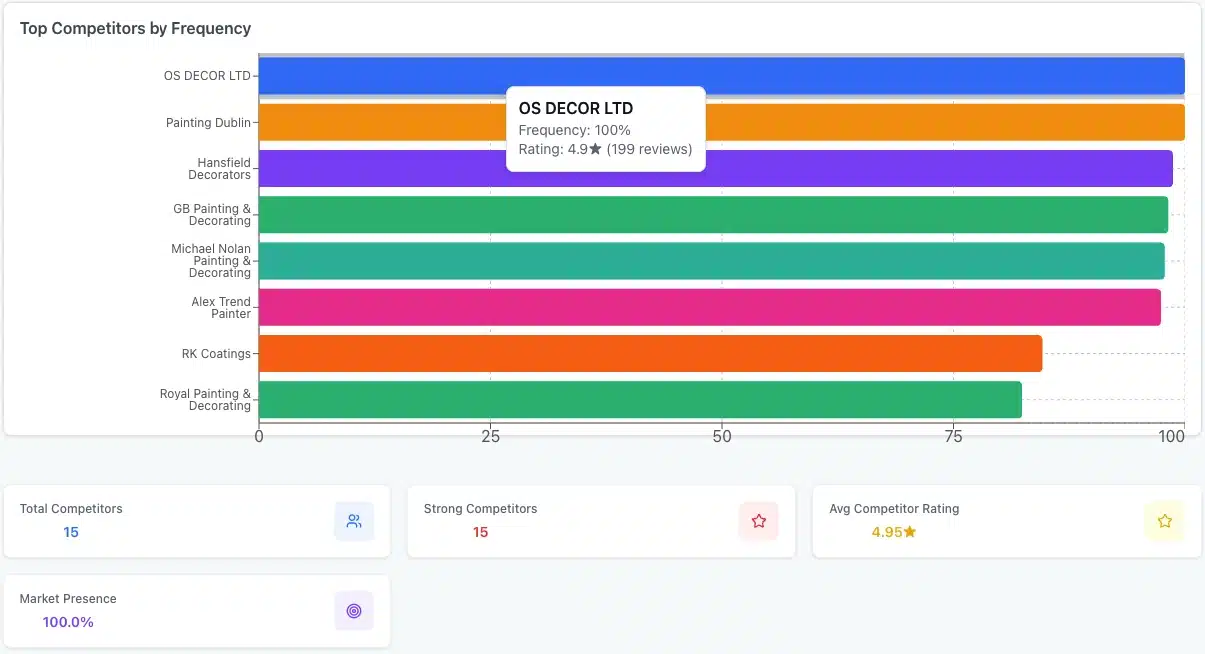
In most cases, the gap will be obvious within five minutes. The winners usually have either much higher review velocity, more relevant categories, or a more complete profile. 87 percent of consumers used Google to evaluate local businesses, so any review or category gap on your profile is a real conversion gap, not just a ranking one. If the gap repeats across several locations or your profile keeps falling out of date, GBP management software centralizes updates so every change happens from one dashboard.
4. Close the Gap
Whatever the obvious differences are, fix them in priority order. Most service-area businesses can close 60 to 80 percent of a grid-visibility gap with three weeks of focused work on review collection, photo uploads, and service descriptions.
5. Run the Grid Again 7 Days Later
This is the part most businesses skip. Without a follow-up scan, you cannot know whether your changes worked. Schedule a recurring grid scan on a 30-day cadence and compare the heatmaps side by side. Real progress shows up as red turning to yellow, and yellow turning to green.
When Linda took over local SEO for a four-location pediatric clinic in Denver, she ran a 7x7 grid scan on "pediatrician near me" for each location. Three of the four had a healthy green core. The fourth, a brand-new clinic that had only been open six months, showed almost solid red. Linda spent the next two months focused only on that location: new photos every week, response to every review within 24 hours, and four service descriptions rewritten with specific conditions treated. On day 60 she ran the same grid. The green core had expanded to cover 60 percent of the grid, and the average position dropped from 14.2 to 4.6. The location went from drawing 8 to 12 calls a week from Google to over 40.
Grid Rank Tracker vs Traditional Rank Trackers
The difference between a grid tracker and a traditional rank tracker is the difference between a photo and a panorama. Same scene, very different amount of information.
| Feature | Traditional Rank Tracker | Google Maps Grid Rank Tracker |
|---|---|---|
| Number of positions tracked per keyword | 1 | 9 to 121, depending on grid size |
| Reflects geographic variation | No | Yes |
| Reflects proximity bias | No | Yes |
| Useful for service-area businesses | Limited | Essential |
| Output | Single position number | Geographic heatmap |
| Best for | National brands, e-commerce | Local businesses, agencies, multi-location |
Traditional rank trackers still have a place, especially for e-commerce or national-keyword tracking, where geographic personalization is minimal. For any local business, though, single-position tracking is not enough data to make decisions on. You will optimize for the wrong thing, or worse, assume you are fine when entire chunks of your service area cannot find you.
The short version: tools that show you a single average position are not telling you the full story. Tools that show you a grid are.
Ready to see the grid for your own business? Run a free scan with our grid rank tracker and find out where you actually rank, point by point, across your service area.
Frequently Asked Questions
1. How often should I run a grid scan?
For most local businesses, once every 7 days is enough. Agencies tracking competitive niches or running aggressive campaigns sometimes scan weekly. More frequent than weekly is rarely worth the API cost since Google Maps rankings do not change daily for most queries.
2. Will a grid scan affect my actual rankings?
No. Grid scans are read-only queries that simulate searches. They do not interact with your Google Business Profile or your website. Running a scan changes nothing about how Google sees your business.
3. Can I track competitors with a grid rank tracker?
Yes. Most grid tools let you swap the business name being scored on the same grid, so you can see exactly where competitors are strong and weak in the same geographic area you operate in.
4. Does grid size affect accuracy?
A larger grid gives you more data points, but each query has the same accuracy. The decision is about coverage area and spacing, not data quality. A 5x5 grid is just as accurate at each point as a 9x9 grid.
5. Do I need a Google Maps grid rank tracker if I am a one-location business?
If you serve only walk-in traffic within a few blocks, a small 3x3 or 5x5 grid is plenty. If you have a service area that extends beyond your block, the answer is yes, because proximity bias starts to affect your visibility as soon as customers search from more than half a mile away.
Final Thoughts
Local SEO is geographic, and so is the data you should track. A Google Maps grid rank tracker is the only kind of tool built to show you ranking the way customers actually experience it: from where they are standing, not from one blended average. Once you see your visibility as a grid, optimizing local SEO stops being a guessing game.
Three takeaways to act on:
- Single-position rank tracking hides where you are actually losing customers. Grid tracking shows you exactly which neighborhoods you cannot find.
- The grid setup that matters is the one that matches where your customers are. Hyper-local? Tight 5x5. Service area? 7x7. Regional? 9x9 or larger.
- Action loop: run the grid, find the weakest zone, fix what is different between you and the local winner, re-scan in 7 days. That cadence beats any one-time audit.
The next move is simple. Run a grid scan on your business right now and find out which parts of your service area you cannot see. Whatever the result looks like, you will know more about your real local visibility in five minutes than most of your competitors learn in a year.