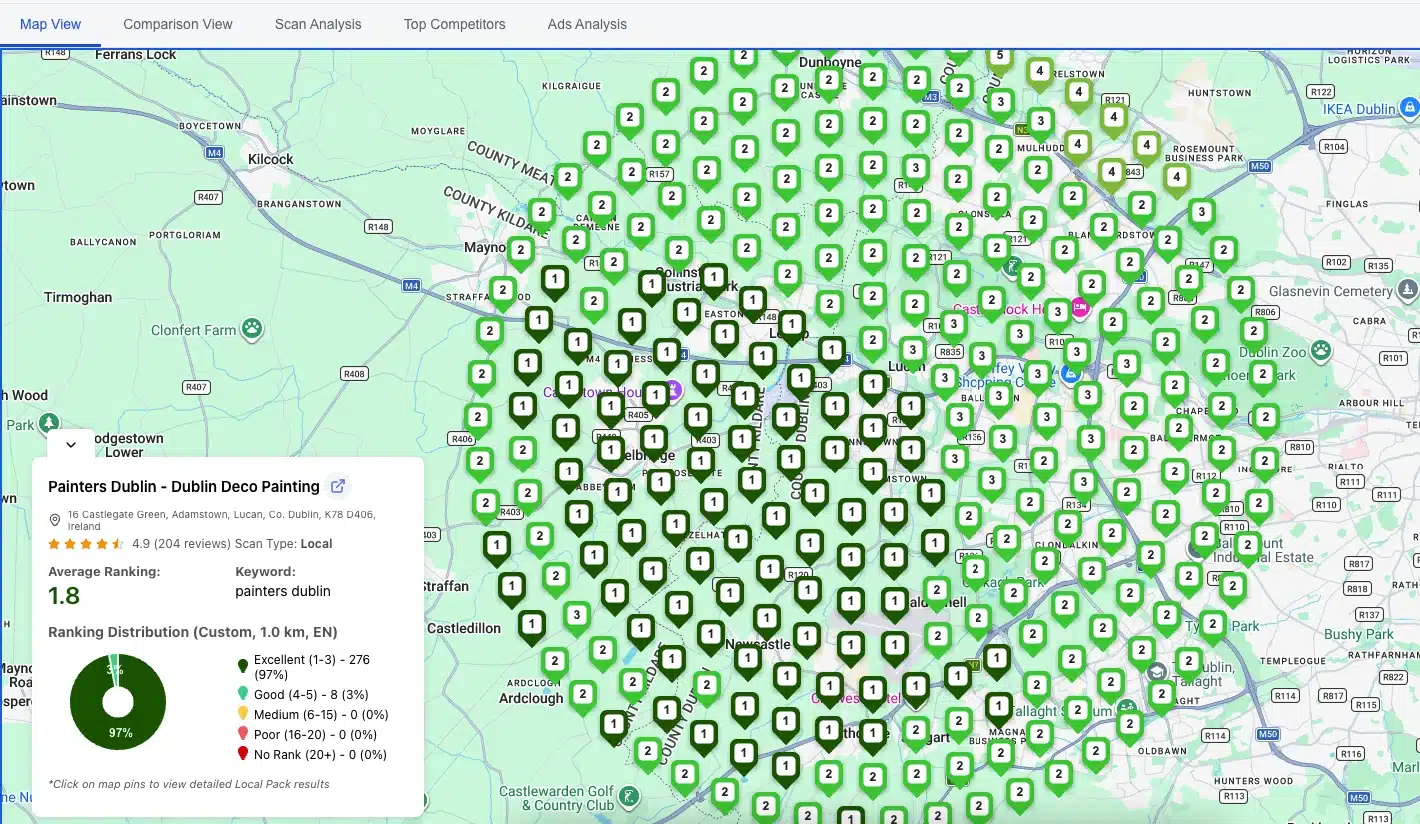
A Google Maps rank checker shows where your business appears in Maps results when someone searches your target keyword from a specific location. Most tools display this as a geo-grid: a grid of pins spread across your service area, with your ranking position at each point.
That grid matters because your Maps rank isn't a single number. You might sit at position 1 two blocks from your storefront and fall to position 18 a mile west. A one-location check won't reveal that. This post covers the four tools worth considering, a side-by-side pricing table, and a step-by-step walkthrough for running your first scan.
What a Google Maps rank checker actually shows you
When someone searches "dentist near me" on Google, the results depend on where they're physically standing. Google serves different Maps results to someone on the north side of a city versus the south side. A rank checker simulates those searches from multiple GPS coordinates and returns the results.
Single-point checkers give you one ranking from one location. That's fine for a quick pulse check, but it hides the full picture of your visibility across a service area.
Geo-grid rank checkers place a grid of pins across your area (a 5x5 grid has 25 pins, a 7x7 has 49) and simulate a search from each one. You get a heatmap showing where you rank well and where potential customers can't find you. That's the data you need to make decisions.
One thing worth understanding before you pick a tool: most geo-grid checkers use a credit system. Each pin on a scan costs one credit. A 5x5 scan uses 25 credits, a 7x7 uses 49. Run that weekly for three keywords at one location and you're burning through roughly 600 credits per month. Free plans and entry tiers vary widely in how far they stretch.
The 4 best Google Maps rank checkers, reviewed
GTrack (by Wiremo)
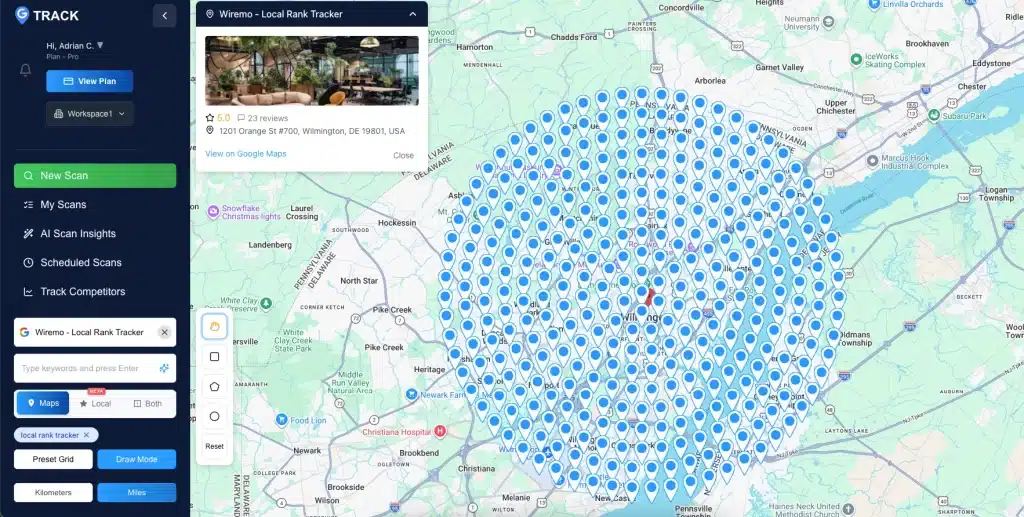
GTrack is the tool we recommend for most businesses and local SEO agencies. The free plan includes 200 scan credits with no credit card required, and paid plans start at $19.99/month. Every paid plan includes scheduled scans, AI keyword discovery, competitor tracking, and detailed scan analysis reports covering Review Comparison, Performance Matrix, and Category Metrics. White-label reporting and API / MCP access are available on Business and Pro plans.
The geo-grid uses real GPS coordinates to simulate searches from specific map pins, which removes location bias from personalized results. The AI insights layer surfaces keyword opportunities beyond the ones you're already tracking.
One differentiator that matters if you care about complete local search visibility: GTrack tracks both Google Maps rankings and Local Pack rankings (the 3-pack that appears directly in Google Search results) in the same geo-grid scan. These are two separate ranking surfaces. A customer searching "plumber near me" on Google sees the 3-pack in their search results; a customer opening the Maps app sees a different set of results. Most tools in this category report on one surface or the other. GTrack reports on both, from every pin on the grid, in a single scan.
GTrack: The free plan covers 200 scan credits, enough for 10 to 20 scans depending on your grid size. No card needed. Start a scan at Google Maps rank tracker.
The Track Competitors feature goes further than anything else in this comparison. Every other tool on this list shows you where competitors rank. GTrack also monitors changes in competitors' Google Business Profiles: hours updates, new photos, review activity, post frequency, category changes. When a competitor makes a profile change and their rankings shift a week later, you see both events. That's the kind of signal that helps you understand why rankings move, not just that they did.
For agencies and developers on Business or Pro plans, GTrack offers API and MCP (Model Context Protocol) access to pull ranking data into custom dashboards, reporting tools, or AI-powered workflows. No other tool in this comparison offers MCP integration.
GTrack holds a 4.9-star rating across 501 reviews. Agencies report cutting per-scan costs by roughly 30% compared to alternatives. White-label reporting is available on Business and Pro plans.
BrightLocal (Local Search Grid)
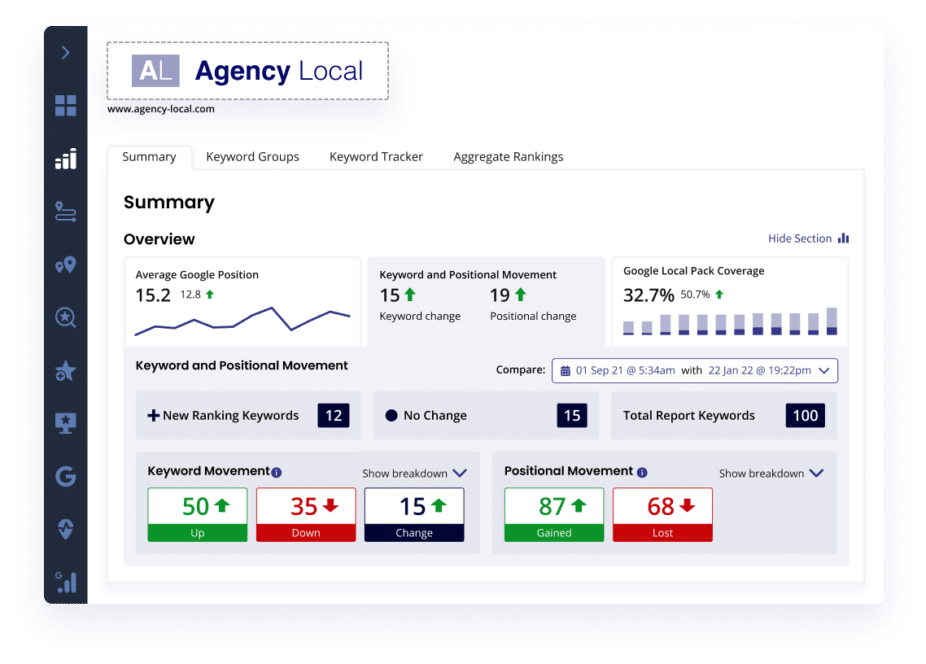
BrightLocal is one of the most established names in local SEO software, and its Local Search Grid feature brings geo-grid rank tracking into a broader platform that also covers citations, reviews, and reporting. Plans start at $39/month, and BrightLocal includes a 14-day free trial across all tiers.
The Local Search Grid is included in every BrightLocal plan (the exception is the Just Reviews plan, which is designed for review management only). You enter up to 5 keywords per campaign, choose your grid area in miles or meters, and the tool returns your ranking position at each grid point alongside the top 10 competitors for each keyword. You can monitor up to 30 keywords total across campaigns.
Where BrightLocal has an edge is breadth. Alongside geo-grid tracking it covers organic rankings, mobile rankings, and Google Maps positions from a single interface. If you're already using BrightLocal for citations or review management, the Local Search Grid is a natural add-on at no extra cost.
The limitation worth knowing: the grid point options aren't as granular as dedicated geo-grid tools, and the keyword cap per campaign (5 at a time) can feel tight if you're tracking a service-area business with many terms. For pure geo-grid power at scale, dedicated tools have more flexibility.
Whitespark (Local Ranking Grids)
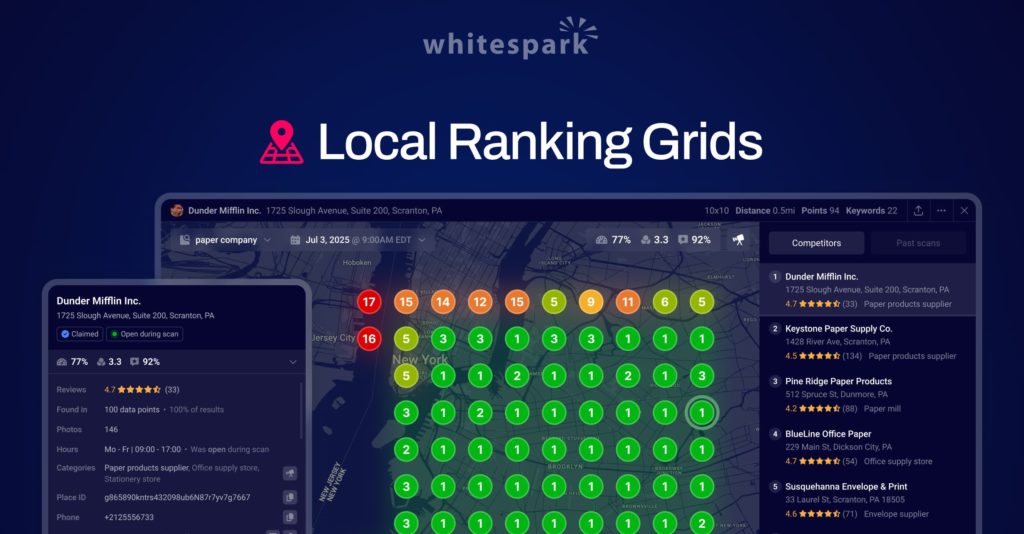
Whitespark is a respected local SEO suite, and its Local Ranking Grids tool takes a different approach to pricing: pay per pin per scan rather than a monthly subscription. The rate is $0.005 per pin per scan, with volume discounts as usage grows. New users get 200 trial credits at no cost to test the tool before spending anything.
The grid itself is highly flexible. You can set anywhere from 4 to 225 grid points, cover a single neighborhood or an entire metro area, and deactivate any pin you don't want to track. That granularity is useful for agencies running precise audits for clients with very specific service zones.
Whitespark tracks Google Local Pack, Maps, and organic results on both desktop and mobile from a single grid run. Its Visibility Score metric weights rankings by estimated click-through rate rather than raw position, which gives a more accurate picture of actual traffic potential. White-label reporting uses live, shareable client URLs rather than static PDF exports, which agencies tend to appreciate.
The pay-per-scan model works well for users who run periodic audits rather than continuous weekly tracking. For businesses that need frequent automated scans, the costs can add up faster than a flat monthly plan.
Local Dominator

Local Dominator offers four subscription tiers: Lite at $39/month (5,000 credits), Advance at $59/month (15,000 credits), Pro at $97/month (36,000 credits), and Powerhouse at $197/month (81,000 credits). There's no free plan, but their introductory offer brings the Lite tier to $1.95 for the first month.
The tool's main differentiator is its tracking scope. Alongside Google Maps and local pack rankings, it monitors standard organic SERPs and AI answer surfaces (like Google's AI Overviews), which puts it in a broader category than pure Maps checkers. Real-time ranking updates and map overlays show your position changes as they happen.
At higher tiers the credit-to-price ratio is competitive, and it suits agencies managing large client portfolios that need volume at a predictable monthly cost. The absence of a free plan beyond the $1.95 intro month is a hurdle when evaluating the tool before committing, and AI insights are more limited compared to GTrack at equivalent price points.
Side-by-side comparison: pricing, geo-grid, and key features
| Tool | Starting price | Free plan / trial | Tracks Maps + Local Pack | Competitor GBP monitoring | White-label | API / MCP access |
|---|---|---|---|---|---|---|
| GTrack | $19.99/mo | 200 credits, no card | Yes, both in one scan | Yes (GBP profile changes) | Business & Pro plans | Business & Pro plans |
| BrightLocal | $39/mo | 14-day free trial | Maps + organic (separate) | No | Yes | API only |
| Whitespark | $0.005/pin/scan | 200 trial credits | Yes (Local Pack + Maps) | No | Yes (live URLs) | No |
| Local Dominator | $39/mo ($1.95 first month) | No | Yes (Maps + SERPs + AI) | No | Yes | No |
How to run your first geo-grid scan (step by step)
This walkthrough uses GTrack, but the general steps apply to any geo-grid tool.
- Create a free account. Go to wiremo.co/google-maps-rank-tracker/ and sign up. No card required. Your account comes with 200 credits.
- Search your Google Business Profile. Search for your business name and let GTrack match it to your GBP listing. This pulls in your category, location, and service area data.
- Choose a keyword to track. Start with your most important service plus your city (for example, "roof repair Denver" or "family dentist Chicago"). The AI keyword tool surfaces related terms worth adding.
- Set your grid size. A 5x5 grid costs 25 credits and works well for a single-location business with a tight service radius. A 7x7 grid (49 credits) gives more detail for broader areas. Larger grids suit service-area businesses covering multiple cities.
- Run the scan. Results appear as a color-coded heatmap: green for positions 1 through 3, yellow for 4 through 10, red for positions beyond 10. Each pin shows the exact ranking number for both Maps and the Local Pack.
- Check the competitor overlay. Toggle on competitors to see which businesses outrank you at each grid point. This shows who you're competing against in different parts of your area, not just at your address.
- Set up a scan schedule. Monthly tracking is the minimum to spot trends. Weekly scans make sense if you're actively optimizing and want faster feedback.
What to do with your ranking data
A heatmap without a plan doesn't help anyone. Here's what to look for and what to do about it.
- You rank in the top 3 across most of the grid. Focus on defense. Keep your Google Business Profile active with regular posts, photo updates, and prompt review responses. Let your Google Business Profile management software handle the scheduling so nothing goes stale.
- You rank well near your address but drop off at the edges. Your proximity signal is strong but your relevance and authority signals need work. Strengthen your service area description in GBP, add keyword-specific service pages on your website, build local citations, and gather reviews from customers in the underperforming zones.
- You're outside the top 10 across most of the grid. Start with your GBP fundamentals: fill out every field, list your service areas, add photos from the past 30 days, and respond to every review. Then check whether your website has a dedicated page for this keyword. A well-optimized service page gives Google more to work with when deciding your Maps rank.
- One competitor consistently beats you across the grid. Look at their GBP: review count, rating, last active date, photo count. Run a scan with their business name and the same keyword to see their grid. That gap analysis tells you exactly where to focus.
Tip: Use the local SEO keyword generator to find related terms before your next scan. Ranking for one keyword is a start; tracking five related terms across the same grid gives you a complete picture of your local visibility.
Run the same scan on the same grid monthly and compare results. Without baseline data, you're guessing whether your optimization efforts are moving anything.
Frequently asked questions
What's the difference between a Google Maps rank checker and a local SEO rank tracker?
Most people use these terms interchangeably. A Google Maps rank checker focuses specifically on where your business appears in Maps results and the local 3-pack. A broader local SEO rank tracker might also cover organic rankings in standard search results. All four tools reviewed here do both, though their primary feature is the geo-grid Maps check.
Is there a truly free Google Maps rank checker?
Several tools offer free access that's real rather than time-limited. GTrack gives you 200 credits with no card required. Whitespark offers 200 trial credits at no cost. BrightLocal's 14-day free trial gives full access to the Local Search Grid. These all let you run meaningful scans before paying anything.
How accurate are geo-grid rank checkers?
Accuracy depends on methodology. Tools that simulate searches from real GPS coordinates at specific map pins are more reliable than those using IP-based location approximation. GTrack and Whitespark both use pin-based GPS simulation. BrightLocal's Local Search Grid uses geolocation-based searches at each grid point. All four tools reviewed here use more precise methods than single-location rank checkers.
How often should I run a rank check?
Monthly is the minimum for most businesses. If you're running an active local SEO campaign, weekly scans let you catch ranking changes faster. Daily scanning is rarely worth the credit cost for most business types. Set up an automated schedule in your tool so you don't have to remember manually.
Do these tools work for service-area businesses without a physical storefront?
Yes. Geo-grid tools are especially useful for service-area businesses because your ranking varies significantly by location when you don't have a fixed address anchoring your proximity signal. Run a wider grid to understand your visibility across the full area you serve.
Which Google Maps rank checker is right for you?
If you're just starting out, GTrack's free plan is the lowest-friction way to see where you stand. You'll have real ranking data within five minutes, no credit card on file, AI insights to tell you what to do next, and the only tool in this comparison that simultaneously tracks your Maps and Local Pack positions while watching competitors' GBP profiles for changes.
If you're already paying for BrightLocal for citations or review management, the Local Search Grid is already included in your plan. Add geo-grid tracking to your existing workflow without touching your budget.
If you run periodic geo-grid audits rather than continuous tracking, Whitespark's pay-per-pin model keeps costs low. The granular grid control (up to 225 points) and live white-label URLs suit agency use well.
If you need volume at scale and track Maps, organic, and AI results in one place, Local Dominator's higher tiers give strong credit-to-cost ratios for agencies with large client rosters.
Whatever tool you choose, track with a geo-grid rather than a single-point check. Your rankings vary by block. Your data should reflect that.