Google products evolve constantly. Some disappear. Some rebrand. Some merge. But one product has become more powerful every year: your Google Business Profile.
Today, your Google Business Profile is one of the most important digital assets you own. And most businesses still underestimate it.
TL;DR
Your Google Business Profile controls how you appear in Google Maps, the Local Pack, and branded search results. It influences visibility, conversions, customer trust, and how Google understands your company. If it is incomplete, outdated, or unmanaged, you are losing customers.
1. What Is a Google Business Profile?
A Google Business Profile is Google’s official local business listing system that allows companies to manage how they appear across Google Search and Google Maps. It acts as your digital storefront inside Google’s ecosystem.
When someone searches for your business name, your services, or even a general category like “dentist near me” or “plumber in Chicago,” Google uses Business Profile data to decide which businesses appear in the Local Pack and Maps results.
In simple terms, your Google Business Profile is the foundation of your local visibility. It is not just a listing. It is a structured data source that feeds Google’s local ranking system.
Core Information Displayed
Your profile contains structured business data that Google uses to understand your company. The more accurate and complete this information is, the better Google can match your business to relevant searches.
- Business Name - Your official brand name as recognized offline and online.
- Address - Your physical storefront location or service area configuration.
- Phone Number - Primary contact number used for calls directly from search results.
- Website - Your main website or landing page connected to the profile.
- Business Hours - Regular hours and holiday hours that influence customer trust and user experience.
- Reviews - Customer ratings and written feedback that impact both rankings and conversions.
- Photos - Business-uploaded and user-generated images that build visual trust.
- Services - Structured service listings that help Google understand what you offer.
- Products - Product showcases for retail and service businesses.
- Booking Links - Direct scheduling integrations for appointments.
- Questions and Answers - Public Q&A section where users can ask about your business.
- Attributes - Details like “Wheelchair Accessible,” “Women-Owned,” “Veteran-Owned,” or service-specific features.
Each of these elements feeds into Google’s understanding of your business entity and influences how often and where you appear.
Where Your Profile Appears
Your Google Business Profile does not exist in isolation. It powers multiple high-visibility areas across Google.
- Google Maps - The primary interface for local navigation and discovery.
- The Local Pack - The top 3 map-based results shown in search queries with local intent.
- The Local Finder - The extended list of businesses accessed after clicking “More places.”
- Knowledge Panels - Branded search panels are shown when users search for your business name.
These placements receive some of the highest click-through rates in local search. In many industries, they drive more traffic and leads than traditional organic website listings.
Why It Is More Than Just a Listing
Many business owners think of their profile as a simple directory listing. That is a mistake.
Your Google Business Profile is:
- A ranking signal for local search
- A conversion platform inside Google
- A review management system
- A content publishing channel through posts and updates
- A trust-building tool
- A competitive positioning asset
Without a Google Business Profile, you cannot rank in the Local Pack. You cannot appear properly in Google Maps. You cannot fully compete in local search.
Without a Google Business Profile, you do not exist in Google’s local ecosystem.
2. Why a Google Business Profile Is More Important Than Your Website
In local search, customers often choose businesses directly from Google results without ever visiting the website.
The Zero-Click Economy
Your profile shows photos, reviews, open status, directions, and call buttons. Many users convert directly from the search results page.
Important Insight
Your website is your home. Your Google Business Profile is your storefront window. Most customers decide before ever clicking through.
Direct Conversion Opportunities
- Call buttons
- Direction clicks
- Bookings
- Orders
- Messages
3. The Core Benefits of a Well-Optimized Google Business Profile
A well-optimized Google Business Profile is not just about visibility. It directly impacts rankings, trust, click-through rates, and conversions.
When optimized correctly, your profile becomes one of your strongest local marketing assets.
Ranking in the Local Pack
The Local Pack, the top three map-based results shown for local searches, is powered entirely by Google Business Profile listings.
If your profile is incomplete, poorly optimized, or inactive, you will not compete effectively in these positions.
Why Local Pack Visibility Matters
- The Local Pack appears above traditional organic results
- It captures high-intent traffic
- It drives calls and direction clicks directly from Google
- It dominates mobile search results
In many industries, the Local Pack drives more leads than standard website rankings.
Building Trust Through Reviews
Reviews are often the first thing customers notice when comparing businesses. Ratings, review count, and responses influence whether someone chooses you or a competitor.
Trust is built in seconds. A well-managed review section creates immediate credibility.
Best Review Practices
- Respond to every review – Positive or negative, engagement shows professionalism.
- Use keywords naturally – Reinforce your services in responses without sounding forced.
- Address complaints professionally – Future customers read your replies more than the complaint itself.
- Encourage detailed feedback – Specific reviews strengthen relevance signals.
Important Insight
Google analyzes review content semantically. When customers consistently mention specific services, it strengthens your profile’s topical authority for those services.
Centralizing User-Generated Content
Your Google Business Profile merges business-controlled content with user-generated content.
This includes:
- Customer reviews
- User-uploaded photos
- Questions and answers
- Public updates
This combination creates social proof. It also means you must monitor your profile consistently.
What Makes UGC Powerful?
User-generated content feels more authentic than marketing copy. When managed correctly, it becomes one of your strongest conversion drivers.
Visual Trust Signals
Humans process visuals faster than text. Profiles with regular, high-quality photo uploads consistently outperform profiles with outdated or low-quality images.
Photos improve:
- Engagement rates
- Click-through rates
- Direction requests
- Overall trust perception
Recommended Photo Types
- Exterior shots – Help customers recognize your location
- Interior shots – Build familiarity and comfort
- Team photos – Humanize your brand
- Work examples – Showcase results and expertise
Consistency Wins
Uploading fresh photos weekly signals activity to both Google and potential customers. An active profile converts better than a stagnant one.
4. What’s Good and What’s Not Good in a Google Business Profile
What’s Good
- Complete business information
- Correct categories
- Consistent NAP
- Fresh photos
- Review replies
- Optimized services
- UTM tracking
What’s Not Good
- Incomplete profile
- Keyword stuffing
- Outdated hours
- No review responses
- Duplicate listings
- Wrong categories
5. Advanced Optimization: Categories, Entities, and Strategy
The Hidden Power of Categories
Your primary category is one of the strongest ranking signals.
Category Example
- Bad: Contractor
- Better: Kitchen Remodeling Contractor
Entity Understanding and Google’s Knowledge Graph
Your Google Business Profile feeds data into Google’s entity system.
- Name consistency
- Location data
- Services
- Website association
- Brand signals
6. Monitoring and Competitive Defense
Tracking Performance Properly
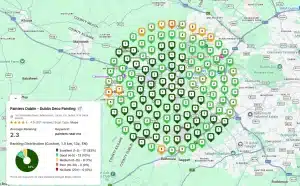
Local rankings vary by location. Single-point rank checks are misleading.
What You Should Track
- Grid rankings
- Visibility spread
- Competitor movement
- Review growth
- Category changes
This is where tools like GTrack become powerful. GTrack allows you to run geo-grid scans to see how your Google Business Profile ranks across your entire service area and monitor competitors over time.
Why This Matters
You may rank #1 near your office, but #9 just three streets away. Without geo-grid tracking, you would never know.
Common Google Business Profile Mistakes
- Setting it and forgetting it
- Ignoring reviews
- Not updating hours
- Wrong categories
- No competitive monitoring
Final Thoughts
Your Google Business Profile is not just a listing. It is a ranking asset, a conversion tool, a trust builder, and a competitive advantage.
Action Step
Audit your Google Business Profile today. Fix what is incomplete, respond to reviews, upload new photos, and monitor rankings properly. Treat it like the revenue engine it truly is.
Frequently Asked Questions About Google Business Profile
1. What is a Google Business Profile?
A Google Business Profile is a free local listing tool from Google that allows businesses to manage how they appear in Google Search and Google Maps. It displays important details such as business name, address, phone number, hours, reviews, and photos.
2. Is a Google Business Profile free?
Yes. Creating and managing a Google Business Profile is completely free. However, optimizing it properly requires time, strategy, and ongoing management to achieve strong local rankings.
3. How does a Google Business Profile help with local SEO?
Your Google Business Profile is one of the strongest local ranking factors. It directly influences visibility in the Local Pack and Google Maps by contributing to relevance, proximity, and prominence signals.
4. Can I rank in Google Maps without a Google Business Profile?
No. Google Maps and the Local Pack are powered entirely by Google Business Profile listings. Without one, your business will not appear in map-based local results.
5. How often should I update my Google Business Profile?
You should monitor your profile weekly and update it whenever necessary. This includes responding to reviews, uploading fresh photos, updating hours, and posting business updates regularly.
6. Do reviews really impact Google Business Profile rankings?
Yes. Reviews influence both rankings and conversions. Review quantity, recency, velocity, and keyword relevance in review text all contribute to prominence and trust signals.
7. What are the most important elements to optimize in a Google Business Profile?
The most important elements include your primary category, secondary categories, business description, services, accurate NAP information, review management, photos, and consistent updates.
8. What is the Local Pack?
The Local Pack is the group of three map-based business listings shown at the top of search results for local queries. It generates high visibility and strong click-through rates for local businesses.
9. Can service-area businesses use Google Business Profile?
Yes. Service-area businesses can hide their physical address and define service regions instead. This allows them to rank in local searches without displaying a storefront location.
10. How can I track my Google Business Profile rankings?
Local rankings vary by location. Using geo-grid tracking tools such as GTrack allows you to monitor how your Google Business Profile performs across your service area and identify competitive gaps.